
In the expansive and ever-evolving landscape of digital creativity, GameSalad stands out as a unique and historically significant platform designed to democratize game development. For many aspiring creators, the sheer complexity of traditional programming languages and advanced game engines can be an insurmountable barrier. GameSalad emerged to address this challenge, offering a visual, drag-and-drop interface that empowers individuals, educators, and indie developers to bring their interactive visions to life without writing a single line of code. It positions itself as a free development program, primarily known for its accessibility on Windows, and also available for Mac, making it a versatile choice for a broad audience.
Developed by Gendai Games, GameSalad quickly carved out a niche for itself by simplifying the intricate process of game creation. It champions a behavior-based logic system, allowing users to define how their game elements interact through intuitive rules and attributes rather than complex algorithms. This approach significantly lowers the entry barrier, enabling a faster prototyping process and a more visual understanding of game mechanics. The platform’s commitment to ease of use has made it a popular choice for educational settings, helping students grasp fundamental programming concepts and computational thinking in a fun and engaging manner. While the specific version detailed in the reference – 0.10.0, updated on February 6, 2013, and available for Windows XP and previous versions – paints a picture of its early footprint, its enduring appeal highlights a continuous need for accessible development tools in the modern era of digital content creation.
Understanding GameSalad: Core Philosophy and Features
At its heart, GameSalad is built upon the philosophy that game creation should be accessible to everyone, regardless of their coding background. This core principle is manifested through its intuitive design and robust set of features, which together form a powerful yet user-friendly development environment. The program’s visual editor is central to its appeal, presenting a clear workspace where users can arrange scenes, characters (referred to as “actors”), and interface elements with remarkable ease. This contrasts sharply with code-heavy environments that demand a deep understanding of syntax and programming paradigms.
The most distinctive feature of GameSalad is its behavior-based logic system. Instead of writing conditional statements and loops in text, developers assign pre-defined or custom behaviors to their actors. These behaviors can range from simple actions like “move,” “rotate,” or “change attribute” to more complex interactions such as “collide,” “constrain,” or “timer.” Each behavior comes with a set of configurable options, allowing users to fine-tune its impact without delving into code. For instance, to make a character jump, a developer might add a “jump” behavior, specifying its height and duration through sliders or input fields. To detect a collision with an enemy, a “collide” behavior is added, triggering another set of behaviors like “lose health” or “play sound.” This modular approach to game logic makes the development process highly visual and iterative, allowing for rapid experimentation and debugging.
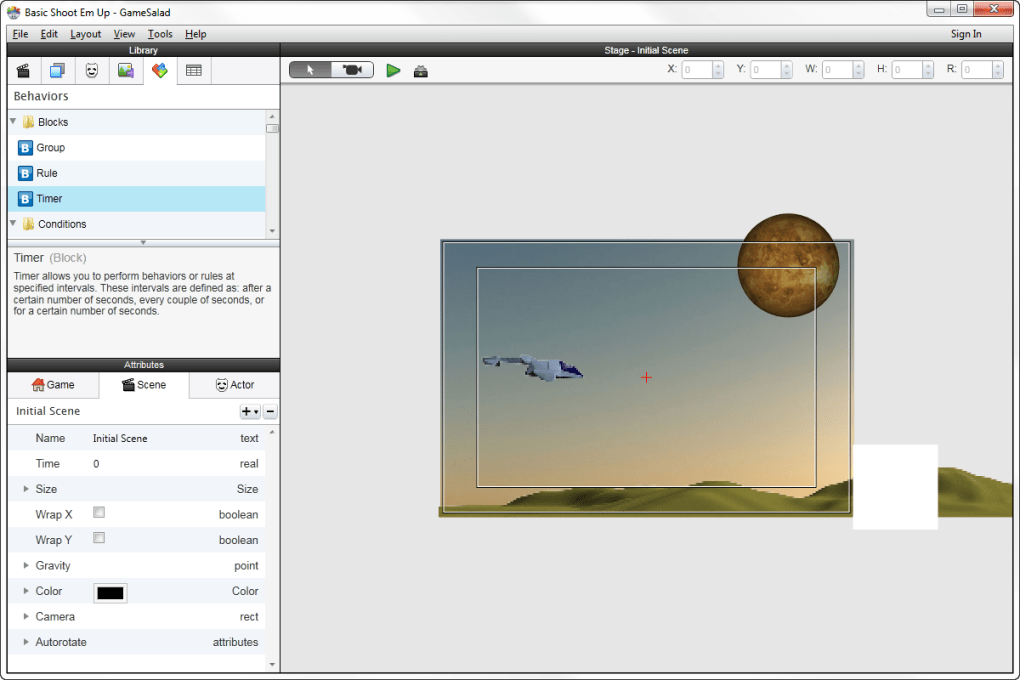
GameSalad also integrates a robust physics engine, enabling realistic object interactions and movements. Developers can apply physics properties such as gravity, friction, and elasticity to their actors, bringing a new dimension of realism to their games. This is particularly beneficial for creating platformers, puzzles, or arcade-style games where physical interactions are paramount. The ability to manipulate these properties visually, without complex mathematical equations, further reinforces the platform’s commitment to accessibility.
Asset management is another crucial aspect where GameSalad simplifies the workflow. Users can easily import various media assets, including sprites for characters and backgrounds, sound effects, and music. The platform provides tools to manage these assets efficiently, ensuring that creators can focus on design and gameplay rather than convoluted file structures. For those without artistic skills, GameSalad often comes with or supports access to libraries of pre-made assets, further lowering the barrier to entry.
The ultimate goal of any game development platform is to allow creators to share their work with the world. GameSalad offers publishing capabilities to multiple platforms, a significant advantage for indie developers targeting a broad audience. While the specific platforms supported have evolved over time, historically, it has been instrumental in enabling developers to deploy their games to popular mobile ecosystems like iOS and Android, as well as desktop platforms such as macOS and Windows, and even web-based platforms like HTML5. This multi-platform deployment capability ensures that a single project can reach a wider player base, maximizing exposure and potential revenue.
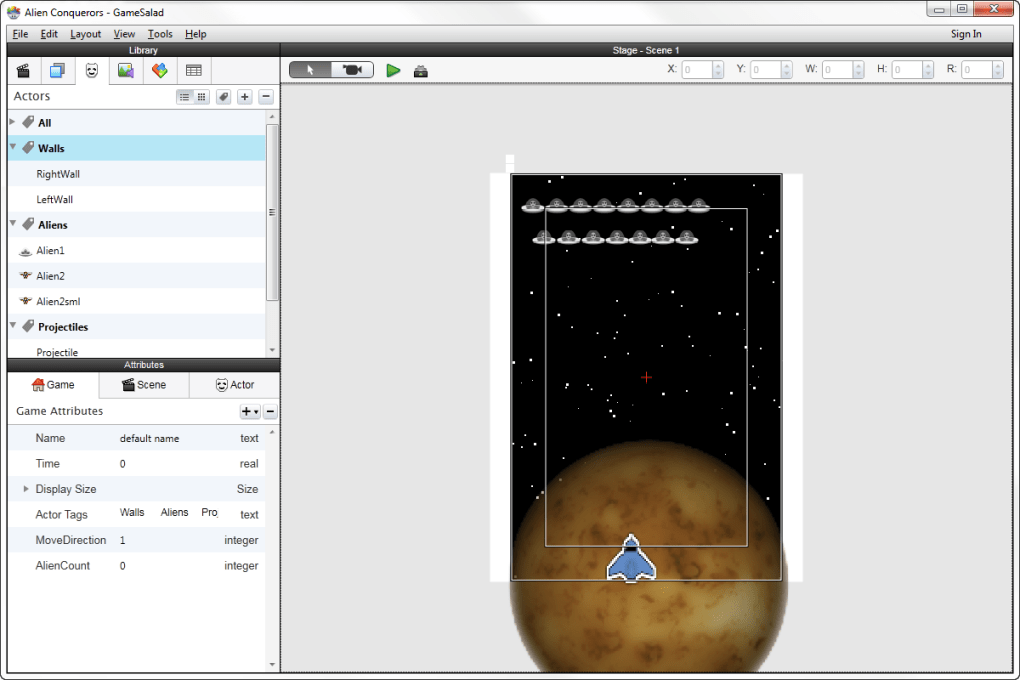
For educators, GameSalad provides an invaluable tool for teaching computational thinking, problem-solving, and basic programming concepts in a highly engaging context. Students can visually see the cause-and-effect relationships of their game logic, making abstract concepts concrete. Its application in schools and universities underscores its utility beyond hobbyist development, serving as an educational powerhouse.
While the reference material highlights version 0.10.0 from 2013, it’s important to recognize that game development tools, including GameSalad, continue to evolve. The foundational principles of visual scripting and accessibility remain central to its identity, but later iterations have likely introduced refinements in features, performance, and supported technologies to keep pace with industry standards. The detailed specifications provided in the reference offer a snapshot of GameSalad’s capabilities at a particular point in its history, showcasing its role as a light yet powerful tool for its time.
Technical Specifications and Platform Availability
Understanding the technical specifications of a software program like GameSalad is crucial for potential users to determine compatibility, performance expectations, and overall suitability for their development needs. Based on the information provided in the reference, GameSalad, specifically version 0.10.0, had a clear profile when it was last updated on February 6, 2013.
The program’s version, 0.10.0, indicates an early stage in its development cycle, suggesting that while functional, it might have been refined significantly in subsequent releases. The update date of February 6, 2013, is a key piece of information, signifying that the data presented reflects the program’s state at that specific time. For a user evaluating the software today, this date would prompt an investigation into more recent versions and their respective feature sets and compatibility.
In terms of platform availability, GameSalad was noted to be available for users with the operating system Windows XP and previous versions, with specific mention of Windows 7 as a supported platform. This broad compatibility with older Windows systems made it accessible to a wide range of users who might not have had the latest hardware or software. Crucially, the reference also confirms its availability for Mac, highlighting its cross-platform nature even in its earlier iterations. This dual-platform support is a significant advantage, allowing developers using either Windows or macOS to leverage the tool without switching their primary operating environment. The program was exclusively available in English, which, while limiting for non-English speakers, streamlined the development and support process for the creators at that time.
The file size of GameSalad version 0.10.0 was relatively light, at 21.15 MB. This “light program” status meant it required less free disk space compared to the average development software, making it an attractive option for users with limited storage or those looking for a quick and easy installation. A small footprint also often correlates with faster download times and potentially lower system resource consumption, which is beneficial for older machines or multi-tasking environments. This characteristic resonated well with its target audience of beginners and educators, who might not always have access to high-end development workstations.
The developer behind GameSalad is identified as Gendai Games. The number of installations reported – 22,367 since its addition to PhanMemFree.org’s selection in 2013, with 77 downloads in the week prior to the reference content’s publication – speaks to its considerable popularity at that time. Its particularly heavy usage in Indonesia, India, and the United States suggests a global appeal, possibly driven by its accessibility and the burgeoning interest in game development in these regions. This geographical distribution highlights the platform’s success in reaching diverse communities eager to enter the world of game creation.
The “Security Status: Free” and “Clean” designation from PhanMemFree.org is an important assurance for users, indicating that the program has been scanned and found free of malicious software or potential threats. This trustworthiness is paramount for any software download, especially for development tools that interact closely with a user’s system.
While these specifications paint a clear picture of GameSalad at a specific point in time, the core takeaway is its commitment to providing a lightweight, accessible, and cross-platform solution for game development. This foundation has undoubtedly allowed it to evolve and continue serving new generations of creators.
User Experience and Community Feedback
The true measure of any software’s success often lies in the feedback and experiences of its users. GameSalad, despite its accessibility, has garnered a range of opinions, reflecting the common trade-offs between ease of use and advanced functionality inherent in many no-code/low-code platforms. The user review prominently featured in the reference content, “too expensive for upgrade into a pro,” encapsulates a common point of contention for many users of freemium software.
The review, dated September 3, 2015, highlights a recurring challenge for platforms that offer a free tier: the pricing structure for professional or advanced features. For many aspiring game developers, the initial allure of a “free” program is its zero-cost entry point. This allows them to experiment, learn the ropes, and even create basic games without financial investment. However, as their skills grow and projects become more ambitious, they often hit a wall – features such as expanded publishing options, removal of watermarks, access to more complex behaviors, or enhanced support might be locked behind a paid “Pro” subscription. The perception of this upgrade cost being “too expensive” suggests that for some users, the jump from the free version’s capabilities to the professional tier’s price point did not align with their perceived value or budget. This is a crucial consideration for indie developers and hobbyists, who often operate on tight financial constraints. While the free version allows for learning and basic creation, the limitations it imposes can become frustrating for those looking to publish commercial-quality games.
Beyond the specific pricing concern, GameSalad’s general user experience is often praised for its intuitive visual interface. Beginners frequently report a steep but manageable learning curve, allowing them to grasp fundamental game design principles much faster than with traditional coding. This immediate gratification of seeing tangible results from drag-and-drop actions is a powerful motivator. Educators, in particular, laud GameSalad for its effectiveness in teaching computational thinking and logic without the intimidation of syntax errors. The ability to prototype ideas quickly and iterate on designs is another significant benefit, enabling creative experimentation.
However, the very features that make GameSalad accessible can also be its limitations for advanced users. While the behavior system is excellent for common actions, creating highly customized or complex game mechanics might require workarounds or prove challenging within the confines of a no-code environment. Developers accustomed to programming often find the visual scripting restrictive, lacking the flexibility and power of direct code manipulation. This leads to a natural ceiling for the complexity of games that can be efficiently developed solely within GameSalad, pushing some advanced users towards more code-centric engines like Unity or Unreal Engine for larger, more ambitious projects.
The mentioned heavy usage in Indonesia, India, and the United States further underscores GameSalad’s global reach and specific appeal. In regions where access to formal programming education might be limited, or where there’s a strong emerging indie development scene, tools that lower the barrier to entry become particularly valuable. Its lightweight nature (as noted in the specs) also makes it suitable for a wider range of hardware configurations, which can be a significant factor in regions where high-end computing resources are less common. This demographic insight suggests that GameSalad effectively serves a critical role in fostering grassroots game development.
In summary, user feedback for GameSalad typically highlights its success in demystifying game creation for beginners and educators, offering a genuinely accessible pathway into the industry. Yet, like many tools of its kind, it faces the challenge of balancing this accessibility with the scalability and advanced features demanded by experienced developers, often leading to a discussion about the value proposition of its paid tiers.
GameSalad in the Broader Development Landscape
To fully appreciate GameSalad’s position and impact, it’s essential to contextualize it within the broader game development ecosystem. The industry is saturated with various tools, each catering to different skill levels, project types, and budgets. GameSalad occupies a distinct niche, often compared to, and sometimes overshadowed by, other powerful engines. The “Alternative apps” and “Related topics” listed in the reference content provide excellent markers for this comparison.
GameSalad primarily appeals to those seeking a visual, no-code or low-code solution for 2D game development, particularly for mobile and web platforms. Its focus on behavior-based logic and drag-and-drop mechanics positions it directly against other visual game creation tools. For instance, Construct 2 (rated 3.8, free in the reference) is a direct competitor, offering a similar event-sheet-based visual scripting approach, also primarily for 2D games and web export. Both target users who want to avoid traditional programming, making them strong contenders for educational purposes and rapid prototyping.
Game Maker (rated 3.3, free) is another significant alternative. While it started as a pure drag-and-drop environment, it evolved to include its own scripting language (GML - GameMaker Language), offering more power and flexibility while retaining an approachable visual interface. This blend positions Game Maker as a step up in complexity from GameSalad, suitable for users who are ready to dabble in code but still prefer a structured engine.
Further along the spectrum of complexity are tools like Unreal Engine (rated 4.1, free). Unreal Engine is a professional-grade 3D game engine, renowned for its stunning graphics, advanced physics, and robust feature set. It offers a visual scripting system called Blueprint, which is powerful but significantly more complex than GameSalad’s behaviors, designed for professional game designers and programmers. The sheer scale and learning curve of Unreal Engine make it a vastly different proposition from GameSalad, catering to AAA development and sophisticated indie projects rather than beginner-level creations. Similarly, FPS Creator (rated 3.4, free) focuses on a very specific genre (first-person shooters), providing tools optimized for that niche, a much narrower scope than GameSalad’s general 2D capabilities.
The “Related topics about GameSalad” like “Web Application Development Free,” “Game Development For Windows,” “Design For Mac,” and “Ipad Apps” highlight its perceived versatility and target platforms. GameSalad’s ability to publish to mobile platforms (implied by “Ipad Apps”) was a significant draw, allowing individual developers to tap into the lucrative mobile gaming market without needing specialized mobile development skills (e.g., Swift/Kotlin). Its role in “Web Application Development” further emphasizes its utility for creating interactive experiences beyond traditional downloadable games, such as educational tools or simple web-based interactives.
GameSalad’s niche is particularly strong among educators, hobbyists, and small indie teams focused on 2D experiences. It excels at rapid prototyping, allowing ideas to be tested and refined quickly. Its strength lies in its ability to enable creative individuals to bypass the steep learning curve of coding and jump directly into game design and logic. While it might not have the raw power or extensibility of a Unity or Unreal Engine for highly complex or graphically intensive projects, it serves as an excellent starting point, a “stepping stone” into the world of game development.
In essence, GameSalad’s enduring relevance stems from its clear focus on accessibility. It competes by offering a less intimidating entry point than more complex engines, making game development achievable for a broader demographic. This commitment to simplifying the creative process ensures its continued importance for those who value intuitive design over deep technical programming knowledge, serving as a vital on-ramp for the next generation of game creators.
Legal and Ethical Considerations: Understanding Software Usage
When engaging with any software, especially development tools, it’s imperative to be aware of the legal and ethical considerations surrounding its use. The disclaimer provided by PhanMemFree.org, “Laws concerning the use of this software vary from country to country. We do not encourage or condone the use of this program if it is in violation of these laws,” serves as a critical reminder of user responsibility. This statement is not just boilerplate text; it carries significant weight in the digital landscape, especially concerning intellectual property, licensing, and online conduct.
Firstly, “Laws concerning the use of this software vary from country to country” points to the global nature of software distribution and consumption. What might be permissible in one jurisdiction regarding software usage, distribution, or even the content created with it, could be illegal in another. This applies to copyright laws, privacy regulations (like GDPR or CCPA), and even specific restrictions on certain types of content (e.g., gambling, violence, or political themes) that could be incorporated into games developed with GameSalad. Users, particularly those intending to publish or monetize their creations, must ensure their work complies with the legal frameworks of their target markets.
The core of the disclaimer, “We do not encourage or condone the use of this program if it is in violation of these laws,” places the onus squarely on the end-user. This means that while PhanMemFree.org facilitates access to GameSalad, it does not endorse or take responsibility for any illegal activities undertaken with the software. This includes:
- Copyright Infringement: Using copyrighted assets (images, sounds, music, character designs) without proper licensing or permission in games developed with GameSalad is a common pitfall. Even if the software itself is free, the content created with it is subject to intellectual property laws. Developers must ensure all assets are either original, public domain, open-source with compatible licenses, or properly licensed from third parties.
- License Violations: While GameSalad is offered as a “free” program, this typically refers to its base usage. As seen in user feedback, there might be “Pro” versions or paid tiers. Users must adhere to the specific terms of service and End User License Agreements (EULAs) provided by Gendai Games for GameSalad. Violating these terms, such as attempting to bypass subscription requirements or using the free version for purposes explicitly reserved for paid tiers, could lead to legal repercussions or account termination.
- Content Restrictions: Games, like any form of media, can be subject to content restrictions. Developing and distributing games that promote hate speech, illegal activities, or contain inappropriate material for specific age groups (especially if mislabeled) can lead to legal issues, platform bans, and public backlash. Users should be mindful of content rating systems (e.g., ESRB, PEGI) if they plan to distribute their games widely.
- Data Privacy: If a game developed with GameSalad collects any user data (even simple analytics), the developer must comply with data privacy laws. This includes transparently informing users about data collection, obtaining consent where necessary, and securely handling any collected information.
The mention of PhanMemFree.org potentially receiving a referral fee if users click or buy featured products also adds a layer of transparency regarding the platform’s business model. This is standard practice for many software aggregators and review sites, and it highlights that the platform is providing a service that comes with its own commercial considerations, separate from the legal responsibilities of the software itself.
In conclusion, while GameSalad offers an accessible pathway to game creation, its users must exercise due diligence regarding legal and ethical responsibilities. Understanding and adhering to national and international laws, respecting intellectual property rights, and upholding ethical content standards are paramount for any developer, regardless of the tools they employ. The disclaimer serves as a vital reminder that the journey from conception to publication in game development is not solely a creative one, but also a legally accountable endeavor.
File Information
- License: “Free”
- Version: “0.10.0”
- Latest update: “February 6, 2013”
- Platform: “Windows”
- OS: “Windows 7”
- Language: “English”
- Downloads: “23.7K”
- Size: “21.15 MB”


