
GANPaint Studio offers a unique approach to photo editing, leveraging the power of generative adversarial networks (GANs) to allow users to manipulate images using high-level semantic concepts rather than traditional color-based tools. This innovative software eliminates the need for precise drawing or coloring skills, making it accessible to both novice and experienced users. This article explores the functionalities, strengths, limitations, and overall user experience of GANPaint Studio.
Understanding the Technology Behind GANPaint Studio
At the heart of GANPaint Studio lies a generative adversarial network, a sophisticated type of artificial intelligence. GANs consist of two neural networks: a generator and a discriminator. The generator creates new images, while the discriminator evaluates their realism. Through a continuous process of creation and evaluation, the generator learns to produce increasingly realistic and convincing images.
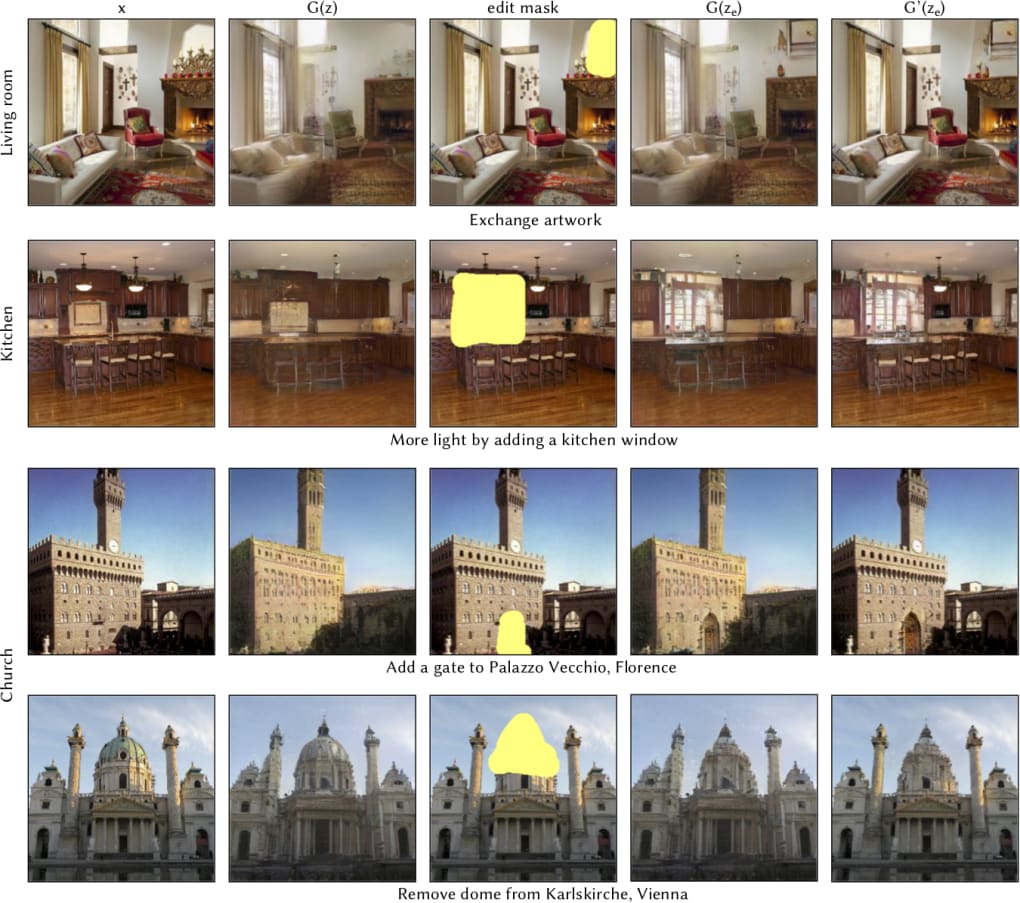
In GANPaint Studio, this GAN has been trained on a vast dataset of images, enabling it to understand and generate images within specific categories. This allows the software to intelligently manipulate existing images based on high-level semantic instructions, such as adding or removing specific elements. Instead of manually adjusting pixels or colors, users interact with the software using “semantic paintbrushes” that target specific aspects of the image, such as adding a window to a building or changing the style of furniture in a room. The user’s input acts as a guide for the GAN, which then generates the modified image.
This process of semantic manipulation is significantly different from traditional photo editing software. Instead of directly manipulating pixels, the user guides the GAN towards a desired outcome by selecting and modifying semantic concepts. This approach streamlines the editing process and makes it more intuitive for users unfamiliar with traditional digital art techniques. However, this reliance on the GAN also introduces some limitations, as detailed below.

GANPaint Studio: Strengths and Weaknesses
GANPaint Studio presents a compelling alternative to conventional photo editing software, but its unique approach comes with both advantages and disadvantages.
Pros:
-
Intuitive and User-Friendly Interface: The software’s design prioritizes ease of use. Users don’t need extensive technical expertise or artistic skills to achieve satisfying results. The semantic paintbrush approach simplifies the editing process, making it accessible to a broader audience.
-
Semantic Editing: The core strength of GANPaint Studio lies in its semantic manipulation capabilities. Users can modify images using high-level concepts, removing the need for pixel-by-pixel adjustments. This speeds up the editing process and allows for more creative freedom.
-
Ideal for Quick Edits: The software is perfectly suited for quick modifications and adjustments. If a user needs to make a small change to an image, GANPaint Studio can offer a rapid solution without the complexity of more feature-rich applications.
-
Accessibility for Non-Artists: This is a significant advantage. The software removes the barrier to entry for individuals who lack traditional artistic skills. Anyone can use GANPaint Studio to make meaningful changes to their photos without needing to learn complex digital art techniques.
-
Focus on Concept, Not Pixels: The emphasis on manipulating concepts rather than pixels allows users to concentrate on the overall composition and feel of the image, leaving the finer details to the GAN.
Cons:
-
Low-Resolution Output: A major limitation of GANPaint Studio is the lower resolution of the output images. This is a consequence of the computational demands of generating high-resolution images using a GAN. While the edits are often semantically correct, the final image may lack the sharpness and detail of those produced by traditional photo editing software.
-
Limited Editing Capabilities: The range of possible edits is restricted by the training data of the GAN. While the software can effectively manipulate specific elements within a given image, the user’s control over the editing process is not absolute. The user essentially guides the GAN, but they don’t have complete control over the final result.
-
Processing Time: While the editing process itself might be fast, generating the modified image can sometimes take a considerable amount of time. This is particularly noticeable when using one’s own custom images, where a 24-hour processing time is mentioned in the app description.
-
Dependency on Pre-trained GAN: The effectiveness of GANPaint Studio is directly tied to the capabilities of its pre-trained GAN. Users cannot customize or fine-tune the GAN’s parameters, limiting the flexibility of the software. The system’s knowledge is constrained by what it was trained on.
GANPaint Studio’s Place in the Photo Editing Landscape
GANPaint Studio occupies a niche within the broader landscape of photo editing software. It doesn’t aim to replace the powerful and versatile tools used by professional graphic designers or photographers. Instead, it caters to a different audience: those seeking a user-friendly and accessible way to make quick, semantic changes to their images without the need for intricate technical skills.
Its strength lies in its simplicity and ease of use. For tasks requiring quick adjustments or conceptual changes, GANPaint Studio can be incredibly efficient. However, its limitations in resolution and control over the editing process make it unsuitable for projects requiring high fidelity or intricate detail.
The software represents an exciting step towards more accessible and intuitive photo editing. The technology behind it is cutting-edge, offering a glimpse into the future of image manipulation. However, as GAN technology continues to evolve, we can anticipate future iterations of GANPaint Studio addressing some of its current limitations, offering a more powerful and versatile experience.
GANPaint Studio: A Tool for the Future of Photo Editing
GANPaint Studio, despite its current limitations, signifies a significant development in the field of photo editing. By utilizing the power of AI and GANs, it simplifies the editing process and makes it accessible to a wider audience. While it may not replace traditional photo editors for professional use, its ease of use and unique approach to semantic manipulation make it a valuable tool for those seeking a quicker and more intuitive way to edit their images. The future development and improvement of GAN technology promise even more sophisticated and versatile applications, potentially bridging the gap between simple image manipulation and advanced artistic control. The current version provides a fascinating glimpse into the potential of AI-powered photo editing tools, showcasing the transformative power of semantic image manipulation. As the technology matures, we can anticipate even more impressive advancements in this rapidly evolving field. While currently possessing limitations concerning resolution and control, its user-friendly interface and focus on quick edits positions GANPaint Studio as a significant contributor to the future of accessible and innovative photo editing.
File Information
- License: “Free”
- Version: “1.0”
- Latest update: “July 3, 2019”
- Platform: “Windows”
- OS: “Windows 8”
- Language: “English”
- Downloads: “1.2K”


