
Gboard, the official keyboard app from Google, has become a ubiquitous presence on Android and iOS devices. Its popularity stems from a potent combination of ease of use, a comprehensive feature set, and seamless integration with the Google ecosystem. This in-depth review explores Gboard’s strengths and weaknesses, examining its core functionalities, user experience, and potential drawbacks.
A Feature-Rich Typing Experience
At its heart, Gboard is a keyboard app designed to improve text input. It goes beyond simply providing keys, however, offering a range of features designed to enhance speed, accuracy, and overall efficiency. The core functionalities include:
-
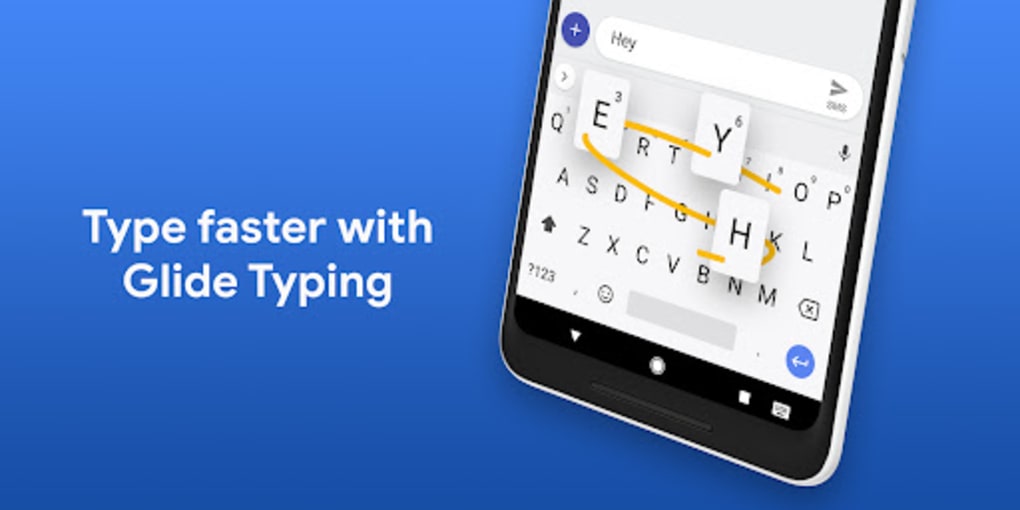
Gesture Typing (Glide Typing): This innovative feature allows users to type words by sliding their finger across the keyboard, eliminating the need to lift their finger between each letter. This method is surprisingly intuitive and, with practice, allows for rapid text entry. The dynamic floating preview of the word as you glide adds accuracy and helps correct potential errors in real-time. The absence of a dedicated spacebar further streamlines the process.
-
Voice Typing: For hands-free typing, Gboard offers a robust voice-to-text functionality. The accuracy is generally high, even in noisy environments, although it still occasionally requires corrections. This is particularly useful for composing longer messages or notes quickly, or when typing with one hand is inconvenient. Voice Typing is a testament to Google’s advancement in speech recognition technology.
-
Next-Word Suggestion and Autocompletion: Gboard leverages machine learning to predict the next word you are likely to type, often accurately anticipating the completion of your sentences. This feature significantly speeds up the typing process, reducing the number of keystrokes required. The suggestions are contextually aware, adapting to your writing style and the subject matter of your text.
-
Multilingual Support: Supporting over 120 languages, Gboard effortlessly adapts to users who switch between multiple languages within a single text. It dynamically adjusts its predictions and autocorrection to suit the currently selected language, ensuring smooth and accurate typing regardless of linguistic context. This versatility makes it an excellent choice for multilingual users.
-
Integrated Google Search: One of Gboard’s most celebrated features is the direct integration of Google Search. Users can access search results, emojis, GIFs, and other content directly from the keyboard without leaving their current application. This eliminates the need for switching between apps, improving workflow significantly. Searching for specific images, GIFs, or information can seamlessly be incorporated into messaging and other communication.
-
Customization: Gboard offers a high degree of customization, allowing users to personalize their keyboard experience. Users can choose from a variety of themes, adjust key size and layout, and even add personal dictionaries for words not included in the standard lexicon. This level of customization caters to individual preferences and ensures the keyboard adapts to the user, rather than the other way around.
-
Advanced Keyboard Layouts: Gboard provides various keyboard layouts to accommodate different typing preferences and languages. These range from standard QWERTY layouts to more specialized layouts for specific languages and input methods. This enhances flexibility and accommodates diverse typing styles.
Beyond Typing: The Integrated Google Experience
Gboard transcends its role as a simple keyboard, acting as a central hub for several Google services. Its integration with Google Search, particularly, distinguishes it from other keyboard apps. The ability to search for information, emojis, GIFs, and other content without leaving the current app greatly enhances productivity and convenience.
Gboard: A User-Friendly Experience?
Despite its extensive feature set, Gboard maintains a remarkably intuitive user interface. The onboarding process is simple and straightforward, guiding new users through the essential settings and features. The layout of the keyboard itself is clean and uncluttered, making it easy to locate the desired keys. Its adaptive nature, where the keyboard intelligently learns your typing habits and adjusts accordingly, further contributes to its user-friendly design. Although the sheer number of features may initially seem overwhelming, the app’s well-organized settings menu allows users to easily customize and tailor the experience to their liking.
Data Privacy Concerns and Battery Consumption
While Gboard offers an impressive array of features and a seamless user experience, it’s crucial to acknowledge potential drawbacks. One significant concern revolves around data privacy. As with other Google services, Gboard collects user data to improve its predictive capabilities and personalize the user experience. This data collection, while contributing to the app’s functionality, raises concerns for some users about the extent and purpose of data usage. Past data leaks, although promptly addressed by Google, have heightened these concerns. Users should carefully review Google’s privacy policy and consider the implications before using the app.
Another aspect to consider is battery consumption. Gboard’s extensive features, particularly its predictive text and machine learning capabilities, can consume a significant amount of battery power. While the benefits of these features are undeniable, users should be aware of the potential impact on battery life, especially on devices with limited power reserves.
Alternatives to Gboard
While Gboard reigns supreme in terms of popularity, other notable keyboard apps exist, each offering unique advantages. Some popular alternatives include:
-
SwiftKey Keyboard: Known for its exceptionally accurate predictive text and personalized learning capabilities.
-
Microsoft SwiftKey Keyboard: Another strong competitor, offering similar features to SwiftKey, with integration into the Microsoft ecosystem.
-
TouchPal Keyboard: Focuses on a user-friendly interface and customization options.
-
GO Keyboard: Provides a vast array of themes and customization options.
These alternatives offer varying degrees of customization, predictive capabilities, and feature sets. The best choice depends on individual preferences and priorities.
Conclusion: Gboard’s Reign Continues
Despite some concerns regarding data privacy and battery consumption, Gboard remains a top contender in the mobile keyboard arena. Its intuitive design, powerful predictive text, seamless Google integration, and multilingual support make it a compelling choice for a wide range of users. The ability to personalize the keyboard to one’s typing style and preferences only adds to its appeal. While alternatives exist, Gboard’s extensive feature set, consistent performance, and deep integration with the Google ecosystem solidifies its position as a leading keyboard app for Android and iOS devices. The convenience and time-saving features it provides ultimately outweigh the minor drawbacks for many users, making it an indispensable app for efficient communication and information access.
File Information
- License: “Free”
- Latest update: “August 13, 2025”
- Platform: “Android”
- OS: “Android 15.0”
- Downloads: “863.2K”
- Download Options: “Google Play”


