
GeForce Experience is a free application designed to enhance the PC gaming experience for users with NVIDIA GeForce GTX graphics cards. It acts as a central hub for optimizing game settings, updating drivers, recording gameplay, and sharing your gaming achievements with others. This comprehensive tool streamlines various aspects of PC gaming, allowing users to focus more on playing and less on troubleshooting technical issues. While primarily beneficial for GeForce users, its features and ease of use make it a powerful addition to any serious PC gamer’s arsenal.
Optimizing Game Settings for Peak Performance
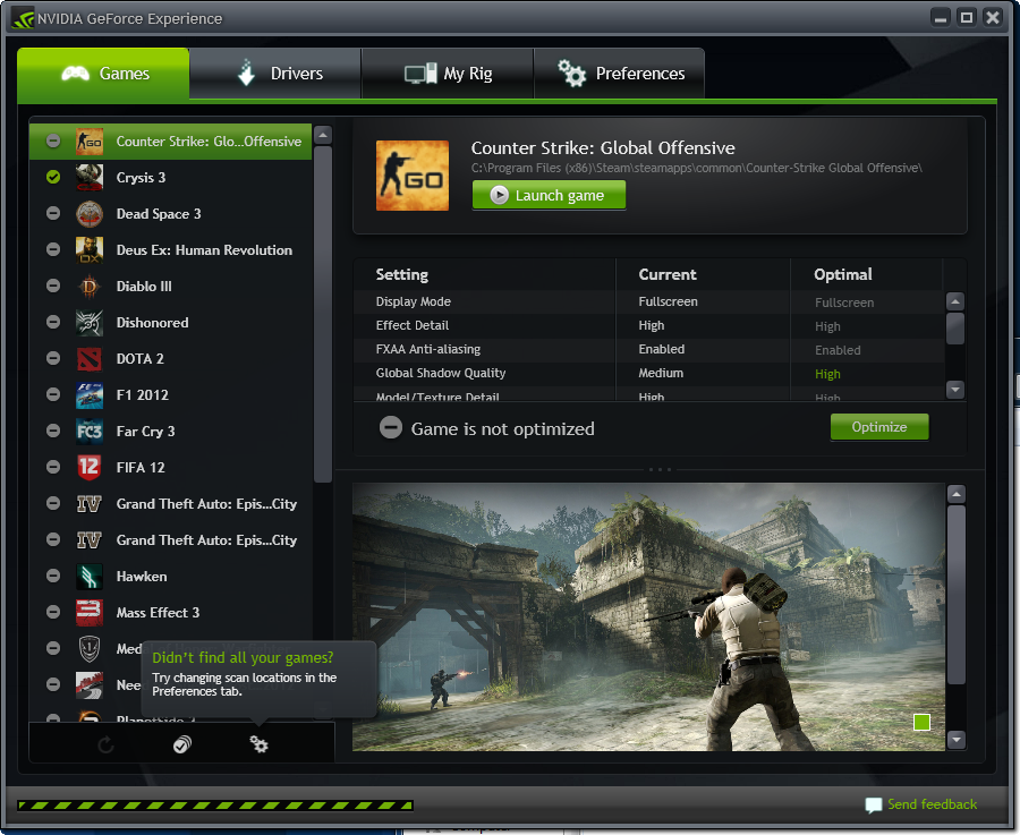
One of the core functionalities of GeForce Experience is its automated game optimization. The application analyzes your system’s hardware specifications – including your CPU, GPU, RAM, and display resolution – and then automatically configures the in-game settings to achieve the best possible balance between visual fidelity and frame rate. This eliminates the need for manual tweaking, which can be a time-consuming and complex process, especially for games with numerous graphical options.
The optimization process is remarkably simple. Once GeForce Experience detects a game installed on your system, it downloads an optimized profile. This profile contains pre-configured settings tailored to your specific hardware. You can then choose to apply these settings directly, or you can review them individually and make adjustments based on your preferences. This granular control ensures that you retain the ability to fine-tune the visuals to your liking while still leveraging the application’s expertise for a solid starting point.
Furthermore, the application goes beyond simply applying pre-set profiles. It allows for custom settings, enabling users to prioritize specific aspects of the game’s visuals. For example, a user might choose to prioritize higher frame rates for smoother gameplay, even if it means sacrificing some visual detail. Conversely, a user might prioritize maximum graphical fidelity, even if it results in a lower frame rate. This level of customization caters to individual gaming preferences and hardware capabilities, delivering a personalized experience.
The impact of optimized settings extends beyond improved visual quality and frame rate. By reducing unnecessary graphical load, GeForce Experience can also lead to reduced CPU and GPU temperatures, improving the longevity of your hardware and reducing system noise. This is especially beneficial for users with high-performance systems that may generate significant heat during intense gaming sessions.
Keeping Your Drivers Up-to-Date
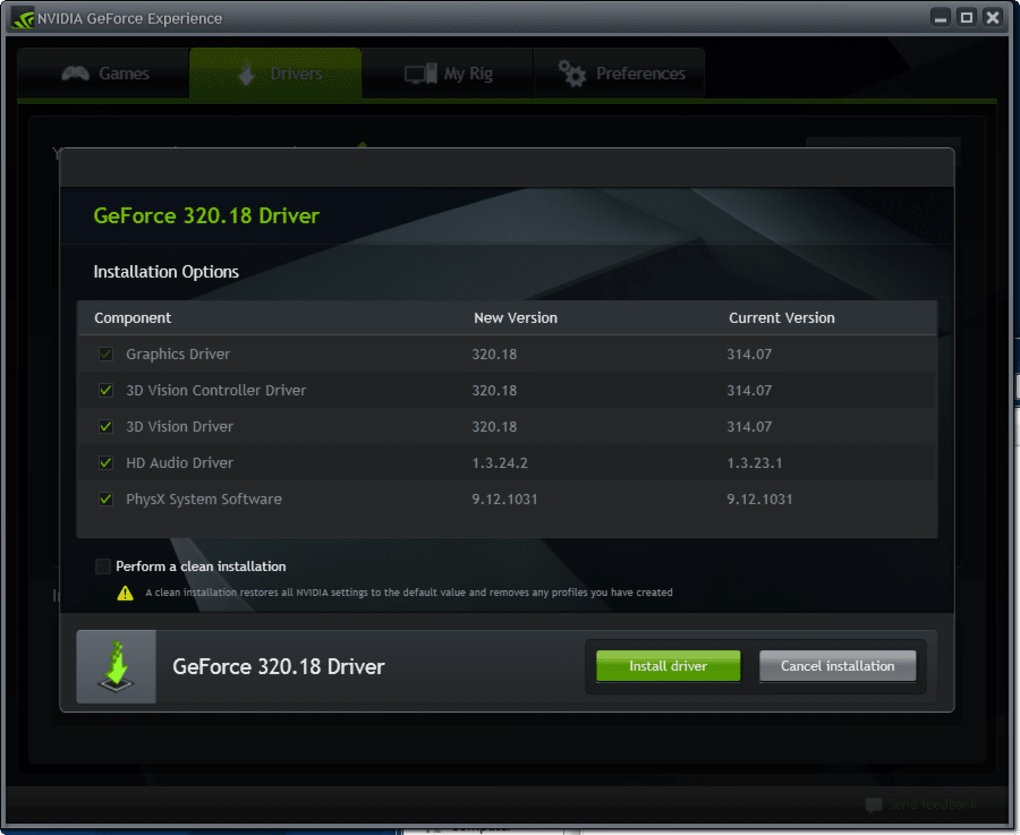
Another crucial aspect of GeForce Experience is its automatic driver update functionality. Maintaining up-to-date graphics drivers is essential for optimal game performance, stability, and access to the latest features. Out-of-date drivers can lead to compatibility issues, performance bottlenecks, and even system crashes. Manually checking for and installing driver updates can be inconvenient and time-consuming, but GeForce Experience automates this process, ensuring that your system always runs with the latest drivers.
The application regularly checks for new driver releases from NVIDIA. When a new driver becomes available, GeForce Experience provides a notification, allowing you to download and install the update with a single click. This streamlined process eliminates the need to visit NVIDIA’s website, search for the correct driver, and manually install it. This automated update feature ensures that you are always running the most optimized drivers for your hardware, maximizing its potential and minimizing potential problems.
Beyond simply updating drivers, GeForce Experience provides information about the drivers currently installed on your system. This allows you to easily verify the driver version and confirm that it is compatible with your games and applications. This transparency fosters a greater understanding of the software running on your system and ensures you are aware of any potential compatibility concerns.
The integration of driver updates within the GeForce Experience application simplifies the maintenance of your system and keeps it running smoothly. This feature significantly reduces the chances of encountering driver-related problems, allowing for a more enjoyable gaming experience.
Recording and Sharing Your Gameplay
GeForce Experience includes an integrated video recording and streaming functionality known as NVIDIA ShadowPlay. This feature allows you to capture high-quality videos of your gameplay, including screenshots, without impacting performance significantly. This seamless integration avoids the need for separate recording software, simplifying the workflow and reducing the overhead on your system.
ShadowPlay offers various recording options, allowing you to capture full gameplay sessions, short clips, or even individual screenshots. You can choose the desired recording resolution, frame rate, and bitrate, tailoring the recording settings to match your needs and storage capacity. The recording process is straightforward and intuitive, minimizing the learning curve for users unfamiliar with video recording software.
Moreover, the feature extends beyond simple recording. It integrates directly with social media platforms like YouTube and Twitch, allowing for seamless sharing of your recorded gameplay. You can easily upload your videos and livestreams directly from the application, streamlining the sharing process and maximizing audience reach. This ease of content creation and distribution is particularly attractive to streamers and content creators, fostering community and increasing interaction.
This integrated recording and streaming functionality provides a powerful suite of tools for those who want to share their gaming achievements and engage with other players. The seamless integration with other applications and platforms further simplifies the workflow, enhancing the overall user experience.
Beyond the Basics: Additional Features and Considerations
GeForce Experience encompasses a wider range of functionalities beyond the core features already mentioned. These additional features further enhance the user experience and address a broader range of needs within the PC gaming community.
For instance, the application provides information about your hardware and performance. It displays real-time metrics such as GPU usage, frame rates, and temperatures. This information allows for monitoring system performance and identifying potential bottlenecks or issues that may be affecting gameplay. This level of insight allows for proactive problem-solving and optimization.
GeForce Experience also integrates with other NVIDIA services, providing access to a broader ecosystem of tools and features. This integration enhances the overall functionality and provides a more cohesive user experience.
While GeForce Experience offers numerous benefits, it’s crucial to acknowledge certain limitations. The application is primarily designed for NVIDIA GeForce GTX graphics cards. Users with AMD or integrated graphics solutions will not be able to utilize its full capabilities. This limited compatibility restricts its accessibility to a specific segment of the PC gaming market.
Conclusion: A Powerful Tool for PC Gamers
GeForce Experience stands out as a valuable tool for PC gamers, especially those using NVIDIA GeForce GTX graphics cards. Its streamlined approach to game optimization, driver updates, and gameplay recording simplifies various aspects of PC gaming, ultimately enhancing the overall experience. While its compatibility is limited to NVIDIA hardware, its comprehensive feature set and user-friendly interface make it a must-have for those within its supported ecosystem. The ease of use, combined with the significant performance benefits, makes GeForce Experience a powerful asset for any serious PC gamer aiming to maximize their gaming experience.
File Information
- License: “Free”
- Latest update: “June 30, 2025”
- Platform: “Windows”
- OS: “Windows 11”
- Language: “English”
- Downloads: “48.2K”


