
GetFLV is a multimedia utility designed for downloading and managing online videos. While primarily a video downloader, its functionality extends to conversion, editing, and audio extraction, offering a relatively comprehensive suite of tools within a single application. However, its user interface and pricing model present some noteworthy caveats. This review delves into the strengths and weaknesses of GetFLV, exploring its features, usability, and overall value proposition.
Downloading Online Videos: Ease of Use and Functionality
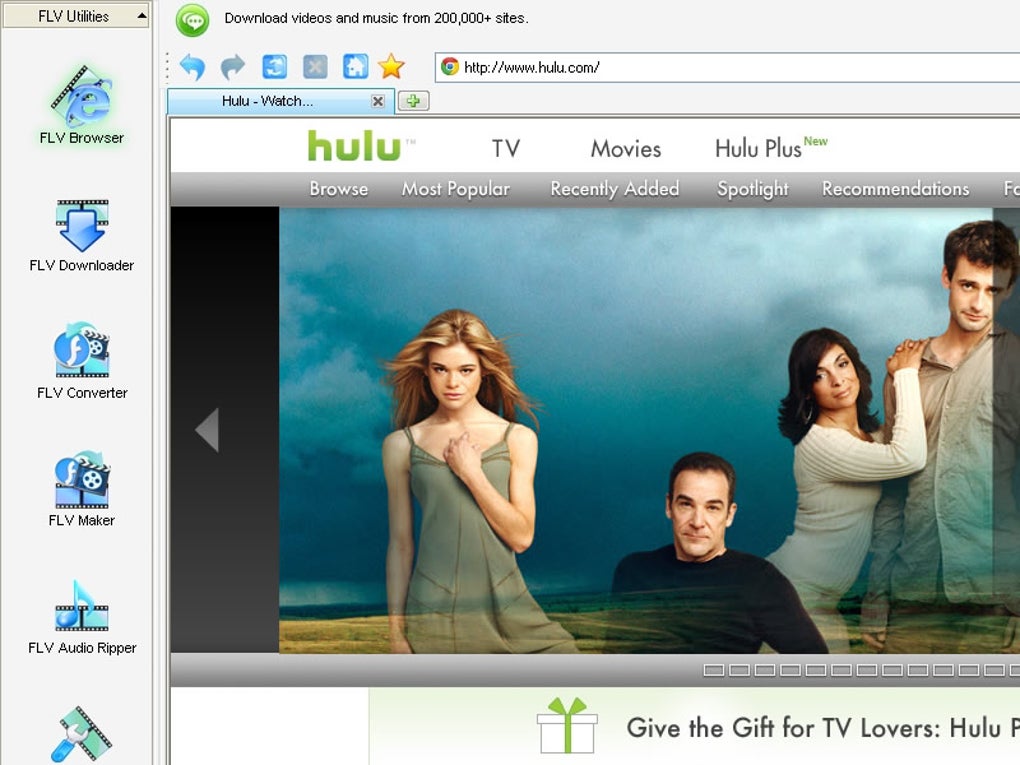
GetFLV boasts a built-in web browser, a key feature that streamlines the video downloading process. Users can navigate to their desired website directly within the application. Upon locating a video, GetFLV automatically identifies and lists the download links, simplifying the selection process. This integrated browser approach eliminates the need for users to copy and paste URLs, offering a more convenient user experience. Users can choose from several output quality options, allowing for optimization based on their storage preferences and bandwidth constraints. The download speed is, however, contingent on the user’s internet connection speed and the server from which the video is being retrieved.
The application’s interface, while functional, requires some initial acclimation. The initial setup might feel overwhelming to new users; however, GetFLV offers a helpful user guide that systematically walks users through each function and step. This contextual help is particularly useful in addressing any immediate issues or uncertainties users might encounter. The well-structured side panel provides convenient access to the main features, with the FLV Browser serving as the central hub for video discovery and downloads. The intuitive organization of features is particularly beneficial for users familiar with similar software.
Beyond Downloading: Conversion, Editing, and Audio Extraction
GetFLV’s capabilities extend far beyond simple video downloads. It incorporates a robust set of tools designed to enhance video management and manipulation. The inclusion of an FLV Converter, FLV Maker, and FLV Audio Ripper provides users with significant versatility. The converter supports numerous formats, including MP4, WMV, AVI, and 3GP, catering to diverse playback devices and preferences. This format flexibility makes GetFLV a valuable tool for users who require compatibility across multiple platforms and devices. Moreover, the categorization of formats based on playback device enhances user experience. The audio ripper allows for extracting the audio track from videos, making it a useful tool for audio enthusiasts and podcasters.
The integrated video editor allows for basic editing functions such as cropping, trimming, and adding watermarks. A color slider provides additional control over the visual aspects of the video. However, a noticeable limitation is the inability to merge multiple video clips into a single file. This omission restricts its editing capabilities compared to more feature-rich video editing software. The video editor caters to basic enhancements and refinements rather than complex video production tasks. This balanced approach simplifies the editing process, making it accessible to users with limited video editing experience.
Pricing and Limitations: Trial Version and Customer Support
GetFLV is not a free application. While a trial version is available, it significantly restricts functionality, particularly concerning the completeness of video downloads. The trial version allegedly only downloads 50% of a video, making it essentially unusable for most users. Users are required to purchase the full version to unlock the complete suite of features. The pricing, however, is noted as being more expensive than comparable software, raising concerns about its value proposition. This pricing model may present a barrier to entry for users seeking budget-friendly solutions, especially given the limitations of the trial version.
The software’s customer support appears to be a weak point. While the user guide offers a degree of assistance, a lack of responsive customer support may leave users frustrated in the event of technical issues or questions that aren’t covered in the documentation. The lack of robust support negatively impacts user satisfaction, especially for those who might require assistance with less common issues or software-specific troubleshooting. The absence of an easily accessible or responsive support system limits user assistance and might leave users feeling unsupported.
Alternatives and Competitive Landscape
The market for video downloading and editing software is competitive. Numerous alternatives exist, each with its own strengths and weaknesses. Some applications focus solely on downloading, others prioritize advanced editing features. A thorough evaluation of alternatives is crucial before making a purchase decision. Several free options exist, albeit often with fewer features or limitations on download speed or video quality. Conversely, many paid options offer more comprehensive features and usually include readily available customer support.
The competitive landscape requires GetFLV to offer a compelling value proposition to attract and retain users. The lack of a robust free version coupled with higher pricing compared to rivals puts it at a disadvantage. Therefore, a prospective user must meticulously evaluate its strengths against the features and pricing models of competing software solutions.
Overall Assessment: Strengths and Weaknesses
GetFLV presents a mixed bag of strengths and weaknesses. Its integrated browser, diverse format support, and inclusion of conversion, editing, and audio extraction tools contribute to its appeal. The ease of downloading videos directly within the application simplifies the process for users who might struggle with alternative methods. The various video editing functions, although limited, cater to basic user needs. However, the drawbacks associated with the pricing model, the restrictive trial version, and the lack of responsive customer support significantly diminish its overall appeal.
The software’s high price compared to competitors offering similar functionality needs to be seriously considered. The limited functionality of the trial version, which is practically unusable for any practical application, is another considerable drawback that dissuades users from purchasing the full version. The apparent lack of responsive customer support adds another layer of concern for users who require timely assistance with technical or usage-related issues. Thus, the value proposition of GetFLV needs improvement to justify its relatively higher cost.
Conclusion: Is GetFLV Worth It?
Whether or not GetFLV is “worth it” depends heavily on individual needs and priorities. Users who require a comprehensive suite of tools for downloading, converting, and performing basic editing on videos might find its functionality attractive. However, the significant limitations of the trial version, the comparatively higher price, and the apparent lack of robust customer support raise concerns. Prospective buyers should carefully weigh the benefits against the limitations and thoroughly investigate the available alternatives before committing to a purchase. A thorough cost-benefit analysis against competitor offerings is essential to determine whether GetFLV justifies its pricing and limitations. The need for improvement in its user experience and support system cannot be overstated if GetFLV intends to remain competitive.
File Information
- License: “Free”
- Latest update: “June 12, 2025”
- Platform: “Windows”
- OS: “Windows 11”
- Language: “English”
- Downloads: “17.3K”


