
Ghost Browser isn’t your average web browser. It’s a meticulously designed tool engineered to significantly boost productivity for users who juggle multiple online accounts and tasks simultaneously. Unlike traditional browsers that often lead to a chaotic jumble of tabs and windows, Ghost Browser introduces innovative features to streamline workflows, enhance organization, and ultimately, reduce work-related stress. This in-depth review explores its key features, benefits, and drawbacks, providing a comprehensive understanding of its capabilities and suitability for different users.
Streamlining Workflows: The Power of Organized Multitasking
One of the most significant hurdles to peak productivity is maintaining a smooth and efficient workflow. Knowing precisely where you need to be and what you need to do at any given moment is crucial. However, achieving this without the right tools can feel like navigating a maze blindfolded. Ghost Browser addresses this challenge directly by providing an advanced, highly organized interface designed for multitasking without the usual interruptions and delays.
Central to Ghost Browser’s functionality is its unique workspace tab, a sidebar feature unlike anything found in mainstream browsers like Chrome, Firefox, or Safari. This workspace acts as a central command center, allowing users to meticulously organize their daily tasks and web pages into easily accessible categories. Think of it as a dynamic, always-available to-do list integrated directly into your browsing experience.

Imagine having multiple Facebook accounts – personal and business – scattered across different tabs or even different browsers. With Ghost Browser, you can create folders within the workspace tab, neatly housing all your Facebook accounts (and any other accounts requiring separate logins) in a single, easily navigable location. The workspace isn’t just for social media; it can efficiently manage any application requiring separate logins or focused task management. The convenience lies in its constant presence – it’s always accessible, regardless of the active tab, easily expandable and collapsable to suit your preference. Your bookmarks, browsing history, and downloads are also readily accessible via the workspace, enhancing its utility as a centralized hub for all your browsing needs.
Seamless Multi-Account Management: Isolated Cookies for Enhanced Security
Ghost Browser’s ability to manage multiple accounts simultaneously without compromising security is a key differentiator. It elegantly solves the common problem of needing to switch between different accounts on the same website or platform. Instead of opening multiple browser windows or constantly logging in and out, Ghost Browser isolates cookies for each tab.
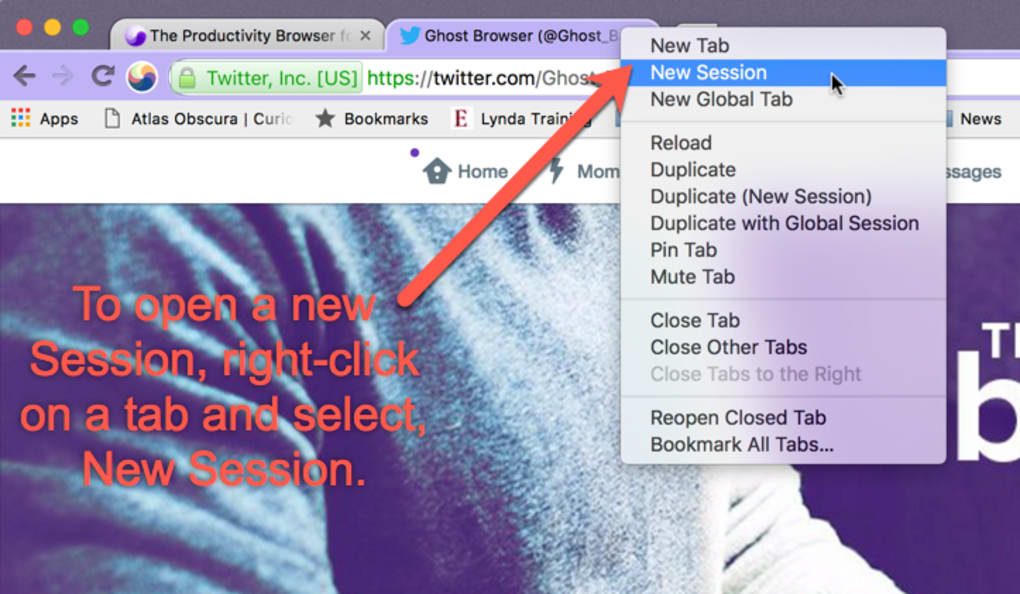
This means you can effortlessly log into your personal Twitter account in one tab, and your various business Twitter accounts in others, all within the same browser window. The browser intelligently manages the cookies, ensuring that each account remains isolated, preventing accidental cross-account activity or security breaches. The ingenious color-coding of tabs sharing the same cookies adds an extra layer of clarity, instantly identifying related accounts and preventing confusion when managing numerous open tabs.
Importantly, this cookie isolation is not limited to social media. Any website or application requiring separate logins can benefit from Ghost Browser’s multi-account capabilities. While cookies are typically isolated per tab, offering the option to retain cookies across multiple tabs adds flexibility for situations where this is desirable.
Beyond Multitasking: A Holistic Approach to Productivity Enhancement
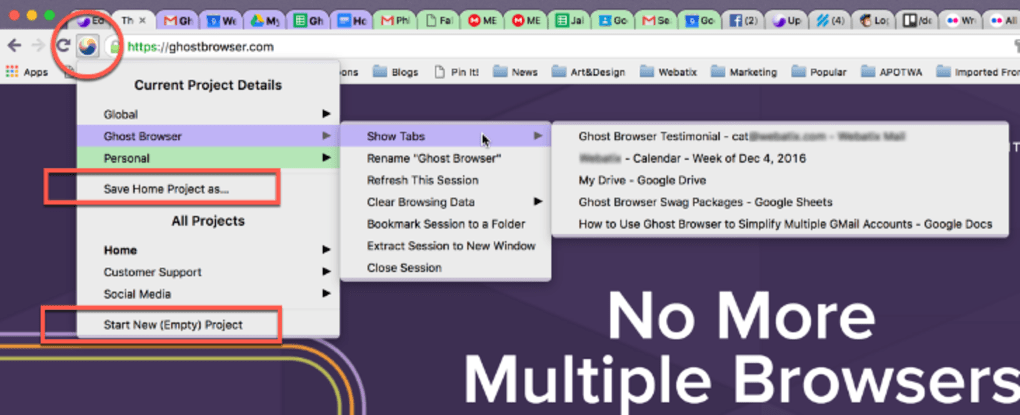
Ghost Browser transcends mere multitasking; it provides a holistic approach to enhancing work life. It’s not just about handling multiple tabs; it’s about the thoughtful design that allows users to manage their tasks efficiently and intuitively. By creating a system of organized tasks, it helps reduce the mental clutter that often accompanies complex workflows, thereby lessening work-related stress. The time saved by not constantly searching for specific tabs or windows significantly contributes to improved productivity. The intuitive interface reduces the learning curve, ensuring that users can harness the full potential of the browser quickly and effectively.
The features offered by Ghost Browser are designed to streamline the entire process of online task management. The combination of workspace organization, multi-account login capabilities, and the thoughtful integration of features like bookmarks and download management establishes Ghost Browser as a powerful all-in-one solution for professionals who require a high degree of organization and efficiency in their daily work. It eliminates the need to switch between different applications or browser windows, centralizing everything within a single, user-friendly interface.
A Detailed Look at the Pros and Cons
Pros:
- Color-coded tabs: Instantly identify tabs sharing the same cookies, preventing confusion when managing numerous accounts.
- Significant productivity boost: Streamlined workflows and efficient multitasking lead to remarkable time savings.
- Isolated cookies per tab: Enhanced security by preventing accidental cross-account activity.
- Dedicated workspace tab: Provides a centralized hub for organizing tasks and accessing important browsing information.
- Intuitive Interface: The user-friendly layout makes it simple to navigate and manage multiple tabs and accounts.
Cons:
- Not for casual browser users: The advanced features and organization might be overwhelming for users who prefer a simpler browsing experience.
- Steeper learning curve: While intuitive, some time may be needed to fully grasp the power and utility of all its features.
Alternative Browsers and the Ghost Browser Niche
While numerous browsers exist, Ghost Browser occupies a unique niche. Many browsers focus on privacy or speed, but Ghost Browser prioritizes efficient multitasking and organized workflow management. This specialization makes it a powerful tool for specific users while potentially leaving casual users less impressed. Alternatives like Epic Privacy Browser focus primarily on privacy, while others like Polarity Browser offer a different approach to browsing altogether. However, none of these alternatives offer the precise combination of features found in Ghost Browser, particularly the integrated workspace and sophisticated multi-account management capabilities. Choosing between these alternatives depends largely on individual needs and priorities. If you prioritize managing multiple accounts and keeping your online activities well organized, Ghost Browser stands out as a strong contender.
Conclusion: A Powerful Tool for the Organized Multitasker
Ghost Browser is a compelling option for professionals and anyone who consistently manages multiple online accounts and tasks. Its innovative features, especially the workspace tab and cookie isolation technology, create a significant advantage in productivity and efficiency. While it might not be ideal for casual users who prefer a simpler browsing experience, its powerful capabilities are undoubtedly attractive to those who require a highly organized and streamlined approach to online work. Its unique focus on multitasking and organization sets it apart from the vast array of available browsers, solidifying its position as a valuable tool for a specific, yet significant, segment of internet users. The minor learning curve is easily overcome by the substantial gains in productivity and organization it offers. For the right user, Ghost Browser is more than just a browser – it’s a powerful ally in conquering the daily challenges of a complex digital landscape.
File Information
- License: “Free”
- Latest update: “June 25, 2025”
- Platform: “Windows”
- OS: “Windows 8.1”
- Language: “English”
- Downloads: “16.6K”
- Size: “112.78 MB”


