
GIF Resizer Pro is a powerful and user-friendly application designed to simplify the process of resizing GIF images, both static and animated, without compromising visual quality. Whether you’re a seasoned graphic designer or a novice user, this software offers a straightforward solution for optimizing GIF files for various online and offline applications. Its intuitive interface and robust features make it a valuable tool for anyone working with GIF images.
Streamlined GIF Resizing for Optimized Online Sharing
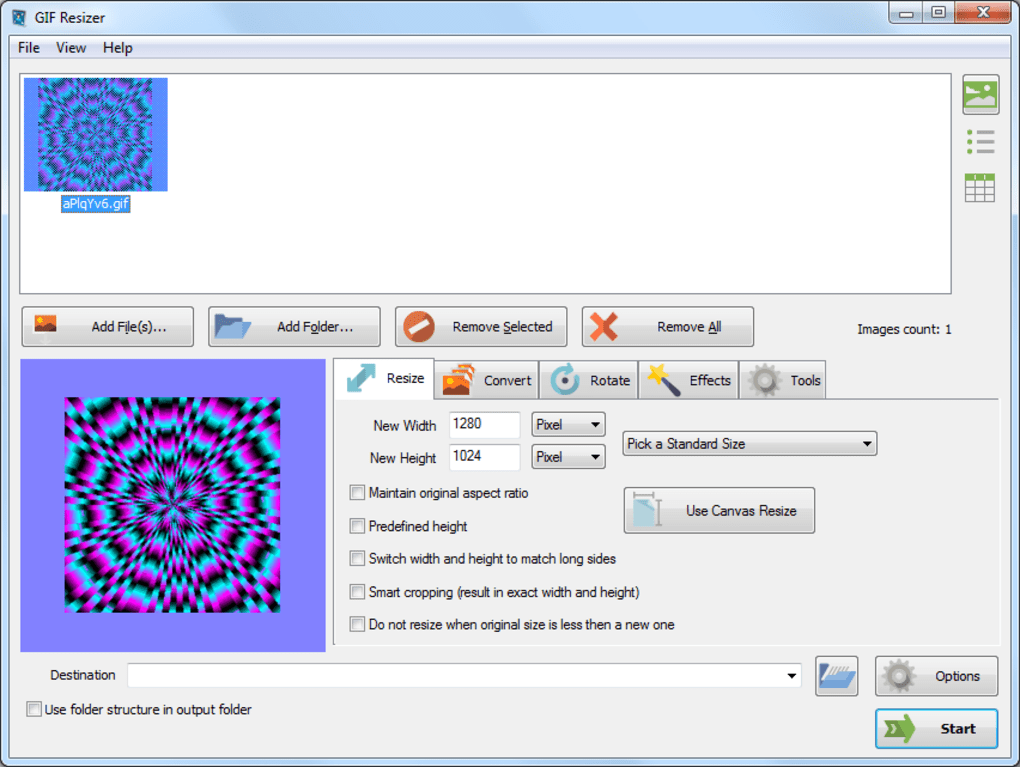
The primary function of GIF Resizer Pro is, as its name suggests, resizing GIF images. This seemingly simple task becomes significantly more complex when dealing with the nuances of GIF compression and the need to maintain image clarity. GIF Resizer Pro tackles this complexity head-on, providing a seamless experience for both single-file and batch processing. This feature is crucial for users needing to quickly adjust the dimensions of multiple GIF files, a common scenario when preparing images for web use. The program allows precise control over resizing, enabling users to adjust both width and height proportionally or independently, offering flexibility to suit specific requirements.
The software’s algorithms are designed to preserve the original quality of the GIF image, even during resizing. While GIF files are already known for their compact size, the resizing process can sometimes lead to a loss of detail or visual artifacts. GIF Resizer Pro employs advanced image rendering techniques to minimize these issues, ensuring that resized images retain their sharpness and clarity. This is particularly important for images containing fine details, gradients, or intricate patterns, which can easily become distorted during resizing with less sophisticated software.
The ability to handle both static and animated GIFs distinguishes GIF Resizer Pro. Animated GIFs, with their multiple frames, require a more sophisticated approach to resizing than static images. GIF Resizer Pro addresses this by processing each frame individually, ensuring that the animation remains smooth and visually consistent after resizing. This ensures that the resized animated GIF retains its intended visual impact, a critical consideration for engaging online content.
Versatile Export Options for Enhanced Compatibility
Beyond resizing, GIF Resizer Pro offers the ability to export resized GIFs in various image formats. This added functionality greatly enhances the compatibility of the images with different applications and platforms. For instance, users might choose to export a resized GIF as a PNG or JPEG, depending on the specific requirements of the target application or website. This flexibility ensures that the resized images can be seamlessly integrated into a wide range of projects without any compatibility issues. This is a significant advantage, as different programs and platforms might have different levels of support for the GIF format, or might require specific image formats for optimal display.
User-Friendly Interface for Effortless Operation
One of the key strengths of GIF Resizer Pro is its intuitive and user-friendly interface. The software is designed to be easily accessible to users of all technical skill levels, from novice users to experienced designers. The program’s straightforward layout and simple controls eliminate the steep learning curve often associated with professional-grade image editing software. Users can quickly navigate the program’s functions and execute resizing operations without needing extensive training or a deep understanding of image editing concepts. This accessibility is a significant advantage, particularly for users who may not have the time or inclination to learn complex image editing software.
The clean and uncluttered interface prevents users from becoming overwhelmed by unnecessary features. It prioritizes ease of use and efficiency, allowing users to focus on the task at hand without getting bogged down in complex menus or settings. This focus on simplicity makes GIF Resizer Pro an ideal tool for quick and efficient image resizing tasks, without sacrificing the quality of the output. The streamlined design streamlines the workflow and allows for rapid processing of multiple files.
Beyond the Basics: Advanced Features and Capabilities
While simplicity is a core feature of GIF Resizer Pro, it also offers several advanced features for more experienced users. These advanced capabilities further enhance the software’s versatility and adaptability. For example, users can fine-tune the resizing process with advanced options, allowing for precise control over aspects such as aspect ratio, interpolation methods, and compression levels. These advanced options provide users with greater control over the final output, allowing them to achieve optimal results for their specific needs.
The batch processing capabilities allow for high efficiency when dealing with large numbers of GIF images. This feature significantly reduces the time and effort required for resizing numerous files, making it particularly useful for users working with large image collections. The ability to automate the resizing process frees up valuable time that can be dedicated to other aspects of the workflow. The software’s advanced options also include the ability to handle various GIF variations, including those with transparency and intricate animations. This ensures consistent results across different types of GIF files.
Furthermore, GIF Resizer Pro incorporates robust error handling and recovery mechanisms to ensure data integrity and prevent data loss. This is especially crucial when working with multiple files or large file sizes. The software safeguards against unforeseen issues and provides users with reliable performance, even in demanding situations. The inclusion of these features reinforces the program’s reliability and ensures consistent, predictable outcomes for users.
Comparing GIF Resizer Pro with Alternatives
While several other GIF resizing tools are available, GIF Resizer Pro distinguishes itself through its combination of ease of use, powerful features, and unwavering focus on maintaining image quality. Many alternative programs might offer similar basic resizing functionalities, but they may lack the advanced features and intuitive design that make GIF Resizer Pro stand out. Some competitors may offer more complex, feature-rich interfaces that can be overwhelming for less experienced users, while others might compromise on image quality in the pursuit of speed or smaller file sizes.
GIF Resizer Pro strikes a perfect balance between simplicity and functionality, providing a powerful yet user-friendly tool that caters to users of all skill levels. Its robust algorithms preserve the integrity of GIF images during resizing, avoiding the common pitfalls of lossy compression and visual artifacts. This dedication to image quality sets it apart from many alternative solutions. The inclusion of batch processing and versatile export options further enhances its efficiency and adaptability.
In conclusion, GIF Resizer Pro offers a comprehensive and efficient solution for resizing GIF images, catering to both novice and experienced users. Its user-friendly interface, powerful features, and dedication to maintaining image quality make it a highly valuable tool for anyone working with GIF images. Whether you need to quickly resize a single GIF or process a large batch of images, GIF Resizer Pro provides a robust and reliable solution for optimizing your GIF files for any purpose.
File Information
- License: “Trial version”
- Latest update: “July 11, 2023”
- Platform: “Windows”
- OS: “Windows 10”
- Language: “English”
- Downloads: “5.7K”
- Size: “22.23 MB”


