
GimPhoto Portable is a free, portable image editor designed as a user-friendly alternative to Photoshop. While not a direct replacement for Photoshop’s full feature set, it offers a compelling suite of tools and a significantly improved user experience compared to its inspiration, GIMP (GNU Image Manipulation Program). This portable version allows users to carry the application on a USB drive, making it accessible from any Windows computer.
GimPhoto’s Strengths: Bridging the Gap Between GIMP and Photoshop
GimPhoto’s development stems from addressing common criticisms of GIMP, specifically its often-confusing interface and sometimes cumbersome menu navigation. GimPhoto directly tackles these issues by incorporating many of GIMP’s powerful features while streamlining the user interface for a more intuitive workflow. This makes it significantly easier to learn and use, especially for those familiar with Photoshop’s layout and conventions.
One of GimPhoto’s key advantages is its inclusion of 20 GIMP plugins by default. This immediately expands its functionality, bringing it closer to Photoshop’s capabilities than a standard GIMP installation. These plugins provide access to a range of advanced features and tools, enhancing the overall editing experience and significantly reducing the need for additional plugin installations. The inclusion of these plugins is a substantial time-saver and contributes to GimPhoto’s overall ease of use.
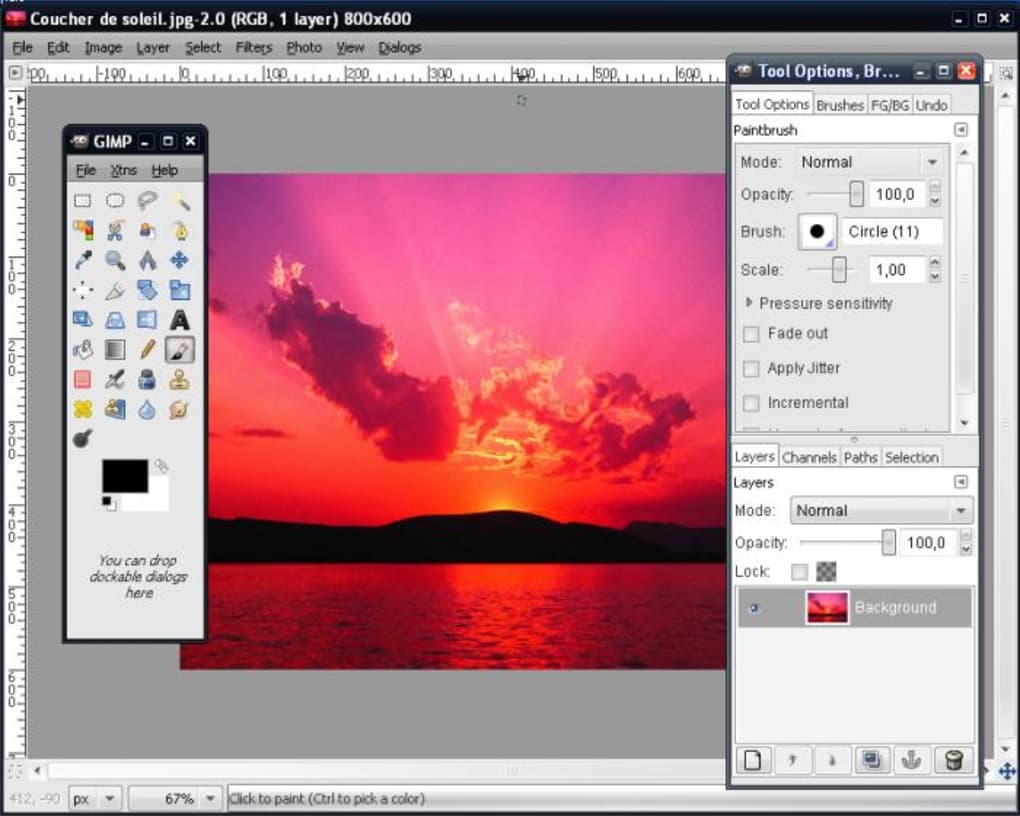
Beyond the plugin integration, GimPhoto boasts several other features that contribute to its user-friendly nature:
-
Improved Interface: The interface is designed with clarity in mind. Menus are organized logically, and labels are straightforward, minimizing the learning curve often associated with complex image editing software. This makes the software accessible to a wider range of users, including those new to image editing or those who found GIMP’s interface challenging.
-
Batch Processing: This feature allows users to apply the same edits to multiple images simultaneously, saving considerable time and effort when working with large numbers of photos or images requiring consistent adjustments. This is a particularly useful feature for professional photographers, graphic designers, or anyone regularly handling large image sets.
-
Online Backups: GimPhoto offers the ability to back up your work online, providing an extra layer of security and preventing data loss. This is a crucial feature for anyone who values the security of their work, and it provides peace of mind knowing that their projects are safely stored.
-
Custom Brushes: Users can create and customize their brushes, allowing for greater control and creativity in their artwork. This allows for a more personalized workflow and enables users to fine-tune the editing process to their specific needs and artistic styles.
-
Advanced Editing Options: Despite its user-friendly design, GimPhoto doesn’t compromise on functionality. It includes a comprehensive set of advanced editing tools, comparable to those found in many professional-grade image editors, including layer management, masking, selections, and color correction tools. This means users have access to the power and flexibility needed for intricate image manipulation.
-
Extensive Help Documentation: Recognizing the complexity of image editing, GimPhoto provides comprehensive documentation and tutorials to guide users through its features. This is a critical element for users who are new to the software or are looking to explore its more advanced functionalities. The documentation acts as an invaluable resource and facilitates a smoother learning experience.
GimPhoto’s Limitations: Where it Falls Short of Photoshop
While GimPhoto excels in its user-friendly approach and powerful feature set, it’s important to acknowledge its limitations compared to the industry-standard Photoshop:
- Complexity Relative to Photoshop: While GimPhoto significantly improves upon GIMP’s interface, it still retains some complexity inherent in powerful image editing software. For users accustomed to the highly streamlined workflows of some other editors, GimPhoto might still feel somewhat overwhelming. However, this is largely mitigated by the clear organization of menus and tools.
-
Lack of Advanced Features: Compared to Photoshop, GimPhoto lacks certain advanced features crucial for professional-level work. While it encompasses a broad range of tools, it might not include every specialized tool or feature found within Photoshop’s extensive arsenal. This is a reasonable trade-off given GimPhoto’s status as free, open-source software.
-
Performance: For very large images or complex projects involving numerous layers and effects, GimPhoto’s performance might not match that of Photoshop, particularly on less powerful hardware. This performance difference becomes increasingly noticeable with intensive operations, though it remains generally acceptable for most typical usage scenarios.
GimPhoto’s Target Audience: Ideal Users and Use Cases
GimPhoto is ideally suited for several user profiles:
-
Users frustrated with GIMP’s interface: Those who found GIMP too complex or confusing will appreciate GimPhoto’s streamlined approach while retaining much of GIMP’s power. The improved user experience and readily accessible features make it a compelling alternative for those seeking a smoother workflow.
-
Casual image editors: For individuals who need a powerful but easy-to-use image editor for casual tasks such as photo retouching, resizing, and basic manipulations, GimPhoto provides a solid balance of functionality and simplicity. Its intuitive interface makes it an approachable option for less experienced users.
-
Users seeking a portable solution: The portable nature of GimPhoto is particularly beneficial for those who need access to image editing capabilities on multiple computers without the need for installation. This is ideal for individuals who frequently work on different machines or prefer to keep their editing tools readily available on a USB drive.
-
Students and educators: GimPhoto’s free availability makes it a valuable resource for students and educators seeking an accessible and powerful image editing tool without the cost constraints associated with commercial software. Its user-friendly design also aids in the learning process and supports educational projects effectively.
-
Individuals on a budget: GimPhoto provides a cost-effective alternative to expensive commercial image editors. Its free availability makes it an attractive option for users who do not want to invest in paid software but require significant editing capabilities.
GimPhoto Portable: A Valuable Addition to Your Software Arsenal
GimPhoto Portable presents a compelling alternative to both GIMP and, to a lesser extent, Photoshop. Its focus on user-friendliness, combined with a robust set of features and the portability benefit, makes it a valuable addition to the software arsenal of both casual users and those seeking a more approachable alternative to the complexity of GIMP. While it may not match Photoshop’s comprehensive feature set, it provides a powerful and accessible image editing experience for a broad range of needs and user skill levels. Its free and portable nature makes it a highly convenient and cost-effective solution for many image editing tasks.
File Information
- License: “Free”
- Version: “1.4.3”
- Latest update: “November 18, 2010”
- Platform: “Windows”
- OS: “Windows 8”
- Language: “English”
- Downloads: “3.8K”
- Size: “20.03 MB”


