
Glass2k is a free personalization utility designed to add transparency to windows on older versions of the Windows operating system. Developed by Chimes Software Ltd., this lightweight program allows users to customize the transparency levels of individual windows and even the taskbar, offering a unique visual experience. While primarily geared towards older Windows editions like Windows 2000 and XP, its simplicity and functionality have garnered some attention. However, its limitations and compatibility issues with modern Windows versions should be considered before installation.
Functionality and User Experience
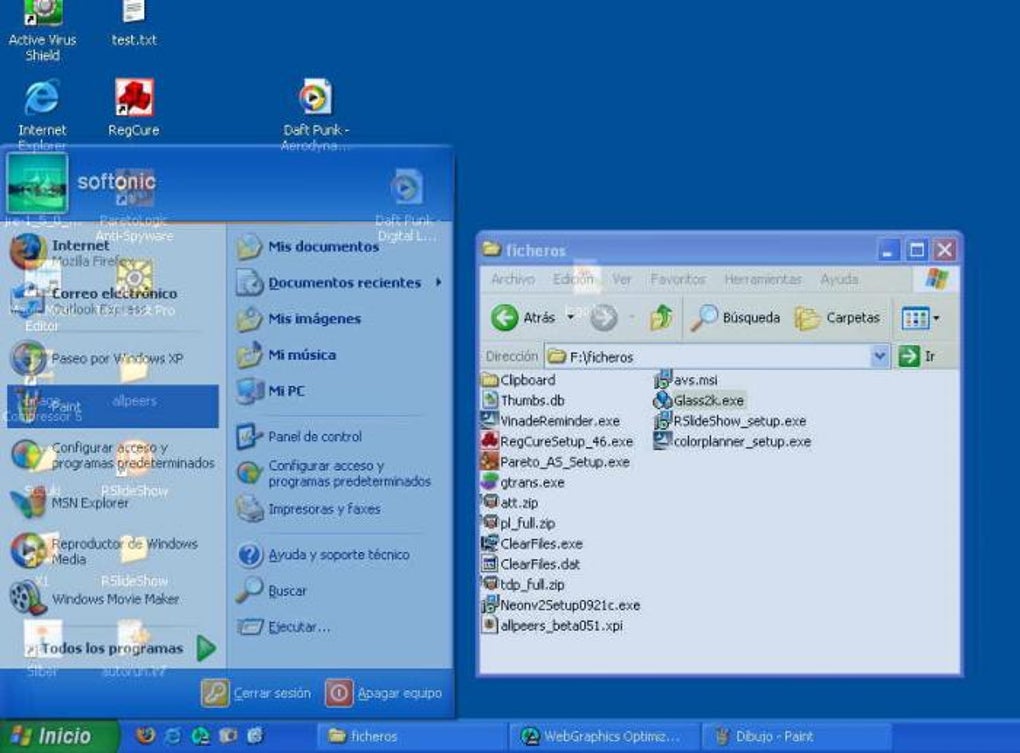
Glass2k operates unobtrusively, residing in the system tray after installation. Its primary function is to adjust the transparency of individual application windows. This is achieved through a right-click context menu which appears when you right-click on any window. The menu provides a selection of preset transparency levels, ranging from “Least transparency” to “Maximum transparency,” along with a “No transparency/Solid” option for reverting to the default. Alternatively, users can employ hotkey combinations for quick adjustments, adding a layer of efficiency to the process.
The program uses a percentage-based system to define transparency, with lower percentages indicating greater transparency. A setting of 10% renders a window highly transparent, while 90% offers minimal transparency. For taskbar transparency, Glass2k suggests a range of 80% to 90% for optimal visual results. This flexibility allows users to tailor the transparency levels to their preferences and the specific application in use. For instance, a user might prefer higher transparency for less critical applications while maintaining a more solid appearance for crucial windows.
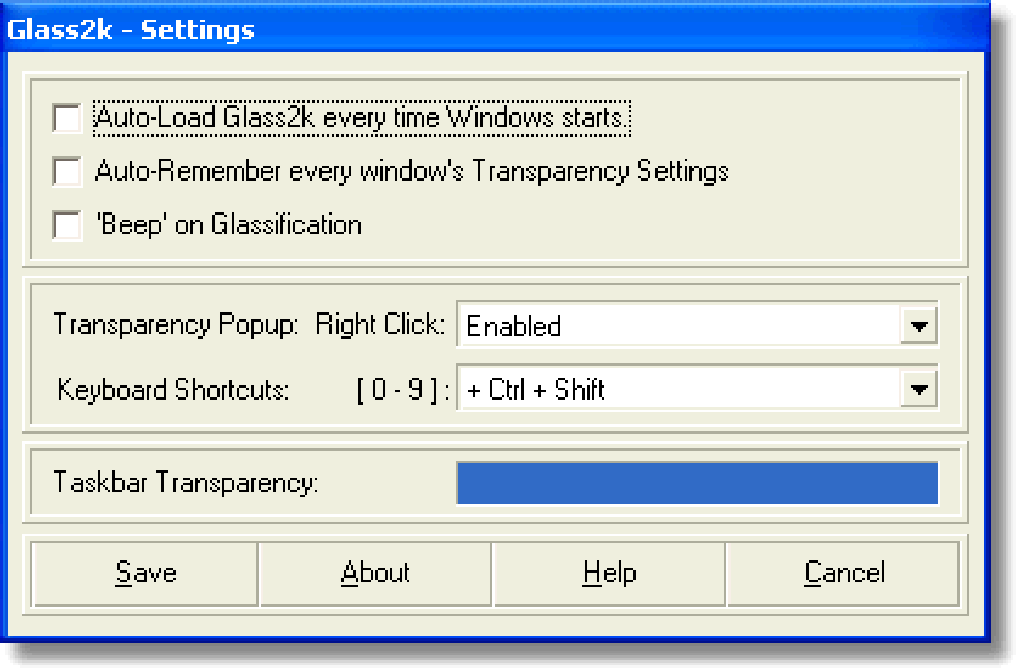
Beyond window transparency, Glass2k extends its functionality to the Windows taskbar. This allows users to apply a degree of transparency to the taskbar, creating a more cohesive and visually appealing desktop experience. This feature, while not as crucial as the individual window transparency, adds a nice touch of consistency to the overall aesthetic.
Configuration and Customization Options
Glass2k’s settings are straightforward and accessible. Beyond the basic transparency adjustment, users can configure several options to personalize their experience. One such option is the ability to set Glass2k to automatically launch upon system startup. This eliminates the need to manually start the program each time the computer is turned on, ensuring consistent transparency throughout the session.
Another configurable feature is the “Beep” sound option. When enabled, this setting provides an audible cue whenever a window’s transparency is altered. This provides helpful feedback, especially during extensive adjustments or when multiple windows are being managed simultaneously. The “On-Top” feature allows users to designate a specific window to always remain in front of all other windows, regardless of their transparency setting. This ensures that a crucial application remains visible, even when other windows are open and partially transparent.
Advantages and Disadvantages of Glass2k
Glass2k offers several advantages, primarily its simplicity and effectiveness in achieving window transparency on supported systems. Its lightweight nature ensures minimal impact on system resources, making it suitable for even older machines with limited processing power. The ability to remember transparency settings for individual windows is a significant benefit, preventing the need for repeated customization each time applications are launched. Moreover, the inclusion of hotkey support adds a significant layer of convenience, streamlining the transparency adjustment process.
However, Glass2k also presents certain drawbacks. The most prominent limitation is its compatibility. The program is primarily designed for older versions of Windows (Windows 2000/XP), meaning users with modern operating systems like Windows 7, 8, 10, or 11 might experience compatibility issues or find better alternatives. This significantly restricts its potential audience. Furthermore, the fact that Glass2k is still in beta suggests the possibility of unresolved bugs or instability. Although the program is generally described as stable, the inherent risks associated with beta software should be considered.
Alternatives to Glass2k
Given its limitations, several alternative applications offer similar functionality with enhanced compatibility and features. These alternatives often provide a broader range of customization options, improved stability, and better support for modern Windows versions. Some examples of such alternatives include:
- Vitrite: This alternative offers similar transparency capabilities and is compatible with a wider range of Windows versions.
- TrueTransparency: This utility provides a solution for achieving Vista-style transparency on older XP systems, offering a similar aesthetic goal to Glass2k.
- Actual Transparent Window: This application provides a more advanced level of control over window transparency, allowing for highly granular adjustments.
- Taskbar Transizer: Focusing specifically on taskbar transparency, this application provides a more focused solution if taskbar transparency is the primary goal.
- TranslucentTB: A popular alternative, focusing on making the taskbar translucent, providing a refined level of control over the taskbar’s appearance.
These applications often present more robust features and improved user interfaces, making them potentially more appealing to users seeking similar functionality.
User Reviews and Feedback
User feedback on Glass2k is mixed. Some users report positive experiences, highlighting its simplicity and effective window transparency. Others have expressed frustration with compatibility issues, glitches, or conflicts with other applications. Some common complaints include the program failing to appear in the installed programs list, overriding right-click functionality, and unexpectedly crashing or not appearing in the Task Manager. These issues highlight the potential risks associated with using beta software. The lack of extensive user reviews and active development also suggests limited community support.
Therefore, potential users should carefully weigh the advantages and disadvantages before installing Glass2k, considering its compatibility limitations and the availability of potentially more stable and feature-rich alternatives.
Conclusion
Glass2k offers a unique and simple way to add transparency to Windows windows, particularly on older systems. Its ease of use and lightweight design are attractive features for users seeking this level of customization. However, its limited compatibility with modern Windows versions and its beta status are significant drawbacks. Users considering Glass2k should carefully assess their needs and system specifications, exploring the available alternatives before making a decision. The mixed user reviews further emphasize the need for cautious consideration, suggesting that for many users, a more modern and well-supported alternative might prove a more reliable and satisfying choice. The potential for conflict with other system processes, as evidenced by user reports, should also be a factor in choosing this utility. Therefore, while Glass2k might provide a unique experience for those who meet its specific compatibility requirements and are willing to accept the limitations of beta software, other options likely offer a more robust and reliable solution for most users.
File Information
- License: “Free”
- Version: “0.9.2”
- Latest update: “June 27, 2025”
- Platform: “Windows”
- OS: “Windows XP”
- Language: “English”
- Downloads: “47K”


