
Glogg is an open-source, cross-platform log file viewer designed for ease of use and efficiency. While compact in size, it boasts a robust feature set making it a valuable tool for programmers, system administrators, and anyone needing to analyze large log files. Its ability to quickly navigate and search through complex log data, even those residing directly on disk without loading them into memory, sets it apart from other log viewers. This review will delve into its capabilities, highlighting its strengths and weaknesses.
Navigating the Labyrinth of Log Files
Log files are essential for tracking system activity and debugging errors. They record every action and command, providing a comprehensive history of a system’s operation. However, these files can quickly become massive and incredibly complex, making it difficult to pinpoint specific information. This is where a dedicated log viewer like Glogg becomes indispensable. Its design prioritizes intuitive navigation, eliminating the need for lengthy tutorials or complex manuals. While lacking explicit instructions within the application itself, its user-friendly interface makes it accessible even to users with minimal experience. The simplicity allows users to focus on the task at hand: analyzing the log data. This straightforward approach makes Glogg a practical solution for users across various technical skill levels, from novices to seasoned professionals.
Key Features and Functionality
Glogg’s core functionality centers around providing a graphical and interactive interface for browsing and searching through log files. Its strength lies in its ability to handle large files effectively, a capability that stems from its design philosophy of directly reading from disk rather than loading the entire file into memory. This design choice significantly boosts performance, particularly when dealing with exceptionally large log files that might overwhelm less efficient log viewers. The application’s speed is noteworthy; even substantial files are processed swiftly, and searching remains highly responsive. The real-time log following feature adds further value, allowing users to monitor ongoing system activity and identify issues as they arise.
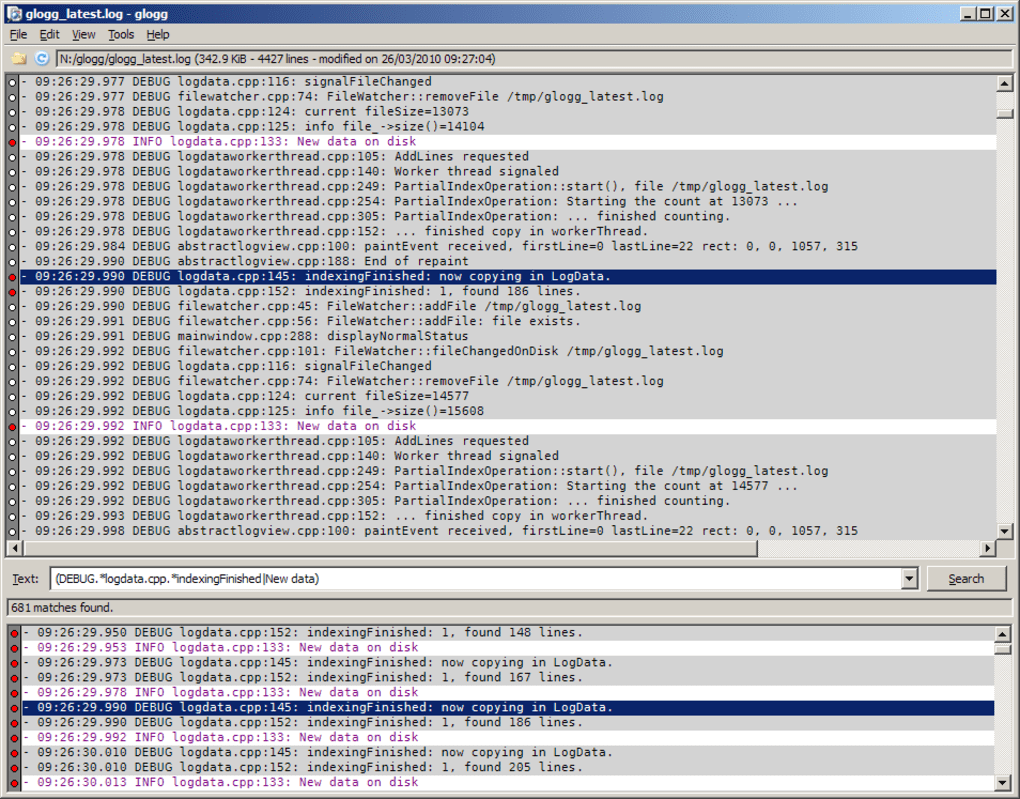
One of Glogg’s standout features is its colored text output. This colorization greatly enhances readability, making it easier to identify key information such as error messages, warnings, or specific events within the log. This visual cue significantly speeds up the process of locating critical details in the often dense and cluttered lines of text found in log files. The color-coding system is not just a visual enhancement; it’s a pragmatic design choice that streamlines analysis. The intuitive color-coding scheme instantly clarifies crucial data points, enabling rapid identification of critical information within the log file.
Beyond simple browsing, Glogg supports powerful search functionality using regular expressions. This allows users to perform complex searches targeting specific patterns or keywords within the log data. The results are displayed in a dedicated window, providing a focused view of the relevant information. This feature is essential for efficiently identifying specific events or errors within a large log file, allowing the user to isolate and analyze the pertinent data rather than sift through irrelevant entries. The results window isolates the specific lines matching the search criteria, ensuring the user’s time is spent on analysis and not manual filtering.
Cross-Platform Compatibility and Performance
Glogg’s cross-platform compatibility extends its reach to users across various operating systems, including Windows, macOS, and Linux. This broad compatibility ensures accessibility regardless of the user’s operating system preference. This feature is particularly advantageous for system administrators managing servers and workstations running diverse operating systems, allowing consistent log analysis across the entire infrastructure. The consistent interface across different operating systems simplifies the workflow for those managing systems running a mix of these platforms.
The application’s speed and responsiveness are remarkable, even with enormous log files. This performance is a direct result of its efficient design that avoids loading the entire log into system memory. Instead, it reads from disk on demand, ensuring that system resources remain available for other tasks while maintaining a snappy user experience. This efficiency is vital for managing large log files, enabling swift navigation and analysis even when dealing with particularly large log files that might otherwise lead to slowdowns or crashes in less efficient viewers. This aspect distinguishes Glogg as a highly reliable solution for managing and analyzing log data, even for users with limited system resources.
Strengths and Weaknesses
Glogg offers several compelling advantages:
- Speed and Efficiency: Its direct-from-disk reading mechanism ensures fast loading and searching, even with extremely large log files.
- Cross-Platform Compatibility: Works seamlessly on Windows, macOS, and Linux, providing a consistent experience across different operating systems.
- Color-Coded Output: Improves readability and allows for easier identification of important information within the log files.
- Regular Expression Search: Facilitates powerful and precise searches for specific patterns and keywords.
- Real-Time Log Following: Enables monitoring of live system activity.
- Open-Source: Allows for community contributions and ensures transparency.
However, Glogg also has some limitations:
- Simplicity: While its simplicity is a strength for many users, some experienced users might find the feature set too basic for their needs. Advanced features such as filtering, data aggregation, or custom scripting may be absent.
- Lack of Documentation: The absence of in-app tutorials or a comprehensive manual can present a minor hurdle for new users. While the intuitive design mitigates this issue, comprehensive documentation would enhance the onboarding experience.
Conclusion
Glogg is a highly effective log file viewer ideal for users needing a fast, efficient, and cross-platform solution. Its strengths lie in its speed, simplicity, and color-coded interface, making it an excellent choice for programmers, system administrators, and anyone frequently working with log files. While lacking some advanced features found in more complex log analysis tools, its ease of use and efficiency make it a valuable tool for a broad range of users. The lack of in-app documentation could be improved, but the intuitive interface largely compensates for this. Overall, Glogg provides a reliable and user-friendly experience for managing and analyzing log data, fulfilling its primary function effectively and efficiently. Its simplicity is a significant advantage for many, and its efficiency in handling large log files makes it a truly powerful tool for log analysis.
File Information
- License: “Free”
- Latest update: “December 12, 2023”
- Platform: “Windows”
- OS: “Windows 8.1”
- Language: “English”
- Downloads: “33.1K”
- Size: “6.78 MB”


