
GMX Mail, developed by 1&1 Mail & Media GmbH, was a desktop email client designed to provide users with a streamlined and secure email experience. While the download is no longer available through official channels, its features and capabilities warrant a retrospective review. This article explores the functionalities, strengths, and weaknesses of GMX Mail to understand its place within the landscape of email clients.
GMX Mail: Features and Functionality
GMX Mail aimed to distinguish itself from other email clients by combining a user-friendly interface with advanced features typically found in more complex solutions. Its core functionality revolved around accessing and managing GMX email accounts, but it extended its capabilities through integration with other services and tools.
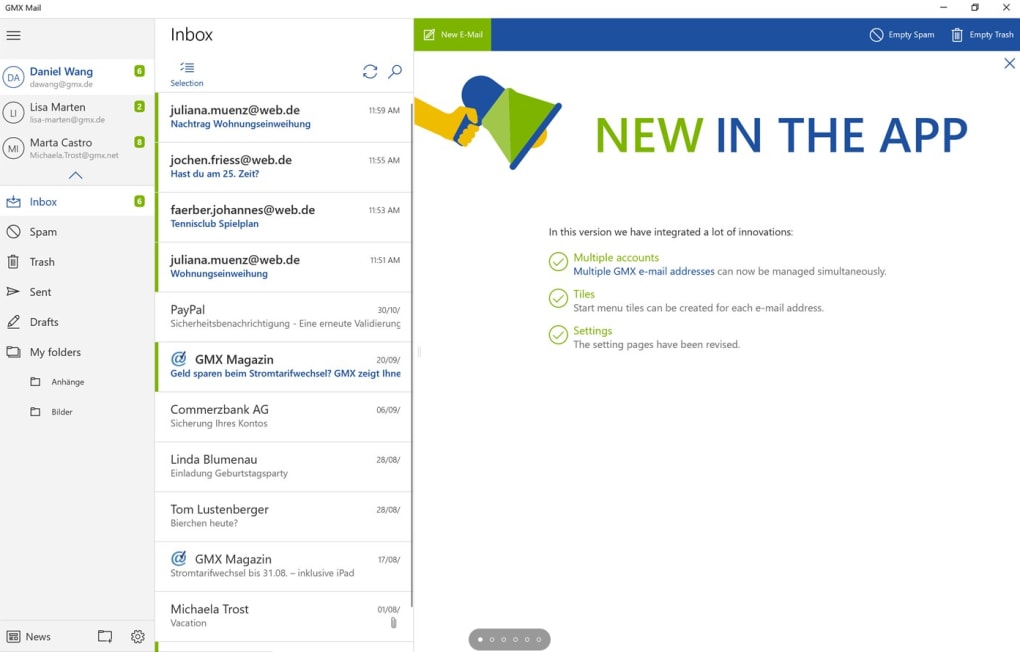
The software boasted a clean and intuitive design, prioritizing ease of use. It eliminated intrusive advertisements, ensuring a distraction-free email experience. Beyond the basic functions of sending, receiving, and organizing emails, GMX Mail incorporated several key features to enhance productivity and security.
GMX Mail Collector: This function allowed users to consolidate emails from multiple third-party inboxes into a single interface, simplifying email management for users with accounts across different providers. This centralized management eliminated the need to switch between various email platforms.
Integration with GMX Organizer and Address Book: Seamless integration with the GMX Organizer and Address Book facilitated scheduling and contact management. Users could schedule appointments, set reminders, and easily access contact information, streamlining workflow and enhancing communication. The auto-suggest feature further streamlined contact management by enabling the effortless export of contacts to other platforms, promoting efficient communication and collaboration.
GMX Online Office Suite Integration: A significant advantage of GMX Mail was its integration with the GMX Online Office suite. Users could create and edit documents, spreadsheets, and presentations directly within the client, eliminating the need to switch to separate applications. This integration enhanced productivity by consolidating essential office tasks within a single platform.
GMX Cloud Storage: Files created or received via email could be easily stored and accessed through the integrated GMX Cloud storage service. This streamlined file management and accessibility, ensuring seamless collaboration and data management. This feature facilitated effortless file sharing and access across different devices.
GMX Search: Efficiently locating specific emails or files within a large inbox could be achieved using the built-in GMX Search function. The intuitive search function facilitated quick retrieval of information, minimizing time spent searching through numerous emails and files.
Enhanced Security Measures in GMX Mail
Security was a focal point in GMX Mail’s design. The client incorporated multiple layers of protection to safeguard user data and prevent malware intrusion.
Virus Protection and Threat Detection: A comprehensive virus protection system was integrated to scan incoming and outgoing emails and attachments for viruses, malware, worms, and Trojans. This proactive approach helped prevent malicious software from infiltrating the user’s system.
Email Filtering and Anti-Spam Modules: Seven anti-spam modules were incorporated into the GMX Mail system. These modules filtered out unwanted spam, reducing the clutter in users’ inboxes and minimizing the risk of encountering malicious content. This enhanced security feature significantly reduced the volume of unsolicited emails, enhancing user experience and reducing the chance of exposure to phishing scams or malware.
Ad-Free Interface: The absence of advertisements within the email client contributed to an enhanced security posture. Advertisements often serve as vectors for malware and phishing attempts. By eliminating ads, GMX Mail reduced the potential for security breaches and enhanced user protection.
Strengths and Weaknesses of GMX Mail
While GMX Mail offered several compelling features, it also had some limitations.
Strengths:
- Ad-free experience: The absence of ads provided a clean and efficient interface, enhancing user experience and security.
- Robust security features: The comprehensive virus protection and anti-spam filters provided substantial protection against malware and unwanted emails.
- Integrated online office suite: The integration with the GMX Online Office suite boosted productivity by consolidating document creation and editing within the email client.
- Unlimited inbox storage: Users benefited from ample storage space, eliminating concerns about inbox capacity limitations. (This claim, while made in the original text, should be verified with official sources as storage is often subject to terms and conditions.)
Weaknesses:
- Cluttered interface (potential): While the interface was described as simplified, the integration of numerous features could potentially lead to a cluttered feel for some users, depending on their preferences and familiarity with the software.
- Unconventional email features: Certain features might have been less intuitive or familiar to users accustomed to more standard email clients, requiring a learning curve.
- Ultra-strict security (potential): While enhancing security, the strict security measures could potentially lead to account blocking if users didn’t adhere to the platform’s security protocols precisely. This could create frustration for users if security protocols were perceived as overly stringent or not clearly documented.
Alternatives to GMX Mail
Given that GMX Mail is no longer available, users seeking similar functionality should consider alternative email clients. The original text suggests Skype, 3uTools, and ROBLOX as alternatives. However, it’s important to note that these are not direct replacements for an email client; Skype is primarily a communication app, 3uTools is a data management tool, and ROBLOX is a gaming platform. Suitable alternatives would be established email clients such as:
- Microsoft Outlook: A widely used, feature-rich email client offering extensive capabilities for personal and professional use.
- Mozilla Thunderbird: A free and open-source email client known for its flexibility and customization options.
- eM Client: A powerful and feature-packed email client available for both Windows and macOS.
- Spark: A modern email client with a focus on simplicity and organization.
Choosing an appropriate alternative depends on individual needs and preferences concerning features, interface, and security requirements. Users should thoroughly research and evaluate different clients before settling on a replacement.
Conclusion
GMX Mail, despite its unavailability, represented a notable attempt to combine a streamlined user interface with robust security and advanced features. While its limitations existed, its strengths were significant enough to appeal to users seeking an integrated and secure email experience. The absence of the program highlights the ever-changing nature of software availability. However, by understanding its features and limitations, users can better assess the strengths and weaknesses of alternative email clients that exist in the market today. The features once offered by GMX Mail — such as integrated cloud storage, an online office suite, and robust security measures — are present in varying degrees in many current email clients, demonstrating that the core value proposition remains relevant in modern email management.
File Information
- License: “Free”
- Version: “1.0”
- Latest update: “September 15, 2021”
- Platform: “Windows”
- OS: “Windows 8.1”
- Language: “English”
- Downloads: “5K”


