
In the bustling digital landscape of today, the ability to capture, create, and share visual content is paramount. Whether for professional presentations, educational tutorials, immersive gaming highlights, or personal vlogs, a reliable and versatile video tool is an indispensable asset. Enter GOM Cam, a powerful, yet remarkably lightweight, application designed to streamline your content creation workflow. Developed by GOM Lab, this free-to-use program transcends the simple act of screen capture, offering an all-inclusive suite that allows users to record their screens, operate webcams, and craft original visual narratives without the need to juggle multiple software applications.
GOM Cam distinguishes itself as an intuitive, all-in-one package, offering diverse recording methods coupled with robust video-editing features. It’s an essential utility for anyone looking to document their digital activities or produce compelling video content for various platforms. From its user-friendly interface to its efficient resource consumption, GOM Cam is engineered to empower creators, educators, and gamers alike.
Utilities & Tools: The Core of GOM Cam’s Functionality
The digital toolbox of any modern user is incomplete without a suite of utilities that enhance productivity and streamline daily tasks. In this category, GOM Cam emerges as a standout, providing essential capabilities that extend far beyond basic software functions. As a core utility, its primary strength lies in simplifying complex recording processes, making sophisticated video and image capture accessible to everyone. The ease with which users can initiate recordings, manage files, and even schedule future sessions positions GOM Cam as a cornerstone utility for a vast range of digital activities.
Beyond merely capturing pixels, GOM Cam integrates smart features that cater to nuanced user requirements. Its efficient operation ensures that it consumes minimal system resources, a critical advantage for users running multiple applications or those with less powerful hardware. This focus on performance without compromising on features underscores its value as a premier utility tool in the modern computing environment. For those navigating the complexities of digital content creation, GOM Cam offers a stable and reliable foundation, ensuring that technical hurdles don’t impede creative flow.
Screen Capture: Precision and Versatility
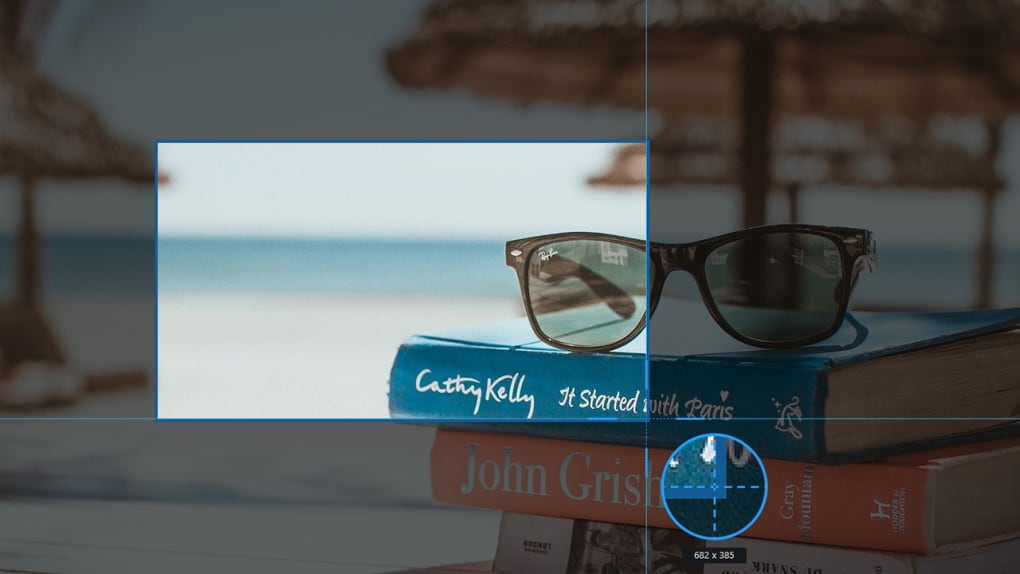
At its heart, GOM Cam is a master of screen capture, offering unparalleled flexibility and precision. This crucial feature is not just about taking static screenshots; it’s about dynamic visual documentation that adapts to your specific needs. When you launch GOM Cam, a helpful tutorial immediately guides you through its major functions, making it easy to get started. The main menu acts as your immediate repository for all recorded materials, whether they are video clips, images, or ongoing editing projects, all easily searchable and filterable with tags and thumbnail views.
For video recording, GOM Cam provides a variety of modes to ensure every scenario is covered. Users can opt for a full-screen recording, manually select a specific area to focus on, or choose from a range of preset resolutions for optimal video output. This flexibility is vital for creating professional tutorials, demonstration videos, or specific content where precise framing is critical.
But GOM Cam’s screen capture capabilities extend beyond video. Its image capture feature is equally robust. Users can perform a single capture of the visible screen, capture all connected displays, or utilize the innovative “Scrolling Capture” for long web pages or documents – a feature that eliminates the need for multiple screenshots and tedious stitching. Furthermore, GOM Cam offers the ability to create GIF animations directly from screen captures, a quick and efficient way to share short visual explanations or reactions without needing to open a separate video editor.
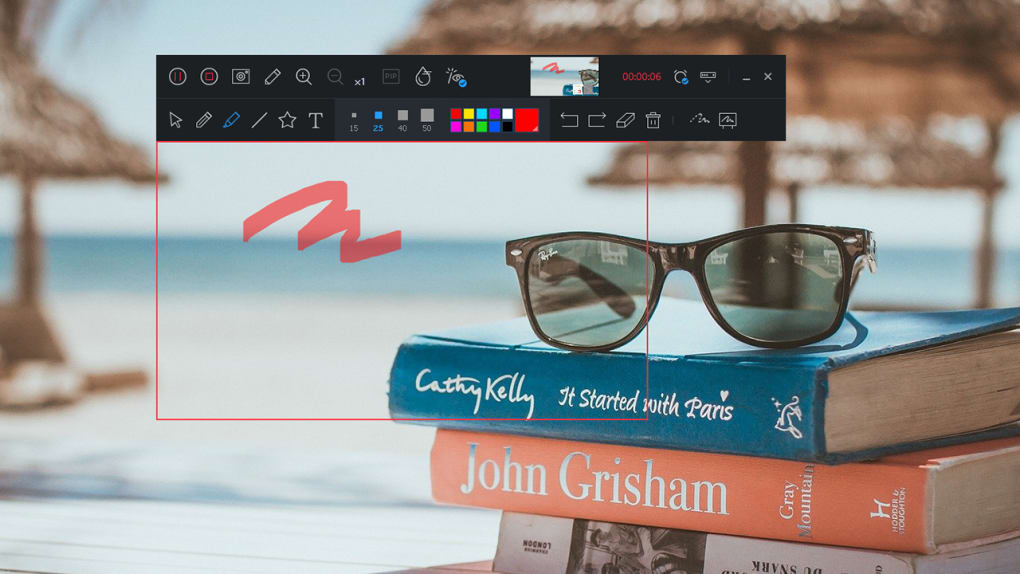
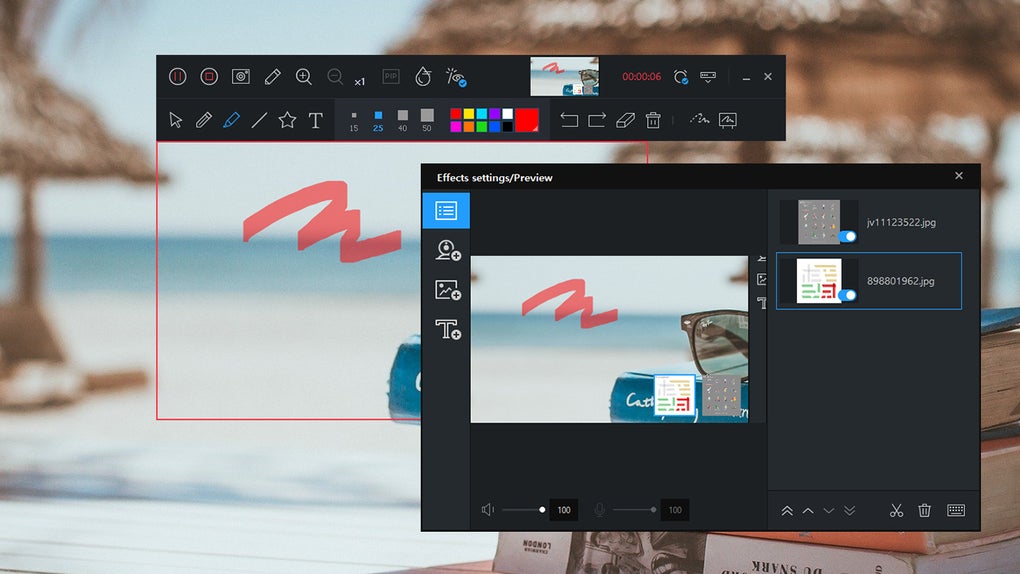
Once a recording action is initiated, GOM Cam transforms your mouse cursor into a magnified crosshair, allowing for precise area selection. Following this, a dedicated recording window appears, equipped with an array of features like “Draw” for live annotations, “Effects” to enhance visual elements, and “PIP (Picture-in-Picture)” to overlay your webcam feed onto the screen recording. These tools are complemented by a small monitoring view and accessible recording controls, ensuring you have full command over your capture session from start to finish. This detailed approach to screen capture makes GOM Cam an indispensable utility for anyone engaged in digital communication or content production.
Multimedia: Unleashing Your Creative Vision
In the realm of multimedia, GOM Cam stands out as a versatile platform that empowers users to create, edit, and share high-quality visual content with remarkable ease. The digital age thrives on rich media, and whether you’re a budding vlogger, a professional presenter, or an avid gamer, the ability to produce compelling video and audio is key. GOM Cam’s comprehensive feature set places it firmly within the core of multimedia creation tools, making it accessible for everyone from beginners to more experienced digital artists. It facilitates not just the capture but also the refinement and dissemination of visual stories, making it an indispensable asset in a world increasingly reliant on visual communication.
The software’s lightweight design means it integrates seamlessly into existing multimedia workflows, offering a smooth experience even when handling demanding tasks. Its focus on providing an all-in-one solution for video creation means users spend less time switching between applications and more time focusing on their creative output. From recording dynamic presentations to capturing the intricate details of a software demonstration, GOM Cam’s multimedia capabilities are expansive and user-centric, truly allowing individuals to unleash their creative vision.
Video: From Recording to Polished Production
GOM Cam is much more than just a recorder; it’s a complete video creation hub. Beyond screen and image capture, it expertly handles webcam and game recordings. The “Webcam” option simply captures your webcam feed, perfect for direct-to-camera messages, quick vlogs, or personal communications. For gamers, the “Game” recording mode is specifically optimized for fast framerate recordings in real-time, ensuring that every epic moment and intricate maneuver is captured with crystal clarity and fluid motion, without significant performance overhead.
A standout feature catering to the demands of modern education and professional development is the “Lecture” mode. This innovative function enables simultaneous capture of both webcam and microphone inputs while allowing you to open and navigate a slide presentation. This makes GOM Cam an ideal tool for creating engaging online lectures, school projects, virtual training modules, or comprehensive online classwork, providing a rich, interactive learning or teaching experience.
Once your recording is complete, GOM Cam doesn’t leave you stranded. The captured files are readily available in the main menu, from where you can initiate the post-production process with ease. Selecting a file reveals seven intuitive functions: “Play” for immediate review, “Edit Name” to organize your content, “Details” for metadata, “Upload” for sharing, “Edit” for refining your video, “Extract Audio” for sound-only projects, and “Delete” for managing storage.
The built-in video editor offers two distinct versions: “Quick” and “Advanced.” The Quick editor provides essential trimming and basic adjustments, perfect for rapid post-production. The Advanced editor elevates your capabilities by allowing the addition of background music, further enhancing the professional quality and emotional depth of your videos. This dual approach ensures that whether you need a fast turnaround or a more polished production, GOM Cam has you covered, simplifying the journey from raw footage to a captivating final product.
Streaming Videos: Sharing Your World
In today’s interconnected world, the ability to easily share video content is as important as creating it. GOM Cam excels in this regard, recognizing the critical role of platforms like YouTube, Google Drive, and Vimeo in global communication and content dissemination. With a single click of the “Upload” function, users can directly share their meticulously crafted videos to these popular platforms, bypassing the need for manual file transfers and re-uploads. This seamless integration with major video-sharing services ensures that your content reaches its intended audience efficiently and effectively.
Furthermore, GOM Cam understands the demands of content creators and professionals who operate on tight schedules. Its built-in scheduling feature for recordings is a testament to this foresight. This allows users to set specific times for recordings to start and stop, automating the capture process for live events, webinars, or long-running tasks. While it requires adherence to the 24-hour time scheme, this feature is invaluable for ensuring no critical moment is missed, freeing users to focus on other tasks while GOM Cam works in the background.
The application also prioritizes user personalization. Within the “Settings,” you can delve into various in-depth configurations. From customizing “Draw” tools and setting “Hotkeys” for efficient workflow to fine-tuning “Tooltips” for a more guided experience, GOM Cam allows you to tailor the software to your exact preferences. This level of customization ensures that the tool adapts to your working style, rather than the other way around.
For those seeking to remove limitations and elevate their creative output further, GOM Cam offers paid versions. These premium options eliminate advertisements, remove watermarks from recorded content, and unlock unlimited recording time—crucial for professional projects or extensive content series. Available in “Basic” and “Pro” tiers, these versions offer varying degrees of expanded functionality, allowing users to choose the package that best fits their needs. Additionally, GOM Lab provides the option to acquire GOM Cam as part of a bundle with other GOM Lab products, offering a more comprehensive software ecosystem. This tiered approach ensures that GOM Cam can grow with your needs, from a free, feature-rich utility to a powerful, unconstrained multimedia production tool, truly facilitating the sharing of your world.
Beyond the Basics: Enhancing Productivity and Digital Experiences
GOM Cam’s utility extends far beyond its core recording capabilities, evolving into a tool that significantly enhances productivity and enriches overall digital experiences. In an era where digital communication, online learning, and remote work are commonplace, having a versatile software solution that can adapt to various demands is invaluable. GOM Cam stands out by seamlessly integrating features that cater to both specific niches, like gaming, and broader applications in education and professional settings. It provides a robust framework for users across different operating systems, although its current primary focus is Windows, ensuring a powerful and optimized experience for PC users. The thoughtfulness in its design allows for an expansion of its usage scenarios, transforming it from a simple utility into an indispensable part of one’s digital toolkit.
The software’s ability to handle diverse recording requirements—from quick screenshots to comprehensive lecture captures—underlines its commitment to being a holistic solution. By providing an efficient way to create and manage digital content, GOM Cam supports a wide array of activities, improving engagement and clarity in every endeavor.
Games: Capturing Every Epic Moment
For the vast and passionate community of gamers, GOM Cam offers a dedicated and optimized solution to immortalize their triumphs, share their strategies, and create captivating game content. The “Game” recording mode is specifically engineered to capture high-fidelity video of gameplay without imposing a significant performance penalty on the system, which is crucial for maintaining smooth framerates during intense gaming sessions. This optimization ensures that every fast-paced action, every strategic move, and every visually stunning moment is recorded with exceptional clarity and fluidity, providing viewers with an immersive experience that mirrors the original gameplay.
Gaming content creation has become a significant digital industry, with platforms like YouTube and Twitch thriving on user-generated gameplay videos, highlights, and live streams. GOM Cam empowers gamers to contribute to this ecosystem with professional-quality recordings. Whether it’s for creating walkthroughs, sharing competitive multiplayer moments, producing humorous compilations, or simply reviewing personal performance, the game recording feature is robust and easy to use. The ability to overlay webcam footage via the PIP function also allows content creators to add their reactions and commentary in real-time, fostering a stronger connection with their audience.
Moreover, the built-in editing features enable gamers to quickly trim, cut, and enhance their raw footage, adding background music or effects to produce polished videos ready for upload. This integrated workflow from capture to production means that gamers can spend more time playing and less time wrestling with complex software, ensuring that GOM Cam is not just a recording tool, but a true partner in their digital entertainment and content creation journey.
Education & Reference: Tools for Learning and Teaching
In the evolving landscape of education and reference, GOM Cam serves as an invaluable tool for both learners and educators. The shift towards online learning, remote teaching, and digital content delivery has necessitated effective and user-friendly software that can bridge geographical distances and enhance understanding. GOM Cam’s “Lecture” mode is a prime example of its commitment to supporting these vital areas. This mode is meticulously designed to facilitate the creation of rich, engaging educational materials by simultaneously capturing a presenter’s webcam, microphone audio, and a slide presentation.
This combination is perfect for crafting dynamic online courses, producing clear and concise tutorials, or delivering impactful virtual presentations. Educators can explain complex concepts while visually guiding students through slides, and students can use it to record and review lectures, create project presentations, or collaborate on study materials. The ability to draw directly on the screen during a live recording further enhances the pedagogical value, allowing for real-time annotation and emphasis on key points, making abstract ideas more concrete.
Beyond formal education, GOM Cam’s general screen recording capabilities are also highly beneficial for reference purposes. Users can record software demonstrations, online webinars, or important video calls to create personal knowledge bases. These recordings can serve as invaluable references for future consultation, ensuring that no critical information is lost. The ease of uploading these educational videos to platforms like Google Drive or YouTube also simplifies sharing within academic communities or with colleagues, fostering a collaborative learning environment.
Furthermore, GOM Cam’s intuitive interface and comprehensive tutorial make it accessible even to those who are new to video creation, lowering the barrier to entry for digital content production in educational settings. This makes GOM Cam an essential component for modern learning and teaching, empowering users to create, share, and retain knowledge effectively, thereby significantly enriching the educational and reference landscape.
Why Choose GOM Cam? The PhanMemFree Perspective
PhanMemFree.org is committed to providing users with access to reliable, efficient, and innovative software solutions, and GOM Cam perfectly embodies these values. As a free video-recording program, GOM Cam offers an exceptional blend of functionality, performance, and user-friendliness that positions it as a top contender in its category. Its ability to capture screens, operate webcams, and produce original content—all within a single, lightweight application—makes it a truly versatile choice for a broad spectrum of users.
One of GOM Cam’s most compelling advantages, as highlighted on PhanMemFree.org, is its efficiency. It consumes surprisingly little system resources, ensuring that your computer remains responsive even during demanding recording sessions. This optimization is crucial for gamers who need every ounce of processing power for their games, for professionals running multiple applications, and for students using older hardware.
Compared to many similar software options available on PhanMemFree.org and elsewhere, GOM Cam carves out a niche by focusing heavily on the wide variety of visual recording functions. While its audio and advanced editing features might not be as extensive as dedicated audio suites or high-end video editors, the overall package is more than sufficient for the vast majority of video content publishing needs. The built-in media editor, offering both “Quick” and “Advanced” options (including background music), means that you can often complete your entire workflow—from capture to basic post-production—without ever needing to switch programs. This “no need to switch between programs” philosophy is a significant time-saver and productivity booster.
The integrated tutorial and FAQs ensure that new users can quickly get up to speed, while features like scheduled recordings add a layer of convenience for busy individuals. Although the scheduling feature currently uses a 24-hour time scheme, which might require a minor adjustment for some, it’s a small trade-off for the immense flexibility it offers.
While the free version might include ads and watermarks, and imposes recording time limits, these are common practices for high-quality free software. The option to upgrade to Basic or Pro versions provides a clear path for users who require unlimited recording, an ad-free experience, and watermark removal, offering a scalable solution that grows with your needs.
In conclusion, GOM Cam, available for free download on PhanMemFree.org, stands as an exemplary all-inclusive video tool. Its robust capabilities for screen, webcam, and game capture, coupled with intuitive editing features and efficient performance, make it an indispensable asset for content creators, educators, gamers, and professionals. It’s a testament to how powerful and user-friendly free software can be, offering a comprehensive solution that truly empowers users to capture, create, and share their digital world with ease.
File Information
- License: “Free”
- Version: “2.0.14.4696”
- Latest update: “July 15, 2022”
- Platform: “Windows”
- OS: “Windows 10”
- Language: “English”
- Downloads: “6.5K”


