
Google Books Downloader Lite is a free Windows utility designed to provide offline access to content from Google Books. Developed by Viktor Konkov, this lightweight application simplifies the process of downloading books and documents, catering to users of all technical proficiency levels. Its intuitive interface and portability make it a convenient tool for researchers, students, or anyone seeking to access Google Books content without a persistent internet connection.
Ease of Use and Portability
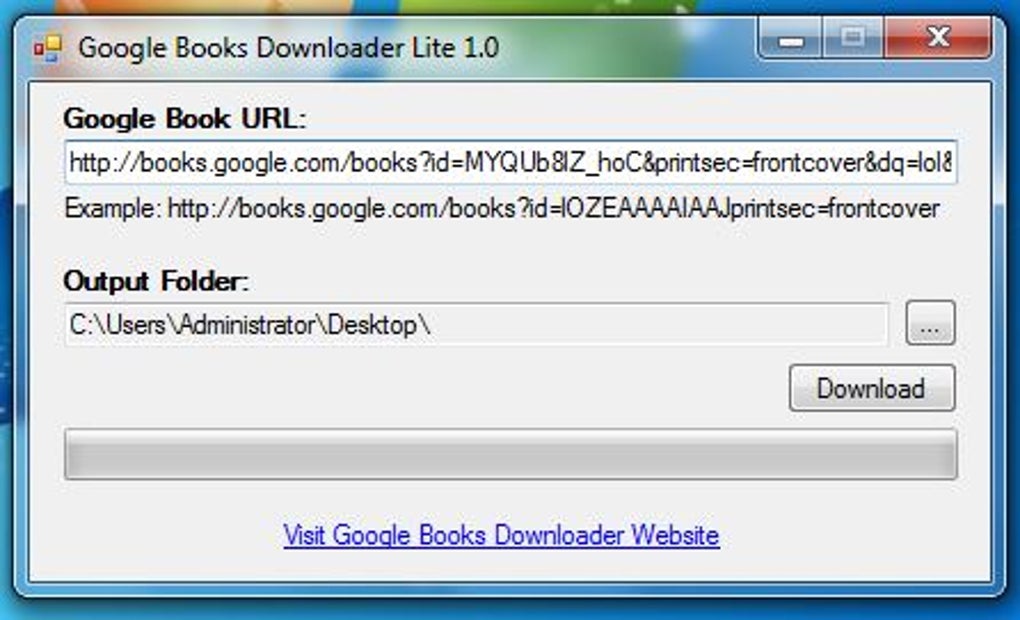
One of the most appealing aspects of Google Books Downloader Lite is its user-friendly design. The interface is straightforward and intuitive, requiring minimal technical knowledge to operate. This simplicity is a significant advantage, ensuring that users can quickly learn to download books without needing extensive technical expertise. The application’s functionality is easily grasped, even by those unfamiliar with download managers or similar software.
Furthermore, the portability of Google Books Downloader Lite enhances its accessibility. Users can save the application to external storage devices like USB drives or SD cards, allowing them to access and utilize the program on various Windows systems without the need for installation on each machine. This feature is particularly beneficial for those who frequently work on multiple computers or prefer to maintain a mobile workflow.
Download Management and Efficiency
Google Books Downloader Lite streamlines the downloading process through its efficient features. A key feature is the ability to create a download queue. This allows users to add multiple documents simultaneously, enabling batch processing. This functionality is highly advantageous when downloading numerous books or documents, significantly reducing the time required for individual downloads. The queue system allows for efficient management of download tasks, providing a more organized and streamlined workflow.
The program also boasts relatively fast download speeds compared to some other similar tools. It provides real-time estimations of the remaining download time, offering users a clear indication of progress and anticipated completion. This real-time feedback mechanism enhances the user experience by providing transparency and managing expectations concerning download duration.
Limitations and Considerations
While Google Books Downloader Lite offers several advantages, it also possesses limitations that users should be aware of. The most significant constraint is the lack of robust editing capabilities. The program’s functionalities are primarily focused on downloading, limiting post-download options such as text editing or format conversion. This restricts the versatility of the application, potentially hindering users who require more extensive post-download manipulation of the downloaded files.
Another limitation is the program’s exclusive support for the PNG file format. This can be problematic for users who prefer other formats, especially those seeking editable text formats such as TXT or DOCX. The lack of format versatility restricts the usability of the downloaded content for those who need to edit or manipulate the text within the downloaded documents. Furthermore, this limitation may also impact the file size and overall quality of the downloaded material, particularly if the user requires high-resolution images or vector graphics.
Finally, the application’s current compatibility is limited exclusively to the Windows operating system. This restricts accessibility for users of other operating systems, such as macOS, Linux, or ChromeOS. The lack of cross-platform compatibility significantly reduces the potential user base and limits its general applicability.
Comparison with Alternative Download Managers
Several alternative download managers exist, offering varying features and capabilities. Direct comparisons highlight Google Books Downloader Lite’s strengths and weaknesses relative to other options. While programs like Internet Download Manager (IDM) offer more advanced features, including scheduling, resume capabilities, and support for multiple file types, they often come with a price tag and a more complex user interface. Free Download Manager (FDM) and other free options might provide wider format support, but may lack the streamlined simplicity of Google Books Downloader Lite. The choice of download manager ultimately depends on the individual user’s specific needs and priorities. Users should weigh the benefits of simplicity and ease of use against the need for advanced features and broader format support when selecting a suitable application.
Overall Assessment and Conclusion
Despite its limitations, Google Books Downloader Lite provides a practical and convenient solution for users who primarily need offline access to Google Books content. Its user-friendly interface, batch downloading capabilities, and portability make it a valuable asset for archiving and offline reading. The simplicity of the application is a key strength, particularly for users who prioritize ease of use over extensive functionality. However, the lack of editing tools, the exclusive support for PNG format, and the Windows-only compatibility are significant drawbacks that should be carefully considered.
For users who require simple offline access to Google Books and value ease of use above all else, Google Books Downloader Lite serves as a worthwhile tool. However, users with more advanced needs, such as the requirement for editable text formats, broader file format support, or cross-platform compatibility, should consider exploring alternative download managers that better cater to their specific requirements.
The ultimate decision of whether or not to use Google Books Downloader Lite hinges on a careful assessment of individual needs and priorities. While the simplicity and portability are undeniable assets, the limitations regarding file formats and editing capabilities necessitate a thoughtful consideration of alternative options for users with more complex requirements. Understanding the trade-offs between ease of use and advanced features is crucial in determining the suitability of this application for a particular user.
File Information
- License: “Free”
- Version: “1.0”
- Latest update: “April 4, 2025”
- Platform: “Windows”
- OS: “Windows 7”
- Language: “English”
- Downloads: “26.2K”
- Size: “148.99 KB”


