
Google Play Books, once a prominent ebook reader and store, has undergone significant changes. While no longer a standalone application in the traditional sense, its functionality remains integrated within the broader Google ecosystem, primarily accessible through the Chrome browser and Chromebook operating systems. This review explores its features, advantages, disadvantages, and how it compares to alternative ebook readers.
Accessing Your Digital Library: A Seamless Chrome Experience
Google Play Books offers a streamlined approach to managing and reading ebooks directly within the Google Chrome browser. Instead of a separate app download, the service integrates seamlessly into the Chrome browser and Chromebook environment, accessible through the browser’s dock or toolbar. This eliminates the need for additional installations, providing a convenient method for users already heavily invested in the Chrome ecosystem. The interface aims for a clutter-free experience, focusing on the user’s library and making book discovery a primary focus. This is a stark contrast to the often overwhelming nature of the broader Google Play Store, which hosts a wide variety of media beyond ebooks.
Unlike the official Google Books website, which often includes search results beyond just ebooks, Google Play Books provides a curated experience centered solely on books. This curated experience allows for more focused searching and browsing, improving the overall user experience. The focus on literature creates a virtual bookstore experience, distinct from the more general-purpose Google Play Store.
Navigating a Vast Selection: Exploring the Google Play Books Catalog
Google Play Books boasts a vast catalog of ebooks, offering access to millions of titles across numerous genres. This substantial collection significantly surpasses the typical offerings of smaller ebook platforms. The search functionality, tailored specifically to books, allows for effective filtering and discovery, unlike the broader Google Play Store search which can include apps, music, movies, and other content, potentially diluting results for book searches. Users can readily browse by category, genre, author, or use keyword searches to quickly locate specific titles or themes.
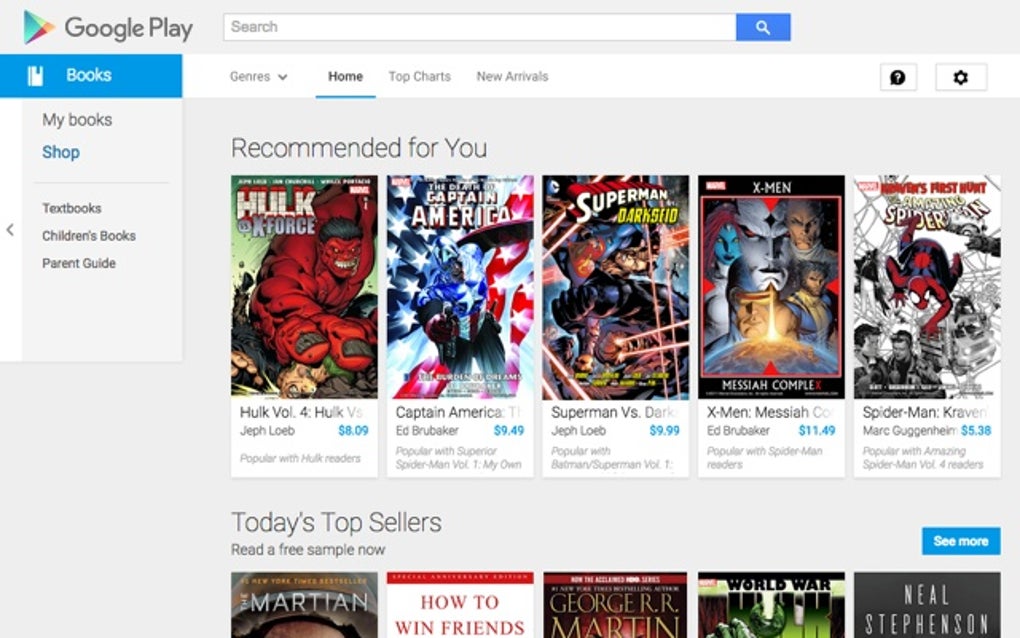
The integrated nature of Google Play Books within the Chrome ecosystem allows users to purchase, download, and manage their books conveniently from a single interface. This convenience simplifies the process of building and maintaining a personal digital library, minimizing the need to navigate various platforms or manage separate accounts. The platform also supports a variety of file formats, ensuring broader compatibility with various ebook sources.
A User-Friendly Interface: Simplicity and Accessibility
The user interface of Google Play Books, unlike the often overwhelming Google Play Store, emphasizes simplicity and ease of use. Its clean, uncluttered design promotes a more focused browsing experience. The intuitive navigation allows users to easily locate their library, browse new releases, explore recommended titles, or use the effective search functionality to find specific books. Key features are readily available, and the interface is responsive, adjusting seamlessly to different screen sizes.
This focus on usability makes Google Play Books an accessible platform for both casual and avid readers. The minimal design prioritizes the content—the books themselves—allowing users to immerse themselves in their reading without unnecessary distractions. This minimalist approach contrasts sharply with the more feature-rich and potentially overwhelming interfaces of other ebook platforms, creating a more relaxing reading environment. The design’s efficiency also translates to quicker search results and more responsive navigation, enhancing the overall user experience.
Features and Functionality: Beyond Simple Reading
Google Play Books offers a range of features designed to enhance the reading experience. These features go beyond the basic function of displaying ebooks. The platform provides tools for highlighting text, adding notes, and creating bookmarks. These features facilitate note-taking and referencing, valuable tools for students, researchers, and readers who want to engage more deeply with the text. The ability to share quotes or highlights with others adds a social aspect to the reading experience.
Furthermore, Google Play Books integrates with other Google services, leveraging the strengths of the larger Google ecosystem. For instance, Google Translate can be used to translate text within the ebook directly, significantly enhancing access to books in other languages. The integration with Google’s dictionary allows readers to quickly look up unfamiliar words without leaving the reading interface, providing an on-demand glossary for enhanced comprehension. This seamless integration of various services demonstrates how Google Play Books utilizes the company’s expertise across different platforms to enrich the ebook experience.
Limitations and Drawbacks: Considerations for Users
Despite its advantages, Google Play Books does have some limitations. Its primary limitation is its exclusive availability within the Chrome browser and Chromebook operating system. Users who prefer other browsers or devices are unable to directly access the Google Play Books service, limiting accessibility for those not within the Google ecosystem. This dependence restricts the platform’s reach, excluding a significant portion of potential users. The lack of a dedicated mobile app is a notable disadvantage for those who prefer reading on smartphones or tablets, emphasizing the platform’s integration with Google’s larger framework.
Furthermore, while the clean and minimal design is appealing to many, it also means that some users might find the platform lacks certain advanced features present in other dedicated ebook readers. The focus on simplicity might exclude customization options or features preferred by power users, who might find other applications more feature-rich. This streamlined approach, while contributing to ease of use, might be a limiting factor for advanced readers.
Google Play Books vs. the Competition: A Comparative Analysis
Google Play Books competes with various other ebook readers and stores, each with its strengths and weaknesses. Compared to Amazon Kindle, Google Play Books offers a less extensive catalog and a less mature ecosystem of devices. However, it boasts seamless integration with the Google ecosystem, which can be a significant advantage for users already entrenched in Google’s services. The pricing is generally competitive, often matching or undercutting prices offered by other platforms.
Compared to dedicated ebook readers like Kobo or Nook, Google Play Books lacks the hardware customization and potential for offline reading in a fully offline application on other devices. However, its availability through a ubiquitous browser offers convenience and accessibility. The choice between these platforms often comes down to individual preferences, especially when considering platform integration and access to specific features or content.
Conclusion: A Niche Player with Strengths and Weaknesses
Google Play Books occupies a unique niche in the ebook market. Its integration with the Chrome browser and Chromebook ecosystem provides convenience and simplicity for users within that environment. Its clean interface and strong Google service integration offer distinct advantages. However, its limited availability outside of the Chrome ecosystem and lack of a dedicated mobile app are significant drawbacks, restricting its broad appeal.
Ultimately, the suitability of Google Play Books depends on individual needs and preferences. Users heavily invested in the Google ecosystem might find its seamless integration invaluable. However, those who prefer more extensive catalogs, more device choices, and enhanced customization options might prefer other platforms. Google Play Books presents a solid option for a particular user segment, but it’s not a one-size-fits-all solution in the diverse world of ebook reading.


