
Google Sites offers a user-friendly platform for creating websites, ideal for individuals, small businesses, and organizations with limited web development experience. This comprehensive guide explores its features, benefits, limitations, and how it compares to other website builders.
Getting Started with Google Sites: Ease of Use and Accessibility
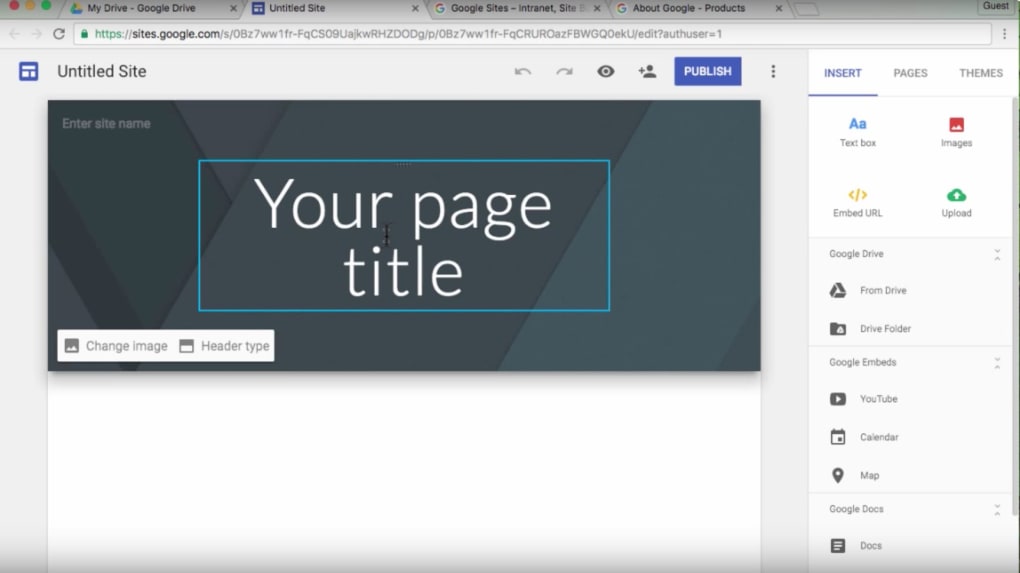
Google Sites stands out for its intuitive design and ease of use. No prior coding knowledge is required, making it accessible to a broad audience. The drag-and-drop interface allows users to easily add and arrange content blocks, including text, images, videos, and other elements. This streamlined approach empowers users to build functional websites without the complexities of traditional website development tools.
The platform’s availability in over 70 languages further broadens its accessibility, catering to a global user base. The availability of 17 diverse templates provides a strong foundation for various website purposes, whether it’s a simple informational site, a portfolio showcase, or a collaborative workspace for a team. The ability to customize these templates by adjusting colors, fonts, and layout ensures that websites reflect individual branding and preferences. Beyond the built-in templates, the Google Sites app marketplace provides additional templates and extensions, enabling even greater flexibility and customization.
Google Sites seamlessly integrates with other Google services like Google Docs, Sheets, Slides, and Drive. This integration allows users to effortlessly embed documents, spreadsheets, presentations, and files directly into their websites, simplifying content management and collaboration. Users can also embed content from other platforms, such as YouTube videos and Google Maps, expanding the possibilities for dynamic and engaging websites.
Key Features and Functionality: Beyond the Basics
While Google Sites excels in simplicity, it also offers a range of features that cater to both basic and more advanced needs. The platform’s built-in tools allow for efficient website management and content organization. Users can create multiple pages within a single site, allowing for a structured presentation of information. This hierarchical structure is vital for presenting complex information or providing in-depth details on specific topics.
The platform’s search engine optimization (SEO) capabilities are also important to consider. While not as comprehensive as dedicated SEO platforms, Google Sites allows for the optimization of page titles, descriptions, and content, thus improving site visibility within search results. This built-in SEO functionality helps to increase organic traffic to the site, without requiring any complex configuration or additional software.
The collaborative features of Google Sites are beneficial for teamwork. Multiple users can simultaneously edit and update the website, facilitating a streamlined workflow. Version history and revision tracking also mitigate the risks associated with collaborative editing, allowing users to revert to previous versions if needed. This feature helps avoid conflicts or accidental data loss during collaborative website development.
Integrating with Google Workspace and Third-Party Apps: Expanding Capabilities
For users leveraging Google Workspace, the integration extends far beyond basic functionality. Google Sites becomes a powerful tool when paired with the broader ecosystem of Google Workspace applications. This integration allows for seamless embedding of documents, spreadsheets, and presentations directly within the website, enhancing content delivery and user experience.
Moreover, the Google Sites app marketplace unlocks access to a wide array of third-party apps and extensions. These additions can significantly expand the functionality of a Google Site, adding features not natively supported, such as contact forms, e-commerce integration, advanced analytics, and much more. This flexibility allows users to tailor their websites to specific needs and seamlessly integrate with external services, enhancing overall functionality.
The ability to use your own domain name with Google Sites, through integration with Google Domains, offers a professional touch. This provides a more polished look and helps establish brand identity. Owning a custom domain enhances credibility and makes the website easier to remember and share. A custom domain is essential for businesses looking to build a professional online presence.
Limitations and Considerations: Where Google Sites Falls Short
Despite its strengths, Google Sites has certain limitations. The platform is not suitable for highly complex websites or those requiring advanced customization. Users needing extensive design control or specific functionalities might find its options limiting compared to more robust website builders. The focus on simplicity means some features found in professional website platforms are absent. For example, sophisticated e-commerce integrations or advanced SEO tools are not built directly into Google Sites.
The free version of Google Sites comes with a limited 100 MB of storage per site, which may be insufficient for websites with extensive media or large files. Users requiring more storage will need to upgrade to a paid Google Workspace plan. The reliance on Google services also means that website functionality is dependent on the reliability and availability of Google’s infrastructure.
System Requirements and Browser Compatibility: Ensuring Seamless Operation
Google Sites is accessible across various devices, including computers, tablets, and phones. However, site editing is restricted to computers. This limitation reflects the need for a more robust computing environment for the complex tasks involved in website editing and content management.
The platform supports a wide range of modern web browsers, including Chrome, Safari, Firefox, Microsoft Edge, and Internet Explorer. However, ensuring compatibility with the latest versions is crucial for optimal performance. Using outdated browsers might result in functionality issues or display problems. Similarly, enabling cookies and JavaScript is essential for a complete and functional user experience. These web technologies are fundamental to many of the site’s features, including user authentication and dynamic content loading.
Google Sites vs. Other Website Builders: A Comparative Analysis
Google Sites distinguishes itself from other website builders through its unparalleled ease of use and seamless integration with the Google ecosystem. However, compared to platforms like Wix, Weebly, or Squarespace, it lacks the breadth of design options and advanced features. These competing platforms offer greater control over website design, customizability, and often incorporate built-in e-commerce functionalities.
The choice of platform ultimately depends on individual needs and priorities. For users seeking simplicity and quick website creation, Google Sites is an excellent choice. For users needing sophisticated design control or specific functionalities, a platform with more extensive features might be more suitable. The trade-off between simplicity and advanced functionality is a key factor to consider.
Conclusion: Google Sites – A Powerful Tool for Simple Website Creation
Google Sites remains a valuable resource for creating straightforward and functional websites. Its ease of use, intuitive interface, and seamless integration with other Google services make it an ideal solution for beginners and those with limited technical expertise. While not a substitute for professional website development platforms, Google Sites serves as a powerful and accessible tool for individuals, small businesses, and organizations seeking a simple yet effective online presence. By understanding its strengths and limitations, users can leverage Google Sites to create websites that effectively meet their specific needs. The ability to easily integrate with Google Workspace and explore the app marketplace significantly expands its capabilities, making it a versatile choice for a wide array of users.
File Information
- License: “Free”
- Version: “0.904”
- Latest update: “March 25, 2025”
- Platform: “Windows”
- OS: “Windows XP”
- Downloads: “15.3K”


