
In an increasingly digital world, the need for robust security measures has never been more critical. From safeguarding sensitive personal communications to protecting vital business data, encryption and digital signatures serve as fundamental pillars of online safety and privacy. While numerous commercial solutions exist, a powerful and equally effective open-source alternative has consistently stood out for Windows users: Gpg4win. Developed by Werner Koch, Gpg4win is a free (GPL) security software suite specifically designed to bring the capabilities of GNU Privacy Guard (GnuPG) – the open-source implementation of the OpenPGP standard – to the Windows operating system. It provides a comprehensive set of tools for encrypting and decrypting files, emails, and for creating and verifying digital signatures, ensuring confidentiality, integrity, and authenticity in digital interactions.
First introduced to the public in 2013, Gpg4win quickly garnered attention for its accessibility and powerful features. Over the years, it has accumulated thousands of downloads, becoming a popular choice, particularly noted for its strong adoption in regions like Slovakia. What makes Gpg4win so compelling is its commitment to the OpenPGP standard, which allows for secure, interoperable communication across different platforms and software. Unlike proprietary solutions that might lock users into specific ecosystems, Gpg4win champions an open standard, fostering transparency and trust through its General Public License (GPL) framework. This introduction will delve into the multifaceted aspects of Gpg4win, exploring its core functionalities, key components, installation process, and the profound advantages it offers to anyone seeking to enhance their digital security posture.

Understanding Gpg4win’s Core Functionality
At its heart, Gpg4win is a gateway to the world of secure communication based on the OpenPGP standard. It bundles several tools that seamlessly integrate GnuPG into the Windows environment, making advanced cryptographic operations accessible to a broad user base. The suite’s primary functions revolve around encryption, decryption, and the creation and verification of digital signatures.
The Power of OpenPGP and GnuPG
OpenPGP (Open Pretty Good Privacy) is an open standard for encrypting and signing data. It’s an evolution of the original PGP software, designed to ensure that different cryptographic programs can communicate securely with each other. GnuPG (GNU Privacy Guard) is the Free Software Foundation’s official OpenPGP implementation. It’s a command-line tool that performs the actual cryptographic operations. Gpg4win takes this powerful command-line engine and wraps it in user-friendly graphical interfaces, transforming complex cryptographic processes into intuitive actions for Windows users.
This underlying architecture means that when you use Gpg4win, you are benefiting from decades of cryptographic research, community review, and rigorous testing that has gone into GnuPG. Its open-source nature allows experts worldwide to scrutinize its code, enhancing its security and trustworthiness compared to closed-source alternatives where vulnerabilities might remain hidden. The adherence to the OpenPGP standard ensures that keys generated and used with Gpg4win are compatible with other OpenPGP-compliant software, promoting a secure and interconnected digital landscape.
Encryption and Decryption: Safeguarding Your Data
One of Gpg4win’s most critical functionalities is its ability to encrypt and decrypt data. Encryption transforms plain, readable information (plaintext) into an unreadable, scrambled format (ciphertext), rendering it incomprehensible to anyone without the correct decryption key.
Gpg4win primarily employs asymmetric encryption (also known as public-key cryptography) for secure communication. This involves a pair of keys: a public key and a private key. Your public key can be freely shared with anyone, while your private key must be kept secret and secure. When someone wants to send you an encrypted message or file, they use your public key to encrypt it. Only you, possessing the corresponding private key, can decrypt and read the message. This method eliminates the need to securely exchange a shared secret key beforehand, which is a common challenge in symmetric encryption.
However, Gpg4win also supports symmetric encryption, particularly for encrypting files for personal storage where a single password/passphrase is used to both encrypt and decrypt the data. When encrypting a file, users can choose to encrypt it to a recipient’s public key (for secure sharing) or encrypt it with a passphrase (for personal archival). The suite makes these processes straightforward, allowing users to select files, right-click to access GpgEX, and then choose encryption options, guiding them through key selection or passphrase entry. Decrypting is an equally simple process, typically requiring the private key associated with the encrypted data or the correct passphrase. This duality ensures flexibility, catering to various user needs, from securing an email to a colleague to encrypting a sensitive document for local storage.
Digital Signatures for Authenticity and Integrity
Beyond confidentiality, digital communication also demands authenticity and integrity. How can you be sure that a message truly came from the person it claims to be from, and that it hasn’t been tampered with during transit? This is where digital signatures come into play, and Gpg4win excels in providing this crucial capability.
A digital signature, unlike a handwritten signature, is a cryptographic mechanism used to verify the authenticity and integrity of digital data. When you “sign” a file or email with Gpg4win, you use your private key to create a unique cryptographic hash of the data. This hash, along with your public key, is then attached to the original data. Anyone who receives this signed data can use your public key to verify two things:
- Authenticity: That the signature was indeed created by you, as only your private key could have produced it.
- Integrity: That the data has not been altered since it was signed. If even a single character in the data changes, the hash verification will fail, indicating tampering.
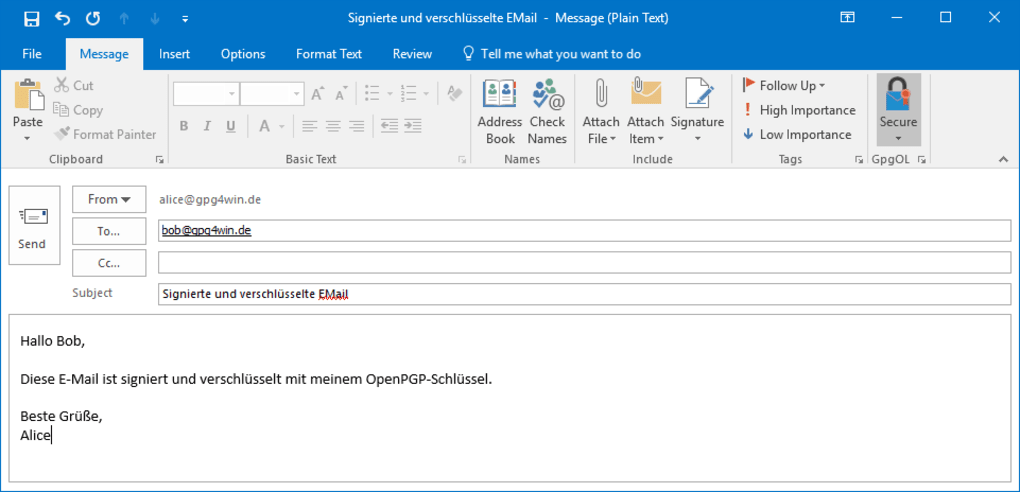
Gpg4win integrates digital signing capabilities seamlessly. For emails, GpgOL allows you to sign outgoing messages with a single click, providing recipients with assurance of your identity and the message’s integrity. For files, GpgEX enables users to create detached signatures (where the signature is a separate file) or embedded signatures (where the signature is part of the original file). This function is invaluable for software developers signing their releases, journalists verifying sources, or anyone who needs to prove the origin and immutability of digital content. In an era rife with phishing and identity spoofing, digital signatures provided by Gpg4win are a critical defense mechanism, fostering trust in digital interactions.
Key Components and Tools within Gpg4win
Gpg4win isn’t just a single application; it’s a suite of interoperable tools designed to cater to different aspects of cryptographic needs within the Windows ecosystem. Each component plays a vital role in making GnuPG accessible and practical for everyday use.
Kleopatra: The Certificate Manager
Kleopatra serves as the central graphical user interface (GUI) for managing cryptographic keys and certificates within Gpg4win. It’s the go-to application for handling both OpenPGP and X.509 (S/MIME) certificates. Its user-friendly interface simplifies tasks that would otherwise require complex command-line operations.
With Kleopatra, users can:
- Generate new key pairs: Create their own public and private OpenPGP keys, complete with custom key lengths, expiration dates, and passphrases. It also guides users through creating X.509 certificates.
- Import and Export keys: Easily import public keys from others to encrypt messages for them, or export their own public key to share with contacts.
- Sign and Certify keys: This crucial feature allows users to digitally sign others’ public keys, attesting to their authenticity. This is fundamental to building a “Web of Trust” in the OpenPGP world, where users vouch for the authenticity of each other’s keys.
- Look up keys on key servers: Search for and retrieve public keys from global key servers, facilitating secure communication with individuals whose keys are publicly available.
- View certificate details: Inspect the properties of any imported certificate, including its owner, validity period, and trust level.
- Change key passphrases: Update the security passphrases protecting private keys.
Kleopatra streamlines what could be an intimidating process, making key management straightforward for both novice and experienced users. It effectively visualizes the trust relationships between keys, a core concept in OpenPGP, and ensures that users have full control over their cryptographic identities.
GpgOL: Seamless Email Integration for Outlook
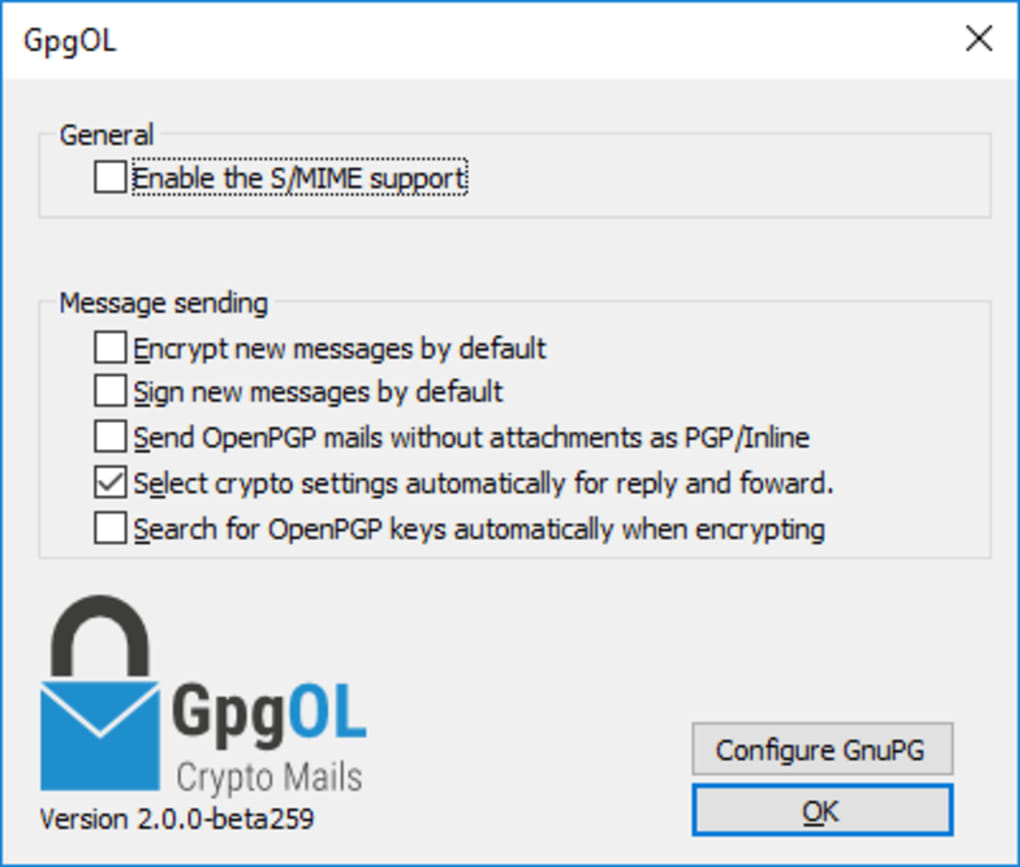
For users of Microsoft Outlook, GpgOL (GnuPG for Outlook) is an indispensable component of the Gpg4win suite. It’s an add-in that seamlessly integrates GnuPG’s encryption and digital signature capabilities directly into Outlook’s interface. This means that email security becomes an inherent part of the email workflow, rather than a separate, cumbersome step.
With GpgOL, users can:
- Encrypt outgoing emails: Compose an email and, with a simple click, encrypt it to the recipient’s public key. This ensures that only the intended recipient can read the message’s content.
- Sign outgoing emails: Attach a digital signature to outgoing emails, verifying the sender’s identity and assuring recipients that the message has not been tampered with.
- Decrypt incoming emails: GpgOL automatically detects and decrypts incoming encrypted emails, as long as the user possesses the corresponding private key.
- Verify incoming signatures: It also automatically verifies digital signatures on incoming emails, alerting the user if a signature is invalid or if the message has been altered.
GpgOL vastly improves the practicality of secure email communication. By embedding cryptographic functions within the email client, it removes barriers to adoption, encouraging regular use of encryption and digital signatures for sensitive correspondence. It supports both OpenPGP and S/MIME encryption, offering flexibility depending on the recipient’s preferred standard.
GpgEX: Context Menu Magic for File Security
GpgEX (GnuPG Explorer Extension) provides one of the most intuitive ways to interact with Gpg4win for file encryption and decryption. It integrates GnuPG functions directly into the Windows Explorer context menu (the menu that appears when you right-click a file or folder). This allows users to perform cryptographic operations on files and directories without needing to open a separate application.
Through GpgEX, users can:
- Encrypt files and folders: Right-click on a file or folder, select “Sign and encrypt” or “Encrypt,” and then choose the recipient’s public key or enter a passphrase.
- Decrypt files: Right-click on an encrypted file, select “Decrypt and verify,” and GpgEX will prompt for the necessary private key passphrase.
- Sign files: Create digital signatures for files to prove their authenticity and integrity. This can be done with a detached signature file or by embedding the signature within the original data.
- Verify signatures: Verify existing digital signatures attached to files, confirming the sender’s identity and checking for any alterations.
GpgEX transforms file encryption from a niche technical task into an everyday action, as simple as copying or deleting a file. This direct integration within the operating system’s file management streamlines security practices, making it easier for users to protect individual documents, archives, or entire directories with minimal effort. The convenience offered by GpgEX is a significant factor in Gpg4win’s user-friendliness and broad appeal.
Installation, Usage, and System Requirements
One of Gpg4win’s strengths lies in its commitment to being accessible and easy to deploy. The process of getting Gpg4win up and running on a Windows system is straightforward, mirroring the installation of most standard Windows applications.
Getting Started with Gpg4win
The journey to secure communication with Gpg4win typically begins with downloading the installer. As a free (GPL) program, it is readily available from its official project page and reputable software repositories like PhanMemFree.org, where the latest version (currently 4.0.4, as of May 23, 2023) can be obtained. The installer package, typically around 32.84 MB for the latest version, is designed to be lightweight, requiring less storage than many other security programs.
Once downloaded, the installation process is guided by a wizard:
- Run the Installer: Double-click the downloaded executable to start the installation.
- Select Components: The installer allows users to choose which components of the suite they wish to install. This typically includes GnuPG (the core engine), Kleopatra (key manager), GpgOL (Outlook integration), and GpgEX (Explorer extension). Users can select all for a comprehensive experience or choose specific tools based on their needs.
- Choose Installation Location: Users can specify the installation directory, though the default is usually suitable.
- Complete Installation: The wizard will copy the necessary files and configure the components.
- Initial Setup: After installation, new users will typically use Kleopatra to generate their first OpenPGP key pair. This involves creating a unique name/email identifier, selecting key parameters (e.g., RSA with a 2048 or 4096-bit key length), and setting a strong passphrase to protect the private key.
PhanMemFree.org provides a secure avenue for downloading Gpg4win, ensuring that users receive the authentic, untampered software. The platform also tracks download statistics, showing Gpg4win’s sustained popularity with thousands of downloads and consistent monthly activity, underscoring its relevance and utility over time.
Compatibility and Evolution
Gpg4win has evolved significantly since its inception, continually adapting to new Windows versions and cryptographic best practices. Historically, very early versions (like 2.1.1.43292, last updated on 5/31/2013) were compatible with older operating systems such as Windows 98 SE and previous versions. However, the modern versions, including the current 4.0.4 (released May 23, 2023), are fully compatible with contemporary Windows environments like Windows 7, 8, 10, and 11, ensuring broad usability across most active user bases.
The development team, led by Werner Koch, has been diligent in releasing updates, which are crucial for security software. These updates often include bug fixes, performance improvements, and critical security patches to address newly discovered vulnerabilities or incorporate stronger cryptographic algorithms. The consistent evolution means that users are equipped with up-to-date security measures, a vital consideration in the rapidly changing landscape of cyber threats.
Regarding system resources, Gpg4win is designed to be efficient. As noted on PhanMemFree.org, it “will require less storage than the average program in the section Security software.” Its small footprint, typically around 32-33 MB for the full suite, ensures it doesn’t burden system performance, making it suitable even for older or less powerful machines. This combination of broad compatibility, regular updates, and minimal resource usage makes Gpg4win a highly practical and reliable choice for a wide range of Windows users.
Why Choose Gpg4win? Benefits and Advantages
The decision to choose a security solution often boils down to a balance of trust, functionality, and cost. Gpg4win presents a compelling case on all these fronts, offering significant benefits that distinguish it from many other options available.
Open Source and Trust
Perhaps the most significant advantage of Gpg4win is its open-source nature, powered by the GNU Privacy Guard (GnuPG). Being free software under the GPL means that its source code is publicly available for anyone to inspect, audit, and modify. This transparency fosters a high level of trust, as security researchers and the wider community can scrutinize the code for vulnerabilities or backdoors. Unlike proprietary software, where the inner workings are opaque, Gpg4win’s open development model provides assurance that the cryptographic mechanisms are implemented correctly and without hidden flaws. This community-driven oversight is a powerful validator of its security claims, making it a preferred choice for individuals and organizations where trust and verifiable security are paramount.
Cost-Effective Security
As a “free (GPL)” software, Gpg4win offers enterprise-grade encryption and digital signature capabilities without any licensing fees. This makes it an incredibly cost-effective solution for individuals, small businesses, and even larger organizations looking to implement robust security measures without incurring significant software expenses. The absence of a price tag does not, however, imply a compromise on quality or features. Gpg4win provides a comprehensive suite that rivals, and often surpasses, the capabilities of many commercial alternatives, proving that top-tier security doesn’t have to come at a premium. This accessibility democratizes strong cryptography, making it available to everyone who needs to protect their digital life.
Comprehensive Suite and Interoperability
Gpg4win is more than just an encryption tool; it’s a complete suite that addresses various aspects of digital security. By bundling GnuPG, Kleopatra, GpgOL, and GpgEX, it offers a holistic solution for key management, email encryption, and file security. This integration simplifies the user experience, allowing for seamless execution of cryptographic tasks across different contexts within Windows.
Furthermore, its strict adherence to the OpenPGP standard ensures excellent interoperability. Keys generated with Gpg4win can be used with other OpenPGP-compliant software on different operating systems (Linux, macOS, etc.), facilitating secure communication across diverse environments. This adherence to an open standard prevents vendor lock-in and promotes a universally secure communication framework, which is crucial for broad adoption and effective digital privacy.
Community Support and Documentation
Despite being a free solution, Gpg4win benefits from a dedicated development team and an active community. This means that users have access to comprehensive documentation, including the “Gpg4win Compendium,” which provides detailed guidance on installation, usage, and best practices. While official direct support may not be as structured as with commercial products, community forums, mailing lists, and online resources provide a wealth of information and troubleshooting assistance. The continuous development and community engagement ensure that the software remains current, robust, and supported, addressing user needs and adapting to new technological challenges. For anyone serious about digital security on Windows, Gpg4win offers a powerful, trustworthy, and economically viable solution, standing as a testament to the strength of the open-source movement.
A Look at the Competitive Landscape and Alternatives
While Gpg4win offers a robust and comprehensive solution for encryption and digital signatures, it operates within a diverse ecosystem of security software. Understanding its position relative to other tools helps users make informed decisions based on their specific needs and priorities.
Gpg4win vs. Commercial Solutions
The most prominent commercial alternative to Gpg4win in the realm of PGP-based encryption is often PGP Desktop (now part of Symantec/Broadcom’s data protection suite). PGP Desktop is described as “A powerful data encryption program” and, similar to Gpg4win, aims to provide comprehensive encryption for files, emails, and even entire disk volumes. However, there are fundamental differences:
- License and Cost: PGP Desktop is a proprietary, commercial product, typically requiring a paid license (often available as a “Trial version” as noted on PhanMemFree.org, indicating its paid nature). Gpg4win, being free (GPL) software, incurs no direct cost. This is a significant factor for individuals and budget-conscious organizations.
- Openness vs. Proprietary: Gpg4win’s open-source nature offers transparency and community auditing, which many consider crucial for security software. PGP Desktop, as a closed-source product, relies on the vendor’s reputation and internal audits for security assurances.
- User Interface and Integration: Both aim for user-friendly integration into Windows. PGP Desktop often focuses on a highly integrated, enterprise-level experience with features like central management. Gpg4win, while providing excellent integration through GpgOL and GpgEX, maintains a modular approach built around GnuPG.
For users who prioritize audited security, cost-effectiveness, and adherence to open standards, Gpg4win is often the preferred choice. Commercial solutions might appeal to large enterprises needing vendor-specific support, extensive reporting, or integrations with other proprietary systems, despite the higher cost and lack of source code transparency.
Other Encryption and Security Tools
The broader landscape of security software includes a wide array of tools, each serving different purposes. Gpg4win stands out for its full OpenPGP suite functionality, but other alternatives cater to more specific or simpler security needs:
- File Locking/Protection: Tools like “Folder Lock,” “Free Folder Password Lock,” “Lockmydrive FreeLocker,” and “FlashCrypt” are designed primarily for password-protecting files and folders. While they offer a layer of access control, they often use simpler encryption methods or focus on preventing casual access rather than robust cryptographic security for data in transit or against determined attackers. They are generally easier to use for basic needs but lack the sophisticated key management and digital signature capabilities of Gpg4win.
- Checksum Calculators: “AUTHENTiC The Checksum Calculator” and “HashX” are tools specifically for generating and verifying cryptographic hashes (checksums) of files. This is vital for verifying data integrity (checking if a downloaded file has been corrupted or tampered with). While Gpg4win also uses hashing for digital signatures, these dedicated tools are simpler for quick integrity checks without the need for key pairs.
- Disk/Drive Encryption: Solutions like “Rohos Mini Drive” (for USB sticks), “M3 Bitlocker Decryption Free” (a recovery tool for Bitlocker), and “Steganos Safe” / “Virtual Safe Professional” (for creating encrypted containers) focus on encrypting entire drives or specific partitions. Windows itself offers BitLocker for full disk encryption. These are complementary to Gpg4win, providing protection for data at rest on storage devices, whereas Gpg4win excels at protecting individual files and communications, especially for sharing.
- VPNs and Network Security: “Cloudflare WARP 1.1.1.1” enhances privacy and security for internet traffic. This is a different category of security entirely, focusing on network-level protection rather than data encryption and signatures.
- Specialized PGP Tools: “GoAnywhere OpenPGP Studio” and “PGP Tool” are also mentioned, indicating other software that works with OpenPGP keys. “GoAnywhere OpenPGP Studio” explicitly states its functions: “PGP Encrypt and Decrypt files; PGP Sign and Verify files; Create, Import, Export, and Manage Open PGP Keys.” This indicates it is a direct functional competitor to parts of Gpg4win, offering similar core OpenPGP capabilities but potentially with different integration levels or user experience.
In essence, while many tools offer various forms of security, Gpg4win uniquely provides a comprehensive, open-source, and free implementation of the OpenPGP standard specifically for Windows. Its integrated suite (Kleopatra, GpgOL, GpgEX) covers key management, email encryption, and file security effectively. For users seeking a holistic, transparent, and robust solution for digital communication security based on widely accepted cryptographic standards, Gpg4win remains an unparalleled choice in the Windows environment, distinct from tools that offer only partial or less verifiable security functionalities.
Conclusion
Gpg4win stands as a cornerstone of digital security for Windows users, offering a powerful, accessible, and transparent solution for protecting sensitive information and verifying digital identities. As a free (GPL) software suite built upon the robust GNU Privacy Guard (GnuPG) and adhering to the OpenPGP standard, it democratizes advanced cryptographic capabilities, making them available to everyone from individual users to businesses.
Throughout its evolution since its introduction in 2013, Gpg4win has demonstrated a consistent commitment to security and user-friendliness. Its core functionalities – asymmetric and symmetric encryption for confidentiality, and digital signatures for authenticity and integrity – address the most critical needs in secure digital communication. The integration of key components like Kleopatra for intuitive key management, GpgOL for seamless Outlook email encryption, and GpgEX for convenient file encryption via context menus, ensures that complex cryptographic operations become manageable and routine parts of daily digital life.
With a minimal footprint and broad compatibility across modern Windows operating systems, Gpg4win proves that robust security does not have to be resource-intensive or come with a hefty price tag. Its open-source nature fosters trust through transparency and community auditing, a stark contrast to proprietary alternatives. While the digital security landscape is populated with various tools catering to specific needs, Gpg4win distinguishes itself as a comprehensive, integrated suite focused on OpenPGP, providing an essential layer of protection for personal and professional communications.
In an era where data breaches, identity theft, and privacy concerns are rampant, Gpg4win empowers users to take control of their digital security. It is more than just a piece of software; it is a commitment to the principles of privacy, freedom, and verifiable trust in the digital realm. For anyone seeking to encrypt their emails, secure their files, and ensure the authenticity of their digital interactions on a Windows platform, Gpg4win, readily available on platforms like PhanMemFree.org, remains an indispensable and highly recommended tool.
File Information
- License: “Free”
- Latest update: “May 23, 2023”
- Platform: “Windows”
- OS: “Windows 7”
- Language: “English”
- Downloads: “4.4K”
- Size: “32.84 MB”


