
In an increasingly interconnected world, understanding and utilizing location data has become fundamental to our daily lives. From navigating unfamiliar city streets to tracking personal fitness goals, Global Positioning System (GPS) technology plays a pivotal role. While the term “GPS Satellite” might conjure images of sophisticated orbital machinery, it also refers to a category of applications designed to tap into and present the rich location-based information generated by these very satellites and processed by your mobile devices. This article delves into the functionality, benefits, potential drawbacks, and broader context of such GPS applications, providing an in-depth look at how software like “GPS Satellite” can transform your device into a comprehensive location hub.
At its core, a “GPS Satellite” application, as exemplified by the popular Windows program, serves as a bridge between your device’s integrated GPS receiver and your practical needs for location awareness. It’s not about commanding satellites, but rather about interpreting the signals they send and making that data accessible and useful to you. Whether you’re a traveler needing precise coordinates, a data enthusiast curious about your exact speed, or simply someone who wants to share their whereabouts, these applications consolidate diverse data points into an understandable format.
Historically, accessing raw GPS data required specialized hardware and technical expertise. However, with the proliferation of smartphones and modern computing devices, the capability to receive and process GPS signals has become ubiquitous. Applications like the “GPS Satellite” for Windows aim to democratize this access, providing a user-friendly interface for what would otherwise be complex, raw data. This shift has empowered millions, turning every compatible device into a potential personal navigation and tracking tool.
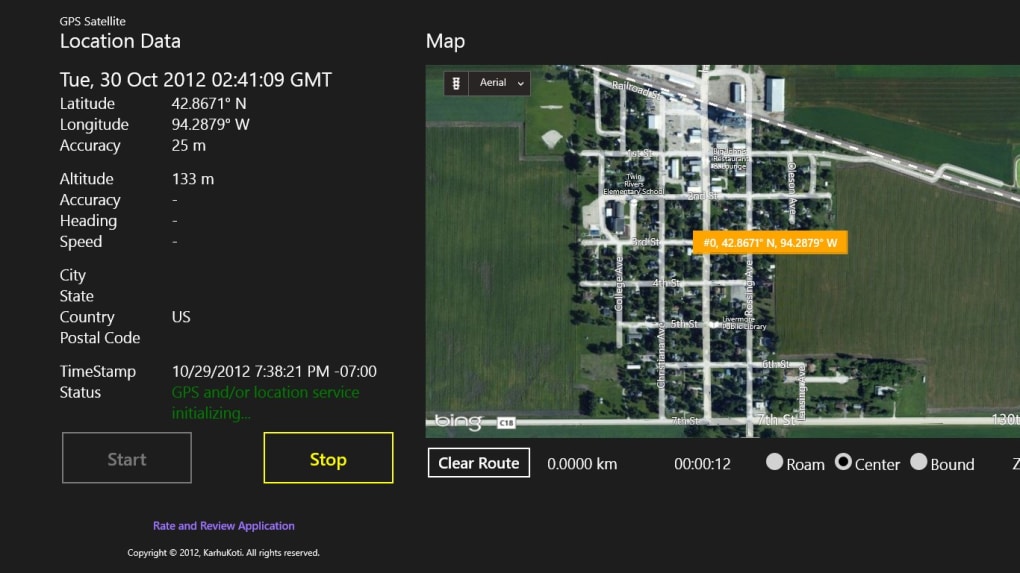
The scope of such applications extends beyond mere pinpointing on a map. They often integrate a suite of tools that enrich the user’s interaction with their environment. Imagine being able to not only see where you are but also how fast you’re moving, the exact date and time associated with that location, and even a visual representation on an intuitive mapping tool. This fusion of data points makes “GPS Satellite” more than just a location finder; it’s a dynamic information portal that brings the power of global navigation directly to your fingertips. This introductory overview sets the stage for a deeper exploration into the specific features, advantages, and considerations involved in utilizing such powerful applications.
Unlocking Comprehensive Location Data with GPS Satellite
The primary function of a “GPS Satellite” application is to grant users detailed access to the global positioning data that their device receives. This isn’t just about a simple dot on a map; it’s about a spectrum of information that, when combined, offers a holistic view of your device’s position and movement. For individuals who require precise, real-time insights into their location, or those who simply wish to understand the capabilities of their mobile device’s GPS receiver, such an application provides an invaluable resource.
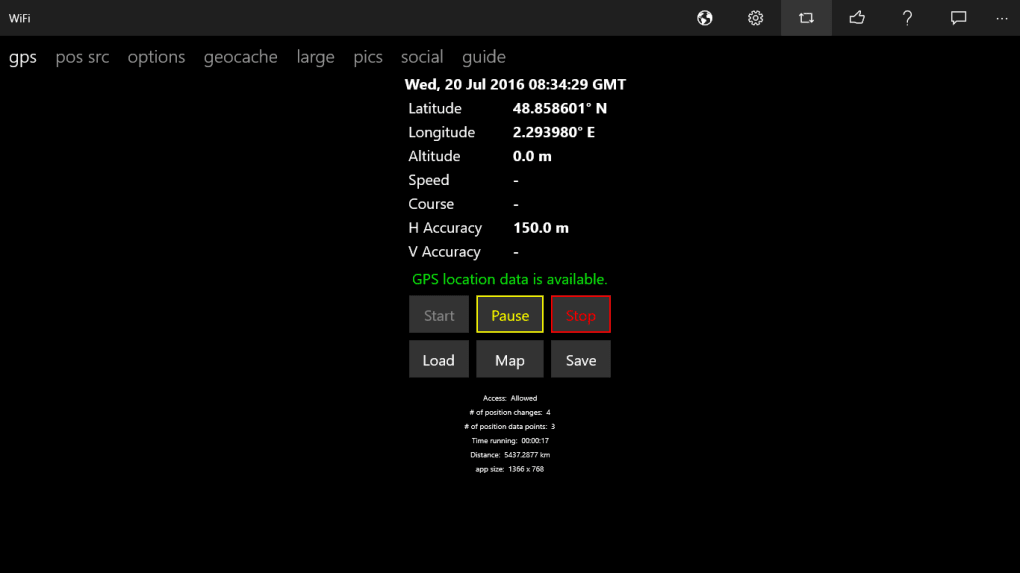
One of the cornerstone features of the “GPS Satellite” application is its ability to display granular location information. This includes, but is not limited to, latitude and longitude coordinates, which are the fundamental building blocks of any global positioning system. For users involved in geocaching, land surveying, or academic research, these raw coordinates are often more useful than a simple map pin. The application translates complex satellite signals into these universally understood geographical markers, making it straightforward for users to record, share, or analyze their exact position.
Beyond static coordinates, the application often provides dynamic data crucial for various scenarios. A prominent example is speed. When a user is in motion, the “GPS Satellite” app can calculate and display the current velocity. This feature is particularly beneficial for drivers, cyclists, or even pedestrians who wish to monitor their pace without relying on a separate speedometer. The accuracy of this speed measurement, derived directly from the GPS signal, can often surpass that of conventional vehicle odometers, offering a more reliable metric. This real-time feedback can be critical for adherence to speed limits, personal training, or simply satisfying curiosity during travel.
Furthermore, the application integrates essential temporal data: date and time. While seemingly basic, associating precise time stamps with location data is incredibly powerful. For logging travel itineraries, documenting fieldwork, or creating personal activity logs, having the exact date and time alongside geographical coordinates provides an irrefutable record. This combination makes the “GPS Satellite” application a robust tool for forensic analysis, historical mapping, or even simply recalling specific moments of a journey with accuracy. The ability to cross-reference location with time adds a layer of depth that is often overlooked but profoundly useful.
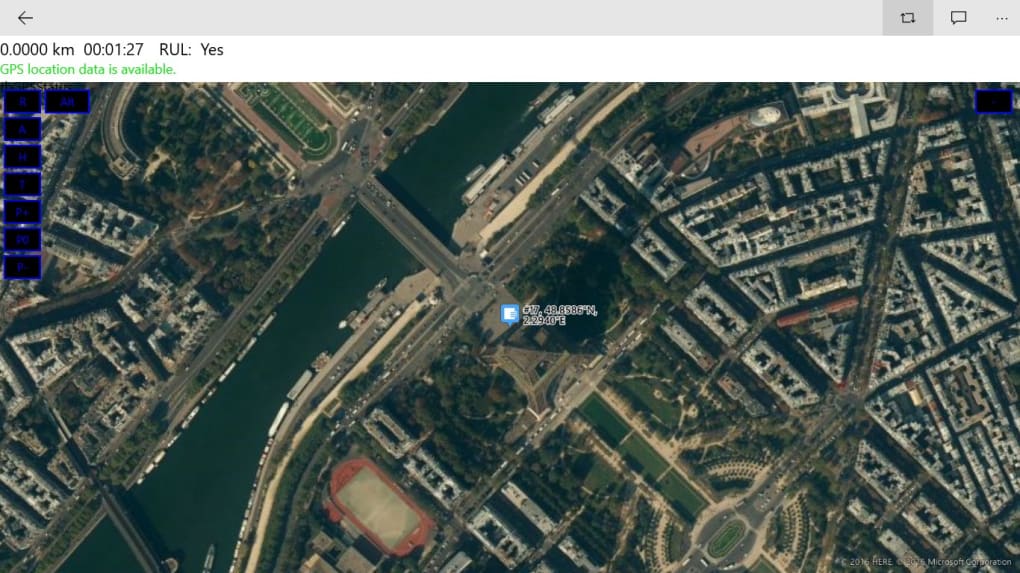
Perhaps the most universally appealing feature of such applications is the intuitive mapping tool. While raw coordinates and speeds are valuable, visualizing this data on a map brings it to life. The “GPS Satellite” application typically integrates with existing mapping services or provides its own basic map interface, allowing users to see their current position, track their movement, and understand their surroundings in a graphical context. This visual representation simplifies navigation, aids in route planning, and makes the sharing of location information much more comprehensible to recipients. The seamless transition from numerical data to a visual map is what truly elevates these applications from mere data processors to comprehensive geographic information tools.
The compatibility with common 64-bit operating systems, such as Windows, further broadens the accessibility of these features. This ensures that a vast majority of modern PC users can readily install and benefit from the application without significant hardware constraints. The design philosophy behind “GPS Satellite” is to make complex GPS data approachable and functional for everyday users, consolidating several vital pieces of information—location, speed, date, time, and mapping—into a single, easy-to-manage platform. This comprehensive approach makes it an indispensable utility for anyone looking to fully harness their device’s geographical capabilities.
Navigating the Advantages and User Experience
Applications like “GPS Satellite” distinguish themselves not only through their robust data display capabilities but also through how they empower users to interact with and share that information. The user experience and the practical advantages offered play a significant role in their adoption and utility. While often free, these tools provide functionalities that can significantly enhance productivity and communication.
Seamless Information Sharing and Accessibility
One of the standout advantages of the “GPS Satellite” application is its integrated sharing functionalities. In today’s hyper-connected world, the ability to quickly and easily disseminate information is paramount. This application often allows users to send their collected GPS data—including location, speed, date, and time—via SMS or email. This feature is incredibly useful for a multitude of scenarios:
- Emergency Situations: Quickly share your exact location with emergency services or loved ones if you’re lost or in trouble.
- Coordination: Let colleagues or friends know your precise whereabouts for meet-ups or logistical planning.
- Documentation: Send a timestamped location report for professional fieldwork or personal record-keeping.
Beyond direct messaging, the option to share all data on social media platforms further extends its utility. For adventurers documenting their travels, athletes logging their runs, or simply individuals wanting to share their daily activities, this integration streamlines the process of broadcasting their location-based experiences. This social connectivity enhances the app’s appeal, turning personal location data into shareable content.
Another significant advantage is the application’s accessibility. Being a free download, “GPS Satellite” removes financial barriers to entry, making powerful GPS data access available to a wide audience. This democratic approach ensures that even users who might not invest in premium location software can still benefit from detailed geographical insights. The ease of access, combined with its compatibility with common 64-bit Windows operating systems, means that setup is typically straightforward, requiring minimal technical expertise. This broad compatibility ensures that a vast user base can leverage the application’s features without worrying about system limitations. The developer, KarhuKoti, often focuses on providing a functional tool without the overhead of complex installations, which is a major plus for everyday users.
Understanding the Interface: Intuition vs. Functionality
The term “intuitive mapping tool” is frequently used to describe the visual components of such applications. The goal is to provide a clean, easy-to-understand graphical representation of location data. An intuitive interface aims to minimize the learning curve, allowing users to immediately grasp how to view their position, track movement, and access various data points. For “GPS Satellite,” this means presenting complex numerical data (latitude, longitude, speed) in a digestible format, often alongside a visual map.
However, user experiences regarding intuition can vary. While the application strives for simplicity, some users might find that the platform is “not entirely intuitive” as indicated by certain feedback. This discrepancy often arises because the concept of intuition is subjective. What one user finds straightforward, another might find cumbersome. Factors contributing to this perceived lack of intuition could include:
- Feature Density: A rich set of features, while powerful, can sometimes make an interface feel cluttered or overwhelming to new users.
- Design Language: The visual design and layout might not align with every user’s expectations based on other applications they use.
- Learning Curve for Advanced Features: While basic location viewing might be simple, advanced functions like data logging or specific sharing options might require a brief period of exploration.
Despite these potential perceptions, the core functionality of “GPS Satellite” to display critical GPS data remains robust. Developers continuously work on refining user interfaces based on feedback, aiming to strike a balance between comprehensive functionality and ease of use. The ability to clearly present information such as current coordinates, speed, and time, combined with an interactive map, fundamentally addresses the user’s need for location awareness. Therefore, while a brief period of acclimatization might be necessary for some, the underlying power and utility of the application typically outweigh minor interface complexities. The sheer amount of data it provides, from detailed specs like its last update (e.g., August 2, 2019) to the number of downloads (e.g., 9.1K last month’s downloads on PhanMemFree), demonstrates its persistent relevance to users seeking free and functional GPS tools.
Addressing Potential Concerns and Maximizing Security
While free applications like “GPS Satellite” offer immense utility and accessibility, it’s crucial for users to approach them with an awareness of potential drawbacks and security considerations. The convenience of a free download should always be balanced against the need for digital hygiene and vigilance.
The Double-Edged Sword of Free Software: Ads and Malware Risks
One of the most frequently cited concerns with free software is the business model often employed to sustain development: advertising. In the case of “GPS Satellite,” there have been instances where “third-party advertisements were attached to viruses.” This highlights a significant risk associated with certain freeware. It’s important to understand that not all advertisements are malicious, but some can originate from unscrupulous ad networks that inadvertently or intentionally serve malware. These can manifest as:
- Adware: Programs that display unwanted advertisements, often in pop-ups or through hijacking browser settings.
- Spyware: Software that collects information about your browsing habits and other data without your consent.
- Direct Malware Injection: In rare, severe cases, the advertisement itself might trigger the download and installation of a virus or other malicious software.
This doesn’t necessarily mean that the “GPS Satellite” application itself is inherently malicious. Often, the issue stems from the third-party advertising modules integrated into the application, which are beyond the direct control of the original developer. When downloading any free software, including applications from platforms like PhanMemFree, it is highly advisable to:
- Scan Downloads: Always use a reputable antivirus program to scan any downloaded executable files before installation. PhanMemFree, for its part, emphasizes its comprehensive scanning process to assess and avoid harm, checking files with over 50 leading antivirus services. However, user vigilance remains critical.
- Read User Reviews: Pay attention to user feedback, especially warnings about unwanted bundled software or suspicious behavior.
- Custom Installation: During installation, opt for “Custom” or “Advanced” installation options instead of “Express.” This allows you to deselect any bundled third-party software that might be offered alongside the main application.
- Ad Blockers: While typically used in web browsers, some system-wide ad blockers can mitigate exposure to malicious ads within applications.
PhanMemFree, like other reputable download platforms, strives to maintain a clean catalog. They routinely scan files and act on user reports. However, the dynamic nature of online threats means that users must also take proactive steps to protect their devices. The warning about “false positives”—where benign programs are wrongfully flagged as malicious—also underscores the complexity of malware detection, making user awareness even more vital.
Protecting Your Privacy in a Connected World
Another critical consideration when using any location-aware application is data privacy. “GPS Satellite” offers the convenience of sharing data via SMS, email, or social media. While beneficial for communication, this also means users are actively sharing their precise location. It’s imperative to be mindful of:
- Who you’re sharing with: Ensure you only share your location with trusted individuals or platforms.
- The implications of public sharing: Once location data is posted on social media, it can be accessed by a wider audience, potentially revealing patterns of movement or home/work locations.
- Developer’s Privacy Policy: Although not explicitly detailed in the provided snippet, any application handling personal data should have a clear privacy policy outlining how user data is collected, stored, and used. Users should seek out and review such policies where available.
To maximize security and protect privacy while using “GPS Satellite” or similar applications:
- Permissions Management: On your operating system, review and manage the permissions granted to the application. Restrict access to location data when it’s not actively in use if your OS allows this granular control.
- Regular Updates: Keep both the application and your operating system updated. Updates often include security patches that address vulnerabilities.
- Strong Passwords: If the application requires any form of account creation or login, use strong, unique passwords.
By understanding the potential risks associated with free software, particularly regarding advertising and privacy, users can confidently leverage the powerful features of “GPS Satellite” while maintaining a secure and private digital environment.
Exploring the Broader Ecosystem: Alternatives and Related Tools
The world of geographic information systems (GIS) and location-based services is vast and diverse, extending far beyond single-purpose applications like “GPS Satellite.” While “GPS Satellite” offers specific utility for accessing mobile GPS data, a multitude of other tools exist to cater to a broader spectrum of needs, from professional mapping to casual navigation. Understanding this ecosystem allows users to select the most appropriate software for their specific requirements.
Diverse Applications for Geographic Information
For users interested in more comprehensive geographical exploration and analysis, several alternatives and related tools stand out:
- Google Earth Pro: This powerful application, often available for free, allows users to explore the entire planet in 3D. It goes beyond simple GPS data display, offering satellite imagery, terrain data, and layers of geographic information (e.g., roads, buildings, points of interest). It’s an excellent tool for virtual travel, urban planning, environmental studies, and detailed mapping projects. Its advanced features cater to both casual explorers and professionals.
- Google Earth: A lighter version of Google Earth Pro, still offering rich exploration features and a vast database of geographic information. It’s ideal for those who want to “travel for free around the world” without needing the professional-grade tools.
- Maps (General): Many operating systems and web browsers offer integrated mapping applications. These often provide navigation, route planning, and basic location services, utilizing GPS data implicitly. They are typically more focused on usability for navigation rather than raw data display. PhanMemFree lists various map applications, emphasizing their utility in science and education programs for Windows.
- QuikGrid: For data users who need to interpolate and visualize scattered data points, QuikGrid is a free software that helps create grid models from irregularly spaced data. While not directly a GPS app, it’s a valuable tool in GIS for creating elevation models or thematic maps from collected data.
- Quantum GIS (QGIS): This is a free and open-source geographic information system that offers powerful capabilities for viewing, editing, printing, and analyzing geospatial data. It’s a professional-grade tool used by cartographers, environmental scientists, and urban planners, offering far more extensive functionalities than a simple GPS data viewer. It truly fits the description of “Free Software for Data Editors” for those with advanced needs.
- Atlas & Seterra: These applications, like Atlas and Seterra, focus on education and learning geography. Atlas helps users “study up on Earth’s continents for free,” while Seterra allows users to “learn basic geography with these fun games.” These are complementary to GPS tools, providing context and knowledge about the regions GPS data points pertain to.
- Google Maps with GPS Tracker: This combination often refers to applications that integrate Google Maps’ robust mapping capabilities with a tracking functionality, allowing users to monitor movement over time, which can be more advanced than the real-time display of “GPS Satellite.”
A Glimpse at Specialized GPS Utilities
Beyond general mapping and exploration, there are applications designed for specific GPS-related tasks:
- GPS Tracker by FollowMee: This is a dedicated tracking application that allows users to monitor the real-time location of their devices. Unlike “GPS Satellite” which primarily displays your own device’s data, a tracker service is designed for continuous monitoring, often used for fleet management, parental control, or personal safety. It is a specific solution for persistent location monitoring.
- GPS Converter: Tools like “GPSconverter” are indispensable for users who work with various GPS devices or mapping programs. These applications “convert Waypoints, Tracks, and Routes from/to any file format for GPS receiver or mapping program.” This ensures compatibility and data exchange between different platforms and devices, addressing a common challenge in GIS workflows.
- Creepy: This unique (and somewhat unsettling) application “extracts location data from tweets and photos.” It highlights the metadata often embedded in digital content and can be used for investigative purposes or simply to understand the privacy implications of sharing media online.
- EasyGPS: This tool focuses on organizing GPS content, making it easier for users to manage waypoints, routes, and tracks for their GPS devices. It acts as a management layer for data that might be collected by different GPS units.
- GPX to KMZ / KML converter: Specific converters like Gpx2Ge allow for easy transformation of GPX (GPS Exchange Format) data to KMZ/KML formats, which are commonly used in Google Earth and other mapping software. This simplifies the process of visualizing collected GPS routes and points.
The landscape of GPS and mapping software is rich and varied. While “GPS Satellite” provides a valuable entry point for accessing raw GPS data from a mobile device, users have a wealth of other options to choose from, depending on whether their needs are for basic navigation, detailed geographic analysis, educational purposes, specialized data conversion, or advanced tracking. The ongoing development in this field means that new and improved tools are constantly emerging, pushing the boundaries of what’s possible with location technology, and platforms like PhanMemFree continue to be a hub for discovering these diverse applications.
Practical Considerations: Installation, Compatibility, and Future Updates
When choosing any software, particularly one that interacts directly with your device’s hardware like a GPS application, understanding the practical aspects of installation, compatibility, and ongoing maintenance is crucial. “GPS Satellite” for Windows is designed with these considerations in mind, ensuring a relatively smooth experience for most users.
System Requirements and Installation Process
The “GPS Satellite” application is designed to be highly accessible, particularly for users of the Windows operating system. As stated in its specifications, the app is compatible with “Windows 10” and generally runs on “64-bit” systems. This broad compatibility means that most modern PCs will be able to run the application without issues. For older versions of Windows, while not explicitly stated, users might need to check for specific compatibility layers or alternative versions if available. The “OS: Windows 10” specification indicates primary support for Microsoft’s latest widely adopted operating system.
The installation process for applications obtained from platforms like PhanMemFree typically follows a standard procedure:
- Download: Users locate the “Free Download for Windows” button on the application’s page on PhanMemFree.
- Run Installer: Once the download is complete, the user executes the installer file.
- Follow Prompts: The installer will guide the user through a series of steps, which may include accepting terms and conditions, choosing an installation directory, and opting out of bundled software (as previously discussed, choosing custom installation is recommended).
- Completion: Upon successful installation, the application will be ready for use.
The file size (“varies-with-device”) and download statistics (e.g., “Downloads: 9.1K Last month’s downloads: 85”) provide an indication of its footprint and popularity. Its relatively small download count for a given month suggests it caters to a niche but consistent user base looking for this specific functionality.
Language and Multi-Platform Availability
The primary language for the “GPS Satellite” application, as listed, is “English.” This ensures a wide usability for English-speaking audiences globally. However, platforms like PhanMemFree often list availability in “other languages” or provide links to translated versions (e.g., “Скачать GPS Satellite” for Russian, “Descargar GPS Satellite” for Spanish, “Télécharger GPS Satellite” for French, etc.). This commitment to multi-language support enhances accessibility and caters to a diverse international user base, demonstrating the developers’ intent to reach a global audience.
Furthermore, the application is also available on “Other platforms (1),” specifically “GPS Satellite for Android.” This multi-platform support is a significant advantage, allowing users to maintain a consistent experience across different devices. Whether on a desktop PC for detailed analysis or on a smartphone for on-the-go tracking, the availability on various operating systems expands its utility and reach.
The Importance of Updates and Support
The “Latest update: August 2, 2019” provides a crucial piece of information. While indicating that the application has been maintained, it also highlights the importance of regular updates in software. Software updates typically bring:
- New Features: Enhancements to existing functionalities or entirely new capabilities.
- Performance Improvements: Optimizations that make the application run faster or more efficiently.
- Bug Fixes: Resolution of glitches or errors that affect usability.
- Security Patches: Crucially, updates often include fixes for security vulnerabilities that could otherwise be exploited.
For location-based applications, keeping up-to-date is particularly important as underlying mapping services, GPS signal processing techniques, and operating system APIs can evolve. Users should routinely check for newer versions of the application, either through an in-app update mechanism or by revisiting the application’s page on PhanMemFree.
Although the snippet doesn’t detail specific customer support channels, the “Developer: KarhuKoti” information provides a point of reference. For any issues or feedback, users might seek out the developer’s website or contact information. The presence of user reviews on PhanMemFree also acts as a community support mechanism, allowing users to share experiences and potential solutions.
In conclusion, “GPS Satellite” offers a valuable, free tool for accessing and visualizing GPS data on Windows and Android devices. Its simple installation, broad compatibility, and multi-language support make it accessible. However, users should always remain diligent about security, especially when using free software, and stay informed about updates to ensure optimal performance and protection. This blend of accessibility and caution will allow users to fully harness the power of location technology.
File Information
- License: “Free”
- Version: “varies-with-device”
- Latest update: “August 2, 2019”
- Platform: “Windows”
- OS: “Windows 10”
- Language: “English”
- Downloads: “9.1K”


