
This article explores the functionality and benefits of GPX to KMZ/KML converters, focusing on their use in converting GPS data for various applications. We will delve into the specifics of GPX, KMZ, and KML file formats, explaining their differences and highlighting why conversion is often necessary. Furthermore, we will discuss the process of converting GPX files and explore alternative software options available for this task.
Understanding GPX, KML, and KMZ File Formats
Before diving into the conversion process, it’s crucial to understand the three file formats involved: GPX, KML, and KMZ. Each serves a specific purpose in representing geographic data, and their differences dictate the need for conversion tools.
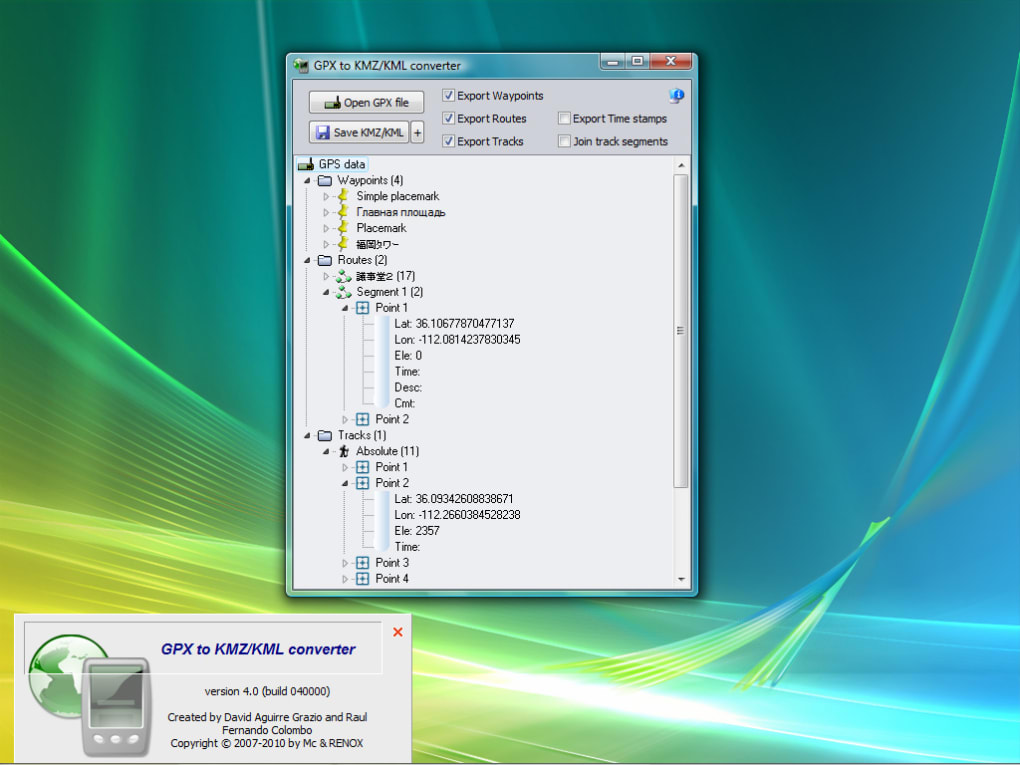
GPX (GPS Exchange Format): GPX is an XML-based format designed for the exchange of GPS data between various devices and applications. It’s widely used by GPS receivers, mapping software, and fitness trackers to store waypoints, routes, and tracks. GPX files contain information such as latitude, longitude, elevation, timestamps, and descriptive metadata associated with geographic locations. Its open standard nature ensures compatibility across different platforms and programs. However, it lacks the visual capabilities and extensive features offered by KML and KMZ.
KML (Keyhole Markup Language): KML is another XML-based format, but it’s specifically designed for use with Google Earth and other Google Maps applications. Unlike GPX, KML includes more advanced features for visualizing geographic data, allowing for the creation of sophisticated maps, including the addition of placemarks, 3D models, images, and more complex geographical annotations. It offers a richer, more visually expressive way to present spatial information. This is especially useful for creating maps showcasing detailed information beyond basic location data, such as adding images or descriptions to specific locations.
KMZ (Compressed KML): KMZ is simply a zipped version of a KML file. It bundles the KML file along with any associated image files, 3D models, or other resources into a single compressed archive. This makes KMZ files more efficient for storage and transmission, particularly when dealing with large datasets that include extensive imagery or 3D models. This compression helps reduce file size and transmission time significantly.
The Need for GPX to KMZ/KML Conversion
The need to convert GPX files to KML or KMZ often arises when you want to utilize your GPS data within applications that don’t directly support GPX. While many programs support GPX, the more extensive capabilities of KML and its compatibility with Google Earth make it the preferred choice for visualizing and sharing detailed geographical data.
Specifically, here are some common scenarios where conversion is necessary:
-
Google Earth Integration: Google Earth is a powerful tool for visualizing geographic data, but it primarily utilizes KML/KMZ formats. If you have GPS data in GPX format and wish to view it in Google Earth, you’ll need to convert it first. This allows for a rich visualization of your GPS tracks, waypoints, and routes within Google Earth’s 3D environment.
-
Sharing Data: Sharing GPX files can sometimes prove difficult due to limited compatibility across various platforms. Converting to KML or KMZ ensures better compatibility and ease of sharing with others, particularly when working with individuals who primarily utilize Google Earth or other KML-compatible software.
-
Enhanced Visualization: KML provides richer visualization options compared to GPX. This allows users to incorporate additional layers of information, imagery, descriptions, and visual cues that enrich the presentation of your GPS data, enabling a more engaging and informative experience.
-
Specific Software Requirements: Certain mapping or GIS applications may require KML or KMZ files as input. If your data is in GPX format, converting it to the required format is a prerequisite for utilizing those specific applications.
Converting GPX to KMZ/KML: A Step-by-Step Guide
The process of converting a GPX file to KML or KMZ is generally straightforward. While several software options exist, the core steps are similar across most converters. Here’s a generalized approach:
-
Obtain a GPX to KML/KMZ Converter: Numerous free and commercial software applications are available for this task. Research and choose a converter that suits your needs and operating system. Some converters offer additional features like batch processing or data editing capabilities.
-
Import the GPX File: Launch your chosen converter and import the GPX file you wish to convert. Most converters provide a simple file browsing interface to locate and select your GPX file.
-
Select Output Format (KML or KMZ): Specify whether you want the output file to be in KML or KMZ format. The choice depends on your needs; KMZ is preferable if you’re concerned about file size or need to include additional resources.
-
Customize Conversion Settings (Optional): Some converters allow for customization of conversion settings, such as selecting which data elements (waypoints, routes, tracks) to include in the output file. You might also be able to adjust the level of detail or add metadata to the converted file.
-
Start the Conversion: Once you’ve configured the settings, initiate the conversion process. The conversion time will depend on the size of your GPX file and the processing power of your computer.
-
Save the Output File: Once the conversion is complete, save the output KML or KMZ file to your desired location. The file will then be ready for use in KML/KMZ-compatible applications such as Google Earth.
Alternative Software for GPX to KMZ/KML Conversion
While dedicated GPX to KML/KMZ converters exist, several other tools can perform this conversion, often as part of their broader functionality.
-
Online Converters: Numerous free online converters are available. These web-based tools eliminate the need for software installation, providing a convenient solution for occasional conversions. However, they may have limitations regarding file size or features compared to dedicated software.
-
GPS Software: Many GPS software applications, designed for managing and analyzing GPS data, include built-in conversion capabilities. These programs offer a comprehensive solution, allowing you to manage your GPS data, perform conversions, and visualize your tracks and waypoints within the application itself.
-
GIS Software: Geographic Information System (GIS) software often supports various geographic data formats, including GPX, KML, and KMZ. These powerful tools allow for advanced spatial analysis and data manipulation, making them suitable for more complex tasks beyond simple conversion. However, GIS software tends to be more complex and may require a steeper learning curve than simpler converters.
Choosing the appropriate tool depends on your specific needs and technical expertise. For simple, occasional conversions, an online converter might suffice. For more frequent conversions or advanced features, a dedicated converter or integration within GPS or GIS software may be more beneficial. The decision hinges on the frequency of conversion, desired level of customization, and technical proficiency. A simple converter might suffice for infrequent users, while GIS software is ideal for advanced users needing extensive data analysis and manipulation capabilities.
File Information
- License: “Trial version”
- Version: “5.3”
- Latest update: “April 1, 2016”
- Platform: “Windows”
- OS: “Windows 8”
- Language: “English”
- Downloads: “2.2K”
- Size: “2.87 MB”


