
Greasemonkey, a once-ubiquitous Firefox extension, revolutionized the way users interacted with websites. It empowered individuals to modify the appearance and functionality of webpages using custom-written scripts, offering a level of control previously unimaginable. While its prominence has waned with the rise of alternative methods and browser integrations, understanding its impact and functionality remains relevant, particularly for those interested in web development and browser extensions. This article delves into the world of Greasemonkey, exploring its capabilities, limitations, and legacy.
Greasemonkey: The Essence of User Scripting
At its core, Greasemonkey wasn’t a standalone application but a Firefox add-on. Its primary function was to enable the execution of user scripts within the Firefox browser environment. These scripts, written typically in JavaScript, allowed users to manipulate various aspects of a webpage, ranging from minor cosmetic adjustments to significant functional changes. The extension itself was minimalistic, providing only a simple interface to manage and install user-created or downloaded scripts.
Upon installation, a small monkey icon appeared in the Firefox toolbar, serving as the access point for Greasemonkey’s functionality. This icon allowed users to browse installed scripts, add new ones, and manage their execution. The lack of extensive configuration options within the extension itself underscored its reliance on the external scripts for customization.
The Power of User Scripts: Transforming the Web Experience
The real power of Greasemonkey resided in the vast repository of user-created scripts available online. Websites like Userscripts (now defunct but archived in various locations) served as central hubs for sharing these scripts, offering solutions for everything from ad blocking and content filtering to enhancing website usability and adding new features. The versatility of user scripts was remarkable:
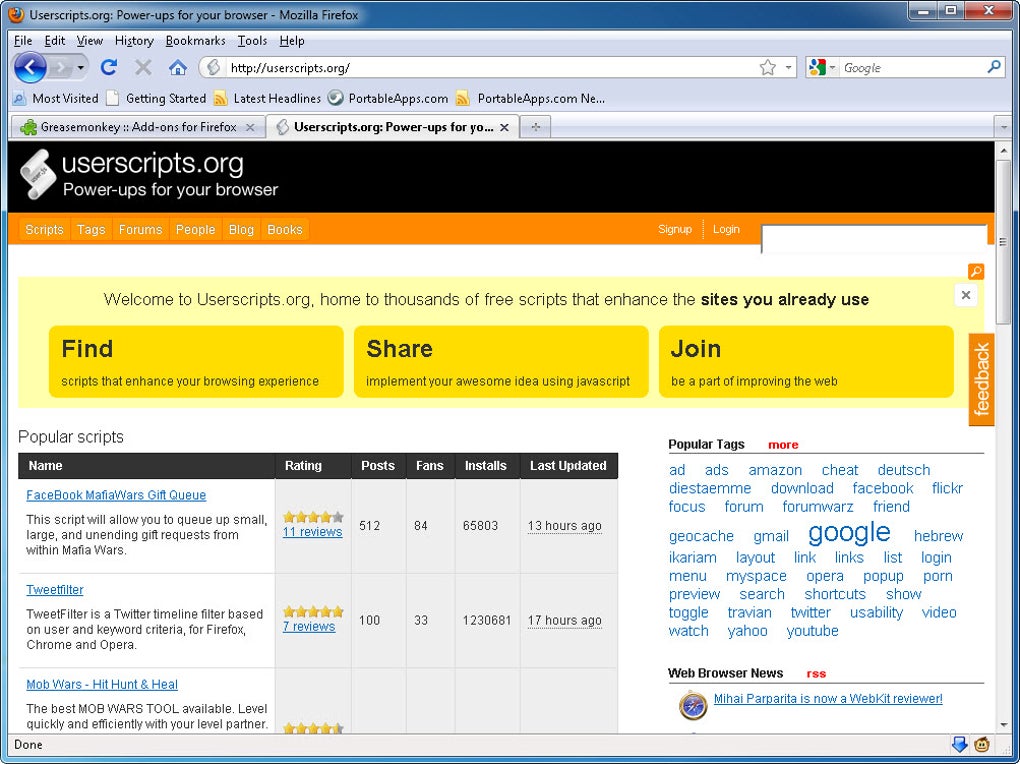
- Ad Blocking: Many scripts focused on removing intrusive advertisements from websites, providing a cleaner browsing experience.
- Content Filtering: Users could customize the content displayed on a page, hiding unwanted elements or highlighting specific information.
- Usability Enhancements: Scripts could improve the layout, navigation, or functionality of websites, making them more user-friendly.
- Feature Additions: Scripts could introduce entirely new features to websites, expanding their capabilities beyond their original design.
- Data Extraction and Manipulation: Advanced scripts could extract data from websites and process it in various ways, automating tasks or generating reports.
The possibilities were limited only by the user’s imagination and coding skills. The widespread adoption of Greasemonkey reflected the growing desire for personalization and control over the online experience. Users weren’t just passive consumers of web content; they became active participants, shaping their online environment to their preferences.
Installing and Managing Greasemonkey Scripts: A User’s Perspective
Installing and managing Greasemonkey scripts was generally straightforward. Once the extension was installed, users could access a menu to install scripts from various sources. Many scripts were readily available through online repositories, often with clear instructions on installation and usage. The process typically involved either directly installing a script file (.user.js) or using the extension’s built-in functionality to install from a web address.
Managing installed scripts was equally simple. Users could enable or disable individual scripts as needed, controlling which customizations were active on a given website. Greasemonkey handled the complexities of script execution and interaction with the webpage, allowing users to focus on the desired customizations. However, the lack of a built-in script repository within Greasemonkey meant users had to rely on external resources, which could pose some risks (discussed in the next section).
Limitations and Security Concerns: The Dark Side of Greasemonkey
Despite its powerful capabilities, Greasemonkey also had limitations and potential security risks:
- Security Risks: The primary security concern revolved around the source of user scripts. Since scripts were often sourced from third-party repositories, there was a risk of installing malicious code disguised as a helpful customization. This risk was heightened by the fact that script verification was not integrated into the Greasemonkey extension itself. Users had to rely on the reputation of the script author and the repository from which they downloaded the script.
- Browser Compatibility: Greasemonkey was primarily designed for Firefox, limiting its usability to users of that specific browser. While alternatives emerged for other browsers (like Tampermonkey for Chrome and others), the original Greasemonkey experience was inherently tied to the Firefox ecosystem.
- Technical Expertise: Creating custom scripts required a working knowledge of JavaScript, a programming language not accessible to all users. This limitation restricted the development of personalized solutions to those with coding skills.
- Maintenance and Updates: As websites evolved, scripts often required updates to maintain compatibility. This reliance on script maintainers for timely updates could lead to broken or outdated customizations.
These limitations, especially the security concerns, contributed to the decline of Greasemonkey’s popularity as more integrated and secure browser extension management systems became prevalent.
The Legacy of Greasemonkey: Influence on Browser Extensions and User Scripting
Despite its decline in popularity, Greasemonkey’s influence on the development of browser extensions and user scripting remains significant. Its pioneering role in enabling user-level customization of websites paved the way for the modern landscape of browser extensions and web development practices. The concept of user scripts, introduced and popularized by Greasemonkey, continues to exist in various forms, integrated into more modern browser extensions and development frameworks.
The legacy of Greasemonkey is twofold:
- Inspiration for Modern Extensions: Modern browser extension architectures, with their robust security measures and standardized development processes, owe a debt to the experimentation and innovation that Greasemonkey fostered. The ability to extend browser functionality through user-written scripts continues to be a cornerstone of web development.
- Impact on Web Development Practices: The ideas and techniques employed in Greasemonkey scripts contributed to advancements in web scraping, data extraction, and user interface customization. Many modern web development practices draw on the principles pioneered by the Greasemonkey community.
In conclusion, while Greasemonkey might not be at the forefront of browser extension technology, its impact remains undeniable. Its legacy as a tool that empowered users to actively shape their online experience, along with its contributions to the development of modern web technologies, firmly establishes its place in the history of the internet. Even today, understanding its core functionality provides valuable insights into the power and complexities of browser extensions and the ever-evolving landscape of user interaction with the web.
File Information
- License: “Free”
- Latest update: “July 21, 2020”
- Platform: “Windows”
- OS: “Windows XP”
- Language: “English”
- Downloads: “319.5K”
- Size: “151.30 KB”


