
GridMove is a free Windows utility designed to significantly improve desktop organization and workflow, particularly for users with larger monitors or multiple displays. It achieves this by overlaying a customizable grid onto the desktop, allowing users to easily snap and arrange windows into predefined zones. This eliminates the frustration of constantly resizing and repositioning windows manually, leading to a more efficient and visually appealing workspace. Unlike macOS’s Spaces feature, which offers virtual desktops, GridMove operates within the single desktop environment, providing a streamlined approach to window management.
Streamlining Window Management with a Visual Grid
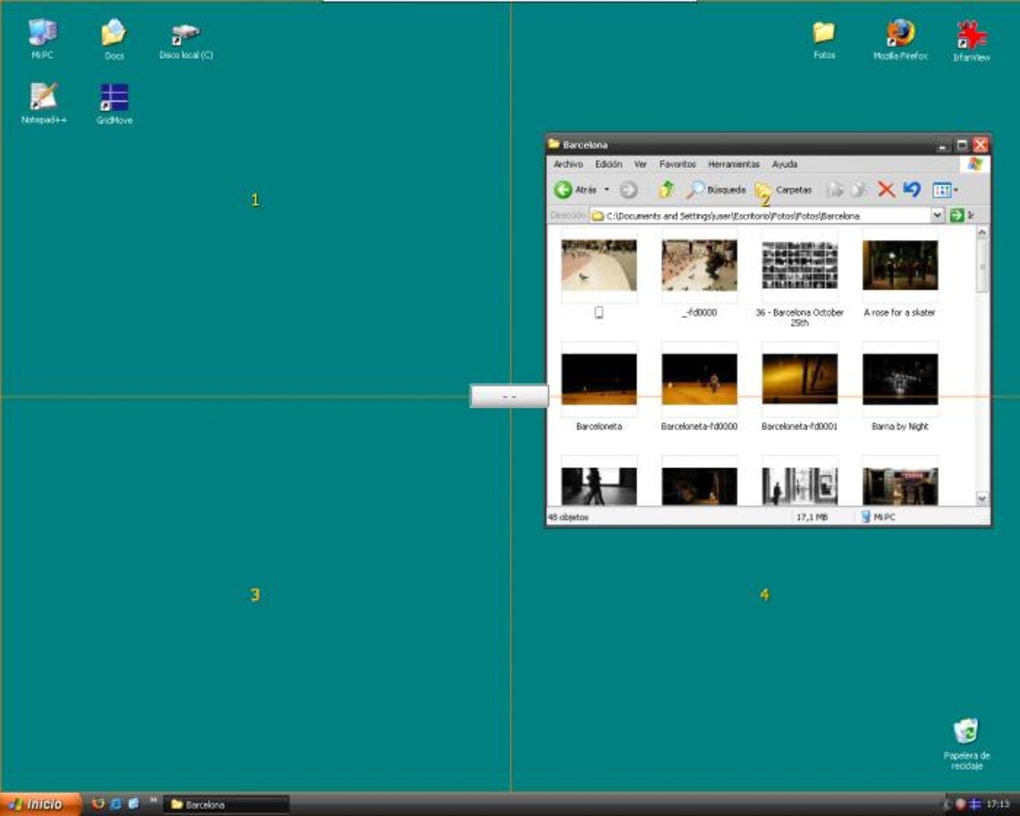
The core functionality of GridMove revolves around its visual grid system. This grid, which is overlaid on the desktop but doesn’t interfere with applications, divides the screen into multiple sections. Users can then drag and drop windows onto these grid sections, instantly snapping them into place and resizing them to fit. The number of grid sections is customizable, allowing users to tailor the layout to their specific needs and screen resolution. This simple drag-and-drop functionality makes arranging windows intuitive and quick, eliminating the need for manual resizing and meticulous positioning.
This grid-based approach offers several key advantages over traditional window management techniques. Firstly, it promotes a consistent and organized desktop layout. Windows are no longer scattered haphazardly, leading to a cleaner and less cluttered workspace. This is especially beneficial for users who regularly work with numerous applications simultaneously. Secondly, GridMove maximizes screen real estate. By neatly arranging windows within the grid, users can efficiently utilize their available screen space, preventing windows from overlapping and obscuring each other. This allows for a more immersive and focused work experience.
Furthermore, GridMove offers additional features beyond simple window snapping. Users can cascade or mosaic windows, arranging them in an overlapping or tiled fashion, respectively. This provides flexibility in how users choose to organize their applications depending on their immediate needs. The “always on top” function ensures critical windows remain visible, preventing them from being obscured by other applications. This is particularly useful for applications such as chat clients or reference materials that require constant visibility.
Advantages and Disadvantages of Using GridMove
GridMove shines in its simplicity and effectiveness for users working with larger screens. The visual grid acts as a powerful organizational tool, providing a clear and structured framework for window management. This is particularly beneficial for users who regularly juggle multiple applications, such as programmers, graphic designers, or researchers. By eliminating the need for constant manual window adjustments, GridMove frees up cognitive resources, allowing users to concentrate on their work rather than their workspace. The added features, such as cascading and mosaicing, provide even greater flexibility and customization options. The ability to define different grid layouts for different tasks or workflows adds to its practicality.
However, GridMove is not without its limitations. One of the primary drawbacks is its lack of practicality for users working on smaller screens, such as laptops. The grid system might become overly restrictive or even cumbersome on smaller displays, potentially reducing screen real estate rather than maximizing it. On laptops, the inherent portability and frequent screen size adjustments might also render the fixed grid system less beneficial. In such scenarios, the inherent flexibility of traditional window management might be preferable.
Another potential limitation is the fixed number of grid sections. While customizable, users may find that the available grid configurations do not perfectly suit their specific workflow requirements. This lack of granularity might be a drawback for those who require a highly customized window arrangement. However, for the majority of users, the available options provide sufficient flexibility to create a well-organized desktop environment.
Comparing GridMove to Alternative Window Managers
GridMove belongs to a category of window management utilities designed to enhance productivity by providing more advanced window arrangement options than those offered by default in Windows. Several alternatives exist, each with its own strengths and weaknesses. Some popular alternatives include WinSplit Revolution, AutoSizer, and Sizer.
WinSplit Revolution offers a more dynamic approach to window management, allowing for precise resizing and positioning using keyboard shortcuts. This is ideal for users who prefer a keyboard-centric workflow. However, its learning curve can be steeper than GridMove’s intuitive drag-and-drop interface. AutoSizer focuses on automatic window resizing, optimizing the size of windows to best fit the available screen space. While efficient for maximizing screen real estate, it lacks the grid-based organization offered by GridMove. Sizer provides similar functionality to AutoSizer but with more customization options. However, similar to AutoSizer, it lacks the visual organization provided by a grid.
The choice between GridMove and these alternatives often depends on individual preferences and workflow requirements. Users who prioritize a visual, grid-based organizational system might find GridMove more appealing. Users who prefer keyboard shortcuts and more precise window control might find WinSplit Revolution more suitable. Those prioritizing automatic resizing might opt for AutoSizer or Sizer.
GridMove: A Practical Solution for Organized Desktops
GridMove offers a simple yet effective solution for managing windows on larger screens. Its intuitive drag-and-drop interface, customizable grid system, and additional features like cascading and mosaicing, provide a powerful tool for enhancing desktop organization and workflow. While not ideal for smaller screens or users who demand highly granular control, GridMove serves as a valuable asset for those seeking a straightforward and visually appealing method for managing multiple applications. Its straightforward design and ease of use make it an accessible tool for a wide range of users seeking to improve their desktop efficiency. By providing a structured and organized workspace, GridMove contributes significantly to improved focus and productivity. The consistent and visually appealing desktop layout it facilitates also enhances the overall user experience. For many users working with multiple applications and larger screens, GridMove proves a significant step forward in desktop management, offering a notable improvement over traditional methods.
File Information
- License: “Free”
- Version: “1.19.57”
- Latest update: “July 20, 2021”
- Platform: “Windows”
- OS: “Windows XP”
- Language: “English”
- Downloads: “18.8K”
- Size: “758.08 KB”


