
Grindstone is a free, powerful time management application designed to help users efficiently organize and track their daily tasks. In today’s fast-paced world, juggling multiple responsibilities can often lead to feeling overwhelmed and unproductive. Grindstone offers a user-friendly interface and a robust feature set to combat this common issue, providing a comprehensive solution for individuals and teams seeking improved time management. This detailed review explores Grindstone’s functionality, highlighting its strengths and weaknesses, and comparing it to similar applications.
Streamlining Task Management: A User-Friendly Approach
Grindstone’s intuitive interface immediately sets it apart. The main window is cleverly divided into two distinct panels, each serving a crucial function in the task management process. The upper panel acts as the central hub for task creation and organization. Users can easily add tasks, categorizing them into customizable columns to reflect personal workflow preferences. This flexible column structure allows for personalized organization based on project, priority, or any other relevant criteria. The system supports the addition of detailed information for each task, including due dates and times, facilitating effective scheduling and prioritization.
The lower panel dynamically displays the scheduled tasks, providing a clear visual representation of the day’s agenda. This section is not merely a static list; it’s a dynamic interface that updates as tasks are completed or rescheduled. This visual representation of upcoming tasks and deadlines is critical for maintaining focus and preventing task slippage. The seamless integration of task creation and scheduling in separate yet connected panels makes Grindstone exceptionally user-friendly, even for those with limited experience with time management software.
The Power of Precise Time Tracking: Timers and Beyond
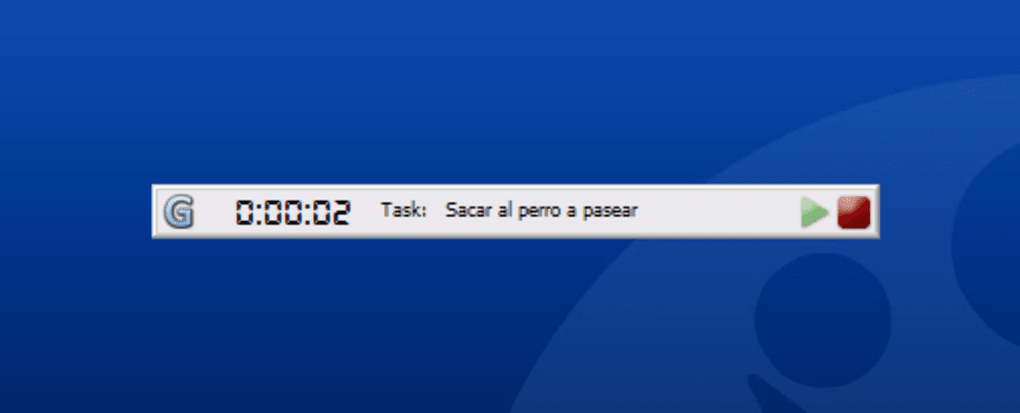
Grindstone’s time-tracking capabilities are a cornerstone of its effectiveness. A prominently displayed timer constantly monitors the time spent on each active task, providing invaluable data for productivity analysis and improvement. This detailed tracking goes beyond simply recording time spent; it also allows for pausing and resuming sessions, acknowledging the realities of interruptions and breaks in the workday. The application intelligently prompts users to input the duration of breaks taken away from the computer, ensuring comprehensive and accurate time accounting.
This level of detail is crucial for accurately assessing time allocation and identifying areas where time is being spent inefficiently. The inclusion of a stopwatch functionality further enhances the time-tracking capabilities, allowing for more granular control and measurement of specific task components. The ability to meticulously track time allows users to develop a clearer understanding of their working patterns and identify potential bottlenecks in their workflow. This self-awareness is a powerful tool in the pursuit of improved productivity.
Advanced Features: Autopilot Mode, Social Integration, and Portability
Grindstone doesn’t stop at basic task management and time tracking. It incorporates several advanced features that significantly enhance its overall utility. The autopilot mode is a particularly innovative function, automatically detecting the applications currently in use and recording this information within the overall statistics. This passive monitoring provides valuable insights into how time is spent across various applications, helping users identify potential distractions or time-wasting habits.
The integration with Twitter allows users to share their progress and accomplishments, providing a sense of accountability and potentially fostering collaboration. This social integration is a valuable tool for those who benefit from external motivation and public accountability. Finally, the option to install Grindstone on a USB drive ensures task management remains consistent and accessible, regardless of location or device. This portability is highly beneficial for individuals who frequently work from multiple locations.
Beyond the Basics: Reports, Wizards, and Methodological Support
Grindstone’s reporting capabilities offer a deep dive into productivity trends, allowing users to analyze their work habits over time. These reports provide more than just a simple summary of time spent on tasks. They offer the potential to uncover patterns, identify areas for improvement, and track progress towards long-term goals. This data-driven approach to self-improvement makes Grindstone more than just a scheduling tool; it’s a productivity analysis platform.
The inclusion of a wizard simplifies the process of installing the application on a USB drive, ensuring seamless portability and access to tasks across various computers. This intuitive setup process removes a common barrier to using such applications. Additionally, Grindstone’s inherent flexibility allows for adaptation to various time management methodologies, such as the Pomodoro Technique, through its timer and task organization features.
Comparison to Alternative Applications: Strengths and Weaknesses
While Grindstone offers a comprehensive suite of features, it’s essential to compare it with other prominent time management applications available on the market. Many alternative applications, such as OpenProj, GanttPV, and MindManager, focus on project management and often lack the granular time-tracking capabilities of Grindstone. While these applications are excellent for managing complex projects with multiple dependencies, they might fall short in providing the detailed insight into individual task duration that Grindstone excels at.
Conversely, applications focused solely on time-tracking might lack the robust task management features of Grindstone. Grindstone’s strength lies in its balanced approach, seamlessly combining powerful task management with precise time-tracking capabilities. However, one potential weakness is the relatively small size of the timer display on some screens, which might limit readability for certain users. This minor issue is easily outweighed by the numerous benefits the application provides.
Conclusion: A Powerful Tool for Productivity Enhancement
Grindstone emerges as a valuable asset for individuals seeking to enhance their productivity and gain greater control over their time. Its intuitive interface, powerful features, and flexible customization options make it an exceptionally versatile tool. While minor drawbacks, such as the timer display size on certain screens, exist, they are insignificant compared to the comprehensive functionality and overall user experience. The integration of task management, precise time-tracking, and advanced features such as autopilot mode and Twitter integration makes Grindstone a truly comprehensive solution for effective time management.
For those seeking to improve their organizational skills, increase productivity, and gain a deeper understanding of their work habits, Grindstone offers a robust and user-friendly platform to achieve these goals. Its capacity for insightful reporting and adaptation to various time management methodologies makes it a valuable tool for both personal and professional use. The accessibility of the free version and the ease of installation, including its portable USB option, further enhance its appeal and make it an ideal choice for users of all levels of technical expertise.
File Information
- License: “Free”
- Version: “2.2.5598”
- Latest update: “February 22, 2023”
- Platform: “Windows”
- OS: “Windows XP”
- Language: “English”
- Downloads: “11.3K”
- Size: “5.28 MB”


