
In the dynamic world of music production, where technology continually reshapes creative workflows, software solutions have become indispensable tools for musicians. Among these, Guitar Rig stands out as a pioneering and robust application designed to revolutionize how guitarists interact with their instruments. Developed by Native Instruments, Guitar Rig transforms an ordinary computer into an all-in-one virtual guitar amplifier and effects processor, offering an expansive sonic palette previously only achievable with rooms full of expensive, heavy, and often temperamental hardware.
For countless musicians, particularly those operating on a budget or seeking a flexible, portable setup, Guitar Rig represents an ideal management application for their sound. It bridges the gap between the guitar and the digital realm, allowing players to connect their instruments directly to their computers. Once connected, Guitar Rig takes over, amplifying and managing the guitar’s sound with a sophistication that mimics a professional studio environment. This simulation extends to a vast array of classic and modern amplifiers, speaker cabinets, microphones, and a seemingly endless selection of effects, all accessible through an intuitive drag-and-drop interface. While purists might argue that the tactile response and subtle nuances of a physical studio are irreplaceable, the overwhelming majority of users report that Guitar Rig’s reproduction quality is remarkably good for a software application, offering an impressive blend of convenience, versatility, and sonic fidelity.
Transform Your PC into a Powerhouse Guitar Studio
Guitar Rig is more than just a software; it’s a complete ecosystem for guitar processing. At its core, it embodies the philosophy of digital emulation, meticulously recreating the characteristics of sought-after analog gear within the digital domain. This approach democratizes access to professional-grade tones, making them available to anyone with a computer and an audio interface.
The Core Concept: Amplification and Effects Simulation
The fundamental principle behind Guitar Rig is straightforward yet powerful. When a guitar is plugged into a computer, typically via an audio interface (which acts as an analog-to-digital converter), the raw instrument signal enters the digital environment. Guitar Rig then processes this signal. The computer’s soundcard routes the processed signal to your speakers or headphones, allowing you to hear the amplified and effected sound in real-time.
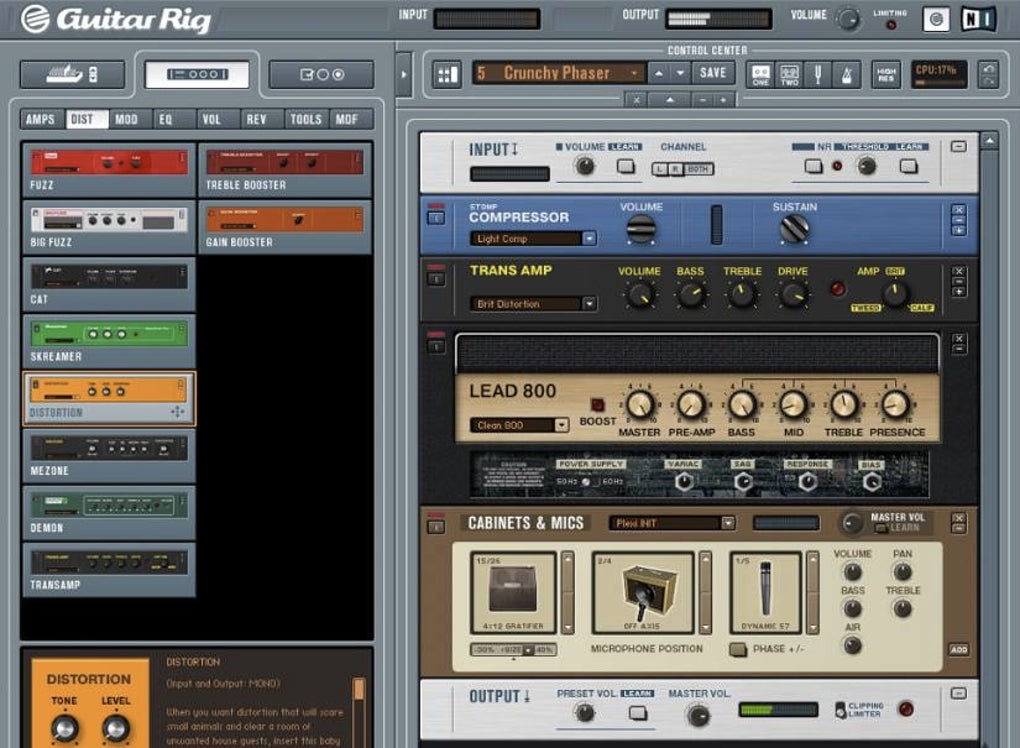
What makes Guitar Rig truly exceptional is its ability to simulate an extensive series of classic and contemporary amps, cabinets, microphones, and effects. This simulation is not merely an approximation; it involves complex algorithms that model the circuitry, component interactions, and sonic characteristics of the original hardware. From the warm, glassy cleans of a vintage Fender to the gritty, high-gain crunch of a Marshall stack, or the distinctive roar of a Mesa Boogie, Guitar Rig provides a digital clone of these iconic tones. The software also emulates various speaker cabinets, allowing users to pair different amps with different speakers – a crucial element in shaping a guitar’s final sound. Furthermore, it simulates microphone placement and type, adding another layer of realism to the virtual signal chain. This entire process is managed via a highly visual and interactive drag-and-drop interface, making complex routing and signal manipulation surprisingly accessible.
A Vast Arsenal of Tones: Amps, Cabs, and Effects
One of Guitar Rig’s most compelling features is its expansive library of virtual gear. It boasts a “huge selection of effects” that cover every imaginable sonic manipulation. This includes essential stompbox effects like overdrives, distortions, fuzzes, wahs, compressors, equalizers, and noise gates. Beyond these, Guitar Rig offers a rich palette of modulation effects such as choruses, flangers, phasers, and tremolos, alongside time-based effects like delays, reverbs, and echoes. The possibilities for sound design are virtually limitless, enabling guitarists to craft unique tones for any genre or style.
Beyond standard guitar effects, Guitar Rig caters to a broader audience of stringed instrument players. It offers robust support not only for lead and rhythm guitar but also for bass guitar, providing dedicated bass amps and effects that capture the low-end thunder and punch crucial for a solid rhythm section. Moreover, the inclusion of microphone support means that vocalists or acoustic instrument players can also benefit from Guitar Rig’s effects processing capabilities, allowing them to apply studio-quality reverbs, delays, and other effects to their signals. Recent updates have further enhanced its capabilities, introducing new elements like the “Cool Plex” amp – a nod to classic British rock tones – and a redesigned Master Effects section, which streamlines post-processing and overall mix refinement. This continuous evolution ensures that Guitar Rig remains at the forefront of digital guitar processing, consistently offering fresh sounds and improved functionality to its users.
Intuitive Interface and Live Performance Readiness
The user interface of Guitar Rig is a testament to thoughtful design. It is “extremely well laid out,” a crucial factor for a piece of software that can manage such a vast array of complex audio processing elements. Even for those new to the intricacies of guitar amps and effects, navigating the application doesn’t take long. The drag-and-drop functionality allows users to easily assemble and rearrange their virtual signal chains, placing amps, cabinets, and effects in any order they desire, just as they would with physical stompboxes and amplifiers. This visual representation of the signal flow makes experimentation enjoyable and intuitive, encouraging users to explore new tonal territories without the hassle of rewiring physical cables.
For musicians who intend to use Guitar Rig not just for studio work but also for live performances, the software offers a highly practical “Live View.” This mode streamlines the interface, displaying only the “most essential readouts and level monitors” that a performer needs to keep an eye on during a gig. This minimalist, focused view minimizes distractions and makes it easier to monitor critical parameters like input/output levels, tuner status, and patch changes, ensuring a smooth and controlled performance. While it may not fully replicate the physical presence of a dedicated professional music studio, Guitar Rig’s combination of powerful processing and a performance-oriented interface makes it an “impressive effort” to deliver a comprehensive, adaptable, and highly capable solution for guitarists across various scenarios.
Understanding Guitar Rig’s Strengths and Limitations
Like any sophisticated tool, Guitar Rig comes with its own set of advantages and potential drawbacks. A balanced understanding of these aspects is crucial for users to maximize its potential and manage expectations effectively.
The Pros: What Makes Guitar Rig Shine
Guitar Rig’s strengths are numerous and directly address many of the challenges faced by modern guitarists. Foremost among these is its incredible versatility. The “huge selection of effects” alone makes it a formidable creative powerhouse, allowing guitarists to sculpt any sound they can imagine, from vintage blues to modern metal, experimental soundscapes to pristine clean tones. This versatility is further enhanced by its support for “lead and bass guitar plus a mic,” making it a multi-instrumental processing hub for a small home studio. No longer do musicians need separate amps and pedalboards for different instruments; Guitar Rig can handle them all, switching seamlessly between configurations.
The “well-designed interface” significantly lowers the barrier to entry for complex sound design. Its visual, drag-and-drop nature demystifies signal chains and effects routing, making it accessible even for beginners while offering enough depth for seasoned professionals to fine-tune every parameter. For musicians “working on a budget,” Guitar Rig is a game-changer. It offers access to hundreds of thousands of dollars worth of virtual gear for the cost of a single software license, eliminating the need to buy, maintain, and transport numerous physical amplifiers and effects pedals. This cost-effectiveness, combined with its portability (your entire rig is on your laptop), makes it an ideal solution for home recording, practice, and even live performance, especially when paired with a MIDI foot controller. The ability to record and mix different takes, often highlighted by users who “can spend hours playing with this” and find the “mix tape option sweet,” further solidifies its value as a complete creative environment.
Realistic Expectations: Addressing the Cons
Despite its many advantages, Guitar Rig is not without its limitations, and it’s important to approach it with realistic expectations. The primary point of contention, often noted by both professional reviews and user feedback, is that “guitar reproduction quality [is] not perfect.” While “most users report that reproduction is very good for a simple computer application,” it’s crucial to acknowledge that a software simulation, no matter how advanced, might not fully capture the elusive “feel,” dynamic response, and subtle harmonic complexity of a finely-tuned, high-wattage tube amplifier pushing air through a physical speaker cabinet. The immediacy and tactile feedback of analog gear, particularly when played at high volumes, is something digital emulations continuously strive to match but may never entirely replicate for all discerning ears. This is less a fault of Guitar Rig and more an inherent characteristic of digital versus analog processing.
Another practical consideration for live use is that “requires foot pedal for best results.” While the Live View provides essential monitoring, changing presets, bypassing effects, or engaging a wah pedal in real-time during a performance is cumbersome, if not impossible, without a dedicated MIDI foot controller. This adds an extra peripheral cost and setup complexity, which can be a minor hurdle for some users.
User reviews also shed light on potential setup frustrations. Some users have reported issues such as “heard nothing even though it appeared to be running” or “zero sound” despite setting the “recording to the right microphone input.” This highlights that while the software itself is well-designed, proper audio interface configuration, driver installation, and understanding input/output routing within your operating system and audio software are prerequisites for a smooth experience. The initial impression of Guitar Rig being “hyped as free download, not free” also created some disappointment among users who discovered it was a trial version rather than a fully free application, leading to perceived “misleading advertising.” Addressing these potential hurdles upfront with proper user guidance and clear marketing about its trial nature can greatly enhance the initial user experience.
Getting Started with Guitar Rig: Setup and Experience
Embarking on your journey with Guitar Rig is an exciting prospect, opening up a world of sonic experimentation. However, a smooth start depends on understanding the basic setup and how to navigate its powerful features.
Basic Setup and Connectivity
Before you can dive into crafting your perfect tone, you’ll need to establish the connection between your guitar and your computer. The fundamental requirement is an audio interface. This external hardware device connects to your computer (usually via USB or Thunderbolt) and provides high-quality audio inputs and outputs. You’ll plug your guitar cable directly into an instrument input on the audio interface. The interface then converts the analog signal from your guitar into a digital signal that your computer can process. Conversely, it converts the digital audio from Guitar Rig back into an analog signal for your headphones or studio monitors.
Once your audio interface is connected and its drivers are properly installed on your Windows machine, you’ll need to configure Guitar Rig to recognize it. Within Guitar Rig’s audio settings, you’ll select your audio interface as the primary input and output device. This step is critical, as incorrect settings can lead to the frustrating “zero sound” issues reported by some users. Ensure that the input level from your guitar is healthy but not clipping (distorting) and that the output is routed to your desired listening device. Taking the time to properly set up your audio drivers and interface within Guitar Rig is the key to unlocking its full potential and avoiding common pitfalls. While the software itself is robust, it relies on a correctly configured hardware chain to function optimally.
Navigating the Interface and Unleashing Creativity
Upon launching Guitar Rig, you’ll be greeted by its “extremely well laid out” graphical interface. For newcomers, the visual representation of a guitar effects rack is immediately intuitive. The main window typically displays a virtual rack where you can “drag and drop” various components – amplifiers, speaker cabinets, microphones, and individual effects pedals (known as “components”).
Starting with a blank canvas, you can begin by dragging an amp head into the rack, then pairing it with a cabinet. From there, you can add effects before or after the amp, experimenting with the signal flow. Want a screaming overdrive into a vintage British amp? Drag in a “Distortion” component, then your chosen “Amplifier” model. Need some spatial depth? Add a “Reverb” or “Delay” at the end of your chain. Each component comes with its own set of virtual knobs and switches, allowing for precise parameter adjustments, just like their physical counterparts. The visual feedback is instant, making it easy to understand how each component affects your sound.
Guitar Rig also includes a “Free Guitar Tuner” built right into the software, making it convenient to get your instrument in tune before playing. Beyond live processing, the application offers capabilities for recording and mixing. As one enthusiastic reviewer stated, “The mix tape option is sweet… So many options and sounds…. just brilliant! The mix tape, tuning, recording can go on and on but I have to get back to playing my guitar on Guitar Rig. Thanks for this!” This highlights the integrated nature of the software, enabling users to not only experiment with sounds but also capture their performances and ideas directly within the same environment. The joy of Guitar Rig lies in this endless experimentation, allowing you to tweak, combine, and discover new tones that inspire your playing and creativity.
The PhanMemFree Perspective: User Reviews and Software Information
Understanding a software’s real-world impact often comes down to the experiences of its users. At PhanMemFree, we aggregate and analyze user feedback to provide a comprehensive view of applications like Guitar Rig. While opinions can vary widely, a consistent picture emerges regarding its capabilities and common challenges.
PhanMemFree users have provided a range of insights into their experiences with Guitar Rig. On the positive side, many users, like one who reviewed it on March 11, 2015, express immense satisfaction, stating they “can spend hours playing with this” and find the “mix tape option is sweet.” Such feedback underscores the software’s deep engagement factor and its ability to inspire prolonged creative sessions. The sheer volume of “options and sounds” is frequently praised, often described as “just brilliant!” highlighting the vast sonic versatility Guitar Rig offers. The integrated features like “recording” and “tuning” are also significant draws for users who appreciate an all-in-one solution. Another user from January 8, 2013, noted that it’s “good to learn to play a guitar,” drawing parallels between the program and “pedal effect” units, which speaks to its utility for both learning and practical application.
However, not all experiences have been seamless. Some reviews highlight significant frustrations, particularly concerning initial setup and perceived discrepancies between advertising and actual product features. A reviewer from January 28, 2018, expressed strong dissatisfaction, noting it was “Hyped as free download, not free.” This user encountered a lack of instructions, leading to difficulties in getting the demo to produce sound and even close the program, ultimately calling the advertising “misleading.” Another user on January 25, 2015, simply stated, “This doesn’t work, don’t waste your time,” detailing issues with setting “the recording to the right microphone input” and getting “zero sound.” These negative experiences underscore the importance of clear communication about the trial version and the necessity of proper audio interface and driver configuration for the software to function correctly. While the software itself is highly capable, these reviews suggest that the onboarding process and user support for initial setup could be improved to prevent frustration.
Software Specifications:
- License: Trial version
- Version: 7.0.25.2.25.2.0 (as of reference)
- Latest Update: September 18, 2024 (as of reference)
- Platform: Windows (also available for Mac)
- OS: Windows 8 and later
- Language: English (and many other languages)
- Downloads: 227.1K (last month: 475, as of reference)
- Size: 584.19 MB
- Developer: Native Instruments
It’s important to clarify that Guitar Rig is distributed as a “Trial version.” This means users can download and test a functional version for a limited period or with restricted features before deciding to purchase the full license. While this is standard practice in software distribution, the initial perception of it being a fully “free download” by some users has historically led to confusion and disappointment, as reflected in several PhanMemFree user reviews. Potential users should be aware that the full, unrestricted experience requires a purchase.
Who Should Consider Guitar Rig?
Guitar Rig caters to a broad spectrum of musicians, each finding unique value in its robust feature set and flexible design. Its appeal lies in its ability to offer high-quality sound processing without the traditional costs and complexities associated with a physical studio or an extensive hardware rig.
1. Musicians on a Budget: This is arguably Guitar Rig’s most significant target audience. For aspiring guitarists, bedroom producers, or hobbyists, acquiring a collection of quality amplifiers, cabinets, and effects pedals can be prohibitively expensive. Guitar Rig provides a comprehensive, studio-grade virtual rig for a fraction of the cost, making professional tones accessible without breaking the bank. It allows experimentation with sounds that would otherwise be out of reach.
2. Home Studio Enthusiasts and Producers: For anyone setting up a home recording studio, Guitar Rig offers unparalleled convenience. Instead of needing multiple microphones, dedicated amp rooms, and the challenges of achieving a good mic’d amp sound, producers can simply plug in their guitar, dial in a tone within Guitar Rig, and record directly. This eliminates room acoustics issues, noise complaints, and the need for extensive soundproofing, streamlining the recording process and making it more efficient for demoing ideas or crafting full productions.
3. Experimenters and Tone Chasers: With its vast library of amps, cabs, and “huge selection of effects,” Guitar Rig is a playground for those who love to experiment with sound. The drag-and-drop interface encourages creative exploration, allowing users to build unconventional signal chains, blend different effects, and discover unique tones that might be impossible or impractical with physical hardware. It’s an ideal tool for sound designers and guitarists looking to push the boundaries of traditional guitar sounds.
4. Beginners Learning Guitar: While Guitar Rig itself is a professional-grade tool, its intuitive interface can be beneficial for learners. It provides a clean, clear way to understand how different effects work and how they influence the guitar’s tone. Paired with other learning tools (like Guitar Pro or TuxGuitar, which offer tablature editing and playback), Guitar Rig can help beginners connect the theory of effects to the practical sound, enhancing their learning experience. The integrated tuner is also a practical aid for those starting out.
5. Performing Musicians Seeking Portability and Flexibility: For gigging musicians, the prospect of carrying a heavy amp, multiple pedalboards, and complex wiring can be daunting. Guitar Rig, when run on a laptop and paired with a reliable audio interface and a MIDI foot controller, transforms into an incredibly portable and versatile live rig. Musicians can store hundreds of presets, switch between them instantly, and adapt their sound to various venues or songs with ease, all from a compact setup. While it “requires foot pedal for best results” in a live setting, the benefits of reduced load-in/load-out time and consistent tone across performances are significant.
In essence, Guitar Rig serves anyone who desires professional-quality guitar and bass tones with the flexibility, convenience, and cost-effectiveness that only software can provide. Whether for practice, recording, or live performance, it offers a compelling alternative to traditional hardware, making advanced sound shaping accessible to a wider audience of musicians.
Conclusion: Guitar Rig – A Digital Evolution for Guitarists
Guitar Rig, from Native Instruments, represents a significant leap in how guitarists can create, manage, and perform with their sound. It has firmly established itself as a leading software solution that effectively transforms a standard computer into a sophisticated virtual amplifier and effects processor. For musicians constrained by budget, space, or the sheer logistics of traditional hardware, Guitar Rig offers an empowering alternative, providing access to an astonishing array of tones and effects previously reserved for professional studios.
The software’s core strength lies in its ability to meticulously simulate classic amps, cabinets, microphones, and an extensive library of effects, all bundled within an “extremely well laid out” and intuitive drag-and-drop interface. This design choice democratizes complex signal chain routing, making it accessible even to those new to audio processing. Furthermore, its “Live View” feature highlights Native Instruments’ foresight in catering to the needs of performing musicians, ensuring essential information is at a glance during gigs. The continuous updates, including new amps like the “Cool Plex” and refined Master Effects, demonstrate a commitment to keeping the software fresh and relevant.
However, a realistic perspective acknowledges that while Guitar Rig’s “reproduction quality is very good for a simple computer application,” it may not fully replicate the intangible feel and response of a high-end analog rig for every discerning ear. Users should also be prepared for the necessity of a dedicated audio interface for optimal performance and understand that the readily available version is a “Trial version,” requiring a purchase for full, unrestricted use. Initial setup, particularly concerning audio drivers and input routing, can also present minor hurdles, as reflected in some PhanMemFree user reviews.
Despite these minor considerations, the overwhelming consensus, as evidenced by positive user feedback, underscores Guitar Rig’s value as a powerful, versatile, and highly creative tool. It allows users to “spend hours playing with this,” exploring countless “options and sounds,” and even offers robust recording capabilities. For aspiring musicians, home studio producers, and gigging guitarists seeking portability and flexibility, Guitar Rig remains an “impressive effort” and an indispensable component in the modern digital musician’s toolkit. It’s more than just software; it’s an accessible gateway to a world of endless sonic possibilities.
File Information
- License: “Trial version”
- Latest update: “September 18, 2024”
- Platform: “Windows”
- OS: “Windows 8”
- Language: “English”
- Downloads: “227.5K”
- Size: “584.19 MB”


