
Haali Media Splitter is a versatile and highly configurable DirectShow splitter and decoder designed for handling diverse media file formats. While lacking a graphical user interface (GUI), its command-line driven approach and extensive configuration options provide users with granular control over media processing. This detailed analysis explores the capabilities, strengths, limitations, and overall utility of Haali Media Splitter.
Understanding Haali Media Splitter’s Functionality
Haali Media Splitter distinguishes itself through its robust support for concatenated files, a feature often absent in simpler media splitters. This capability allows users to seamlessly process multiple files joined together as a single entity, eliminating the need for cumbersome individual processing. Beyond concatenated files, Haali Media Splitter offers broad compatibility with popular container formats such as Matroska (.mkv), MP4, and MPEG Transport Stream (.ts). This makes it a valuable tool for users working with various video and audio streams.
The core of Haali Media Splitter’s functionality rests on its DirectShow architecture. This integration allows it to seamlessly interact with other DirectShow components within the Windows ecosystem. This interoperability enhances its flexibility and allows for integration with a broader range of codecs and filters, further extending its processing capabilities.
While the absence of a GUI might seem limiting, it’s a deliberate design choice that contributes to Haali Media Splitter’s efficiency and speed. The lack of visual elements removes the overhead associated with rendering a user interface, leading to faster processing times and reduced resource consumption. Configuration is handled through text-based options, requiring a degree of technical knowledge but granting users exceptional levels of control.
Configuration and Customization Options: Unleashing the Power of Haali Media Splitter
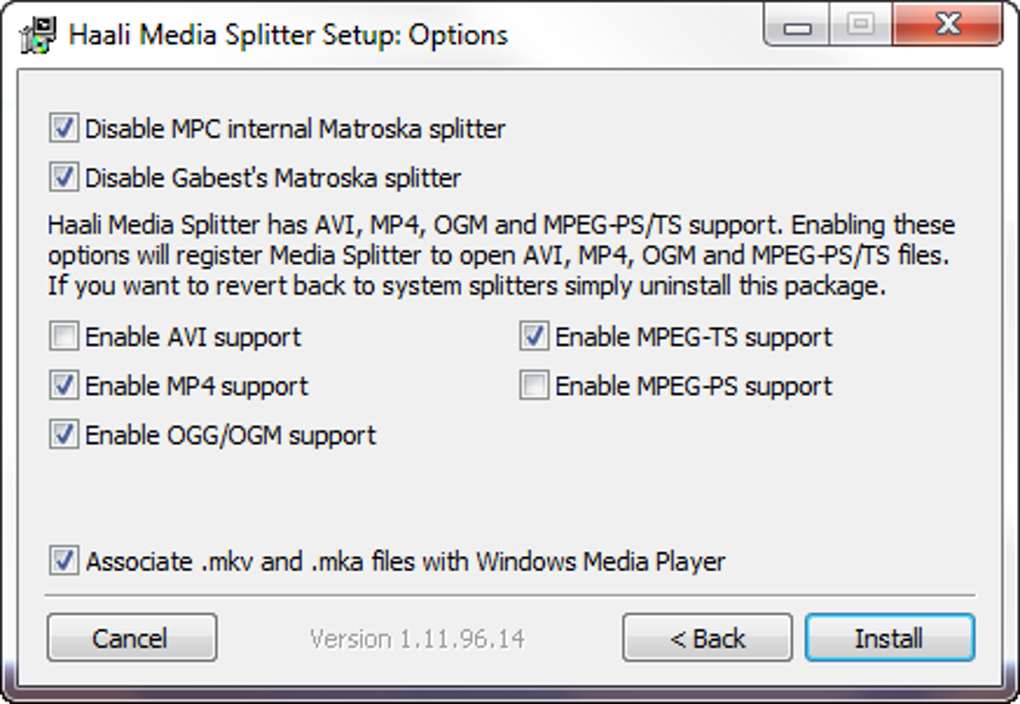
The core strength of Haali Media Splitter lies in its extensive configurability. Unlike many GUI-based applications that offer a limited set of presets, Haali Media Splitter provides access to a vast array of parameters through its configuration options. These settings allow users to tailor the splitter’s behavior to specific needs, optimizing performance and addressing individual requirements.
One notable feature is the ability to directly manage the disk buffer size. Unlike many applications that rely on system cache, Haali Media Splitter allows users to define the size of the disk buffer, which can be critical when dealing with large files or systems with limited memory. Adjusting this parameter can significantly influence performance, particularly for users working with high-resolution or high-bitrate media files. The default setting of eight megabytes can be increased to accommodate larger files and prevent interruptions during playback or processing.
Furthermore, Haali Media Splitter’s configuration extends beyond simple buffering parameters. Users can fine-tune various aspects of the splitting and decoding process. These settings might include adjusting the decoding algorithm, specifying output parameters, and handling specific metadata within the input files. This level of granularity is essential for users who require precise control over the media processing pipeline.
Strengths and Weaknesses: A Balanced Perspective
Haali Media Splitter, despite its strengths, is not without its limitations. Understanding both the advantages and disadvantages provides a balanced perspective on its suitability for various tasks.
Strengths:
- Broad Format Support: Its compatibility with Matroska, MP4, and MPEG TS containers makes it suitable for a wide range of media files.
- Concatenated File Support: The ability to handle concatenated files streamlines the processing of multiple files.
- High Configurability: The extensive configuration options provide unparalleled control over the media processing pipeline.
- DirectShow Integration: Seamless integration with other DirectShow components enhances flexibility and expands its capabilities.
- Efficient Resource Utilization: The absence of a GUI contributes to faster processing times and reduced resource consumption.
- Customizable Buffering: The ability to manage disk buffer size allows optimization for different hardware configurations and file sizes.
Weaknesses:
- Steep Learning Curve: The command-line interface and extensive configuration options require a degree of technical expertise.
- Limited Streaming Support: Haali Media Splitter may not be ideally suited for all streaming formats. Specific streaming protocols or requirements might not be fully supported, potentially limiting its use in real-time streaming applications.
- Potential Stability Issues: While generally robust, complex configurations or interactions with other components could potentially lead to stability issues. Careful testing and configuration are recommended.
- Infrequent Updates: The relatively infrequent release of updates might mean that the latest codecs or format improvements might not be immediately supported.
- Not Ideal for MPEG Programs: Certain MPEG program structures might not be handled optimally, potentially resulting in playback or processing errors.
Comparison with Alternative Solutions: Finding the Right Tool for the Job
Several alternative applications offer similar functionalities to Haali Media Splitter, although they often differ in their approaches and capabilities. Comparing Haali Media Splitter with other popular tools helps illustrate its unique characteristics and position within the broader landscape of media splitting and decoding software.
Some alternative solutions might offer intuitive GUIs, simplifying the user experience but potentially sacrificing some of the granular control that Haali Media Splitter offers. Other tools might focus on specific formats or tasks, making them more specialized but potentially less versatile. The choice of the optimal tool ultimately depends on the specific requirements of the user and the nature of the tasks being performed.
Conclusion: A Powerful Tool for the Technically Inclined
Haali Media Splitter remains a potent tool for experienced users seeking advanced control over media processing. Its command-line approach, extensive configuration options, and robust support for concatenated files and various container formats make it ideal for tasks requiring precise manipulation of video and audio streams. While its steep learning curve and potential limitations might make it unsuitable for casual users, those comfortable with a technical approach will find Haali Media Splitter a powerful and versatile addition to their media processing toolkit. Its ability to efficiently handle large files, coupled with its flexible configuration options, makes it a valuable asset for tasks ranging from simple splitting to complex media manipulation. However, potential users should carefully weigh its strengths and limitations to ensure it aligns with their specific needs and technical proficiency.
File Information
- License: “Free”
- Latest update: “July 11, 2023”
- Platform: “Windows”
- OS: “Windows 2000”
- Language: “English”
- Downloads: “21.1K”
- Size: “1.36 MB”


