
Hacker’s Keyboard is a free Android app developed by Klaus Weidner that aims to elevate the mobile typing experience. Categorized as a business and productivity tool, it offers a virtual keyboard that closely mimics the functionality of a physical keyboard, providing features often absent in standard Android keyboards. This review will delve into its capabilities, advantages, disadvantages, and overall user experience.
Enhanced Typing Functionality: Beyond the Standard Keyboard
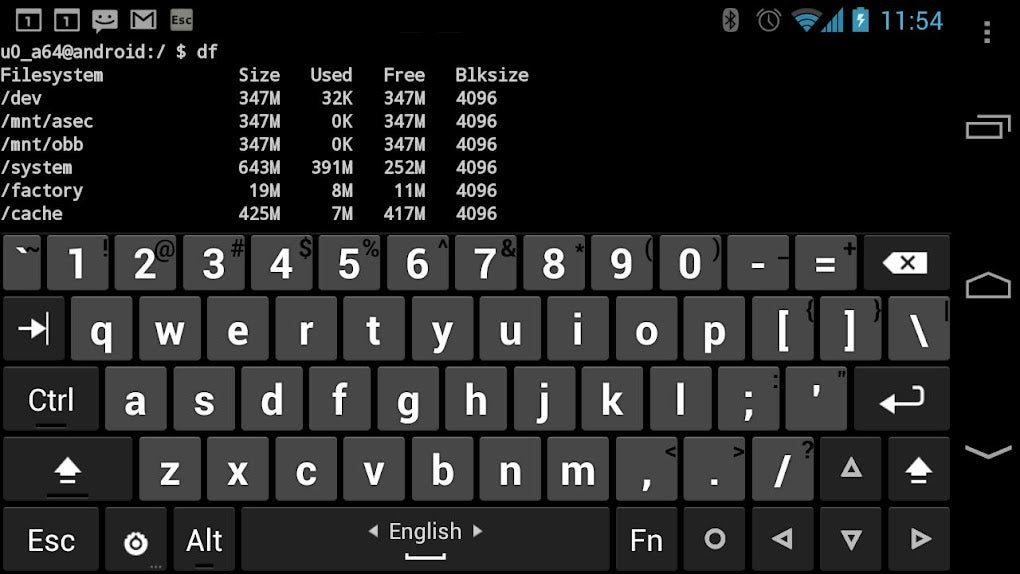
Unlike standard on-screen keyboards, Hacker’s Keyboard boasts a significant expansion of functionality. It includes dedicated function keys (F1-F12), allowing for seamless integration with applications and systems that utilize these keys for shortcuts and commands. Furthermore, it incorporates essential navigation keys such as “PgUp,” “PgDown,” and “End,” providing a more intuitive and efficient workflow for tasks requiring extensive text navigation and editing. This inclusion of typically desktop-oriented keys significantly enhances productivity, particularly for users accustomed to physical keyboards or those working with applications designed for such input methods. The result is a typing experience that feels more familiar and less restrictive than the limitations of most standard Android keyboards.
The app isn’t just about adding keys; it’s about optimizing the overall typing experience. Features like auto-capitalization and auto-complete are readily available, enhancing typing speed and reducing errors. The developers have clearly prioritized efficiency, aiming to bridge the gap between the limitations of a touchscreen and the responsiveness of a physical keyboard. This attention to detail is evident in the app’s design and functionality, making it a compelling choice for users who prioritize productivity and accurate input.
Multilingual Support and Customization Options
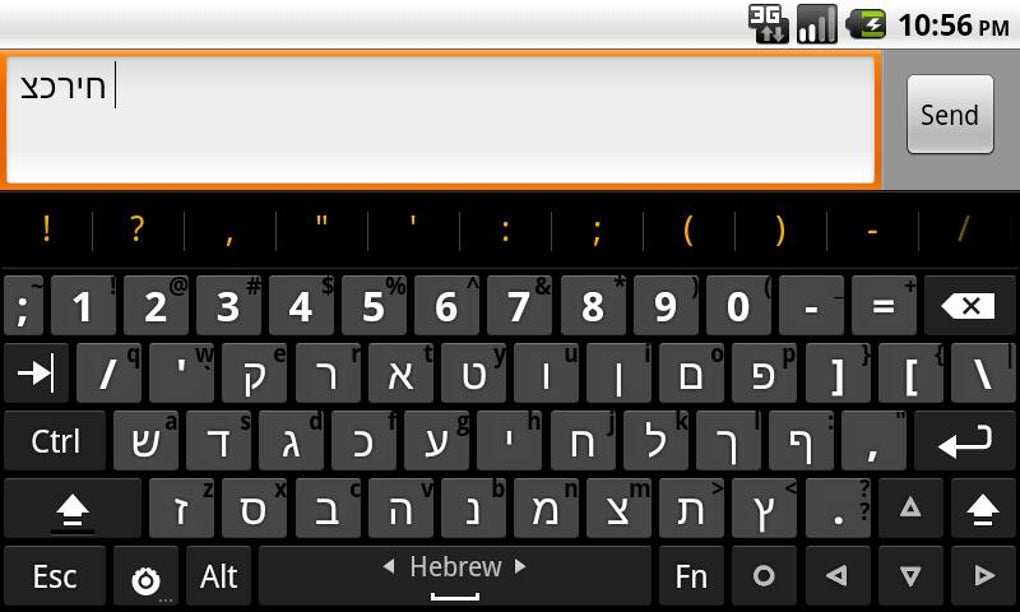
Hacker’s Keyboard demonstrates its commitment to inclusivity through its comprehensive multilingual support. While English is naturally included, the app extends its reach to support a variety of languages, including French, German, and Russian, among others. This adaptability makes it a valuable tool for a global audience, transcending geographical and linguistic barriers. Users can easily switch between languages, ensuring a comfortable typing experience regardless of their native tongue. This feature significantly enhances the app’s accessibility, broadening its appeal to a diverse user base.
Beyond language support, Hacker’s Keyboard provides extensive customization options. Users have the ability to tailor the keyboard’s layout, behavior, and various other settings to align with their personal preferences. This level of control ensures a personalized and optimized typing experience, catering to individual needs and workflows. However, the sheer number of settings within the “SETTINGS” page can initially appear overwhelming to new users. While this level of customization offers significant benefits to experienced users, the abundance of options might require some time for exploration and familiarization. The developers could consider streamlining the user interface to offer a more intuitive onboarding experience for new users.
Installation and Setup: Enabling and Configuring Hacker’s Keyboard
The installation process for Hacker’s Keyboard is relatively straightforward, but activating the keyboard requires explicit user intervention. This is a deliberate design choice, emphasizing user control over their input method. Users need to actively enable the keyboard through the Android settings menu and then select Hacker’s Keyboard as the preferred input method. This two-step process ensures that users understand the change they’re making and prevents the app from automatically overriding their default keyboard settings. This approach enhances security and avoids unintentional disruptions.
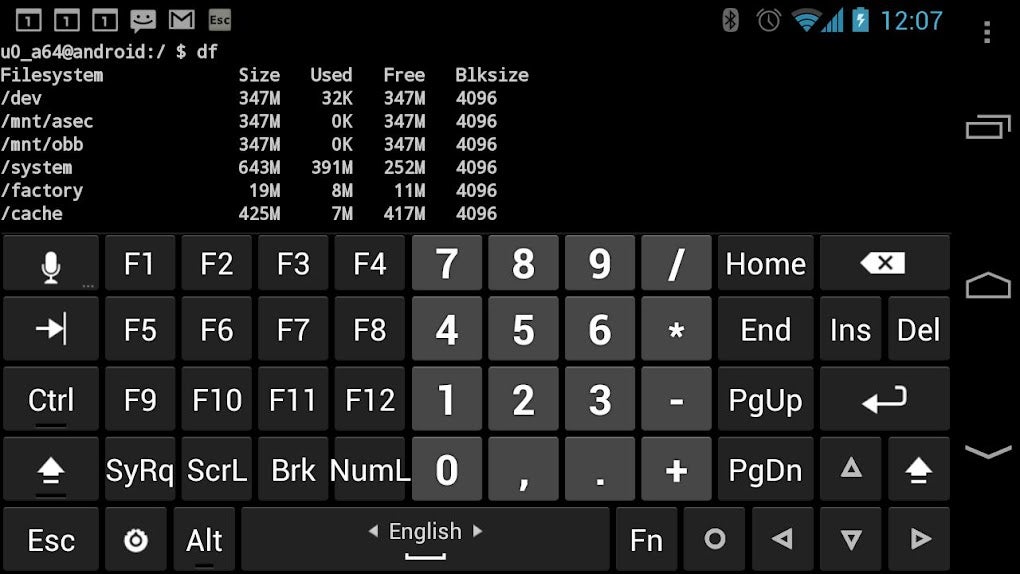
Once enabled, users can customize the keyboard to their liking. However, as mentioned earlier, the comprehensive settings menu can present a steep learning curve for new users. The array of configuration options, while comprehensive, might be initially daunting. A more user-friendly approach to presenting this information could significantly improve the initial user experience. A step-by-step guide or a more visually intuitive interface would ease the process of customizing the keyboard. The inclusion of a well-structured User’s Guide and FAQ directly within the app or accessible via a link would be a valuable addition, alleviating the potential frustration of navigating the configuration options.
Advantages and Disadvantages: Weighing the Pros and Cons
Hacker’s Keyboard presents a compelling blend of advantages and disadvantages. On the positive side, its functionality closely resembles a physical keyboard, offering a far more efficient and familiar typing experience compared to many standard on-screen keyboards. The inclusion of function keys and navigation keys elevates its productivity, making it a valuable tool for various tasks. The multilingual support expands its usability to a global audience, enhancing its accessibility. The ability to extensively customize the keyboard’s layout and behavior allows users to tailor the experience to their specific needs and preferences. The accessibility of a User’s Guide and FAQ, although potentially requiring an external link, helps address the complexity of the extensive settings.
However, the app also presents some drawbacks. The initial setup and configuration can be overwhelming for new users due to the multitude of settings. The comprehensive nature of the configuration options, while powerful, can be initially daunting and require considerable time and effort to master. For users accustomed to simpler keyboards, the learning curve might be steep. This could be mitigated with a better-structured onboarding process and a more intuitive presentation of the settings. The extensive options might unintentionally complicate the workflow for users who simply desire a straightforward, efficient keyboard.
Hacker’s Keyboard: A Verdict
Hacker’s Keyboard offers a unique solution for users seeking a more powerful and adaptable Android keyboard experience. Its rich feature set, including function keys, navigation keys, and extensive customization options, makes it a valuable tool for those prioritizing productivity and efficiency. The multilingual support further enhances its accessibility. However, the steep learning curve associated with its extensive settings might discourage less technically inclined users.
For users willing to invest the time in learning the app’s functionality, Hacker’s Keyboard represents a significant upgrade over standard on-screen keyboards. Its emulation of a physical keyboard’s capabilities makes it a particularly attractive option for users accustomed to that input method. The developers could improve the user experience by simplifying the onboarding process and possibly providing more guided tutorials. Despite the initial complexity, the app’s potential for productivity and customization makes it a noteworthy contender in the Android keyboard market. Overall, Hacker’s Keyboard is a powerful and adaptable tool, although its success hinges on the user’s willingness to invest the time and effort necessary to master its intricate settings. It’s a keyboard for users who want extensive control and functionality, but it may not be ideal for users seeking a simple and straightforward typing experience.
File Information
- License: “Free”
- Version: “v1.41.1”
- Latest update: “July 11, 2023”
- Platform: “Android”
- OS: “Android 9.0”
- Downloads: “330.1K”
- Size: “2.70 MB”
- Download Options: “APK, Google Play”
- Filename: “org-pocketworkstation-pckeyboard-1041001-62534021-899fd0398682961525271330c8113831.apk”


