
The Hard Disk Serial Number Changer is a lightweight, portable application designed to modify the serial number of a hard drive. This functionality can be useful in various situations, offering a convenient alternative to the more cumbersome process of reformatting the entire drive. This guide will delve into the features, usage, advantages, and limitations of this tool.
Ease of Use and System Requirements
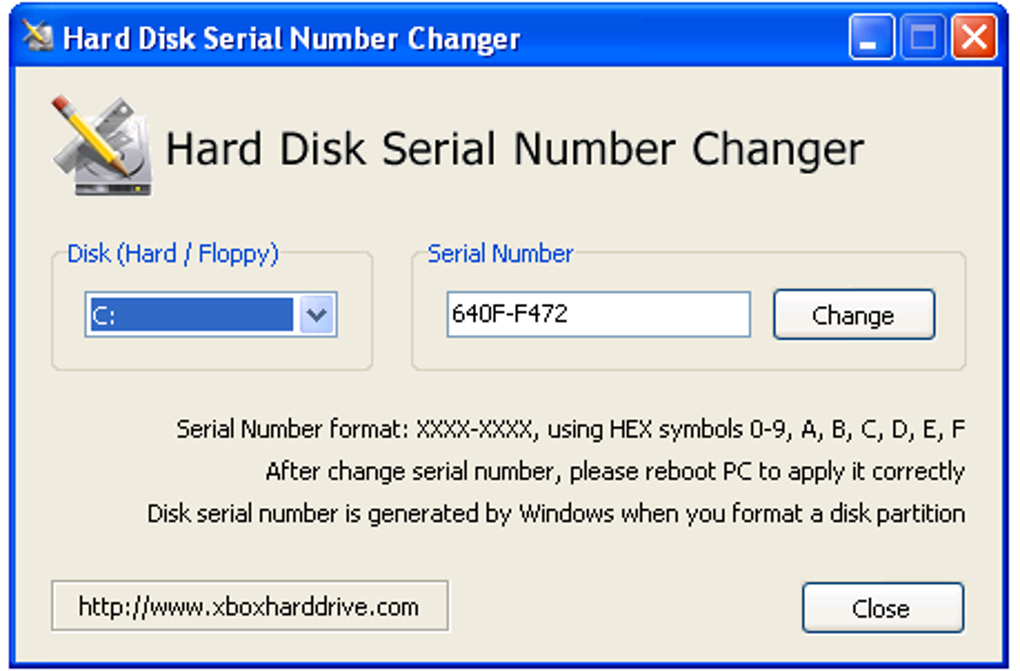
The Hard Disk Serial Number Changer boasts an exceptionally user-friendly interface. No specialized technical knowledge is required to operate this program. Its straightforward design allows users to quickly select the target drive from a dropdown menu and input the desired new serial number. The process is streamlined, culminating in a simple button click to apply the changes. While a system restart is necessary to fully implement the new serial number, this is a minor inconvenience compared to the alternative of a full drive reformat.
The program’s compatibility is another noteworthy feature. It functions seamlessly across a broad spectrum of Windows operating systems, ranging from older versions like Windows 98 and XP to the more recent Windows 8.1 and Windows 10. This wide compatibility ensures accessibility for a significant portion of Windows users. The program’s small file size (approximately 651.78 KB) further contributes to its convenience, minimizing disk space usage and ensuring swift download and execution. Its portability is a key advantage; no installation is required. Users can simply download the executable file and run it from any chosen directory on their hard drive.
Functionality and Operational Process
At its core, the Hard Disk Serial Number Changer alters the volume serial number, a unique identifier assigned to a hard drive during the operating system installation. Traditionally, modifying this number necessitates a full drive format, a time-consuming and data-erasing procedure. This tool bypasses this laborious process, providing a quick and efficient solution for changing the serial number without data loss.
The program’s interface is minimalistic yet functional. A user-friendly dropdown menu allows users to select the target hard drive. Once the drive is selected, users can input the new serial number directly into a designated field. The process concludes with a single button click, initiating the serial number change. The simplicity of the interface, combined with the clear and concise instructions, makes this tool accessible to users of all technical skill levels.
The application’s core functionality lies in its ability to modify the volume serial number without requiring a complete drive reformat. This is a significant advantage, especially for users with large amounts of data stored on their hard drives. It saves considerable time and effort, eliminating the risk of data loss associated with reformatting.
Advantages and Disadvantages
The Hard Disk Serial Number Changer offers several distinct advantages:
- Ease of Use: The intuitive interface and simple operation make it accessible to users with varying levels of technical expertise.
- Portability: The program’s portability eliminates the need for installation, allowing for immediate use upon download.
- Time-Saving: Modifying the serial number without reformatting the drive saves considerable time and effort.
- Data Preservation: The process avoids data loss, a major benefit compared to reformatting the drive.
- Wide Compatibility: Its compatibility with various Windows versions ensures accessibility to a large user base.
- Lightweight: The program’s small file size minimizes disk space usage and ensures rapid download and execution.
- Free of Charge: This application is free to download and use, making it a cost-effective solution.
However, the tool is not without its limitations:
- Limited Update History: While functional on newer Windows versions, the lack of frequent updates might indicate potential compatibility issues with future operating system versions or evolving hardware configurations.
- Compatibility with Newer File Systems: User reviews suggest potential incompatibility with the exFAT file system, limiting its functionality for some users. This warrants careful consideration before using the tool on drives formatted with this file system.
- Potential Security Concerns: Altering system identifiers could potentially raise security concerns in certain environments, especially corporate or highly secured networks. Users should be aware of their organization’s policies and security protocols before using this tool.
Alternative Applications
While the Hard Disk Serial Number Changer provides a simple and effective solution, several alternative applications offer similar or related functionalities. These alternatives might provide additional features, improved compatibility, or more robust security measures. Some potential alternatives include:
- Volume Serial Number Editor: This program focuses specifically on modifying the volume serial number, offering a potentially more focused and specialized approach.
- Hard Disk Sentinel: A comprehensive hard drive monitoring software that offers various diagnostic and maintenance tools, including the potential to indirectly manage aspects related to drive identification.
- Hard Drive Eraser: This application provides secure data erasure from a hard disk, which, while not directly related to serial number changes, may be a relevant consideration when managing hard drive data and security.
These alternative applications should be researched to determine their suitability based on individual needs and technical requirements.
Conclusion: A Valuable Tool with Caveats
The Hard Disk Serial Number Changer presents a straightforward and efficient method for altering a hard drive’s serial number without the necessity of reformatting. Its ease of use, portability, and compatibility across various Windows versions make it an appealing option for users seeking a quick and simple solution. However, users should be aware of the potential compatibility limitations with newer file systems and the infrequent updates. Furthermore, potential security implications should be carefully considered in specific environments. Ultimately, the decision to use this tool should be based on a thorough understanding of its capabilities and limitations, along with a consideration of available alternatives.
File Information
- License: “Free”
- Version: “1.0”
- Latest update: “March 3, 2025”
- Platform: “Windows”
- OS: “Windows XP”
- Language: “English”
- Downloads: “468.5K”
- Size: “651.78 KB”


