
Selling or donating a computer? Giving away a USB drive? Before you hand over your hardware, ensuring the complete removal of all your personal data is paramount. A hard drive eraser offers a powerful solution, guaranteeing that sensitive information is irretrievably deleted, preventing unauthorized access and protecting your privacy. This comprehensive guide explores the functionality and importance of a hard drive eraser, focusing on the specific features and considerations of a representative application.
Understanding the Need for Secure Data Erasure
In today’s digital age, data security is a critical concern. Hard drives, while seemingly empty after a simple deletion, often retain remnants of previously stored files. Sophisticated data recovery tools can potentially reconstruct this deleted data, potentially exposing personal information, financial records, or confidential business documents. This vulnerability underscores the importance of employing secure data erasure methods to permanently wipe a hard drive. A simple “delete” command in your operating system simply removes the file’s pointer, leaving the data itself physically intact on the drive.
A dedicated hard drive eraser utilizes advanced algorithms to overwrite the data multiple times, making recovery virtually impossible. This process ensures that even the most persistent data recovery techniques are ineffective, providing a robust layer of security. The consequences of neglecting secure data erasure can be severe, ranging from identity theft to corporate espionage.
The Functionality of Hard Drive Eraser Software
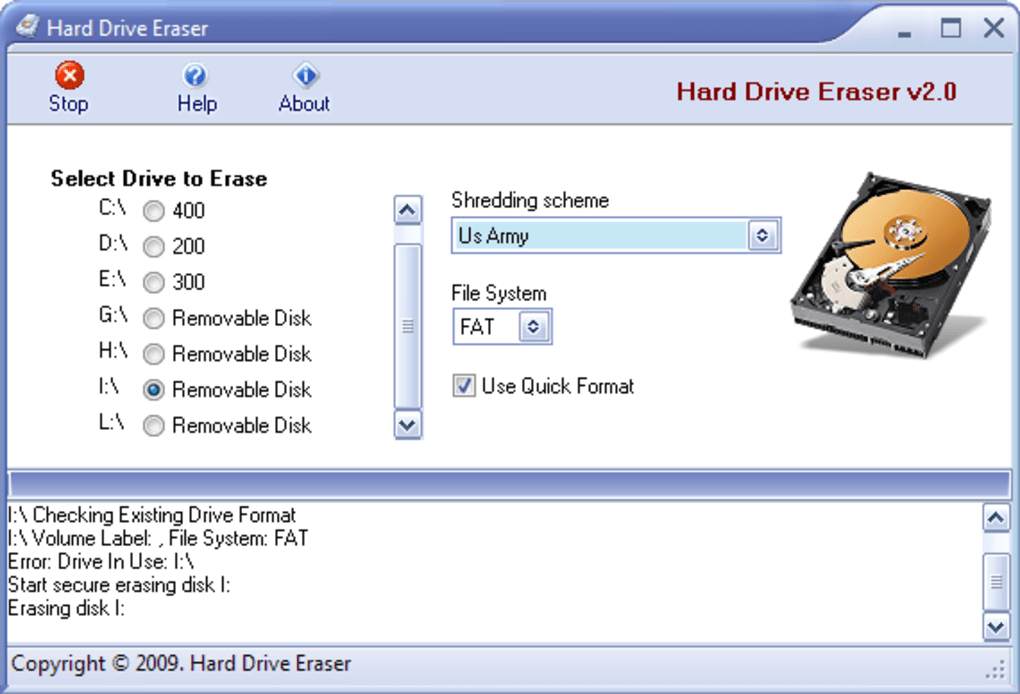
Hard drive eraser software provides a user-friendly interface to perform this crucial task. It allows users to select the target drive (hard drive, SSD, USB drive, etc.) and initiate the wiping process. The software’s key functionality includes:
-
Drive Selection: The software clearly displays all connected drives, enabling users to select the specific drive for erasure. This typically includes internal hard drives, external hard drives, SSDs, and USB flash drives.
-
Wiping Methods: A critical aspect of a robust hard drive eraser is the variety of wiping methods it offers. These methods determine how many times the data is overwritten and with what patterns. The more passes, the more secure the erasure, but the longer the process takes. Common methods include:
- Write Zeros: This is the simplest method, overwriting all sectors with zeros. While relatively quick, it’s not as secure as more complex methods.
- Overwrite with Random Data: This method overwrites data with randomly generated data, making recovery even more challenging than simply writing zeros.
- Guttman Method (or similar DoD standards): This is a more robust method, involving multiple passes with different patterns to ensure thorough data destruction. This is often considered the most secure option but also the slowest. It conforms to security standards often used by the Department of Defense.
-
Verification: After the wiping process is complete, some hard drive erasers offer a verification step. This step scans the drive to confirm that the data has been successfully overwritten and is unrecoverable.
-
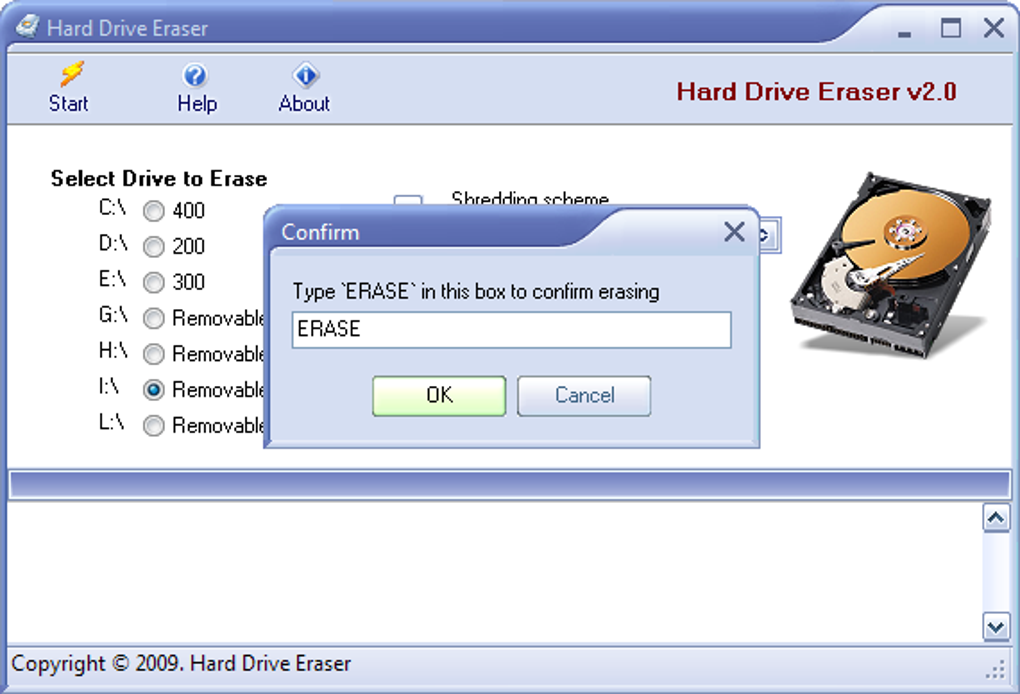
Confirmation Prompts: To prevent accidental data loss, reputable hard drive erasers incorporate multiple confirmation prompts before initiating the wiping process. This safeguards against unintentional data destruction.
-
Support for Various Drive Types: A reliable hard drive eraser should support various drive types and sizes, including traditional hard disk drives (HDDs), solid-state drives (SSDs), and various types of removable media.
Choosing the Right Wiping Method
The choice of wiping method hinges on the desired level of security and the available time. Simpler methods like “Write Zeros” are faster but offer less security, making them suitable for situations where the data’s sensitivity is relatively low. For sensitive data like financial records, confidential business documents, or personally identifiable information (PII), the more robust methods like the Guttman method or those adhering to DoD standards are recommended, despite the longer processing times.
The trade-off between speed and security is a key consideration when selecting a wiping method. Users should carefully weigh the potential risks associated with incomplete data erasure against the time required for a more secure process.
Hard Drive Eraser: A Case Study
Let’s delve into a specific example—a hypothetical “Hard Drive Eraser” application. This application, as described in the provided information, offers four different wiping methods, ranging from simple zero-writing to the more secure Guttman method. The software is designed to be user-friendly, with clear instructions and multiple confirmation prompts to minimize the risk of accidental data deletion.
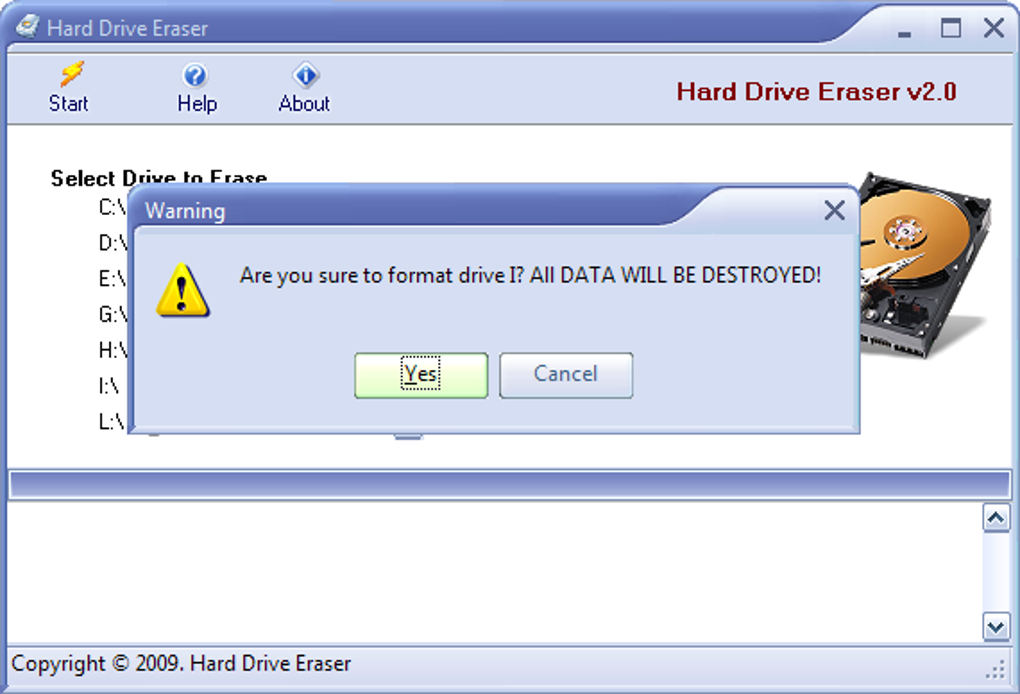
While the application offers a straightforward approach, a crucial consideration highlighted is the way it lists partitions as separate drives. This can be confusing for users who are unfamiliar with hard drive partitioning. A user might inadvertently select a partition containing critical data, unintentionally wiping it. The software should ideally include a feature to clearly highlight the selected partition and its contents before initiating the wiping process, perhaps even offering a visual representation of the drive’s structure.
Another point to consider is that this specific application was last updated in 2009. While it might still function, it’s crucial to consider the advances in data recovery techniques in the intervening years. A modern hard drive eraser should ideally incorporate the latest algorithms and methods to ensure data is irretrievably deleted, accounting for the constantly evolving landscape of data recovery tools.
Beyond the Software: Physical Destruction as a Last Resort
While software-based hard drive erasers are effective for most scenarios, the ultimate guarantee of data destruction lies in physical destruction. For highly sensitive data or in situations where absolute certainty is paramount, physically destroying the hard drive is the most foolproof method. This can involve shredding, drilling, or other methods that render the drive unusable and irrecoverable.
This option should only be considered after all software-based erasure methods have been employed, as it is irreversible. Appropriate disposal methods should also be followed to comply with environmental regulations and avoid harmful waste.
Security Best Practices for Data Erasure
Using a dedicated hard drive eraser is just one part of a comprehensive data security strategy. Additional best practices include:
- Regular Backups: Before erasing a hard drive, ensure that all essential data has been backed up to a separate, secure location. This serves as a safety net in case of accidental data loss.
-
Strong Passwords: Employ strong, unique passwords for all accounts and devices to prevent unauthorized access.
-
Software Updates: Keep all software, including your operating system and antivirus software, updated to patch security vulnerabilities.
-
Secure Disposal: Properly dispose of old hardware to prevent data recovery by unauthorized individuals.
-
Encryption: Consider encrypting sensitive data on the hard drive before erasure. This adds an additional layer of security, ensuring that even if some data remnants remain, they are unreadable without the decryption key.
Conclusion
The use of a hard drive eraser is a crucial aspect of responsible data management and digital security. It guarantees the irretrievable deletion of data, protecting sensitive information from unauthorized access and mitigating potential risks. Choosing the right software and understanding the various wiping methods available are critical factors in ensuring the complete and secure eradication of your data before disposing of or repurposing a hard drive. Remember that while software-based methods are effective, physical destruction remains the ultimate guarantee of data security in some scenarios. Combining a reliable hard drive eraser with other security best practices will contribute to a robust data security strategy, safeguarding your privacy and protecting your sensitive information.
File Information
- License: “Free”
- Version: “2.0”
- Latest update: “January 29, 2009”
- Platform: “Windows”
- OS: “Windows Vista”
- Language: “English”
- Downloads: “33.9K”
- Size: “632.32 KB”


