
Hardwipe is a user-friendly application designed for the secure deletion of files and the complete wiping of hard drives. Unlike simply emptying the Recycle Bin, which leaves data potentially recoverable, Hardwipe employs robust data wiping algorithms to ensure that deleted information is irretrievable, providing peace of mind, especially when disposing of or selling old computers or storage devices. This detailed review explores Hardwipe’s features, ease of use, security measures, and compares it to alternative software options.
Core Functionality and Features
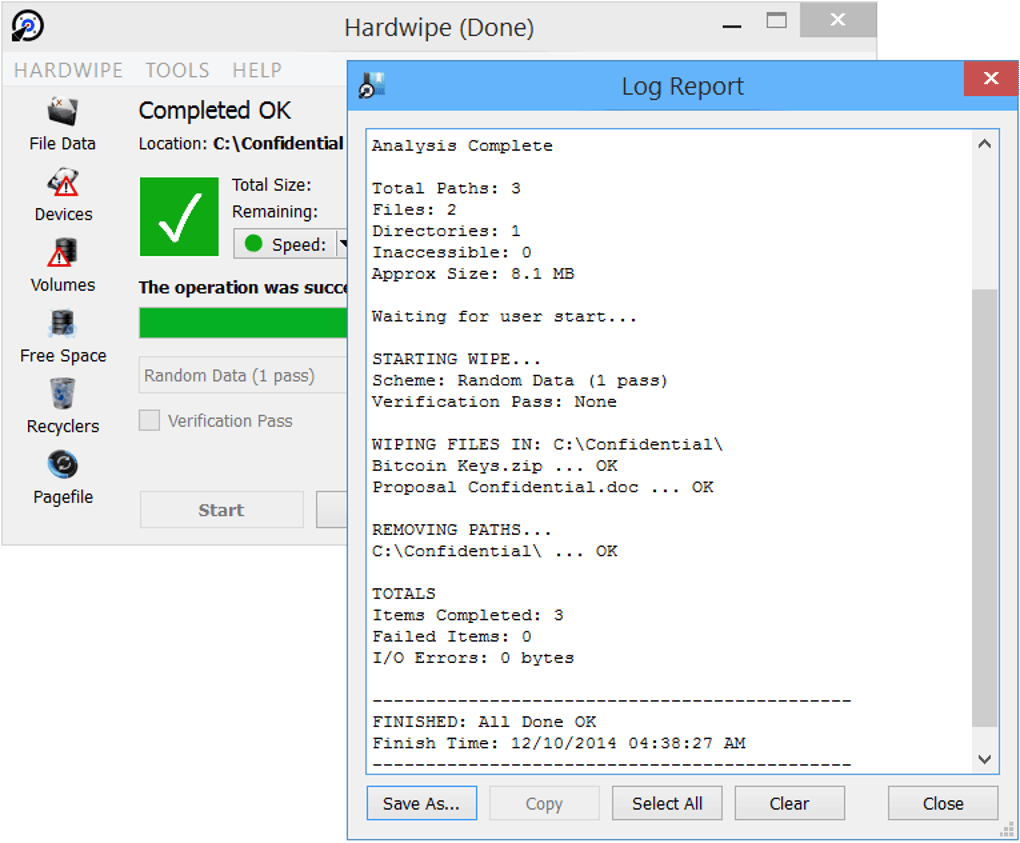
Hardwipe offers three primary functions to cater to various data deletion needs:
-
Wiping Specific Files: This allows users to selectively delete individual files or groups of files, ensuring that sensitive documents, images, or other data are permanently removed and unrecoverable. The user simply selects the files they wish to delete, and Hardwipe performs the wiping process according to the selected algorithm and priority settings.
-
Wiping an Entire Drive: This powerful feature enables users to completely wipe a hard drive, SSD, or other storage device. This is particularly useful when preparing to sell, donate, or discard a computer or storage device, ensuring that all data, including remnants from deleted files, are irrecoverably erased. The process is thorough and leaves the drive in a state where data recovery is virtually impossible.
- Cleaning Free Hard Drive Space: This function focuses on the unused sectors of a hard drive, eliminating any residual data that might be lingering from previous file deletions or other processes. This helps to maintain data security and improve overall system performance by preventing fragmentation and optimizing drive space utilization.
Hardwipe provides users with a customizable approach to data wiping. Users can choose from a range of algorithms that vary in intensity and time required for the process:
-
Simple Data Randomization: This method overwrites the data with random data, making it significantly more difficult to recover the original information. While less intensive than multi-pass methods, it is still an effective way to protect sensitive data from basic recovery attempts.
-
Multi-Pass Deletion: Hardwipe supports multiple passes of data overwriting. Each pass uses a different pattern of random data, making data recovery exponentially more difficult with each additional pass. The option to choose a higher number of passes (up to 35) is particularly helpful for users who require the highest levels of data security. Higher pass counts naturally consume more time and system resources.
Furthermore, Hardwipe allows users to prioritize the deletion process. Users can select “high” or “low” priority. High priority will allocate more system resources to the process, resulting in faster deletion speeds, while low priority will use fewer resources, allowing the user to continue using their computer during the process. The choice depends on the urgency of the deletion and the user’s available system resources.
Ease of Use and User Interface
Hardwipe is designed with simplicity in mind. The user interface is intuitive and straightforward, making it accessible even to users with limited technical expertise. The program’s main functions are clearly labeled and easily accessible. The selection of wiping algorithms and priority settings is also presented in a clear and understandable manner. This user-friendly design contributes to a smooth and efficient data deletion experience, reducing the potential for user error during the critical process of secure data erasure.
Security Implications and Precautions
Hardwipe’s powerful capabilities necessitate careful and responsible usage. Because it can permanently delete data from entire drives, accidental use could result in the irreversible loss of critical information. The developers emphasize the importance of using the software only on accounts with administrator privileges and strongly caution against its malicious use. The program’s capability to erase entire hard drives makes it a potentially dangerous tool in the wrong hands; therefore, secure storage of the program and careful adherence to the instructions are paramount.
While Hardwipe is a powerful security tool, it’s not a general-purpose cleaning utility. For regular maintenance tasks such as cleaning temporary files or optimizing disk space, it is recommended to use a dedicated system cleaner like CCleaner. Hardwipe’s focus is solely on secure deletion, ensuring the permanent removal of sensitive data.
Comparison with Alternative Applications
Numerous other applications offer similar data wiping functionality, each with its own strengths and weaknesses. Hardwipe’s direct competitors include:
-
WipeFile: Similar to Hardwipe, WipeFile offers file and folder wiping, but lacks the full drive wiping capability. It may be suitable for selective data removal but falls short for complete drive sanitization.
-
Disk Wipe: Focusing on external drives and USB sticks, Disk Wipe complements Hardwipe by providing secure deletion options for portable media. However, it doesn’t offer the comprehensive hard drive wiping features of Hardwipe.
-
CBL Data Shredder: CBL Data Shredder presents a competitive option with a focus on data security for security-conscious users. A comparative analysis would require examining its algorithms and features in more depth to identify specific differences from Hardwipe’s capabilities.
- DBAN (Darik’s Boot and Nuke): DBAN is a powerful open-source option, but it requires booting from a bootable media (like a USB drive), making it a less convenient choice for regular users compared to Hardwipe’s straightforward installation and execution within the operating system.
Hardwipe differentiates itself by offering a simple, intuitive user interface, alongside the full range of functionality — selective file deletion, full drive wiping, and free space cleaning—all within a single, easily accessible application. The combination of convenience and robust security features makes it a compelling choice for users seeking a reliable and user-friendly solution for secure data deletion.
Conclusion
Hardwipe provides a reliable and user-friendly solution for secure data deletion and hard drive wiping. Its straightforward interface, combined with its powerful data wiping algorithms, makes it an excellent choice for users who need to ensure the permanent removal of sensitive information. However, it’s crucial to use Hardwipe responsibly, understanding its potential consequences and taking the necessary precautions to prevent accidental data loss. Its strengths lie in its comprehensive feature set, ease of use, and focus on providing a robust and secure data wiping experience. The various algorithms and priority settings allow for flexibility in choosing the appropriate level of security and system resource utilization. While alternative applications exist, Hardwipe effectively balances user-friendliness with the level of security necessary for complete data sanitization.
File Information
- License: “Free”
- Latest update: “May 24, 2023”
- Platform: “Windows”
- OS: “Windows 8.1”
- Language: “English”
- Downloads: “21.2K”
- Size: “10.14 MB”


