
HashMyFiles is a free, portable utility program for Windows developed by NirSoft. Designed as a file management tool, its primary function is to calculate the MD5 and SHA1 hashes of any file or folder. This allows users to verify file integrity, ensuring that files haven’t been altered, corrupted, or tampered with during transfer, download, or extraction. This detailed guide explores HashMyFiles’ features, functionality, and benefits, comparing it to similar tools and addressing its limitations.
Understanding File Hashes and Their Importance
Before delving into the specifics of HashMyFiles, it’s crucial to understand the concept of file hashes. A hash is a unique digital fingerprint generated from the contents of a file. Algorithms like MD5 and SHA1 (Secure Hash Algorithm 1) process the file’s data, producing a fixed-length string of characters. Even a tiny change in the file’s contents will result in a drastically different hash value. This characteristic makes file hashes invaluable for several reasons:
-
Verifying File Integrity: By comparing the hash of a downloaded file with the hash provided by the original source, you can confirm that the file hasn’t been corrupted during the download process. This is crucial for ensuring the functionality and safety of software, documents, and other important files. A mismatch indicates potential corruption or tampering.
-
Detecting Tampering: If a malicious actor alters a file, even slightly, the hash will change. This provides a reliable method for detecting tampering, ensuring that the file hasn’t been infected with malware or altered to contain malicious code.
-
Ensuring Authenticity: Hash values can be used to verify the authenticity of files, particularly when downloading from untrusted sources. Comparing the calculated hash to a known good hash can provide confidence that the file is genuine and hasn’t been replaced with a fraudulent or malicious version.
-
Data Backup and Recovery: In data backup and recovery scenarios, hash values provide a way to verify the integrity of backups. Comparing the hashes of original files with their backed-up counterparts ensures that the backup is accurate and complete.
HashMyFiles: Key Features and Functionality
HashMyFiles provides a straightforward method for calculating and comparing file hashes. Its key features include:
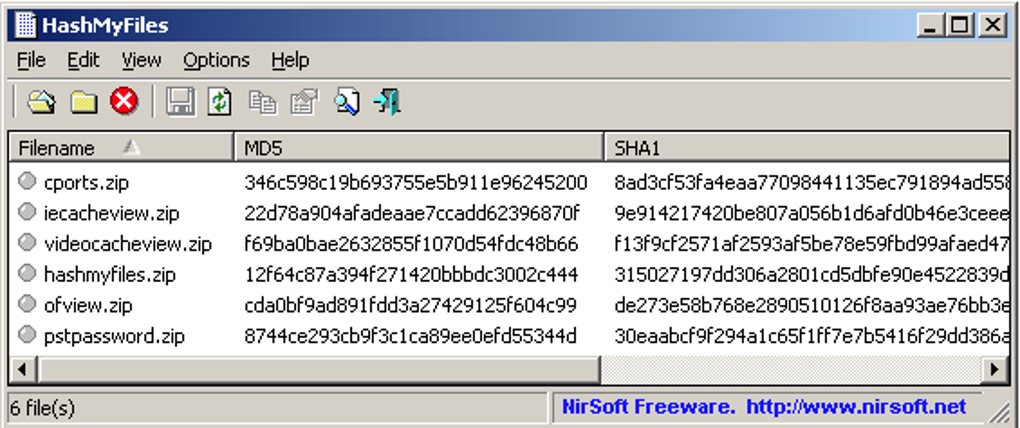
- Simple and Intuitive Interface: The program boasts a user-friendly interface, making it accessible even to users with limited technical expertise. The layout is clean and uncluttered, facilitating easy navigation and quick access to essential functions.
-
Support for Multiple File Formats: HashMyFiles can handle a wide variety of file types, enabling users to verify the integrity of diverse files. This broad compatibility makes it a versatile tool for various applications.
-
Drag-and-Drop Functionality: HashMyFiles supports drag-and-drop functionality, allowing users to simply drag files or folders from their file explorer directly into the program’s window for immediate hash calculation. This streamlined approach saves time and effort.
-
Batch Processing: The program efficiently handles multiple files and folders simultaneously, accelerating the process of verifying the integrity of large sets of data. This batch processing capability greatly enhances productivity.
-
Multiple Hash Algorithms: HashMyFiles supports both MD5 and SHA1 hash algorithms, providing users with options for different security needs and levels of assurance. The choice of algorithm depends on the specific security requirements and the level of protection desired.
-
Export Options: Users can export the calculated hash values to various file formats, including text (.txt), HTML (.html), and XML (.xml). This flexibility allows for seamless integration with other applications and systems.
-
Context Menu Integration: HashMyFiles can be integrated into the Windows context menu, enabling users to right-click a file or folder and directly select the option to calculate its hash. This convenient feature streamlines the workflow and improves user experience. However, be aware that selecting multiple files will open multiple instances of the program.
-
Portable Application: HashMyFiles is a portable application, meaning it doesn’t require installation. This allows users to run the program from any location, including USB drives, without needing administrative privileges. This portability is a significant advantage, particularly for users who frequently work on multiple computers or prefer to maintain a clean system.
Using HashMyFiles: A Step-by-Step Guide
Using HashMyFiles is incredibly straightforward:
- Download and Launch: Download the HashMyFiles executable from the official NirSoft website. Since it’s a portable application, simply extract the downloaded archive and double-click the executable to run it. No installation is needed.
-
Add Files or Folders: You can add files and folders in several ways:
- Add File: Click the “Add File” button and browse to select individual files.
- Add Folder: Click the “Add Folder” button to add entire folders, recursively processing all files within.
- Drag and Drop: Simply drag and drop files or folders directly from your file explorer onto the HashMyFiles window.
-
Calculate Hashes: Once you’ve added the files or folders, HashMyFiles will automatically calculate the MD5 and SHA1 hashes. The results will be displayed in a clear table, showing the file name, path, size, MD5 hash, and SHA1 hash.
-
Compare Hashes: Compare the calculated hashes with the expected hashes obtained from the original source. Any discrepancy indicates a problem with the file’s integrity.
-
Export Results: If desired, click the “Export” button to save the results in a chosen format (text, HTML, or XML).
-
Context Menu Integration (Optional): HashMyFiles can be integrated into the Windows context menu for even quicker access. Consult the program’s documentation for instructions on enabling this feature.
Comparing HashMyFiles to Alternative Tools
HashMyFiles stands alongside other popular file hash calculation tools such as HashCalc and HashTab. While all these tools serve the same basic function, some differences exist:
-
HashCalc: HashCalc is another popular choice offering a wider range of hash algorithms compared to HashMyFiles. However, HashMyFiles shines with its simplicity and portability.
-
HashTab: HashTab integrates directly into Windows Explorer’s context menu, providing an extremely convenient way to check file hashes without launching a separate program. However, HashMyFiles’ standalone nature offers flexibility for users who prefer a dedicated application.
The best choice depends on individual preferences and workflow. If you need a simple, portable, and easy-to-use tool, HashMyFiles is an excellent choice. If you require more algorithms or seamless Windows Explorer integration, HashCalc or HashTab might be preferable.
Limitations of HashMyFiles
While HashMyFiles offers many advantages, it also has some limitations:
-
Outdated User Interface: The user interface appears somewhat dated, and a visual redesign would significantly improve its modern appeal. While functionality remains paramount, a more modern look would enhance user experience.
-
Limited Algorithm Support: Compared to some competitors, HashMyFiles supports a relatively smaller number of hash algorithms. While MD5 and SHA1 are widely used, other algorithms might be preferred for specific security needs.
-
Multiple Instance Issue with Context Menu: Using the context menu option to process multiple files results in the opening of multiple instances of HashMyFiles, which can be inconvenient for users working with many files simultaneously.
Conclusion
HashMyFiles remains a valuable tool for verifying file integrity. Its ease of use, portability, and ability to handle multiple files simultaneously make it a handy utility for anyone who needs to ensure their files are authentic and haven’t been corrupted or tampered with. While its user interface could benefit from a modernization and its algorithm support could be expanded, its core functionality remains robust and highly effective. For users seeking a simple, efficient, and portable file hash checker, HashMyFiles offers a compelling solution.
File Information
- License: “Free”
- Version: “2.50”
- Latest update: “June 27, 2025”
- Platform: “Windows”
- OS: “Windows 8”
- Language: “English”
- Downloads: “11.5K”
- Size: “65.85 KB”


