
HD Tune is a versatile and user-friendly hard drive utility designed for Windows operating systems. Available as a free download, it provides a comprehensive suite of tools for assessing the performance and health of your hard drives and solid-state drives (SSDs). Far from a simple diagnostic tool, HD Tune offers a blend of performance benchmarking, health monitoring, and detailed information retrieval, making it an invaluable asset for both casual users and tech enthusiasts. This in-depth review explores the features, functionality, and overall effectiveness of HD Tune.
Unveiling the Features of HD Tune
HD Tune’s power lies in its multifaceted approach to hard drive analysis. It moves beyond basic health checks to provide a detailed performance profile, offering insights into various aspects of storage device functionality. The primary features can be broadly categorized as follows:
1. Benchmarking: Measuring Raw Performance
The benchmarking feature is arguably HD Tune’s most prominent offering. This function assesses the raw read and write speeds of your storage device, providing crucial data on its performance capabilities. The results are presented graphically, allowing for easy visualization of performance characteristics across different data blocks and transfer sizes. This isn’t just about peak speeds; the benchmark reveals potential bottlenecks and inconsistencies that might indicate underlying issues. By testing sequential and random read/write performance, HD Tune offers a thorough evaluation of your drive’s overall efficiency. Understanding these performance metrics is essential for troubleshooting sluggish system response times or identifying drives nearing the end of their lifespan. The detailed results, often presented in graphs and tables, allow users to pinpoint specific areas of strength or weakness, aiding in informed decision-making concerning system upgrades or drive replacement.
2. Hard Disk Information: A Detailed Identity Check
HD Tune doesn’t merely assess performance; it also provides a comprehensive inventory of your hard drive’s attributes. This “Hard Disk Information” section functions as a detailed identification card for your storage device, outlining key specifications and characteristics. This wealth of information includes:
-
Partition Information: A complete breakdown of your drive’s partitions, including size, file system type (e.g., NTFS, FAT32), and overall layout. This is invaluable for managing partitions, troubleshooting storage issues, and understanding the organization of your data.
-
Supported Features: A clear indication of the features and technologies supported by your hard drive, such as Advanced Format, Native Command Queuing (NCQ), and various power management options. This section helps users understand the capabilities of their drive and ensures compatibility with system requirements.
-
Firmware Version: Knowing your drive’s firmware version is vital for troubleshooting and ensuring access to the latest bug fixes and performance improvements. HD Tune provides this crucial information clearly.
-
Serial Number: The unique serial number allows for precise identification of the drive, facilitating support requests or warranty claims if necessary.
-
Disk Capacity: A readily accessible display of the drive’s total storage capacity and the amount of used and free space.
-
Buffer Size: Displays the size of the drive’s internal buffer, a critical component influencing data transfer speeds.
-
Transfer Mode: Shows the current data transfer mode being utilized by the drive, providing insights into its communication protocol with the system.
This comprehensive information allows users to fully understand their storage device, making informed decisions about data management, system configurations, and upgrades.
3. Hard Disk Health: Monitoring the Vital Signs
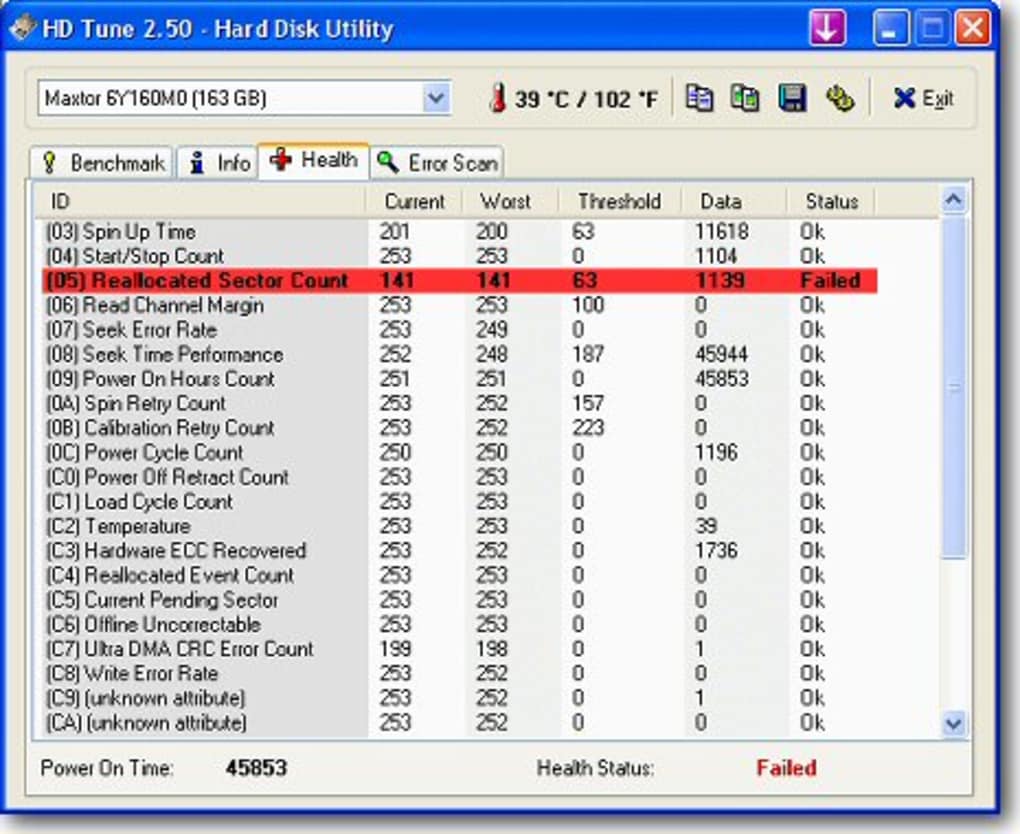
HD Tune’s health assessment capabilities are a significant part of its overall utility. It provides an assessment of the drive’s overall well-being, offering valuable insights into potential issues that could lead to data loss. This functionality often utilizes SMART (Self-Monitoring, Analysis and Reporting Technology) data, a set of health attributes embedded within the drive itself. HD Tune translates this complex SMART data into user-friendly summaries and warnings, alerting users to potential problems such as:
-
High Error Rates: Indicators of potential read/write errors, which could be a symptom of impending drive failure.
-
Excessive Wear: Tracking the overall wear and tear on the drive, helping to predict its remaining lifespan.
- Overheating: Detecting high temperatures that can significantly reduce drive longevity and lead to data corruption.
Early detection of these issues allows users to take proactive measures, such as backing up crucial data, before experiencing catastrophic failure. While not a replacement for regular backups, the health checks provided by HD Tune offer an extra layer of security.
4. Error Scan: Pinpointing Problematic Sectors
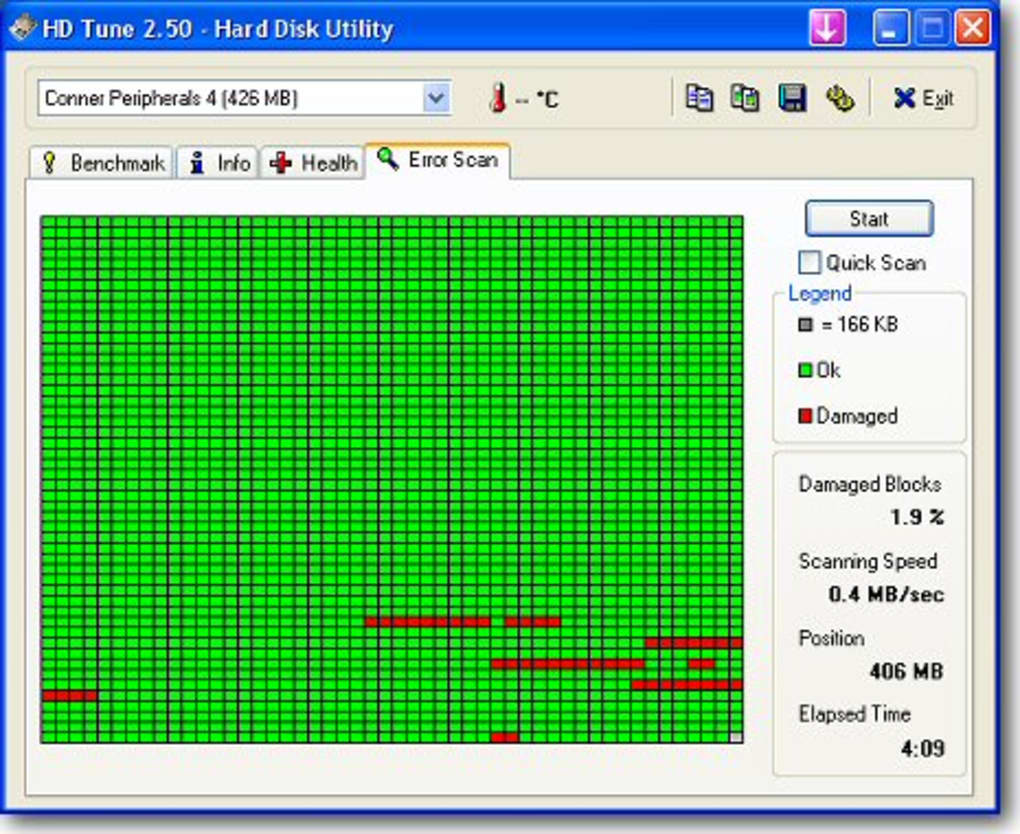
This crucial feature goes beyond general health assessments by performing a thorough scan of the hard drive for bad sectors. Bad sectors are areas on the drive’s surface that have become unreadable or unwritable. HD Tune’s error scan methodically examines every sector, identifying any that are malfunctioning. Early detection of bad sectors allows for proactive intervention, preventing potential data loss or performance degradation. The results clearly indicate the location and number of affected sectors, providing valuable information for potential repairs or drive replacement decisions.
5. Temperature Display: Monitoring Thermal Conditions
HD Tune accurately monitors and displays the operating temperature of your hard drive. High temperatures can significantly shorten a drive’s lifespan and lead to data corruption. The temperature reading provides crucial insight into the drive’s thermal health. This feature, combined with the other health checks, offers a comprehensive view of the drive’s well-being. Sustained high temperatures often indicate a need for improved cooling solutions, such as better case ventilation or the use of cooling pads.
Beyond the Core: Additional Features and Enhancements
HD Tune’s functionality extends beyond its core features. While the primary features focus on diagnostics and benchmarking, several enhancements significantly boost its usability and value:
- User-Friendly Interface: The interface is intuitive and straightforward, making it easy to navigate and understand the results, regardless of technical expertise.
-
Data Visualization: Results are presented in clear, easy-to-understand graphs and charts, providing a visual representation of performance and health metrics. This visual approach simplifies complex data, allowing for quick identification of potential issues.
-
Detailed Reporting: Users can export the results to various formats, facilitating sharing or archiving the data for later reference. This is beneficial for tracking performance changes over time or providing information to technical support.
-
Regular Updates: The developers regularly update HD Tune with new features, bug fixes, and support for newer hardware, ensuring its compatibility and effectiveness over time.
HD Tune in Comparison to Other Hard Drive Utilities
Several other utilities exist for hard drive diagnostics and benchmarking, each with its own strengths and weaknesses. Compared to competitors like CrystalDiskInfo and AS SSD Benchmark, HD Tune stands out due to its comprehensive suite of features, combining both performance benchmarking and health monitoring in a single, user-friendly package. While other tools may excel in specific areas, HD Tune provides a balanced approach, making it a highly versatile option for a wider range of users.
Conclusion: HD Tune - A Necessary Tool for Every Computer User
HD Tune offers a powerful and comprehensive solution for hard drive diagnostics and performance analysis. Its intuitive interface, combined with its detailed reporting and proactive health monitoring capabilities, makes it an indispensable tool for both novice and experienced computer users. Whether you’re troubleshooting performance issues, monitoring the health of your drives, or simply curious about your storage device’s capabilities, HD Tune provides a wealth of information that goes far beyond the capabilities of many other utilities. The free availability makes it an easy decision for anyone looking to optimize their system and safeguard their valuable data. In short, HD Tune is a valuable addition to the toolkit of anyone concerned about the well-being and efficiency of their computer’s storage.
File Information
- License: “Free”
- Latest update: “June 24, 2025”
- Platform: “Windows”
- OS: “Windows XP”
- Language: “English”
- Downloads: “87.2K”
- Size: “5.67 MB”


