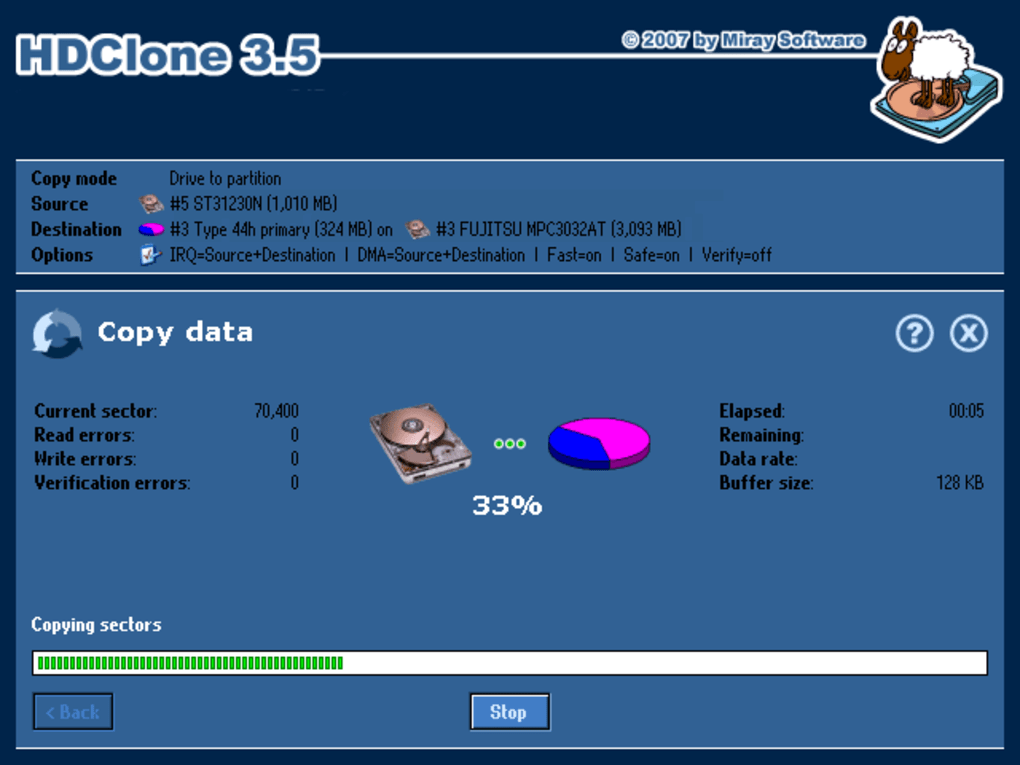
HDClone Free Edition is a disk cloning utility designed for Windows systems. It offers a free, albeit limited, version capable of creating exact, bit-by-bit copies of hard drives and other storage media, including IDE/ATA, SATA/eSATA, SCSI, USB, and Firewire devices. This capability makes it ideal for creating full system backups, migrating operating systems to new drives, and recovering data from failing hard disks. This review will delve into the features, performance, strengths, and weaknesses of HDClone Free Edition, comparing it to its paid counterparts and alternative software options.
Core Functionality: Cloning and Data Recovery
At its heart, HDClone Free Edition excels at its primary function: creating sector-by-sector copies of storage media. This means every bit of data, including the boot sector, partition tables, and file systems, is duplicated precisely. This level of accuracy is crucial for ensuring the cloned drive is a perfect replica of the source. This 1:1 cloning process is particularly beneficial for:
-
System Migration: Seamlessly transferring your operating system and all installed applications to a new hard drive, effectively cloning your entire system’s configuration. This is particularly helpful when upgrading to a larger or faster drive without reinstalling the operating system and applications.
-
Data Backup: Creating a complete backup of your crucial data and system files, providing a reliable recovery point in case of hard drive failure or data corruption. This is a crucial aspect of data protection and business continuity.
-
Data Rescue: Utilizing the “SafeRescue” mode, HDClone Free Edition can attempt to clone data from failing or damaged hard drives. By working directly at the physical level, it can bypass file system issues that may prevent access to data through standard means. This rescue functionality is a critical feature for recovering valuable information when a drive is malfunctioning.
The software operates independently of the file system and operating system, meaning it can work with FAT, FAT32, NTFS, and other proprietary formats. This versatility ensures broad compatibility and allows for copying even those drives with uncommon or inaccessible formats, exceeding the capabilities of simpler cloning tools. This compatibility is a significant advantage, particularly when dealing with legacy systems or uncommon storage configurations. The ability to select individual partitions for cloning, rather than the entire drive, allows for more targeted backups or migrations.
Performance and Limitations of the Free Edition
While HDClone Free Edition’s functionality is robust, the free version comes with limitations. User reviews consistently point to significantly slower cloning speeds compared to the paid versions and competing software. This performance difference is a major drawback, particularly for users with large hard drives. The speed reduction is often attributed to the free version employing a deliberate performance throttling mechanism, encouraging users to upgrade to the paid version. While this is understandable from a business perspective, it does affect the usability of the free edition for users with time constraints or large data volumes. This performance disparity is a critical consideration when choosing between the free and paid versions.
The limited features of the free edition are another consideration. Although it provides core cloning and data recovery functionality, advanced features such as scheduled backups, compression, verification options, and support for specific hardware configurations are generally reserved for the paid versions. The lack of these features might impact its suitability for professional use or complex cloning scenarios.
Comparison with Alternative Software
Several alternative cloning and imaging software packages are available, both free and commercial. Some noteworthy competitors include:
-
Clonezilla: A free and open-source disk cloning utility known for its versatility and ability to clone to various media types. Clonezilla is a strong contender for users prioritizing free software and flexibility. However, it has a steeper learning curve than HDClone, possibly making it less user-friendly for beginners.
-
EaseUS Todo Backup Free: A comprehensive backup and cloning solution with a user-friendly interface. EaseUS provides more comprehensive backup options than HDClone Free, but its cloning functionality may not be as detailed or thorough in the free version.
-
Macrium Reflect Free: Another free backup and imaging solution, Macrium Reflect is particularly popular for its robust features and relatively intuitive user experience. The free version offers powerful imaging capabilities, but might lack some advanced features found in HDClone’s paid versions.
The choice between these options depends heavily on individual needs and priorities. While HDClone Free Edition excels in its precise 1:1 cloning capabilities, its speed limitations in the free version might push users towards alternative free options like Clonezilla or EaseUS Todo Backup Free, which often offer faster cloning times at the cost of potentially less thorough sector-level copying.
User Experience and Interface
HDClone Free Edition features a relatively straightforward interface, although it might not be as visually appealing or intuitive as some competing software. The lack of extensive tooltips and help documentation might make it initially challenging for novice users. While the main functions are easily accessible, the advanced settings and options may require a degree of technical understanding. The simplicity of the interface is a positive aspect for users familiar with disk cloning tools, while the lack of comprehensive guidance might be a drawback for beginners.
Security Considerations
As with any software that handles sensitive data, security is a critical concern. HDClone Free Edition’s primary function is data duplication, meaning it handles data at a very low level. This inherent functionality may not be susceptible to common software vulnerabilities. However, users should always ensure they download the software from the official website to avoid malware or potentially compromised versions. Additionally, using strong passwords and practicing good security hygiene for the overall system is vital, irrespective of the software used.
Conclusion
HDClone Free Edition provides a powerful, albeit limited, solution for disk cloning and data recovery. Its strength lies in its ability to create accurate, bit-by-bit copies of storage media, making it invaluable for system migration, data backup, and data rescue from failing hard drives. However, the significant performance limitations in the free version and lack of advanced features should be carefully weighed against the alternatives. Users requiring fast cloning speeds or advanced functionality might find better value in the paid HDClone versions or alternative free or commercial software packages. The choice ultimately depends on the user’s specific needs, technical expertise, and tolerance for the free edition’s performance restrictions. While a valuable tool for specific tasks, users should carefully assess their requirements before settling on HDClone Free Edition as their primary disk cloning solution.
File Information
- License: “Free”
- Latest update: “January 30, 2024”
- Platform: “Windows”
- OS: “Windows XP”
- Language: “English”
- Downloads: “51.7K”
- Size: “105.52 MB”