
The Sims 4, Electronic Arts’ beloved life simulation game, offers players an expansive canvas to create and manage virtual lives. From crafting unique personalities to designing dream homes, the game provides endless opportunities for creativity. However, like many games, it comes with certain built-in limitations, particularly when it comes to character customization. One such limitation, the inability to precisely control a Sim’s height beyond a predefined range, has long been a minor frustration for players seeking ultimate personalization. This is where community-driven innovation steps in, exemplified by the ingenious Height Slider mod for Sims 4. Developed by Luumia Sims, this free utility transcends the game’s default constraints, offering players the power to make their Sims genuinely taller or shorter, and crucially, ensures these changes are seamlessly integrated into the game world.
Imagine a towering Sim who literally stands head and shoulders above their peers, or a petite character who brings a unique perspective to their virtual existence. The Height Slider mod makes these visions a reality, transforming the creation process and adding a new layer of depth to storytelling within The Sims 4. Unlike some other height-changing mods that might lead to awkward interactions or visual glitches, Luumia Sims’ creation is designed with in-game compatibility in mind. This means your newly proportioned Sims will still engage naturally, maintaining eye contact during conversations and fitting organically into the game’s animations. This thoughtful integration is a testament to the mod’s quality and its commitment to enhancing, rather than disrupting, the core Sims 4 experience.
This article delves deep into the Height Slider mod, exploring its features, the impact it has on gameplay, and how it empowers players to craft truly distinct virtual characters. We’ll cover everything from the mod’s basic functionality to its unique advantages over alternatives, and even provide insights into its installation process and potential considerations. For anyone looking to push the boundaries of Sim creation and inject more individuality into their digital narratives, the Height Slider mod is an indispensable tool that promises to elevate (or lower) your gameplay to new, exciting levels.
The World of Sims 4 and the Drive for Personalization
The Sims franchise has always prided itself on providing players with an unparalleled level of freedom in virtual life simulation. The Sims 4, the latest main installment, continues this tradition, allowing players to build entire towns, craft intricate family dynamics, and guide their Sims through every facet of daily life. At its core, the game revolves around the “Sims” themselves – the human or humanoid characters whose lives players direct. The game’s robust “Create-a-Sim” (CAS) menu is often the first point of interaction, where players can sculpt every facial feature, body type, and outfit. Yet, even with its advancements, the base game left a significant desire unfulfilled for many: true height variation.
The Sims 4: A Canvas for Life Stories
Developed by Electronic Arts (EA), The Sims 4 was designed with a more streamlined Create-a-Sim interface compared to its predecessors and introduced a more complex Sims AI system, allowing characters to express emotions and multitask. Critically, the game was optimized to run smoothly on a wider range of hardware, including low-end machines. This design choice often translated into a simpler visual aesthetic and, at times, less granular control over certain character attributes in the name of performance and accessibility. While the game excels at offering a vast array of clothing, hairstyles, and even body fat/muscle sliders, the concept of a Sim’s height remained largely static, limited to a narrow, pre-set range that felt more like slight variations within a single height class rather than true diversity.
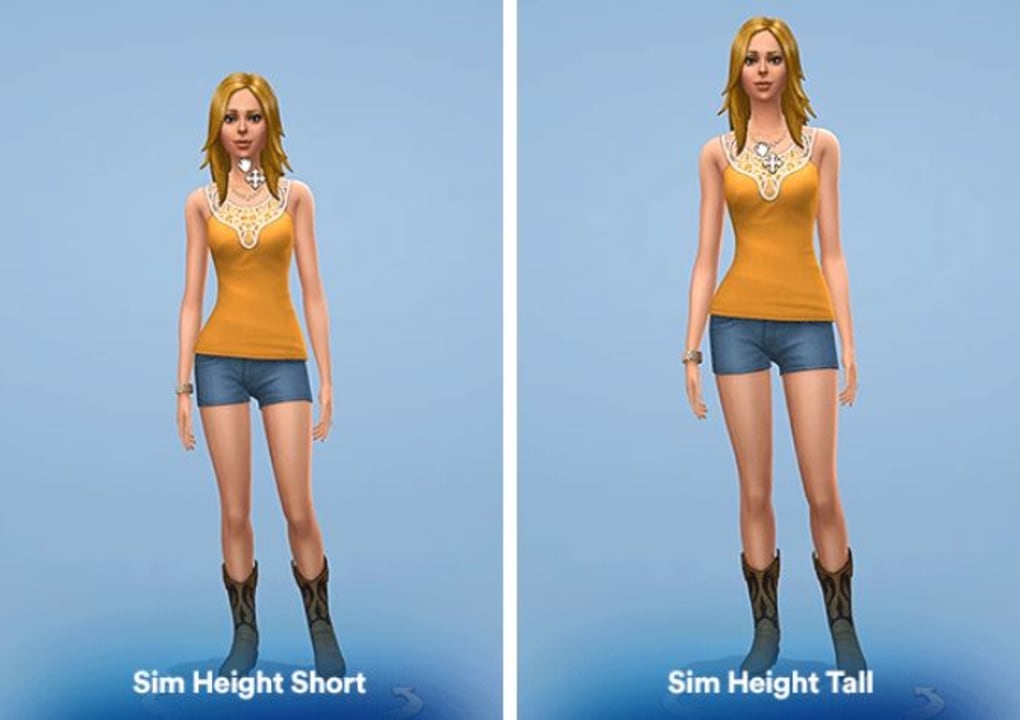
The beauty of The Sims 4 lies in its ability to tell stories. Players often spend hours meticulously crafting Sims that reflect real-life people, fictional characters, or entirely new personas. A crucial element of character identity in the real world is height – it influences how we perceive individuals, how they interact with their environment, and even how they carry themselves. Without the ability to modify this fundamental attribute, many players felt their storytelling capabilities were somewhat constrained. A powerful, imposing CEO might feel less impactful if they stand at the exact same height as a timid, shy artist. This desire for greater authenticity and broader narrative possibilities naturally led to the community exploring ways to overcome these limitations.
Why Customization Matters: Beyond Default Limits
For dedicated Sims players, customization isn’t just an optional feature; it’s the very heart of the game. It’s about expressing creativity, bringing unique visions to life, and deepening immersion. The base game’s limitations on height meant that every Sim, regardless of their role or backstory, occupied roughly the same physical space. This homogeneity, while minor to some, was a significant barrier to personalization for others. Imagine trying to recreate a famous sports team or a diverse family unit where everyone is of similar stature – it breaks the illusion.
The drive for more advanced customization is not unique to The Sims 4; it’s a recurring theme across many simulation and role-playing games. Players crave control over every detail, from the color of a Sim’s eyes to the exact curve of their spine. Height is a fundamental aspect of human appearance that profoundly impacts perception and interaction. When a game offers extensive visual customization but neglects such a basic element, it creates a noticeable gap. Community-created content, or “mods,” consistently fills these gaps, demonstrating the passionate commitment of players to tailor their gaming experience precisely to their desires. The Height Slider mod is a prime example of this collaborative spirit, born from a collective wish to push the boundaries of what’s possible within The Sims 4’s framework. It directly addresses the player community’s demand for deeper, more meaningful personalization, proving that even small details can have a huge impact on the overall satisfaction and creative freedom offered by a game.
Unveiling the Height Slider Mod: A Game-Changing Utility
The Sims 4 modding community is a vibrant ecosystem of creators continually innovating and expanding the game’s horizons. Among these, Luumia Sims has carved out a niche for developing impactful, yet often subtle, enhancements that significantly improve the player experience. The Height Slider mod stands as one of their most popular and indispensable contributions, providing a solution to the long-standing request for greater control over Sim proportions. This mod is not just another tweak; it’s a testament to how a single utility can profoundly change the way players interact with their virtual characters and stories.
Core Functionality and Design Philosophy
At its heart, the Height Slider mod is deceptively simple: it allows you to adjust your Sims’ height beyond the default limits set by The Sims 4. This means you can make your Sims notably shorter or considerably taller than what the vanilla game permits. The genius, however, lies in how Luumia Sims achieved this and the underlying philosophy that guided its development. Many attempts at height modification in games can lead to catastrophic visual glitches – limbs clipping through bodies, animations breaking, or interactions becoming nonsensical. Luumia’s mod, conversely, was engineered to integrate as seamlessly as possible, minimizing these common pitfalls.
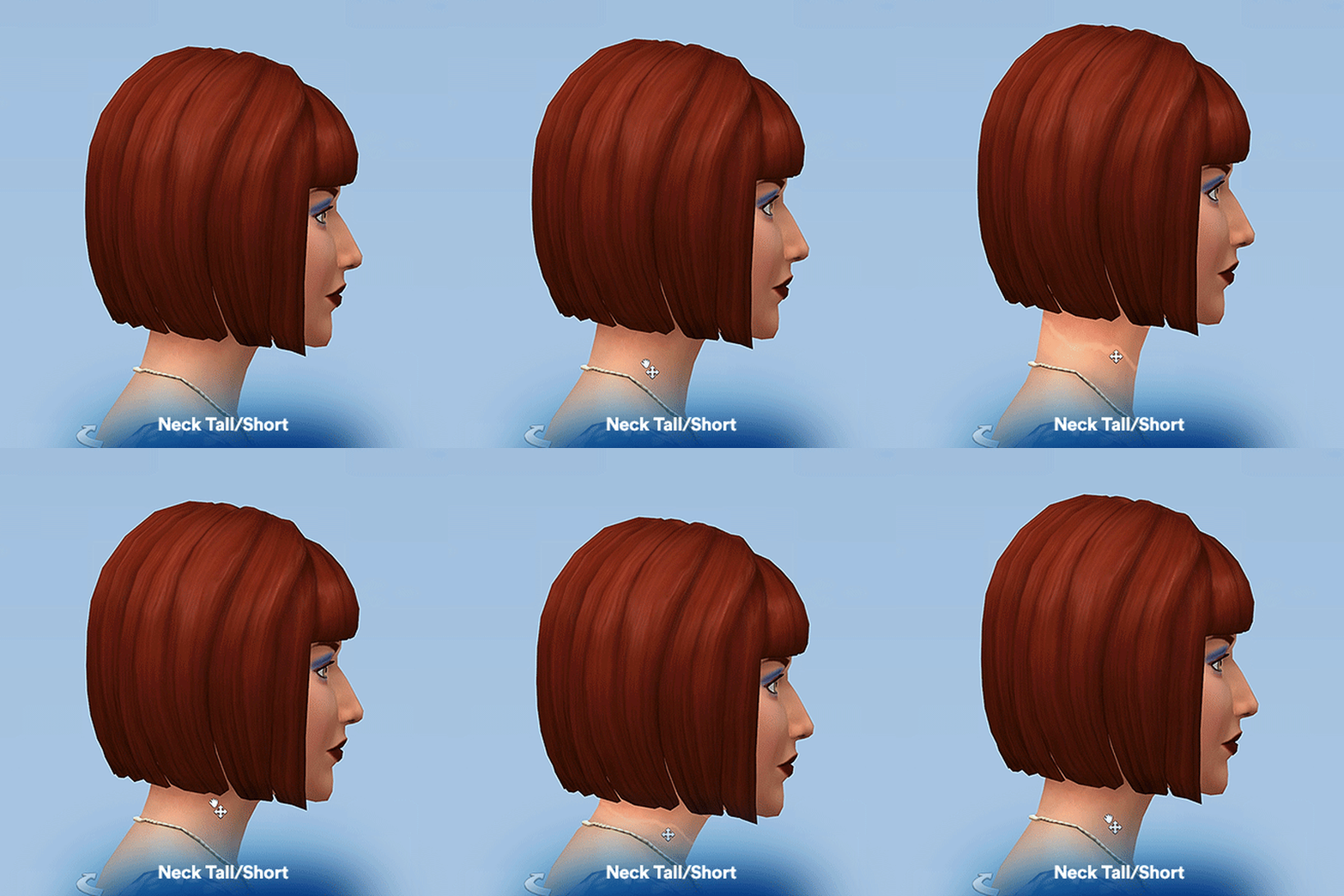
The mod’s intuitive control mechanism is a highlight. Instead of navigating complex menus or inputting numerical values, players simply need to click on a Sim’s throat in the Create-a-Sim (CAS) interface. This action activates a slider, allowing for real-time adjustments to their height. This direct manipulation makes the process feel organic and integrated, almost as if it were an original feature of the game. The ease of use ensures that even players new to modding can quickly grasp and utilize its capabilities without a steep learning curve. The mod’s design reflects an understanding of player needs: powerful customization doesn’t have to be complicated.
The Magic of In-Game Acknowledgment
What truly sets Luumia Sims’ Height Slider apart from other similar endeavors is its unique ability to influence the rest of the game dynamically. The official description highlights this crucial feature: “the changes you make with this mod will influence the rest of the game. Thus, you don’t need to worry so much about how awkward your height changes might look once you start playing with your Sims. Height Slider ensures that everything will still look normal.” This “in-game acknowledgment” is the mod’s crowning achievement and its most significant advantage.
In practice, this means several things:
- Realistic Interactions: Taller Sims will genuinely appear to look down at shorter Sims during conversations, and vice-versa. Their eyes will align naturally, preventing the uncanny valley effect often seen with poorly implemented height mods where characters stare awkwardly into each other’s chests or foreheads.
- Environmental Cohesion: Sims of different heights will interact with objects and environments more believably. While perfect animation adjustment for every single interaction is an incredibly complex undertaking for a mod, Luumia’s solution goes a long way in ensuring general movements and object interactions don’t look entirely out of place.
- Unbroken Immersion: The feeling of immersion, central to The Sims experience, remains intact. Players can genuinely believe in the unique physiques of their Sims because the game reacts to them in a consistent manner. This level of fidelity means players can craft truly diverse casts of characters without sacrificing the visual integrity of their game.
This sophisticated level of integration elevates the Height Slider from a mere cosmetic tweak to a foundational utility for character creation. It’s not just about changing how a Sim looks, but how they exist and interact within the simulated world, proving that mods can add profound depth without compromising gameplay quality.
Practical Application: How to Adjust Sim Heights
Utilizing the Height Slider mod is straightforward once it’s installed. Here’s a brief overview of the practical steps:
- Enter Create-a-Sim (CAS): Whether you’re creating a new Sim or editing an existing one, you’ll need to be in the CAS interface.
- Locate the Control Point: With the mod installed, a new interactive zone becomes available. Simply hover your mouse cursor over your Sim’s throat area.
- Click and Drag: Once the cursor changes (indicating an interactive element), click and hold. Then, drag your mouse up or down to adjust the Sim’s height. You’ll see the Sim’s stature change in real-time, allowing for precise adjustments.
- Observe and Refine: Pay attention to how the Sim’s body proportions change. While the mod strives for natural integration, extreme adjustments might still lead to some body parts appearing disproportionate (a known “con” mentioned in the original source). Experiment to find the perfect balance for your desired aesthetic.
- Finalize and Play: Once satisfied with the height, you can continue customizing other aspects of your Sim or finalize their creation and jump straight into gameplay, confident that their new height will be acknowledged.
This user-friendly approach makes the Height Slider mod accessible to all players, from seasoned modders to those taking their first steps into the world of Sims 4 customization. Its simple interaction belies the complex engineering required to make such a profound change work so seamlessly within the game’s engine.
Integrating the Mod: Navigating Installation and Exploring Related Tools
While the Height Slider mod offers significant benefits for personalization, its installation, like many Sims 4 mods, requires a few manual steps. For newcomers to modding, this process might initially seem daunting, but it’s a fundamental aspect of enhancing the Sims 4 experience with community-created content. Understanding the installation procedure and the broader context of game utilities is key to unlocking the full potential of your game.
Installation: A Step-by-Step Guide for Beginners
The Height Slider mod for Sims 4, being a custom content (CC) file, needs to be manually placed into your game’s directory. Here’s a general guide for installing mods in The Sims 4, specifically tailored for the Height Slider:
- Enable Mods in Game Settings: Before anything else, launch The Sims 4 and go to
Game Options->Other. Ensure thatEnable Custom Content and ModsandScript Mods Allowedare both checked. Apply changes and restart your game. This is a crucial first step for any mod. - Download the Mod: Obtain the Height Slider mod file (typically a
.packageand sometimes a.ts4scriptfile) from a reliable source like PhanMemFree.org or Luumia Sims’ official distribution channels. The file size is relatively small, reported at 26.14 KB, making it a quick download. - Locate Your Mods Folder: Navigate to your Sims 4 game directory. The default path is usually:
Documents\Electronic Arts\The Sims 4\Mods. - Place the Mod Files: Unzip the downloaded mod file (if it’s compressed) and copy the
.packagefile(s) and any.ts4scriptfiles directly into yourModsfolder. It’s often recommended to create a subfolder withinMods(e.g.,Mods\Luumia Height Slider) to keep your custom content organized, especially as your mod collection grows. - Launch The Sims 4: Start your game. A pop-up window should appear, listing all the custom content and mods that have loaded successfully. Confirm that the Height Slider mod is on this list.
- Test the Mod: Head into Create-a-Sim and attempt to adjust a Sim’s height as described in the previous section (by clicking on their throat). If it works, congratulations, your mod is installed!
Important Considerations for Beginners:
- Read the Mod Creator’s Instructions: Always prioritize the specific installation instructions provided by Luumia Sims or the download page on PhanMemFree.org, as they may have unique requirements.
- Updates and Compatibility: Mods can sometimes become incompatible with new game patches. Check PhanMemFree.org or the mod creator’s page for updates after game patches to ensure continued functionality.
- Troubleshooting: If the mod doesn’t appear or function, double-check your installation steps, ensure mods are enabled in game settings, and look for conflicting mods (though less common for a simple utility like a height slider).
While described as “tricky for beginners,” this manual process is a rite of passage for many Sims 4 players and opens the door to a vast world of custom content that can dramatically reshape your gameplay experience.
Understanding Modding and Game Utilities
The Height Slider mod falls under the umbrella of “Utilities” within the broader context of software applications and games. In this sense, a utility is a piece of software designed to help analyze, configure, optimize, or maintain a computer or game. For The Sims 4, utilities often take the form of mods that enhance gameplay, add new features, or, as in this case, expand customization options.
The Role of Mods in Gaming: Mods (modifications) are user-created content that alters a game’s appearance or behavior. They are a cornerstone of many PC gaming communities, allowing players to:
- Extend Game Longevity: Mods breathe new life into older games and add endless replayability to newer ones.
- Address Developer Limitations: Like the Height Slider, many mods fill gaps that developers couldn’t or didn’t address in the base game.
- Foster Creativity: They empower players to shape their gaming experience into something truly unique, fostering a sense of co-authorship.
- Build Communities: Modding communities are often vibrant hubs of discussion, collaboration, and mutual support, as seen with resources like PhanMemFree.org offering a platform for such downloads.
The Sims 4, in particular, thrives on its modding community. From custom clothing and furniture (CC) to complex gameplay overhauls and quality-of-life improvements, mods transform the game from a developer-designed experience into a player-defined sandbox. The Height Slider mod is a perfect example of a small, focused utility that provides a massive quality-of-life improvement, allowing players to feel a deeper connection and control over their Sims’ identities. By embracing these utilities, players aren’t just playing The Sims 4; they’re actively curating their version of The Sims 4.
Weighing the Pros and Cons: A Balanced Perspective
Like any modification to a game, the Height Slider mod comes with its own set of advantages and potential drawbacks. Understanding these aspects allows players to make an informed decision about integrating it into their Sims 4 experience and manage expectations effectively. Luumia Sims’ mod is generally well-regarded for its innovative solution, but it’s important to consider all facets.
The Advantages of Luumia’s Creation
The Height Slider mod offers several compelling benefits that significantly enhance the Sim-creation process and overall gameplay:
- Unprecedented Customization Beyond Default Limits: This is the primary and most significant advantage. The base game’s limitations on height can make Sims feel somewhat generic. The mod shatters these barriers, allowing for truly short, average, or tall Sims, adding a layer of physical diversity that was previously impossible. This opens up new narrative possibilities and allows players to create characters that more closely match their real-world inspirations or unique creative visions.
- Seamless In-Game Acknowledgment of Height Changes: As highlighted, this is the mod’s standout feature. Unlike many other mods that might lead to visual glitches or awkward interactions, Luumia’s Height Slider ensures that Sims of varying heights interact believably. They maintain eye contact during conversations, and general animations adapt reasonably well. This meticulous design prevents immersion breaks and contributes to a much more polished and believable virtual world, even with extreme height differences.
- Free and Accessible: The mod is available completely free of charge. This accessibility means that any Sims 4 player on Windows can download and integrate this powerful customization tool without any financial barrier, further promoting community engagement and creative freedom. With a small file size of 26.14 KB, it’s also a light addition to your game files.
- Developed by a Respected Modder: Luumia Sims is a known and trusted creator within the Sims 4 community. Their mods are generally well-designed and stable, giving users confidence in the quality and longevity of the Height Slider. The mod’s latest update on January 31, 2023, suggests ongoing support and compatibility.
- Enhances Storytelling and Role-Playing: By adding physical diversity, the mod empowers players to tell richer, more nuanced stories. A towering jock, a tiny artist, or a family with significant height differences – these variations add visual interest and personality that were previously unattainable, making role-playing scenarios more engaging and realistic.
Potential Hurdles and Considerations
While the pros are substantial, there are a few points to consider before installing the Height Slider mod:
- Tricky Installation for Beginners: As noted in the original information, the installation process “can be tricky for beginners, as you have to manually access your game files for it.” This involves enabling mods in the game settings, navigating to specific folders, and correctly placing the mod files. For those unfamiliar with modding, this initial hurdle might require a bit of patience and reliance on guides (like the one provided earlier) or community forums. However, once mastered, it opens the door to a vast world of other custom content.
- Body Parts May Not Be Proportionate After Extreme Adjustments: While the mod excels at integrating height changes into animations and interactions, extreme adjustments to a Sim’s height can sometimes lead to slight disproportionality in other body parts. For instance, a very tall Sim might have slightly stretched limbs or a somewhat elongated torso, or a very short Sim might appear overly compact. This is an inherent challenge when modifying a base character model not originally designed for such extreme variations. Players should exercise caution and experiment to find a height that looks natural for their desired aesthetic, understanding that perfection across all animations and body parts is an incredibly difficult feat for any mod to achieve.
- Potential for Minor Clipping: In very rare instances, especially with extreme height differences interacting with specific objects or animations, minor clipping might occur. This is not a common issue with Luumia’s mod due to its thoughtful design but remains a theoretical possibility when pushing the boundaries of character models.
- Compatibility with Other Mods: While generally stable, any mod introduces the potential for conflicts with other custom content, especially those that also alter Sim bodies or animations. Most conflicts are rare, but it’s always good practice to test new mods in a smaller, controlled game save first.
Despite these minor considerations, the overwhelming consensus is that the Height Slider mod’s benefits far outweigh its drawbacks. Its ability to revolutionize Sim customization and maintain game immersion makes it an essential utility for many Sims 4 players seeking to truly personalize their virtual worlds. The freedom it offers to create more diverse and realistic characters adds immeasurable value to the gameplay experience, solidifying its place as a beloved and impactful mod within the community.
The Broader Impact of Mods on the Gaming Experience
The Sims 4, much like many other sandbox and simulation games, owes a significant portion of its enduring popularity and depth to its robust modding community. The Height Slider mod by Luumia Sims is a prime example of how community-driven content can not only enhance a game but also fundamentally reshape a player’s interaction with it. Beyond the immediate gratification of personalized Sim heights, mods collectively contribute to a richer, more dynamic, and ultimately, more satisfying gaming ecosystem.
Enhancing Longevity and Replayability
One of the most critical contributions of mods like the Height Slider is their role in extending a game’s lifespan. Even the most expansive base games can eventually feel stale. Mods introduce new content, mechanics, and customization options that keep the experience fresh and exciting for years beyond its initial release. For The Sims 4, where the core loop involves creating and managing lives, endless customization is paramount. A mod that allows for genuine height diversity means players can embark on entirely new storytelling ventures, create families that are visually distinct, and build narratives that hinge on physical differences – something not possible with the default game. This continuous influx of novel elements encourages players to return to the game, explore new possibilities, and invest more deeply in their virtual worlds.
Replayability is also significantly boosted. Players might decide to start a new legacy challenge where all family members must conform to a certain height profile, or create a storyline around a Sim who stands out due to their exceptional height. These imaginative scenarios are directly enabled by the flexibility offered by mods, ensuring that each new playthrough can feel genuinely unique and tailored. Resources like PhanMemFree.org, by hosting and categorizing these utilities, play a crucial role in making these enhancements accessible, fostering a vibrant cycle of creativity and extended engagement for the gaming community.
Community-Driven Innovation
The modding scene is a powerful testament to community-driven innovation. Developers like Luumia Sims are often passionate players themselves, intimately familiar with the game’s strengths and weaknesses. They identify unmet needs or overlooked opportunities for enhancement and then leverage their skills to create solutions. This bottom-up approach to game development often results in highly specialized and effective tools that cater directly to specific player desires, sometimes even anticipating future trends.
The success of the Height Slider mod underscores the collaborative spirit that defines the modding world. Players share feedback, report bugs, and offer suggestions, helping mod creators refine their work. This symbiotic relationship between modders and players ensures that the content remains relevant, functional, and aligned with community expectations. Moreover, the existence of a thriving modding community makes a game more attractive to potential new players, knowing that they can customize their experience far beyond what the developers originally envisioned. Websites like PhanMemFree.org serve as vital hubs for this interaction, providing platforms for discovery, download, and discussion, cementing the idea that the game’s evolution is a shared journey between its creators and its dedicated player base. In essence, the Height Slider mod is more than just a piece of software; it’s a symbol of the collective passion that continues to shape and enrich the world of The Sims 4.
File Information
- License: “Free”
- Version: “1”
- Latest update: “January 31, 2023”
- Platform: “Windows”
- OS: “Windows 8”
- Language: “English”
- Downloads: “6.3K”
- Size: “26.14 KB”


