
HERE Maps, once a prominent contender in the navigation and mapping arena, offers a compelling blend of features, particularly for Windows users. While it may not surpass the feature-richness of giants like Google Maps or Apple Maps, it holds its own with a user-friendly interface and robust navigation capabilities. This review delves into the strengths and weaknesses of HERE Maps, exploring its various aspects and comparing it to its competitors.
HERE Maps: Navigational Strengths and Interface Design
HERE Maps distinguishes itself through its intuitive and easy-to-navigate interface, especially beneficial for in-car use. The large, clearly labeled buttons are designed for effortless interaction, even while driving. This ease of use mimics the experience offered by popular navigation apps like Waze, prioritizing straightforward navigation above extensive exploration features. The app’s clear visual presentation ensures that users can quickly grasp crucial information at a glance, minimizing distractions while on the road. Multiple map views—satellite imagery, real-time traffic updates, and public transit routes—cater to diverse user needs and preferences.
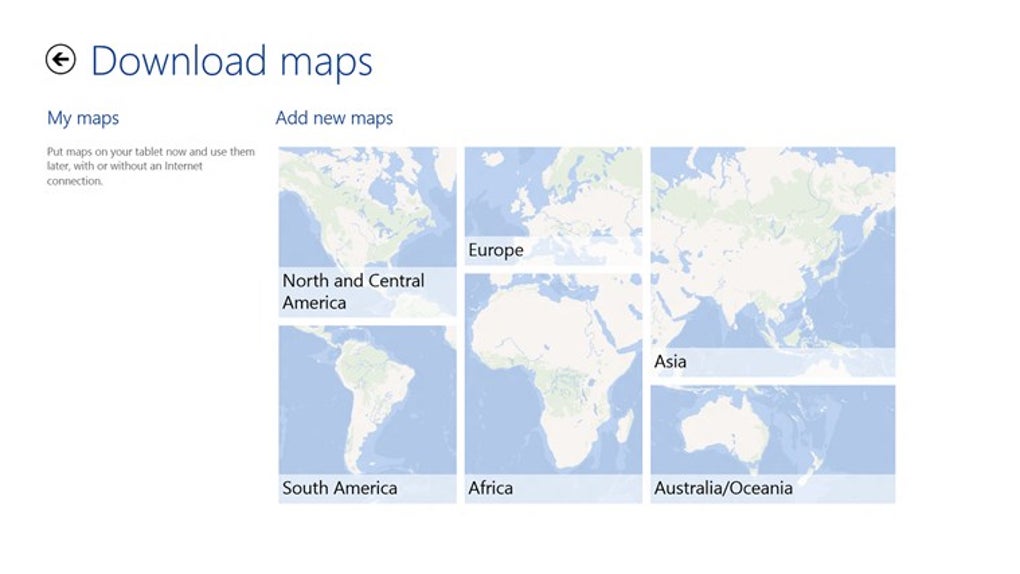
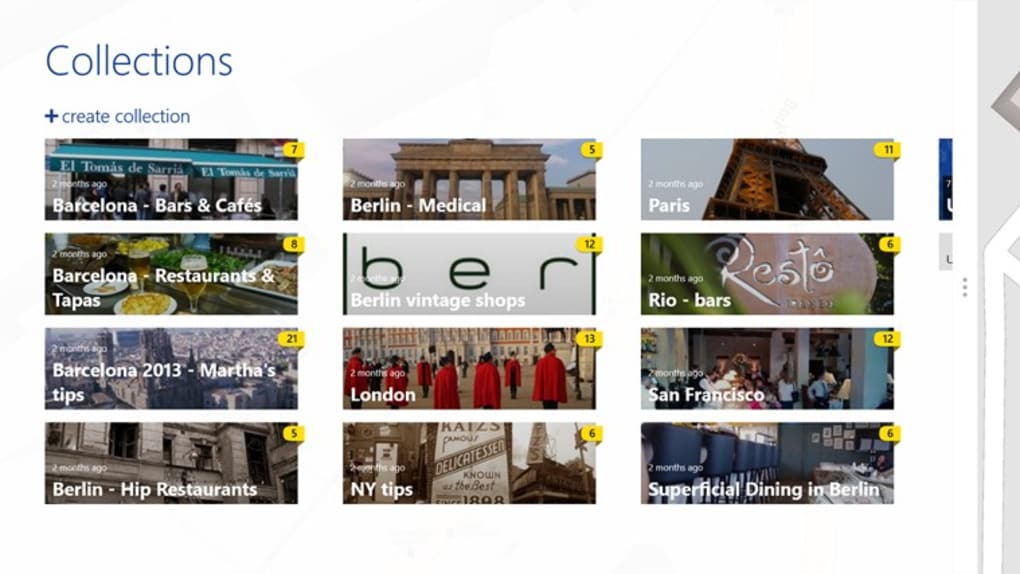
One of the most appreciated aspects of HERE Maps is its offline functionality. Users can download maps for areas of interest, ensuring access to navigation even without a data connection. This is particularly useful in areas with limited or unreliable network coverage. However, this feature requires account registration, which unlocks additional benefits such as synchronized favorites and the ability to customize voice guidance.
The design philosophy of HERE Maps shows a clear focus on the Windows ecosystem. Originally crafted with Windows 8 and Windows Phone in mind, the app’s design language significantly differs from its counterparts on other platforms. This design approach is most evident in the Windows 8 tablet version, which cleverly utilizes Microsoft’s snap feature. This feature splits the screen, presenting search results on one side and the map view on the other, optimizing screen real estate for a more efficient user experience. While the design language is tailored for Windows, this focus may lead to a less cohesive experience on other operating systems. For instance, the Android version lacks the consistency with the platform’s Material Design language, making it stand out visually from other Android applications.

On mobile devices, the app is divided into two distinct sections: one for map exploration and another dedicated to driving navigation. This streamlined segregation simplifies the user experience by focusing attention on the task at hand. The driving mode efficiently integrates favorite places and past navigation history for convenient access to frequently used locations. However, the experience on a Windows 8 tablet differs considerably from the mobile version, highlighting the app’s design priorities.
Feature Comparison: HERE Maps vs. Competitors
While HERE Maps excels in navigation and offers offline capabilities, it lags behind competitors like Google Maps and Yelp in terms of search functionality and local business information. The search results are noticeably limited, providing less comprehensive and detailed information about points of interest compared to the richer datasets offered by its rivals. Exploring local businesses, finding reviews, or discovering nearby activities is considerably less effective on HERE Maps. While it suffices for basic navigation, users seeking detailed local information should rely on alternative mapping and search services for a more fulfilling experience.
This difference is particularly noticeable when comparing HERE Maps to Google Maps. Google Maps leverages its vast database of places, reviews, and user-generated content to provide a significantly more comprehensive search experience. The integration of Google’s other services further enriches the experience, providing access to street view imagery, real-time traffic data from multiple sources, and public transit schedules with real-time updates. Similarly, Yelp’s emphasis on user reviews and business ratings offers a detailed perspective on local establishments, a feature missing in HERE Maps.
HERE Maps: Platform Availability and User Experience
HERE Maps is available on multiple platforms including Windows, Android, and iOS, allowing for cross-platform usage. However, as mentioned earlier, the user experience may vary significantly depending on the platform. The Windows version reflects a closer integration with the Windows ecosystem, while the versions on Android and iOS appear as somewhat standalone apps, lacking seamless integration with the platform’s design languages and feature sets. This inconsistency might lead to a fragmented user experience for users familiar with the design standards of their chosen mobile platform.
The app’s performance and stability should also be considered. While generally reliable, user reviews indicate some instances of occasional glitches or inconsistencies, particularly on older devices or operating systems. Regular updates from the developers aim to address such issues and improve overall performance.
HERE Maps: Strengths and Weaknesses Summarized
Pros:
- Excellent Navigation Mode: The driving navigation mode is intuitive and easy to use, with large, clear buttons perfect for in-car use.
- Comprehensive Public Transit Maps: Provides detailed information about public transportation routes, schedules, and real-time updates.
- Offline Mode: Allows downloading maps for offline use, a valuable feature for areas with limited or no internet access.
- User-Friendly Interface (Windows): The Windows version boasts a clean and intuitive interface, leveraging Windows features effectively.
Cons:
- Limited Search Results: The search functionality is noticeably weaker than competitors, providing fewer details and less comprehensive information about points of interest.
- Windows-Centric Design: The design prioritizes the Windows ecosystem, resulting in inconsistencies and less platform integration on other operating systems.
- Inconsistent User Experience Across Platforms: The user experience may differ significantly across platforms, lacking cohesiveness and platform integration.
- Potential Performance Issues: Occasional performance issues or glitches have been reported by some users.
Conclusion: Who Should Use HERE Maps?
HERE Maps remains a viable option for users primarily focused on straightforward navigation, particularly those within the Windows ecosystem. Its strengths lie in its easy-to-use navigation interface and offline capabilities. However, users seeking a comprehensive mapping and discovery experience with extensive search features and local business information would likely find Google Maps or other alternatives better suited to their needs. The app’s strengths are most evident for Windows users who may find it a superior alternative to the built-in mapping solution, but its limitations in search and cross-platform consistency should be considered before making a decision. Ultimately, the optimal choice depends on individual priorities and usage patterns.
File Information
- License: “Free”
- Version: “3.4.437.8”
- Latest update: “June 1, 2015”
- Platform: “Windows”
- OS: “Windows 8.1”
- Language: “English”
- Downloads: “43.4K”


