
Hetman Partition Recovery is a data recovery software designed to retrieve lost data from damaged or inaccessible hard drives and partitions. While the prospect of hard drive failure can be daunting, Hetman offers a user-friendly solution, simplifying a potentially stressful situation. This review explores the software’s features, ease of use, performance, and overall effectiveness in recovering lost files.
Understanding Hetman Partition Recovery’s Functionality
Hetman Partition Recovery isn’t just a single tool; it’s a comprehensive suite designed to address various data loss scenarios. Its core function lies in recovering data from partitions that have been formatted, corrupted, or become inaccessible due to various reasons, including accidental deletion, system crashes, or hardware malfunctions. Beyond simple file recovery, it boasts a robust set of tools capable of:
- Undeletion: Recovering files that have been accidentally deleted but haven’t been overwritten.
- Unformatting: Restoring data from partitions that have undergone formatting, effectively wiping their contents.
- Partition Reconstruction: Rebuilding damaged or lost partitions, making them accessible again.
- File System Repair: Fixing corrupted file systems (like NTFS or FAT) to regain access to stored data.
- Hard Drive Recovery: Addressing more complex issues where the hard drive itself is malfunctioning, impacting data accessibility.
This multifaceted approach makes Hetman Partition Recovery suitable for a wide range of data loss situations, offering a potential solution even when simpler recovery methods fail. The software seamlessly integrates these functions, providing a unified interface for navigating various recovery tasks.
User Interface and Ease of Use: A Step-by-Step Guide
One of Hetman Partition Recovery’s strengths lies in its user-friendly interface. Even those without extensive technical expertise can navigate the software and perform data recovery. The process is generally straightforward and involves several key steps:
-
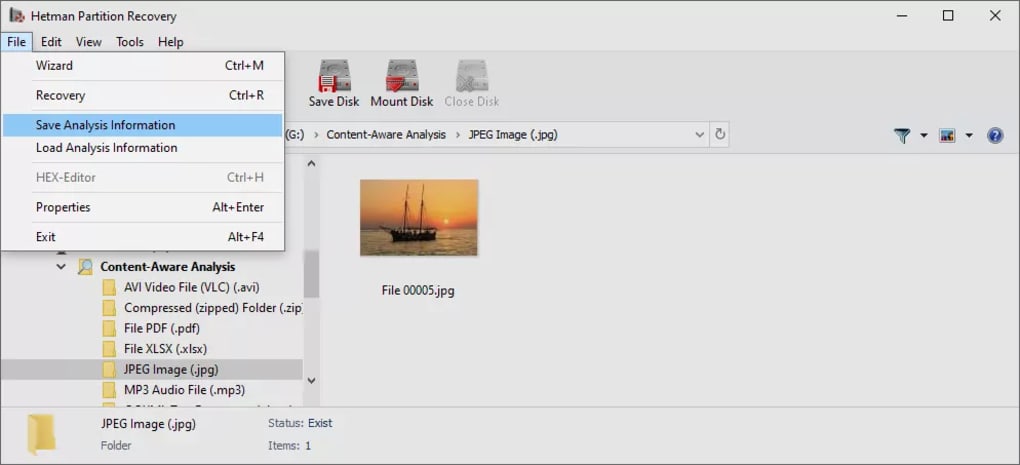
Drive Selection: Upon launching, the software presents a familiar Explorer-like interface, allowing users to select the target drive (hard drive, USB drive, memory card, etc.) requiring scanning. The intuitive design guides users through the process of identifying the correct drive.
-
Scanning Process: Once the drive is selected, Hetman initiates a thorough scan, searching for lost files and partitions. This process can take some time, depending on the size of the drive and the extent of the damage. The software provides regular updates on the scan’s progress.
-
File Identification and Preview: After the scan completes, Hetman displays a list of recoverable files. Users can preview files (where possible) to verify their integrity before initiating recovery. The software efficiently categorizes and organizes files, simplifying the search process for specific data.
-
File Recovery and Destination Selection: This stage offers various options for saving the recovered files. Users can choose to copy the files to another hard drive, burn them onto a CD/DVD, create an ISO image for later restoration, or even upload them to an FTP server. This flexibility minimizes the risk of overwriting existing files and provides multiple avenues for securing the recovered data.
-
File Renaming (Optional): During the recovery process, Hetman may prompt users to rename files, especially those whose original names have been lost or corrupted. While this adds a small layer of complexity, it allows for more accurate restoration. A helpful “Apply to All” option is available to streamline the renaming of similar files.
Hetman Partition Recovery’s Performance and Effectiveness
Hetman Partition Recovery’s performance depends significantly on factors like the drive’s condition, the extent of data loss, and the type of file system involved. In several test cases, the software successfully recovered a wide range of files from damaged USB sticks and hard drives, often restoring them to their original folders. While the software might not be able to recover every single file, especially in cases of severe drive damage or extensive data overwriting, its success rate is generally high, offering a significant chance of recovering valuable data. The speed of the scanning and recovery processes varies depending on drive size and complexity, but it generally performs within reasonable timeframes.
However, users should be aware that the effectiveness of the recovery process can be affected by the following:
- Extent of Data Overwriting: If the lost files have been overwritten by new data, recovery becomes increasingly challenging or impossible.
- Drive Physical Damage: Severe physical damage to the storage medium can significantly reduce the chances of successful recovery.
- File System Corruption: The extent of file system damage can also affect the recovery process.
Hetman Partition Recovery: Pros and Cons
Pros:
- Comprehensive Functionality: Hetman effectively handles various data loss scenarios, including accidental deletion, formatting, partition damage, and hard drive failure.
- User-Friendly Interface: The software’s design is intuitive and accessible, even for users with limited technical skills.
- Multiple Recovery Options: Users have several choices for saving recovered files, enhancing safety and flexibility.
- File Preview: The ability to preview files before recovery allows for verification and selective restoration.
- Strong Recovery Rate: Hetman exhibits a high success rate in recovering lost data, offering a valuable tool in data loss situations.
Cons:
- Cost: Hetman Partition Recovery is a commercial product, and its price point might be a barrier for some users.
- Time-Consuming Scan: The scanning process can be quite lengthy, especially for large drives.
- File Renaming: The requirement to rename recovered files can add a bit of complexity for less experienced users, though the “Apply to All” function mitigates this somewhat.
- Not a Replacement for Backups: While effective, Hetman shouldn’t replace regular data backups. Proactive backups remain crucial for data protection.
Conclusion: Is Hetman Partition Recovery Right for You?
Hetman Partition Recovery emerges as a powerful and user-friendly data recovery solution, effectively addressing various data loss scenarios. Its comprehensive functionality, intuitive interface, and high recovery success rate make it a valuable tool for both individuals and businesses. While the cost might be a factor for some, the potential for recovering irreplaceable data often outweighs the expense. However, it’s crucial to remember that Hetman is a recovery tool, not a preventative measure. Regular backups remain the most effective way to protect data and avoid the need for such software. If you’re looking for a reliable and efficient data recovery solution, Hetman Partition Recovery is certainly worth considering, particularly when facing serious data loss. Remember to always test the software on a non-critical drive before using it on your main drive to prevent further data loss.
File Information
- License: “Trial version”
- Latest update: “December 18, 2024”
- Platform: “Windows”
- OS: “Windows 10”
- Language: “English”
- Downloads: “226K”
- Size: “68.66 MB”


