
Hex Workshop is a powerful hexadecimal editor for Windows, offering advanced binary editing capabilities combined with the user-friendliness of a word processor. This comprehensive review explores its features, functionality, and place within the landscape of similar software. For those unfamiliar with hex editors, Hex Workshop provides a gateway to low-level data manipulation, making it invaluable for programmers, data recovery specialists, and anyone needing to delve into the binary heart of files and systems.
Core Functionality and Features
At its core, Hex Workshop provides the essential tools for manipulating hexadecimal data. This includes the standard editing functions: cut, copy, paste, insert, and delete. However, Hex Workshop transcends basic editing by integrating a suite of advanced features designed to streamline and enhance the hex editing experience. These features extend beyond simple byte manipulation, providing sophisticated tools for analysis and interpretation.
The ability to print customizable hex dumps is a particularly useful feature, allowing for the generation of formatted reports suitable for documentation or analysis. The export functionality, allowing for the saving of data in RTF or HTML formats, further enhances the utility of the program for sharing and presentation purposes. This feature is vital when communicating findings from hex editing to others who may not possess the same technical expertise.
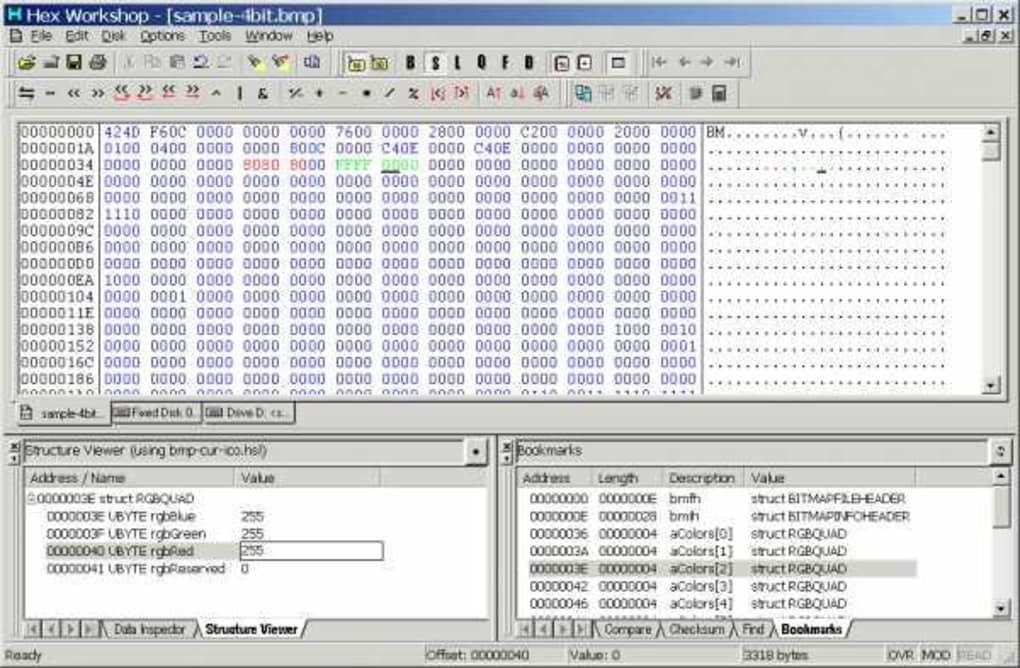
Beyond basic editing, Hex Workshop offers robust search and replace functionality, enabling users to locate and modify specific hex patterns within a file. This is critical for tasks such as data correction, malware analysis, or reversing engineering. The integrated “goto” function allows for quick navigation to specific memory addresses or offsets, expediting the editing process, especially in larger files.
Checksum calculations are a key aspect of data integrity verification. Hex Workshop seamlessly integrates this capability, allowing users to compute various checksums (e.g., CRC32, MD5) and verify the consistency of data. This is indispensable for ensuring that data hasn’t been corrupted during transfer or storage.
Smart bookmarks are a significant productivity enhancer. This feature allows users to easily mark specific locations within a file for later reference, eliminating the need for manual navigation. The ability to auto-load bookmarks upon opening documents further enhances efficiency, particularly when working on large projects that require repeated access to certain parts of the file.
The color mapping feature enhances visual clarity and aids in identifying patterns and anomalies in the data. By assigning different colors to specific hex values or ranges, users can quickly discern significant information from the raw hexadecimal representation. This visual aid can be crucial in reducing analysis time and enhancing comprehension, particularly when working with complex or large data sets.
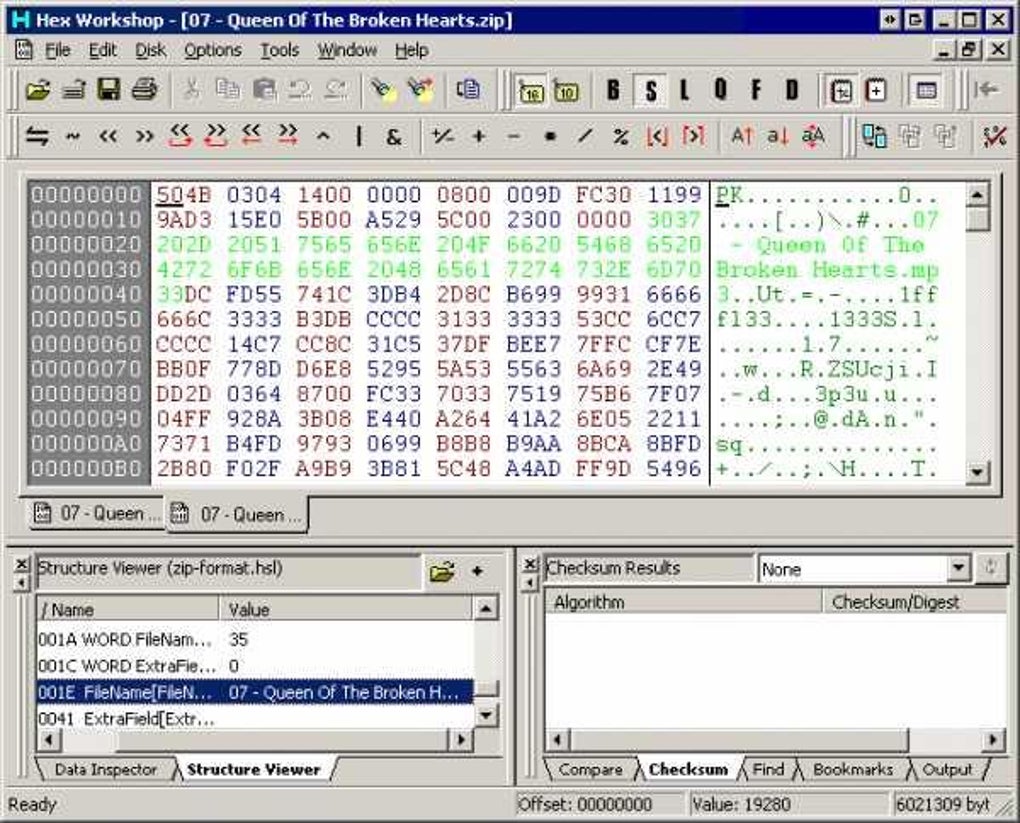
Character distribution generation provides a statistical overview of the character frequencies within a file or sector. This feature is helpful in identifying potential anomalies or patterns that may not be immediately apparent from a purely visual inspection of the hexadecimal data. It’s a powerful tool for pattern recognition and data analysis, especially in contexts such as identifying file types or hidden information.
Hex Workshop’s support for drag-and-drop functionality streamlines the workflow. The seamless integration with the Windows operating system allows for quick and intuitive hex editing within commonly used workspaces. This ease of use is a strong point, making the powerful capabilities accessible to a broader range of users.
Data Inspection and Manipulation
The integrated Data Inspector is a cornerstone of Hex Workshop’s functionality. This tool facilitates the interpretation, viewing, and editing of decimal and binary values, significantly expanding the program’s capabilities beyond basic hexadecimal manipulation. The ability to perform arithmetic, logical, ASCII case, and bitwise operations directly within the editor empowers users to dynamically manipulate data in place, saving time and effort compared to external calculations.
This direct manipulation is particularly helpful for tasks requiring precise adjustments to data values without the need to convert between different number systems. The ability to work directly in the desired format (decimal, binary, or hexadecimal) streamlines the workflow and reduces the chances of errors associated with manual conversions. This direct manipulation is a testament to the program’s focus on efficiency and user experience.
The Integrated Structure Viewer
The Structure Viewer is a standout feature that significantly differentiates Hex Workshop from many other hex editors. This component allows for the viewing and editing of data in a highly intuitive and structured manner. Instead of navigating raw hexadecimal data, users can interact with data according to predefined structures. These structures are defined in text files using a syntax that closely resembles C/C++ style struct definitions.
This structured approach is particularly beneficial when dealing with complex file formats or data structures where understanding the data’s organization is paramount. The Structure Viewer transforms the otherwise arduous task of interpreting raw hexadecimal data into a simple and straightforward process, significantly enhancing productivity and reducing the risk of errors. The ability to open and apply structures from multiple structure libraries further enhances the versatility and adaptability of the Structure Viewer. The support for setting document file extensions, display names, and verify statements (for sanity checking) adds layers of organization and validation, crucial for managing large and complex projects.
This feature essentially brings the power of a high-level programming language’s structural capabilities to the process of hex editing. It’s a significant advantage, allowing users to deal with structured data in a way that is both efficient and less error-prone.
Command-Line Functionality and Enhancements
Hex Workshop’s functionality extends beyond its graphical user interface (GUI). The addition of a “/FILELIST” command-line argument allows users to batch process multiple files by loading a list of files from a text file. This feature significantly increases efficiency for tasks involving the processing of numerous files, automating a process that would otherwise require manual input for each file.
Further enhancing usability, buttons were added to the Checksum results tab, bookmarks results tab, and structure viewer. These additions improve the overall user experience by providing quicker access to important functions and options. This focus on incremental improvements shows a commitment to refining the software based on user feedback and experience.
The ability to auto-load bookmarks when opening documents is a valuable addition that streamlines workflows. This feature eliminates the need to manually restore bookmarks each time a project is revisited, saving users considerable time and effort. It is a small but significant feature that contributes greatly to the overall efficiency of the software.
The option to select odd and even column background colors enhances readability and reduces visual fatigue. This seemingly minor detail significantly improves the user experience, especially during prolonged editing sessions. The flexibility in color customization contributes to a more personalized and comfortable workflow.
Comparison with Alternative Hex Editors
While Hex Workshop offers a robust suite of features, it’s important to consider its place within the broader context of available hex editors. Several popular alternatives exist, each with its own strengths and weaknesses. Direct comparison with competitors such as HxD Hex Editor, HexEditor, WinHex, and others would highlight Hex Workshop’s advantages and disadvantages. For example, while HxD is known for its open-source nature and lightweight design, Hex Workshop distinguishes itself with its advanced features, like the integrated Structure Viewer and comprehensive data manipulation tools. The comparison would allow users to choose the editor that best suits their specific needs and preferences.
The decision of which hex editor to use ultimately depends on individual needs and priorities. Some users may prioritize open-source availability and cross-platform compatibility, while others may prefer the advanced features and powerful data manipulation capabilities offered by a commercial product like Hex Workshop. A thorough analysis of alternative options, along with their respective strengths and weaknesses, would help potential users make an informed choice.
Conclusion
Hex Workshop stands out as a robust and feature-rich hex editor, particularly well-suited for professional users and those requiring advanced capabilities beyond basic hexadecimal manipulation. Its intuitive interface, combined with powerful features such as the Structure Viewer and integrated data inspection tools, distinguishes it from many competitors. While a commercial product, its capabilities justify the cost for users who regularly engage in advanced binary data editing tasks. The ongoing updates and enhancements reflect a commitment to improvement and user satisfaction, ensuring that Hex Workshop continues to be a valuable asset in the toolkit of any serious hex editor user.
File Information
- License: “Trial version”
- Version: “5.02”
- Latest update: “April 3, 2008”
- Platform: “Windows”
- OS: “Windows 95”
- Language: “English”
- Downloads: “55.2K”
- Size: “3.00 MB”


