
HitFilm Pro stands as a powerful and versatile video editing software, expertly blending the capabilities of a sophisticated video effects compositor with the intuitive functionality of a traditional non-linear editor (NLE). This comprehensive tool caters to a wide range of users, from professional video editors and filmmakers seeking seamless integration of compositing and editing workflows to aspiring creators looking to enhance their video production skills. Its extensive feature set and user-friendly interface make it a compelling choice for those aiming to produce high-quality, visually stunning videos.
Feature-Rich Editing and Compositing Capabilities
HitFilm Pro’s strength lies in its seamless integration of editing and compositing tools. Unlike many software packages that require switching between separate applications for these functions, HitFilm Pro provides a unified environment, streamlining the workflow and maximizing efficiency. The software offers a robust timeline-based editor, enabling users to perform fundamental editing tasks with ease, including L and J cuts, which smoothly transition between clips. Beyond basic editing, however, HitFilm Pro boasts a wealth of advanced features that elevate its capabilities significantly.
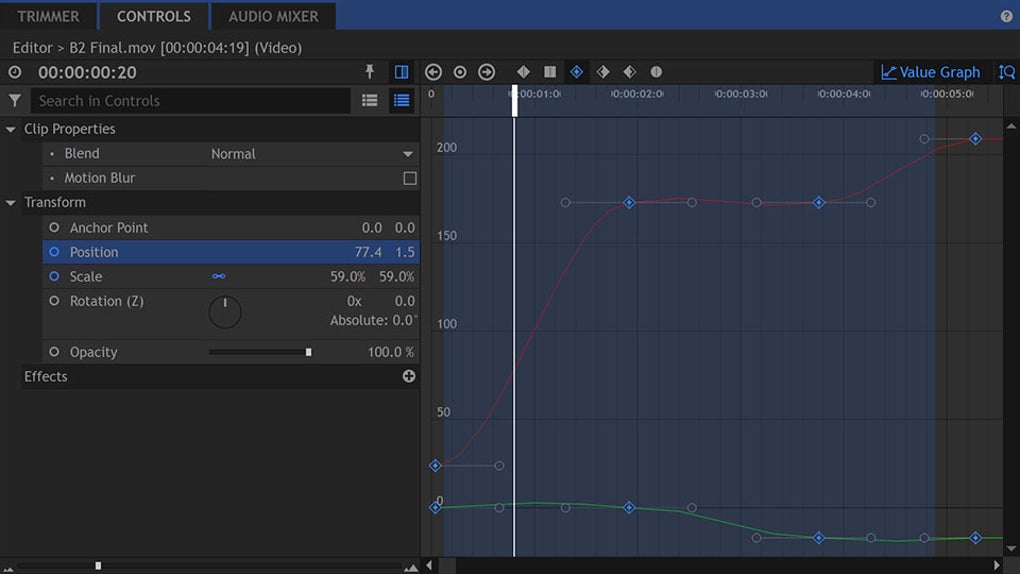
The sophisticated color grading tools provide extensive control over color correction and enhancement, allowing for nuanced adjustments to achieve a specific aesthetic or enhance the overall visual appeal of the footage. The dedicated trimmer offers precise control over clip lengths and transitions, ensuring clean and polished edits. HitFilm Pro’s 3D titling capabilities enable the creation of dynamic and engaging text animations, adding a professional touch to video projects. Advanced keyframing provides fine-grained control over animation parameters, unlocking the potential for intricate and sophisticated visual effects.
Furthermore, HitFilm Pro offers a vast library of over 500 presets and video effects, significantly expanding the creative possibilities. These effects cover a wide range of visual styles, allowing for the creation of everything from subtle stylistic enhancements to dramatic special effects. Users can leverage these presets to generate convincing muzzle flashes, realistic lightsabers, intriguing energy distortions, powerful explosions, and dynamic particle emitters, transforming ordinary footage into captivating visual experiences.
The inclusion of Ignite Pro, a powerful plugin, further amplifies HitFilm Pro’s capabilities. This plugin extends HitFilm Pro’s graphic effects functionality to virtually any professional video editing software, providing users with unmatched flexibility. Whether they prefer to maintain their established workflows with other editing programs or solely utilize HitFilm Pro’s comprehensive environment, the option to integrate the software’s powerful effects remains consistently available. This seamless integration of various tools allows for a smooth and efficient workflow, irrespective of the user’s preferred editing environment.
Powerful Audio Editing Tools
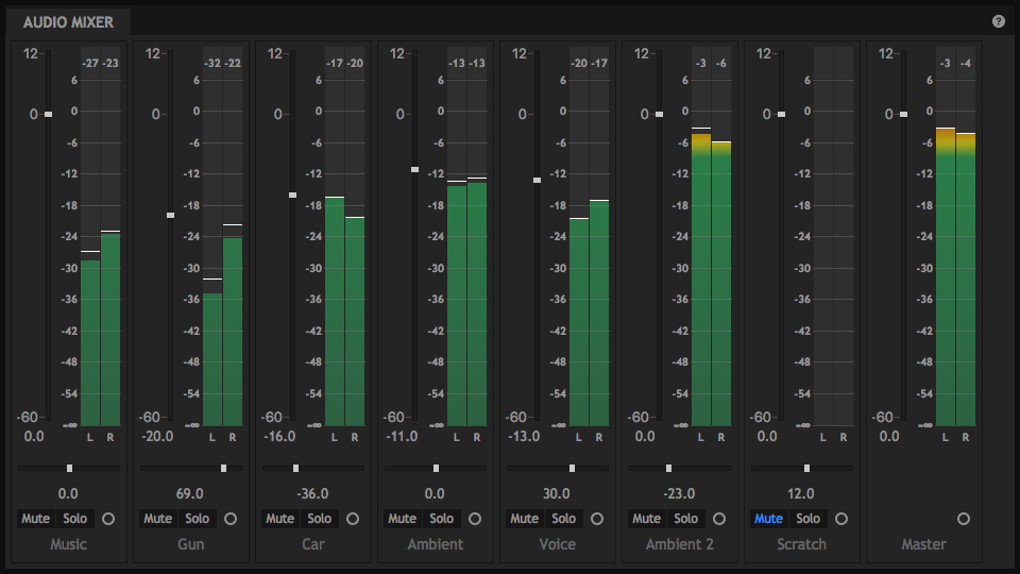
HitFilm Pro doesn’t limit itself to video editing; it also incorporates a comprehensive suite of audio editing tools. Central to this is the integrated audio mixer, a powerful tool that allows for precise sound design and fine-tuning of audio levels. This built-in audio mixer eliminates the need for external audio editing software, streamlining the post-production workflow and keeping everything within a single, cohesive environment.
Another significant audio feature is the automatic audio synchronization functionality. This powerful tool allows users to seamlessly integrate audio from multiple sources, such as a DSLR camera and a dedicated audio recorder, without manual synchronization. This automated process ensures precise alignment of audio tracks, minimizing the time spent on tedious manual adjustments and maximizing efficiency.
The combined capabilities of the audio mixer and the auto-sync feature provide comprehensive control over the audio aspects of any video project, eliminating the need for separate audio editing software and ensuring a unified, streamlined workflow.
Advantages and Disadvantages of HitFilm Pro
HitFilm Pro presents numerous advantages that make it a compelling choice for various users. Its all-in-one nature streamlines the video editing and compositing process, eliminating the need for multiple software packages and simplifying the workflow. The extensive library of effects and presets allows for the creation of incredibly diverse and visually striking videos, catering to a wide range of creative styles. The integration of both video and audio editing tools within a single package enhances convenience and efficiency, minimizing the need for switching between applications.
However, HitFilm Pro also has some drawbacks to consider. The limited export options may pose a challenge for users who require specific file formats or codecs. The software’s steep learning curve presents a hurdle for beginners, potentially requiring a substantial time investment to master its complex features and functionalities. While the comprehensive nature of the software is an advantage for experienced users, it might overwhelm newcomers who are unfamiliar with advanced video editing and compositing techniques.
HitFilm Pro vs. Alternatives
Compared to alternative video editing software, HitFilm Pro holds its own with its unique strengths. While other popular options such as DaVinci Resolve offer free versions with considerable functionality, HitFilm Pro distinguishes itself with its strong focus on visual effects and compositing, seamlessly integrating it into a non-linear editor. This makes it ideal for users who want to create visually impressive projects without the added complexity of switching between separate software applications.
Other free and open-source options, like Lightworks and Shotcut, provide more streamlined editing experiences but lack the advanced visual effects capabilities of HitFilm Pro. This difference makes HitFilm Pro a preferable choice for users who prioritize visual effects and compositing, even if it comes with a steeper learning curve and a paid license. The decision ultimately depends on the user’s specific needs and priorities, weighing the advanced features against the ease of use and cost considerations.
HitFilm Pro offers a compelling blend of advanced features and intuitive workflows. Its powerful compositing tools, combined with the traditional non-linear editing capabilities and extensive audio features, make it a serious contender in the professional video editing space. While the learning curve may be steep, the resulting capabilities and creative freedom are significant rewards for those willing to invest the time to master its sophisticated tools. The software’s versatility and integrated functionality significantly streamline the video production process, ensuring that users can focus on their creative vision without being bogged down by complex workflows or the need for multiple applications. Whether you are a seasoned professional or an aspiring video creator, HitFilm Pro provides a robust and comprehensive toolset to bring your creative vision to life.
File Information
- License: “Trial version”
- Version: “2023.1”
- Latest update: “January 11, 2024”
- Platform: “Windows”
- OS: “Windows 8.1”
- Language: “English”
- Downloads: “11.3K”


