
HitPaw VikPea, formerly known as HitPaw Video Enhancer, is a premium video enhancement software for PC developed by HitPaw. This AI-powered video editing program offers a range of features designed to improve the quality and clarity of your videos. It caters to various needs, utilizing different processing methods tailored to the content, such as those containing human faces or computer-generated imagery (CGI). Similar in ease of use to established video editors like Adobe Premiere Pro or Filmora Video Editor, HitPaw VikPea streamlines the video enhancement process, providing multiple subscription plans and a one-time purchase option after the free trial.
Effortless Video Enhancement with AI
Capturing life’s precious moments through photos and videos is commonplace. While photos offer a snapshot in time, videos capture the dynamism of an event. However, the quality of recorded videos can sometimes fall short, leaving you with blurry or noisy footage that lacks detail. This is where HitPaw VikPea steps in, offering a solution for enhancing video quality with ease.
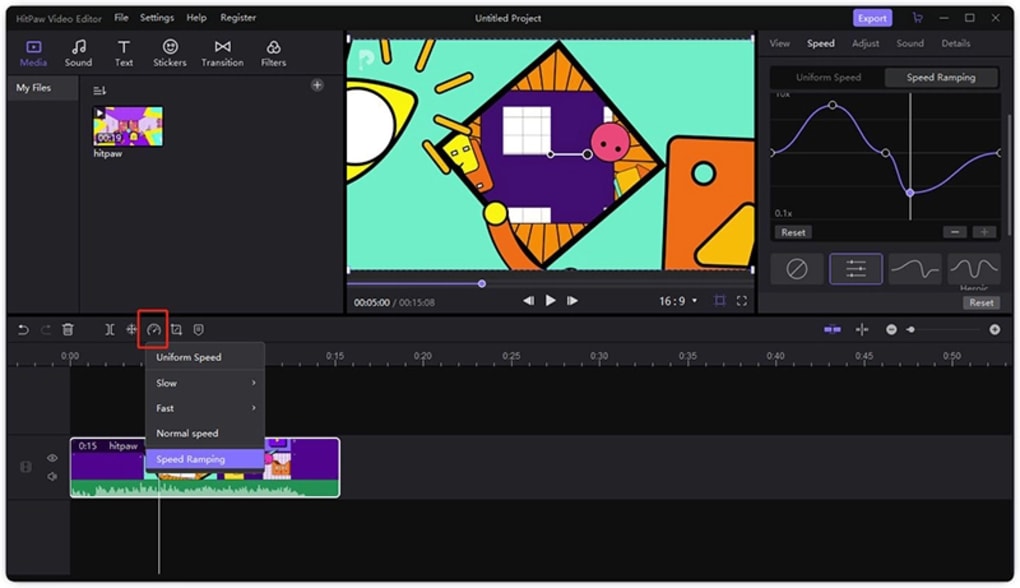
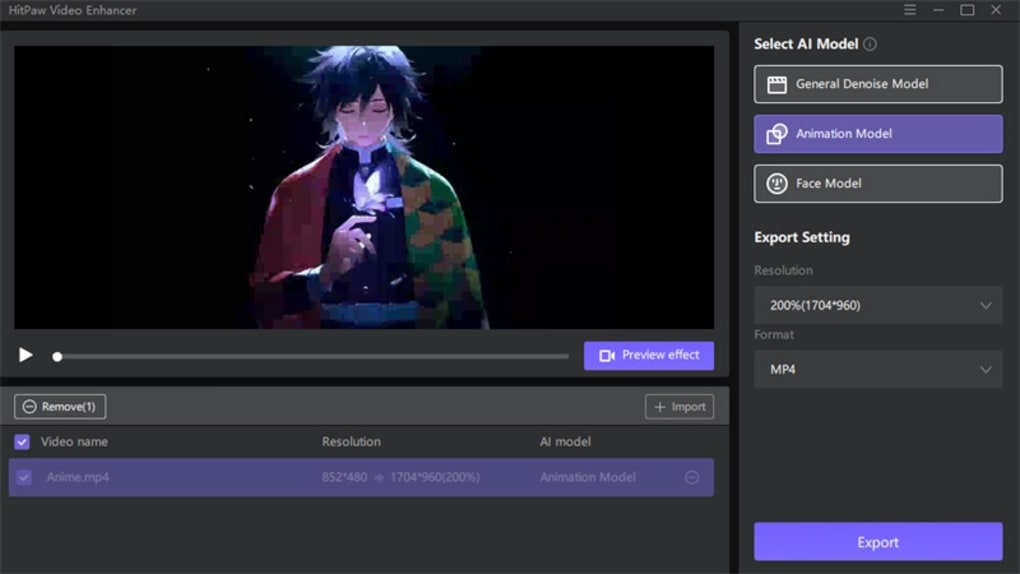
Powered by advanced AI technology, HitPaw VikPea supports over 30 video formats and can upscale videos to impressive 4K resolution. Its strength lies in its ability to intelligently clean up videos, utilizing three distinct AI models:
-
General Denoise Model: This model is specifically designed for enhancing videos of buildings, objects, and scenes with relatively static elements. It effectively reduces noise and enhances clarity without significantly altering the original content. This model excels at improving the detail and sharpness of videos shot in low-light conditions or those that have inherent noise.
-
Animation Model: Ideal for fast-paced scenes and action-packed videos, the Animation Model focuses on preserving the fluidity and detail of movement. It intelligently handles motion blur and minimizes artifacts often introduced during fast-motion recording or compression. This model is particularly beneficial for videos featuring dynamic action, sports footage, or animated content.
-
Face Model: Recognizing the importance of facial clarity in videos, HitPaw VikPea offers a dedicated Face Model. This specialized model prioritizes enhancing the details and sharpness of faces within a video, effectively smoothing out skin textures while maintaining natural features. This allows users to enhance the quality of personal videos, interviews, or any video where facial clarity is paramount.
The intuitive user interface simplifies the enhancement process. Users simply import their video, select one of the three AI models best suited to their content, adjust the enhancement settings to their preferences, and export the processed video. The software even supports batch processing, allowing users to efficiently enhance multiple video clips simultaneously. This feature is particularly time-saving for individuals working with a large number of videos or those seeking to streamline their workflow.
However, it’s important to note that the processing times can be substantial, especially when working with long clips or on systems with lower specifications. Users with less powerful hardware should consider processing videos in smaller batches to avoid excessively long wait times. While the power of the AI is undeniable, users should manage their expectations regarding processing speed.
Powerful Performance, but with Considerations
HitPaw VikPea delivers on its promise of enhancing video quality, producing impressive results in terms of detail restoration and fidelity improvement. Its ability to revitalize blurry and noisy videos, coupled with its broad format support and effective AI upscaling, makes it a compelling tool for both amateur and professional video editors. The AI models effectively address different types of video imperfections, delivering tailored enhancements that preserve the natural integrity of the footage.
The software’s wide range of supported video formats caters to a broad user base, accommodating a diversity of video sources and projects. This feature removes the limitations often imposed by software that only handles a few select formats, enhancing its overall accessibility and versatility.
However, the software’s processing speed presents a crucial consideration. While the quality of the results is undeniable, users should be prepared for potentially lengthy processing times, especially when working with high-resolution videos or extensive editing. This processing time can be significantly impacted by the hardware capabilities of the user’s system, highlighting the need for users to understand the limitations of their own computing power. Those with lower-spec machines may find the processing times unacceptable, especially for extensive projects.
Pros and Cons of HitPaw VikPea
Pros:
-
Automated One-Tap Enhancement: The software’s ease of use simplifies the enhancement process, with a simple, intuitive interface. Users can easily process their videos with minimal technical expertise.
-
AI Upscaling to 4K Resolution: The ability to upscale videos to 4K resolution dramatically improves the visual clarity and detail of the final output, enhancing the overall viewing experience.
-
Multiple AI Models for Diverse Scenarios: The provision of three distinct AI models (General Denoise, Animation, and Face) addresses the specific needs of various video types, resulting in optimal enhancement for different scenarios.
-
Batch Processing Capability: The software’s ability to process multiple videos simultaneously streamlines the workflow, saving considerable time and effort for users working with extensive projects.
Cons:
- Lengthy Processing Times: The processing time can be significantly long, particularly when dealing with high-resolution videos or less powerful hardware, demanding patience from the user.
- Premium Software: The software operates on a premium model, requiring a paid subscription or one-time purchase after a trial period, which may be a barrier for some users.
HitPaw VikPea: A Comparison with Alternatives
HitPaw VikPea sits alongside a range of other video enhancement tools, each with its own strengths and weaknesses. While direct comparisons are difficult without extensive testing across all products, some key differences can be highlighted. Compared to free, open-source options, HitPaw VikPea offers a more polished user experience and arguably more powerful AI algorithms. However, these come at the cost of a premium subscription. Some competing software may offer a wider array of features beyond AI-driven enhancement, but may lack the intuitive interface or specialized AI models that HitPaw VikPea provides. Ultimately, the best choice will depend on individual needs and budget constraints.
Conclusion: Is HitPaw VikPea Right for You?
HitPaw VikPea is a potent tool for enhancing video quality, particularly for those seeking a streamlined, AI-powered solution. Its intuitive interface and specialized AI models deliver excellent results, making it suitable for various applications. However, the significant processing times and premium pricing model should be carefully considered before purchasing. Users with less powerful computers or those on a tight budget may find the drawbacks outweigh the benefits. However, for those prioritizing ease of use, high-quality output, and the convenience of AI-driven enhancement, HitPaw VikPea presents a strong contender in the field of video enhancement software. Weighing the pros and cons against your specific needs will ultimately determine if HitPaw VikPea is the right choice for your video enhancement projects.
File Information
- License: “Trial version”
- Latest update: “June 3, 2025”
- Platform: “Windows”
- OS: “Windows 10”
- Language: “English”
- Downloads: “25K”


