
HitPaw Watermark Remover is a multimedia program designed for Windows PCs, developed by HitPaw. Co., Ltd. This software offers a straightforward solution for eliminating watermarks from both photos and videos, providing a range of tools and features to streamline the process. This review delves into its capabilities, usability, pros and cons, and explores its place within the competitive landscape of watermark removal software.
Understanding HitPaw Watermark Remover’s Functionality
HitPaw Watermark Remover aims to simplify the often tedious task of watermark removal. Its core functionality revolves around identifying and seamlessly eliminating watermarks from various image and video formats. The software achieves this through a combination of intelligent algorithms and user-friendly interface elements. Instead of simply masking or covering the watermark, the program employs techniques designed to blend the removed area seamlessly into the surrounding image or video, minimizing noticeable artifacts.
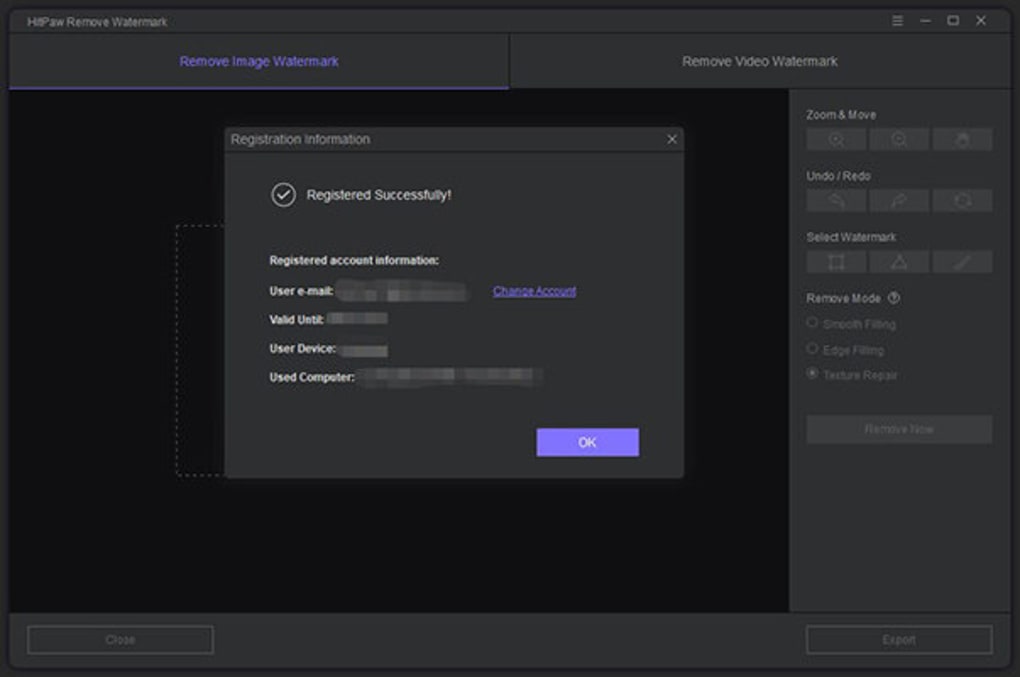
The application distinguishes itself through its multiple watermark removal modes. Users can select from “Smooth Filling,” “Edge Filling,” and “Texture Repair,” each designed to address different watermark types and image contexts. “Smooth Filling” is suitable for watermarks with relatively uniform backgrounds, creating a gradual transition from the surrounding area to the removed region. “Edge Filling” focuses on accurately replicating the edges of the image or video, useful for watermarks that have sharp or defined boundaries. Lastly, “Texture Repair” utilizes advanced algorithms to analyze the surrounding image texture and generate a natural-looking fill, ideal for removing watermarks in complex or detailed areas.
Further enhancing the user experience are the multiple selection tools available. Users can choose from a “Pen” tool for precise manual selection of the watermark, a “Square” tool for quick selection of rectangular watermarks, and a “Triangle” tool for selecting irregularly shaped watermarks with greater accuracy. This versatility ensures that users can efficiently target watermarks of any size or shape, regardless of their complexity.
The software’s ability to remove multiple watermarks simultaneously significantly reduces processing time and streamlines workflow. This feature is particularly beneficial when dealing with images or videos containing numerous watermarks of varying sizes and types. The application’s capacity to handle multiple watermarks concurrently avoids the need for repeated processing, a significant advantage over some competing software.
To assist users in correcting any errors during the watermark removal process, HitPaw Watermark Remover incorporates “redo” and “undo” features. This functionality allows users to quickly revert or reinstate changes, ensuring flexibility and providing a safety net for any accidental modifications. This feature is invaluable in preventing the need to start the entire process from the beginning when mistakes occur.
HitPaw Watermark Remover supports a wide array of common image and video file formats, ensuring compatibility with diverse media sources. This broad support minimizes the need for file conversion before processing and enhances the software’s overall practicality.
User Interface and Experience
The user interface (UI) is designed for intuitive navigation, even for those unfamiliar with watermark removal software. The clean and uncluttered layout facilitates a smooth user experience, making the entire process straightforward. Key features are prominently displayed, ensuring easy access to essential tools and options. The software’s streamlined design minimizes the learning curve, enabling users to quickly become proficient in its operation.
Furthermore, HitPaw incorporates various keyboard shortcuts that expedite common actions, improving efficiency and minimizing mouse interaction. The incorporation of these shortcuts contributes to a more fluid and accelerated workflow, particularly beneficial for users who prefer keyboard-based input.

Despite its user-friendly nature, the software does require account registration for exporting processed images and videos. This requirement, although a minor inconvenience, is a common practice among similar software, often used to manage licenses and provide access to updates.
Pros and Cons of HitPaw Watermark Remover
Pros:
- Multiple watermark removal: Handles multiple watermarks simultaneously, significantly speeding up the process.
- Versatile removal modes: Offers various removal modes (“Smooth Filling,” “Edge Filling,” “Texture Repair”) to optimize results based on watermark characteristics.
- Flexible selection tools: Provides multiple selection tools (Pen, Square, Triangle) for precise and efficient watermark targeting.
- Redo and Undo functionality: Allows for easy correction of errors, minimizing wasted time.
- Broad file format support: Ensures compatibility with a wide range of image and video formats.
- Intuitive UI: Features a user-friendly interface, minimizing the learning curve.
- Keyboard shortcuts: Improves efficiency through the use of keyboard shortcuts.
Cons:
- Account registration required: Users must create an account to export processed files.
- Subscription model: While a free trial is offered, long-term use requires a paid subscription. This might be a deterrent for infrequent users.
HitPaw Watermark Remover Compared to Alternatives
HitPaw Watermark Remover competes with a variety of watermark removal software. While several free options exist, they often lack the sophisticated algorithms and features found in HitPaw. Free alternatives might produce less refined results, especially with complex watermarks or high-resolution media. Paid competitors might offer comparable features, but HitPaw’s streamlined UI and multiple removal modes offer a distinct advantage for ease of use.
The choice between HitPaw Watermark Remover and alternative solutions depends on individual needs and priorities. Users requiring a powerful, versatile, and user-friendly tool might find HitPaw a worthwhile investment. Those with more limited budgets or infrequent needs might consider exploring free alternatives, acknowledging potential limitations in functionality and output quality.
Conclusion
HitPaw Watermark Remover provides a robust and user-friendly solution for removing watermarks from photos and videos. Its multiple removal modes, selection tools, and intuitive interface make it an efficient and effective tool for both novice and experienced users. While the requirement for account registration and a subscription model might be drawbacks for some, the software’s comprehensive feature set and ease of use outweigh these minor inconveniences for many users. The ability to remove multiple watermarks simultaneously and the inclusion of redo/undo functionality significantly enhance its practicality. Overall, HitPaw Watermark Remover stands as a strong contender in the watermark removal software market, offering a compelling balance of features, performance, and usability.
File Information
- License: “Trial version”
- Version: “2.5.0.7”
- Latest update: “July 15, 2022”
- Platform: “Windows”
- OS: “Windows 10”
- Language: “English”
- Downloads: “14.1K”
- Size: “1.79 MB”


