
HotkeyP is a free, lightweight Windows utility that empowers users to create and manage custom keyboard shortcuts for a vast array of system functions and applications. This powerful tool transcends the limitations of basic keyboard shortcuts, offering a flexible and intuitive interface for streamlining everyday computing tasks, enhancing productivity, and automating repetitive actions. This guide delves into the functionality, features, and benefits of HotkeyP, exploring its capabilities for both novice and advanced users.
Understanding HotkeyP’s Core Functionality
At its heart, HotkeyP is a shortcut manager. Unlike built-in operating system shortcuts, which are often limited in scope, HotkeyP allows users to assign keyboard combinations to virtually any executable file, system command, or even complex macros. This extensibility makes it invaluable for power users who frequently perform repetitive tasks or require quick access to specific applications and tools. The program goes beyond simple application launches; it offers the ability to control various system settings, manipulate files, and execute custom scripts, all through user-defined hotkeys.
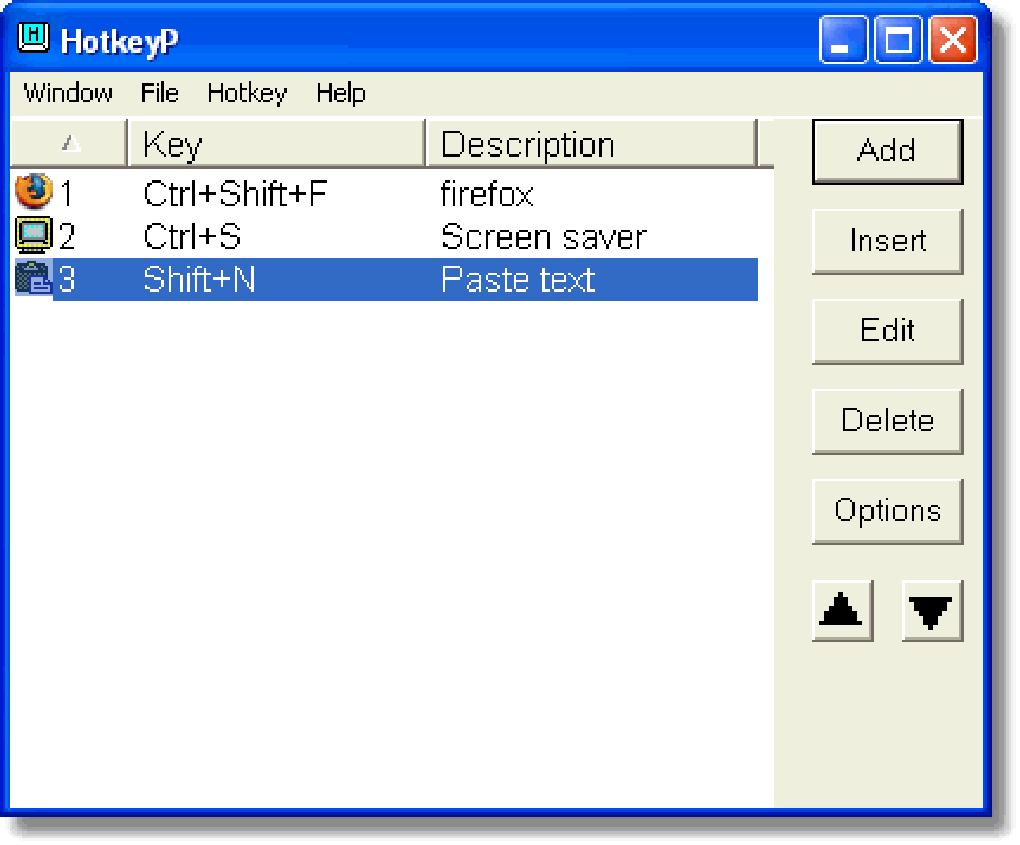
The software’s simplicity belies its power. The intuitive interface presents a clear and organized list of defined hotkeys, allowing for easy modification and management. Adding a new shortcut is a straightforward process, typically involving selecting a target action (an application, command, macro, etc.) and assigning a unique key combination. The program intelligently handles potential conflicts, alerting the user to any overlapping shortcuts.
HotkeyP’s versatility extends to its macro capabilities. Users can record sequences of mouse clicks and keyboard input, effectively automating multi-step processes. This feature is particularly useful for tasks involving repetitive mouse movements or complex keystrokes, significantly increasing efficiency and reducing the potential for errors.
Key Features and Capabilities
HotkeyP boasts a number of features that contribute to its effectiveness and user-friendliness:
-
Extensive Compatibility: The program supports a wide range of Windows versions, ensuring compatibility with a broad spectrum of systems. Its lightweight nature minimizes system resource consumption, making it suitable for both high-performance and low-specification machines.
-
Customizable Hotkeys: Users have complete freedom in assigning hotkeys. This allows for personalization based on individual preferences and workflow, ensuring optimal efficiency. The program allows for a combination of standard keys, modifier keys (Ctrl, Alt, Shift, Win), and even mouse button combinations.
-
Built-in System Commands: HotkeyP integrates a selection of pre-defined commands covering essential system functions. These include common tasks such as launching applications, controlling volume, managing windows, manipulating files, and much more. This readily-available library of commands significantly simplifies the setup process, providing immediate benefits to new users.
-
Macro Recording and Playback: The macro recording feature simplifies the automation of complex tasks. Users can record a series of actions, including mouse movements and keystrokes, and then assign a hotkey to execute the entire sequence with a single keypress. This functionality is particularly valuable for repetitive or time-consuming processes.
-
Clipboard Integration: The program facilitates seamless integration with the system clipboard. Specific commands allow users to insert clipboard content into various applications or display the clipboard contents directly on the screen. This feature is exceptionally useful for tasks that involve frequent copying and pasting of text or other data.
-
Security Features: HotkeyP addresses potential security concerns by offering options to password-protect certain functions. This ensures that sensitive actions are only accessible to authorized users.
-
Regular Updates: The developers consistently release updates, improving functionality, addressing bug fixes, and enhancing compatibility. These updates reflect a commitment to maintaining a reliable and feature-rich application.
Advanced Usage and Customization
Beyond its basic functionality, HotkeyP offers advanced features to cater to more experienced users:
-
Command Parameters: Several commands support customizable parameters, allowing for more nuanced control over the actions they perform. This level of customization enhances the program’s flexibility, enabling the creation of highly specific and tailored shortcuts.
-
External Executable Support: Users aren’t limited to built-in commands. HotkeyP allows for the execution of external executable files, providing access to a virtually limitless range of applications and tools. This expands the program’s capabilities, enabling the integration of custom scripts and third-party utilities.
-
Tray Icon and Notifications: The program’s tray icon provides discreet system monitoring and notifications. Users can configure notifications to be displayed upon certain events, such as when a macro finishes or a specific command is executed.
Comparison with Alternative Software
While HotkeyP stands out for its simplicity and user-friendly design, several alternative programs offer similar functionalities. However, HotkeyP’s strengths lie in its intuitive interface, lightweight design, and comprehensive range of features. Competitors may offer more advanced macro scripting capabilities or specialized functions, but they often come at the cost of increased complexity and resource usage. HotkeyP maintains a delicate balance between powerful functionality and ease of use, making it accessible to a broader range of users.
Installation and Setup
Installing HotkeyP is a simple process. The downloaded installer guides users through a straightforward installation procedure. After installation, the program’s intuitive interface allows for easy setup and configuration of custom shortcuts. The program’s clear documentation and helpful online resources are valuable tools for novice users, ensuring a seamless onboarding experience.
Conclusion
HotkeyP provides a powerful and efficient method for managing keyboard shortcuts and automating tasks on Windows systems. Its blend of simplicity, versatility, and advanced features makes it a valuable tool for users ranging from casual computer users to power users and software developers. The program’s intuitive interface, lightweight design, and regular updates solidify its position as a robust and reliable solution for enhancing productivity and streamlining workflows. Whether you seek to simplify everyday computing tasks or automate complex processes, HotkeyP offers a comprehensive and user-friendly approach to maximizing efficiency and personalizing your computing experience. Its consistent updates ensure the program remains current and compatible with the latest Windows versions, ensuring long-term usability and value.
File Information
- License: “Free”
- Latest update: “July 11, 2023”
- Platform: “Windows”
- OS: “Windows XP”
- Language: “English”
- Downloads: “8.1K”
- Size: “293.13 KB”


