
Keyboard shortcuts are a game-changer for computer users. They dramatically increase efficiency, transforming the way you interact with your operating system and applications. Instead of relying on the slower, less precise movements of a mouse, keyboard shortcuts allow for rapid execution of commands, leading to significant time savings and improved workflow. If you’re already a devotee of keyboard shortcuts, then Hotkeyz is an application designed to elevate your productivity to a whole new level.
What is Hotkeyz?
Hotkeyz is a free, customizable keyboard shortcut utility for Windows. It goes beyond the built-in shortcuts offered by the operating system, providing a comprehensive platform to create, manage, and utilize an extensive library of personalized keyboard commands. The program allows users to assign custom shortcuts to virtually any action imaginable, from launching applications and opening files to controlling system settings and executing complex macros.
This extensive functionality is packaged within a surprisingly lightweight application. Hotkeyz has a minimal system footprint, ensuring that it won’t bog down your computer’s performance even when running continuously in the background – a necessity to access your custom shortcuts.
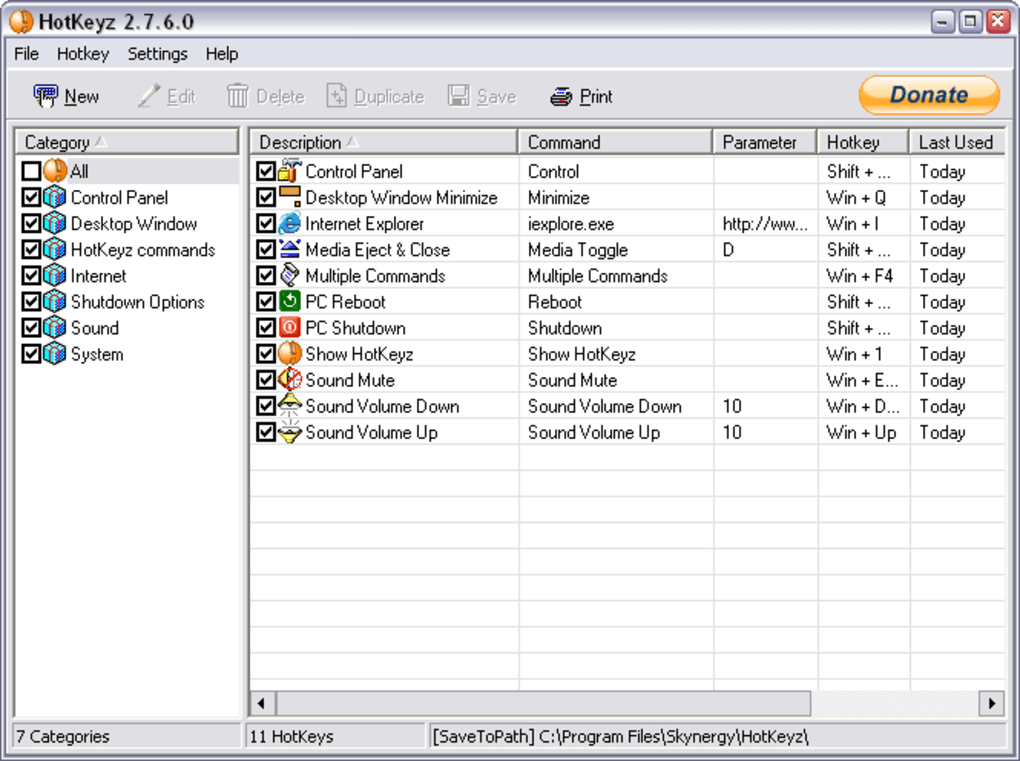
The program’s intuitive interface is designed for ease of use. It’s divided into two key areas: a category list and a shortcut list. Users can organize their shortcuts into categories for better management and navigation. The addition of new categories and shortcuts is straightforward, and each shortcut includes customizable configuration options. The only real challenge might be memorizing the multitude of shortcuts you create, but the efficiency gains far outweigh this minor inconvenience for many users.
Key Features and Functionality
Hotkeyz boasts a wealth of features designed to maximize its versatility and usefulness:
-
Comprehensive Customization: The core strength of Hotkeyz lies in its extensive customization options. Users are not limited to a pre-defined set of shortcuts; instead, they can create an unlimited number of custom shortcuts tailored to their specific needs and workflow. This includes assigning shortcuts to applications, files, system commands, and even complex macro sequences.
-
Categorization for Organization: Managing a large number of shortcuts can be daunting. Hotkeyz addresses this potential issue by allowing users to organize their shortcuts into custom categories. This makes finding and using the right shortcut much easier and more efficient, preventing the frustration of sifting through a long, unorganized list.
-
Macro Recording and Playback: One of the most powerful features of Hotkeyz is its integrated macro recorder. This allows users to record sequences of keyboard strokes, mouse clicks, and even delays, creating complex macros that can be executed with a single shortcut. The updated versions offer improvements to this feature including the ability to edit recorded macros, control playback speed (normal or fast), and record mouse movements relative to the screen. The ability to save macros as *.mac files for later editing and reuse adds further flexibility.
-
AutoSave Functionality: Losing unsaved work is a universal frustration. Hotkeyz mitigates this risk with its integrated autosave feature. With this option enabled, the application automatically saves the “last used” and “times used” data for unsaved hotkeys every five minutes, preventing data loss in the event of unexpected program closure or system crashes. However, the autosave feature is intelligently designed to avoid interfering with active editing windows.
-
Enhanced Tray Icon Functionality: The system tray icon provides quick access to Hotkeyz settings and functionality. Updates have improved the tray icon’s capabilities, including an option to display all hotkeys directly within the tray menu, making them readily accessible without opening the main application window.
-
System Control and Task Automation: Hotkeyz extends beyond simple application launching; it enables users to control various system functions through custom shortcuts. This includes actions such as adjusting volume, locking the computer, shutting down, and even interacting with specific login windows. The pre-user name behavior for login hotkeys simplifies the login process for sites requiring multiple tabs before accessing the username field.
-
Date Mask for Paste Commands: The improved date mask functionality allows for greater precision in pasting date information. The addition of “Mon” as an option provides a flexible way to incorporate abbreviated month names into custom date-related shortcuts.
- Hide Hotkeyz Option: Users now have the option to hide the Hotkeyz window while executing a hotkey, providing a cleaner, less intrusive experience.
Advantages and Disadvantages
Hotkeyz offers several significant advantages:
- Complete Customization: The ability to create truly personalized shortcuts is its strongest asset.
- Minimal System Impact: The program’s lightweight design ensures it won’t impact system performance.
- Powerful Macro Functionality: The macro recording and playback capabilities greatly enhance automation possibilities.
- User-Friendly Interface: Despite the complexity of its features, the interface is intuitive and easy to navigate.
However, there are some potential downsides to consider:
- Constant Background Operation: Hotkeyz needs to run constantly in the background for the shortcuts to work. While its resource usage is minimal, it is still a persistent application.
- Memorization Required: Creating numerous custom shortcuts necessitates memorizing them. This learning curve is inherent to all keyboard shortcut systems.
Hotkeyz Compared to Alternatives
Several alternative keyboard shortcut and macro applications exist, each with its own strengths and weaknesses. While direct comparisons are complex due to varying feature sets, it’s helpful to understand the general landscape. Some competitors might offer more advanced scripting capabilities or tighter integration with specific applications, while others might focus on a simpler, more streamlined interface. The optimal choice depends on individual needs and preferences. Users might consider exploring alternatives like AutoHotkey (powerful scripting), PhraseExpress (text expansion), or FastKeys (comprehensive automation) to determine the best fit for their workflow.
The decision to use Hotkeyz versus another application often boils down to a balance between feature richness, ease of use, and the specific needs of the user. Hotkeyz excels in its balance of robust customization and straightforward usability.
Conclusion
Hotkeyz is a valuable tool for users who want to significantly improve their computer efficiency through the use of custom keyboard shortcuts and macros. Its combination of extensive customization capabilities, minimal system footprint, and straightforward interface makes it a compelling option for both novice and experienced users. While the initial learning curve of memorizing shortcuts exists, the long-term productivity gains and enhanced workflow resulting from its use often make it a worthwhile investment of time and effort. The recent updates have further solidified its position as a powerful and versatile keyboard shortcut utility for the Windows environment.
File Information
- License: “Free”
- Latest update: “June 25, 2020”
- Platform: “Windows”
- OS: “Windows XP”
- Language: “English”
- Downloads: “14.6K”
- Size: “1.40 MB”


