
Hotspot Share Master is a Windows application designed to simplify the process of sharing your internet connection with friends and family. This comprehensive guide will delve into the features, functionality, and overall user experience of this application, providing a detailed overview for those considering using it to create and manage Wi-Fi hotspots.
Understanding Hotspot Share Master’s Functionality
Hotspot Share Master provides a user-friendly interface for establishing and managing a Wi-Fi hotspot on your Windows PC. It goes beyond simply sharing your internet connection; the application offers features that enhance convenience and flexibility, making it a versatile tool for both personal and limited business use. The core functionality revolves around creating a secure and readily accessible Wi-Fi network using your computer’s existing internet connection. This allows others to connect to the internet through your PC, effectively turning it into a portable Wi-Fi hotspot.
Unlike some complex networking utilities, Hotspot Share Master streamlines the process, eliminating the need for advanced technical knowledge. The application handles the intricate configurations involved in setting up a hotspot, allowing users to focus on sharing their internet connection rather than wrestling with technical settings.
Key features include:
-
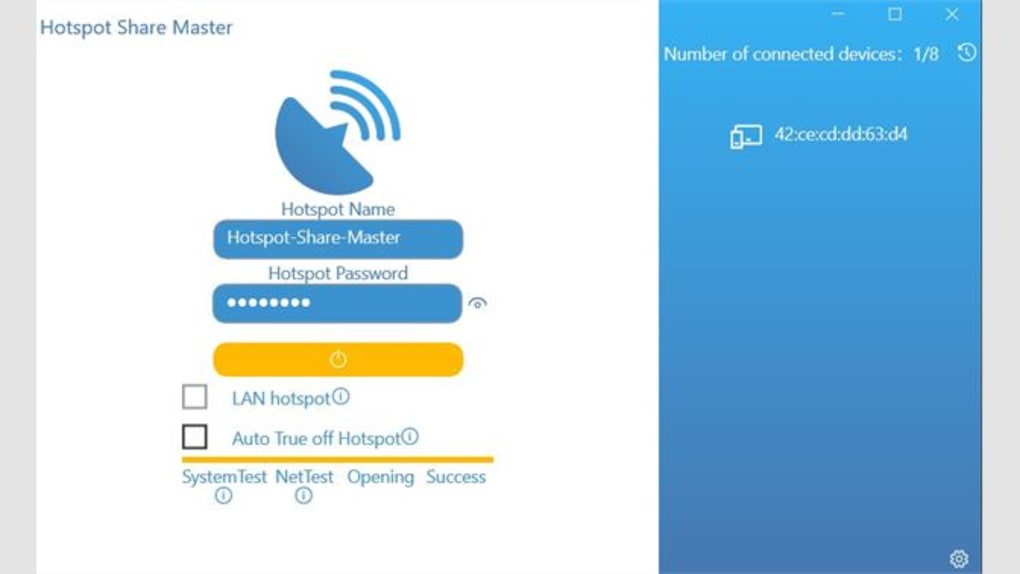
Easy Hotspot Creation: The application simplifies the complex process of setting up a Wi-Fi hotspot, requiring minimal technical expertise. Users can quickly create a hotspot with a custom name and password, ensuring the security of their network.
-
Secure Network Sharing: Hotspot Share Master prioritizes network security. Users can define strong passwords to protect their hotspot from unauthorized access, safeguarding their internet connection and personal data.
-
Multiple Use Cases: The application’s versatility extends beyond simple hotspot creation. It can function as a Wi-Fi repeater to extend the range of an existing network or as a bridge to connect devices that may not otherwise have direct access to the internet. This adaptability makes it useful in diverse situations.
-
User-Friendly Interface: The intuitive design of Hotspot Share Master eliminates the steep learning curve often associated with network configuration tools. The application’s clean interface allows for easy navigation and straightforward management of the hotspot settings.
- Flexible Sharing Options: Users can choose to share their internet connection with specific individuals or create a more open network. This flexibility allows users to tailor the hotspot to their specific needs and preferences.
Hotspot Share Master: A Comparison with Alternatives
While Hotspot Share Master provides a convenient solution for sharing your internet connection, several alternative applications and methods exist. Comparing Hotspot Share Master with these alternatives can help users determine if it’s the best option for their specific requirements.
Some competing applications may offer additional features like bandwidth management, advanced security protocols, or integration with other network tools. However, these often come with a steeper learning curve and increased complexity. Hotspot Share Master prioritizes simplicity and ease of use, making it a preferable choice for users who prioritize ease of use over advanced features. Conversely, users needing advanced features or specific network control options might find more sophisticated applications more suitable.
Methods like manually configuring a hotspot through Windows settings are possible, but this often involves a more technically demanding process, making Hotspot Share Master a user-friendly alternative for those lacking networking expertise.
Applications and Use Cases for Hotspot Share Master
The applicability of Hotspot Share Master extends across various scenarios, both personal and, to a limited extent, business-related. Here are some key use cases:
- Home Use: Sharing your home internet connection with guests who need internet access on their devices without providing them with your primary network password.
-
Travel: Transforming your laptop into a portable Wi-Fi hotspot while traveling, allowing other devices to access the internet using your mobile data plan or a hotel’s internet connection.
-
Emergency Internet Access: In situations where conventional internet access is unavailable, using your computer as a hotspot to provide limited internet access to other devices.
-
Limited Business Use: Small businesses or individuals working remotely could potentially use it to create a temporary hotspot for client demonstrations or presentations. However, for larger-scale business applications, more robust and secure network solutions are generally recommended.
-
Extending Wi-Fi Range: Using Hotspot Share Master as a Wi-Fi repeater to enhance the coverage area of an existing Wi-Fi network.
Hotspot Share Master: Security Considerations and Best Practices
Security is paramount when sharing your internet connection. While Hotspot Share Master offers features to enhance security, it’s crucial to follow best practices to protect your network and data.
-
Strong Passwords: Use a complex and strong password for your hotspot. Avoid easily guessable passwords and regularly change your password for enhanced security.
-
Network Encryption: Ensure your hotspot uses a robust encryption protocol (like WPA2 or WPA3) to prevent unauthorized access and data interception.
-
Limited Access: Only share your hotspot’s password with trusted individuals. Avoid making the network publicly accessible.
-
Regular Updates: Keep Hotspot Share Master updated to the latest version to benefit from security patches and improvements.
-
Firewall Protection: Ensure your Windows firewall is active to filter incoming and outgoing network traffic and block malicious activities.
-
Awareness of Shared Resources: Remember that sharing your internet connection also means sharing your computer’s resources. Be cautious about the amount of bandwidth consumed by connected devices.
While Hotspot Share Master enhances the ease of creating and managing a secure hotspot, maintaining good security practices remains the user’s responsibility. Failing to implement proper security measures can expose your network and data to vulnerabilities.
Conclusion: Is Hotspot Share Master Right for You?
Hotspot Share Master is a user-friendly application ideal for users seeking a straightforward solution to share their internet connection. Its simplicity and ease of use make it a compelling option for individuals and small businesses with limited networking expertise. However, users requiring sophisticated network management features or robust security functionalities for large-scale operations should consider more advanced networking solutions. If ease of use and convenient sharing are your top priorities, Hotspot Share Master offers a solid and reliable way to create and manage a personal Wi-Fi hotspot on your Windows PC. Remember to always prioritize security by following best practices to safeguard your network and data.


