
HTMLPad is a veteran in the world of web development Integrated Development Environments (IDEs). For years, it has served as a reliable tool for both professional developers and aspiring web designers, providing a robust suite of features designed to streamline the process of creating and editing web pages. This review delves into the capabilities, strengths, and limitations of HTMLPad, examining its features, user experience, and overall effectiveness as a web development tool in the modern landscape.
A Powerful Editor for Multiple Web Languages
At its core, HTMLPad is a powerful source code editor specifically designed for HTML, CSS, and JavaScript. However, its capabilities extend far beyond these fundamental web technologies. It offers robust support for a range of server-side scripting languages, including PHP and ASP, as well as XML, making it a versatile choice for developers working on diverse projects. This multi-language support is a key advantage, allowing developers to manage different aspects of a website within a single IDE, simplifying the workflow and minimizing the need to switch between different applications. The editor seamlessly integrates syntax highlighting for each supported language, improving code readability and making it easier to spot potential errors. This integrated approach fosters efficiency by reducing context switching and maintaining a consistent development environment.
Enhanced Productivity Through Integrated Features
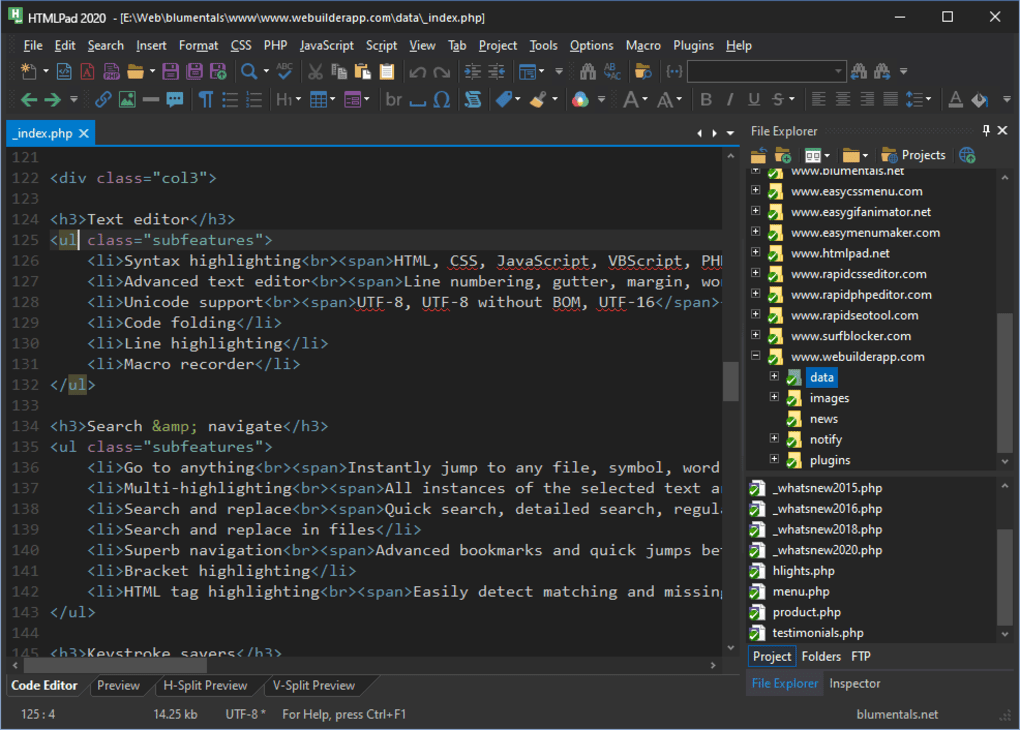
Beyond its support for multiple languages, HTMLPad boasts a range of features aimed at boosting developer productivity. Code completion, a standard feature in modern IDEs, is implemented effectively, offering suggestions as the user types, reducing the amount of code that needs to be manually written. This intelligent assistance minimizes typing errors and speeds up the coding process significantly. In addition to code completion, the IDE offers real-time code validation, alerting developers to potential syntax errors or inconsistencies in their code as they write. This immediate feedback loop helps to prevent the accumulation of errors and facilitates faster debugging, a critical aspect of efficient web development. The integrated preview window, perhaps one of HTMLPad’s most useful features, allows developers to see a live preview of their work in a browser window directly within the IDE. This eliminates the need to constantly switch between the editor and a separate browser, dramatically speeding up the design and testing cycle, allowing for rapid iteration and immediate feedback on design changes.
Furthermore, HTMLPad incorporates a helpful array of additional features to enhance the user experience. Code snippets, readily accessible pre-written code blocks for common tasks, are a time-saving element for frequently repeated coding patterns. Auto-formatting capabilities ensure consistency in code style, which is crucial for readability and maintainability, especially in larger projects. These stylistic preferences can be configured according to personal preferences or team coding standards. The integration of debugging tools further enhances the efficiency of the development process, allowing developers to swiftly identify and resolve code errors within the IDE. The seamless integration of these tools eliminates the need for external debugging utilities. The streamlining of the workflow not only saves time but also minimizes interruptions, fostering focus and uninterrupted coding sessions.
User Interface and Workflow Considerations
HTMLPad’s user interface, while functional, may not match the visual appeal of some modern IDEs. Its design prioritizes functionality over stylistic finesse. For users accustomed to sleek, modern interfaces, the slightly dated appearance may initially seem less intuitive. However, the straightforward layout and logical arrangement of features are designed for efficiency. The interface’s uncluttered nature, while perhaps not aesthetically pleasing to all, minimizes distractions and helps maintain a workflow focused on coding. The logical placement of commonly used features ensures ease of access, making the editor practical even for less experienced users. Experienced users may find this simplicity a welcome change from the complexity of feature-rich but potentially cluttered IDEs, especially in environments where efficiency takes precedence over visual appeal.
The intuitive nature of HTMLPad means there is a relatively short learning curve for those new to the software. The simplicity of the features enhances the development flow, allowing beginners to focus on the nuances of web development without encountering significant usability barriers. However, this straightforward design may not be suitable for users who value highly customizable workspaces and an interface with a greater degree of visual feedback. The balance between simplicity and complexity is a delicate one; HTMLPad chooses simplicity as its guiding principle.
Limitations and Missing Features
While HTMLPad offers a strong set of features, it does have some notable limitations. One key area where it falls short is collaboration. The software lacks built-in features for collaborative coding, a crucial aspect of modern software development. This limitation requires developers to rely on external tools for version control and collaborative efforts. The absence of integrated version control is another significant drawback. Version control systems such as Git are essential for tracking changes, managing different versions of code, and facilitating collaborative development. Without built-in support, developers are forced to use a separate version control system, adding complexity to their workflow. This lack of integration can pose a significant impediment to developers used to the seamless integration of version control in other modern IDEs.
The absence of advanced features common in competing IDEs, such as advanced refactoring tools or integrated testing frameworks, is another area where HTMLPad could be improved. While the current set of features is quite sufficient for basic web development tasks, these omissions might limit its appeal to developers working on larger or more complex projects. These limitations, while not necessarily deal-breakers, represent areas where HTMLPad could benefit from significant enhancements. The integration of such features would elevate its suitability for professional-level development in a highly competitive landscape.
Conclusion: A Solid Choice for Specific Needs
HTMLPad remains a viable option for web developers, particularly those prioritizing efficiency and ease of use for straightforward projects. Its strong multi-language support, integrated preview window, and helpful features like code completion and validation significantly boost productivity. However, the lack of collaboration features and integrated version control represents a significant drawback that limits its suitability for larger teams and complex projects. Developers working on individual projects or smaller teams, who prioritize a streamlined and easy-to-use IDE, might find HTMLPad an excellent choice. However, those needing collaborative features and integrated version control would be better served by exploring alternative IDEs with richer feature sets. The overall utility of HTMLPad hinges upon the developer’s specific needs and preferences, but the decision to use it should be made with a full understanding of its strengths and limitations.
File Information
- License: “Full”
- Latest update: “July 3, 2025”
- Platform: “Windows”
- OS: “Windows 8”
- Language: “English”
- Downloads: “16.4K”
- Size: “106.31 MB”


