
In the vast and ever-evolving digital landscape, efficient and reliable file downloading remains a cornerstone of both personal and professional computing. From software updates and large media files to development resources and essential documents, the ability to acquire digital assets quickly and securely is paramount. While web browsers offer built-in download capabilities, they often fall short when confronted with large files, unstable connections, or the need for advanced management features. This is where dedicated download managers step in, and among them, HTTP Downloader emerges as a robust, free, and open-source solution specifically tailored for Windows users. Developed by Eric Kutcher, HTTP Downloader is more than just a simple utility; it’s a commitment to enhancing the user’s online experience by providing a powerful, transparent, and community-driven approach to file acquisition.
At its core, HTTP Downloader is designed to streamline the process of downloading files over the Hypertext Transfer Protocol (HTTP), which is the foundation of data communication for the World Wide Web. Unlike a standard browser download, HTTP Downloader specializes in optimizing download speeds, offering the critical ability to pause and resume downloads, and ensuring greater stability, especially when dealing with interrupted connections or very large files. Its free (GPL) license signifies its open-source nature, inviting scrutiny, collaboration, and continuous improvement from a global community of developers and users. This transparency is a key differentiator, particularly in an era where software trust and security are increasingly important considerations. The application, currently at version 1.0.5.5, has been consistently updated, with its latest iteration released on January 17, 2024, demonstrating active maintenance and a commitment to keeping pace with evolving user needs and technical advancements.
HTTP Downloader: An Essential Tool for Web Development and IT
Within the comprehensive landscape of Development & IT, robust and reliable tools are not just desirable; they are indispensable. HTTP Downloader finds a natural home and significant utility in this domain, particularly for professionals engaged in web development, system administration, and network engineering. Web developers, for instance, frequently need to download large SDKs, frameworks, libraries, media assets, or even entire project repositories. Browser-based downloaders can become bottlenecks in these scenarios, often failing on large files or requiring a restart from scratch if the connection drops. HTTP Downloader, with its advanced features like multi-segment downloading and resume capabilities, ensures that these critical resources are acquired efficiently and without unnecessary frustration. It segments files into smaller chunks, downloading them concurrently, which can significantly boost overall download speeds by maximizing bandwidth utilization. If an internet connection is temporarily lost, or if the user needs to pause the download to free up bandwidth for other tasks, HTTP Downloader allows for seamless resumption from the point of interruption, saving invaluable time and data.
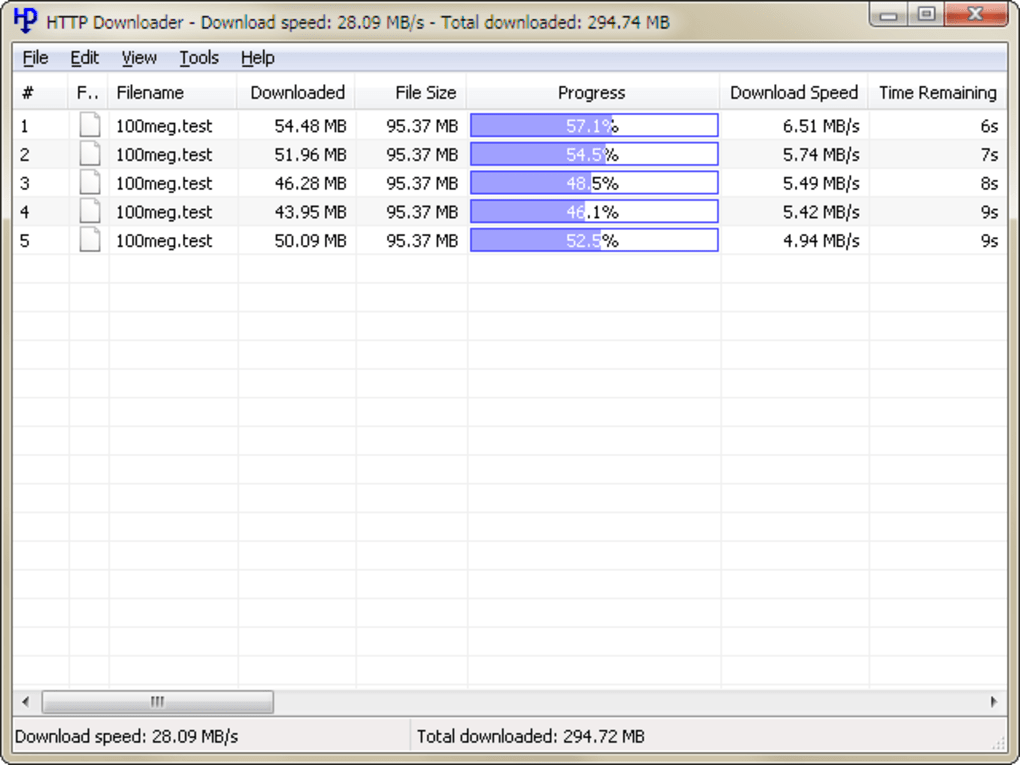
For IT professionals and system administrators, the application’s reliability extends to tasks like downloading operating system images, virtualization disk files, server updates, or proprietary software packages from vendor websites. These files are often enormous, and a failed download can mean hours of wasted time and bandwidth. The stability offered by HTTP Downloader mitigates such risks, providing a dependable mechanism for acquiring critical infrastructure components. Furthermore, given its open-source nature, developers and IT personnel can examine its source code, understand its underlying mechanisms, and even contribute to its development or customize it for specific needs. This level of transparency and flexibility is highly valued in the Development & IT community, fostering trust and enabling solutions that are precisely tailored to complex technical environments. Its classification under “Web Development” within the broader “Development & IT” category on platforms like PhanMemFree.org is a testament to its specific relevance and utility for those building and maintaining the digital backbone of our world.
Optimizing Your Internet & Network Download Experience
The broader category of Internet & Network encompasses a vast array of tools and services designed to facilitate connectivity, communication, and data exchange. Download managers, including HTTP Downloader, are crucial components within this ecosystem, playing a vital role in enhancing the user’s overall online experience. While modern browsers have made strides in their integrated download functionalities, they inherently prioritize browsing and rendering webpages, often treating downloads as a secondary function. This can lead to slower speeds, difficulties with large files, and a lack of advanced management features that are standard in dedicated download managers. HTTP Downloader addresses these limitations head-on, transforming the act of downloading from a passive background process into an optimized, controlled, and efficient operation.
One of the most significant advantages of using a tool like HTTP Downloader is its ability to maximize download speeds. It achieves this through several techniques, primarily parallel downloading and connection optimization. By opening multiple connections to the server and downloading different segments of the file simultaneously, HTTP Downloader can effectively bypass server-side limitations that might throttle single-stream downloads and fully utilize the available internet bandwidth. This is particularly beneficial for users with high-speed internet connections who often find their browser downloads underperforming. Beyond speed, reliability is a critical factor. The internet, by its very nature, can be unpredictable, with intermittent disconnections or fluctuating speeds. HTTP Downloader’s robust resume capability means that even if a download is interrupted – whether due to a network outage, a system crash, or simply a deliberate pause by the user – it can be seamlessly continued from where it left off. This prevents the frustrating and bandwidth-intensive necessity of restarting large downloads from the beginning, a common pain point with basic browser downloads.
Furthermore, HTTP Downloader offers a centralized interface for managing all ongoing and completed downloads. Users can easily monitor progress, view download speeds, and prioritize files. This level of control is essential for users who frequently download multiple files or need to manage their bandwidth usage effectively. It transforms the often-chaotic experience of managing numerous downloads into an organized and efficient workflow. For anyone regularly interacting with the internet to acquire digital content, whether for work, education, or entertainment, HTTP Downloader stands out as an indispensable utility that elevates the entire Internet & Network experience by making downloads faster, more reliable, and easier to manage. Its purpose aligns perfectly with the goal of making online interactions smoother and more productive.
The Open-Source Advantage: Security, Transparency, and Community Contributions
In the contemporary digital landscape, concerns surrounding Security & Privacy are paramount, and rightly so. Users are increasingly wary of closed-source software, which can harbor hidden vulnerabilities, data collection practices, or even malicious code without the user’s knowledge. This is precisely where HTTP Downloader’s open-source nature, governed by the GPL (General Public License), offers a profound advantage, fostering an environment of transparency, trust, and community-driven security. The user reviews on PhanMemFree.org highlight this tension, with one user raising concerns about potential malware when attempting a direct download from GitHub, while another staunchly defends the open-source nature, advocating for code auditing. This conversation underscores the critical importance of open source in addressing security fears.
The GPL license means that the source code for HTTP Downloader is publicly available for anyone to inspect, modify, and distribute. This inherent transparency is a powerful security mechanism. Unlike proprietary software where vulnerabilities might remain undiscovered or unaddressed by a single development team, open-source projects benefit from “many eyes” reviewing the code. Expert developers, security researchers, and even curious users worldwide can scrutinize every line of code, identify potential bugs or security flaws, and propose solutions. This collective auditing process significantly reduces the likelihood of malicious code being intentionally embedded or critical vulnerabilities remaining hidden for extended periods. When a potential issue is identified, the community can often react swiftly, developing patches and distributing updates much faster than traditional closed-source models.
Moreover, the open-source model fosters a strong community of contributors. This is not just about security; it’s also about the continuous improvement and evolution of the software. Users can report bugs, suggest new features, or even contribute code themselves. This collaborative approach ensures that HTTP Downloader remains relevant, addresses user needs, and adapts to new technologies and security challenges. The discussion around potential malware, as seen in the user reviews, is precisely the kind of dialogue that open-source transparency encourages. Instead of blindly trusting a black box, users are empowered to audit the code themselves or rely on the collective wisdom of the community to verify its integrity. This aligns perfectly with the principles of Security & Privacy, offering users a choice for software where the mechanisms of trust are openly demonstrated rather than implicitly assumed. By choosing HTTP Downloader, users are not just getting a free utility; they are opting for a software solution built on a foundation of communal trust, verifiable security, and continuous innovation. This commitment to an open model reassures users that their downloading activities are not compromised by hidden agendas or unpatched vulnerabilities, providing peace of mind in an increasingly complex digital world.
Streamlining Digital Productivity: Beyond Basic Downloads
While HTTP Downloader is primarily categorized under “Web Development” and enhances “Internet & Network” functionalities, its impact extends directly into the realm of Productivity. In today’s fast-paced digital environment, efficient file management and acquisition are foundational to maintaining high levels of productivity, whether for individual users or professional teams. Waiting for large files to download, dealing with corrupted files, or manually restarting failed transfers can significantly disrupt workflow and consume valuable time that could be spent on more critical tasks. HTTP Downloader directly addresses these productivity inhibitors.
Consider a scenario where a graphic designer needs to download several large texture packs for a project, or a student requires multiple educational videos and datasets for research. A traditional browser download might take hours, during which the user’s internet connection might fluctuate, or they might need to shut down their computer. With HTTP Downloader, these files can be queued, prioritized, and downloaded with unparalleled efficiency. The ability to pause downloads allows users to free up bandwidth for a video conference or an urgent upload, and then resume the download later without losing progress. This flexibility ensures that downloading activities integrate seamlessly into a dynamic work schedule, rather than dictating it. For professionals who manage multiple projects, the organized download list acts as a mini project management tool, allowing them to track the status of various file acquisitions at a glance.
Furthermore, by reducing the time spent on troubleshooting failed downloads and maximizing the utilization of internet bandwidth, HTTP Downloader indirectly contributes to overall system efficiency. Faster downloads mean less idle time for users, quicker access to necessary resources, and a smoother digital workflow. For tasks that require routine acquisition of updated files or large datasets, integrating HTTP Downloader into a daily routine can lead to substantial time savings over weeks and months. This focus on optimizing the often-overlooked yet critical aspect of file transfer positions HTTP Downloader as more than just a utility; it’s a strategic tool for enhancing digital productivity across a wide spectrum of users, from casual browsers to demanding professionals.
HTTP Downloader stands out as a pragmatic and powerful solution for anyone seeking to improve their file download experience on Windows. Its free and open-source nature, coupled with its robust feature set like resume capabilities, multi-segment downloading, and consistent updates, makes it a superior alternative to basic browser downloaders. While it finds a strong footing in Development & IT due to its relevance for web development, its benefits permeate across Internet & Network usage and directly boost Productivity. The commitment to transparency through its GPL license also addresses critical Security & Privacy concerns, empowering users with knowledge and fostering a trusting community. Available in multiple languages including English, German, and Italian, and actively maintained, HTTP Downloader is not just a utility; it’s a testament to the power of open-source software in delivering high-quality, reliable, and secure tools for the modern digital age. Whether you’re a developer needing to fetch large libraries or an everyday user downloading media, HTTP Downloader on PhanMemFree.org offers an optimized, dependable, and transparent pathway to your digital content.
File Information
- License: “Free”
- Latest update: “January 17, 2024”
- Platform: “Windows”
- OS: “Windows 10”
- Language: “English”
- Downloads: “4.9K”
- Size: “529.26 KB”


