
The internet, a boundless realm of information and connection, also presents significant risks to user privacy and security. Malicious actors constantly seek vulnerabilities to exploit, aiming to steal personal data, track online activity, and execute phishing attacks. In this ever-evolving digital landscape, safeguarding one’s online presence is paramount. One effective tool in the arsenal of online security is HTTPS Everywhere, a browser extension designed to enhance user protection by automatically switching websites from HTTP to HTTPS whenever possible. This article delves into the features, benefits, and considerations associated with HTTPS Everywhere, examining its role in bolstering online security and privacy.
Understanding HTTPS and its Security Advantages
Before exploring HTTPS Everywhere, it’s crucial to understand the fundamental difference between HTTP and HTTPS. HTTP (Hypertext Transfer Protocol) is the foundation of data communication on the World Wide Web. It facilitates the transfer of web pages and other content between servers and clients (browsers). However, HTTP lacks built-in encryption, meaning data transmitted using HTTP is sent in plain text, vulnerable to interception and modification by malicious actors.
HTTPS (Hypertext Transfer Protocol Secure), on the other hand, incorporates SSL/TLS (Secure Sockets Layer/Transport Layer Security) encryption. This encryption process scrambles data before transmission, making it unreadable to anyone without the correct decryption key. This protects sensitive information, such as passwords, credit card details, and personal data, from unauthorized access. When a website uses HTTPS, a padlock icon usually appears in the browser’s address bar, visually indicating a secure connection.
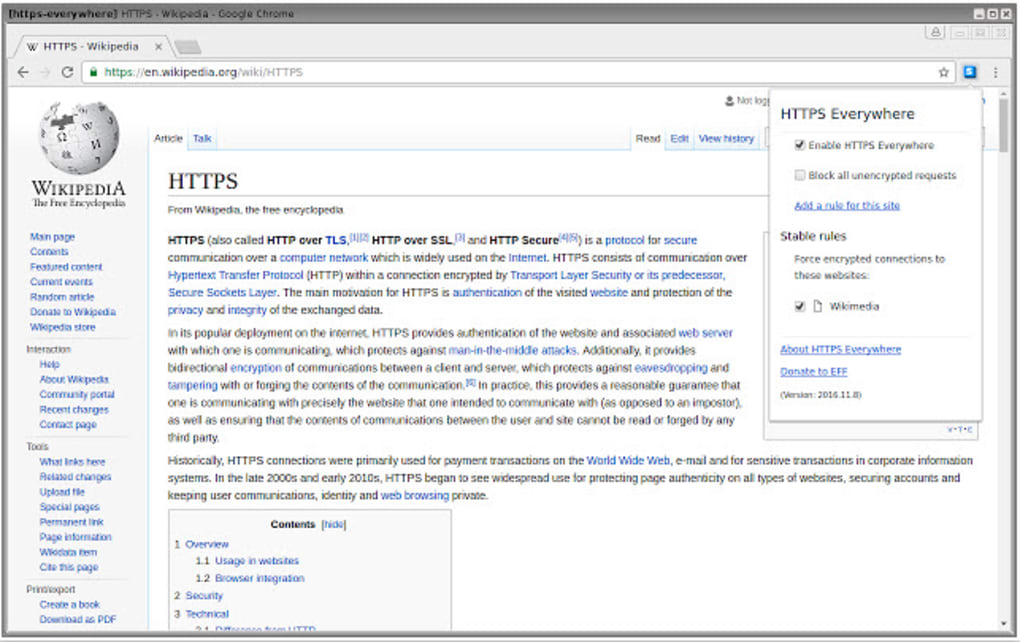
The benefits of HTTPS are manifold:
- Confidentiality: HTTPS encryption prevents eavesdropping on data transmitted between the browser and the server. This safeguards sensitive information from being intercepted by hackers or other unauthorized parties.
- Integrity: HTTPS ensures the integrity of data by verifying that the data received has not been tampered with during transmission. This helps protect against man-in-the-middle attacks, where an attacker intercepts and modifies data before it reaches its destination.
- Authentication: HTTPS provides authentication by verifying the identity of the website server. This helps prevent users from connecting to fraudulent websites posing as legitimate ones. This is achieved through SSL/TLS certificates issued by trusted certificate authorities.
How HTTPS Everywhere Works: Enhancing Browser Security
HTTPS Everywhere, developed by the Electronic Frontier Foundation (EFF), takes the security benefits of HTTPS a step further. Instead of relying solely on individual websites to implement HTTPS, HTTPS Everywhere proactively attempts to establish secure HTTPS connections whenever possible. It operates by using a regularly updated list of websites that support HTTPS. When a user visits a website listed in this database, the extension automatically redirects the request from HTTP to HTTPS if a secure version is available.
The extension’s functionality doesn’t end there. It also applies HTTPS to subdomains and resources related to the main website. For instance, if a user accesses “www.example.com”, HTTPS Everywhere will also attempt to establish secure connections for resources such as “login.example.com” or “images.example.com,” comprehensively enhancing security across the website’s entire domain. This proactive approach strengthens security by ensuring that even seemingly minor aspects of a website are protected with encryption.
The mechanism involves mapping HTTP requests to HTTPS equivalents, effectively creating a more secure browsing experience. This ensures that even if a website doesn’t automatically redirect to HTTPS, HTTPS Everywhere will still try to force the secure connection. This is particularly useful for websites that may not prioritize security or have outdated infrastructure.
However, it’s important to note that HTTPS Everywhere isn’t a panacea. While it significantly boosts security, it cannot guarantee absolute protection. Some websites may not offer a functional HTTPS version, and others might present compatibility issues when forced into HTTPS mode. The extension strives to mitigate these issues by employing a carefully curated list of websites and error handling mechanisms.
Benefits of Using HTTPS Everywhere: A Multifaceted Approach to Online Safety
The benefits of using HTTPS Everywhere extend beyond simply encrypting web traffic. Its impact on online safety and privacy is substantial and far-reaching:
- Protection against eavesdropping: By automatically switching to HTTPS, HTTPS Everywhere prevents third parties from intercepting and reading sensitive data transmitted between the user’s browser and websites. This safeguards passwords, credit card information, and other personal details, mitigating the risk of data breaches and identity theft.
- Mitigation of phishing attacks: Phishing attacks often rely on users unknowingly visiting malicious websites disguised as legitimate ones. HTTPS Everywhere helps mitigate this risk by ensuring that connections to known legitimate websites are secure, making it harder for phishers to masquerade their fraudulent websites as authentic ones.
- Enhanced privacy: While HTTPS doesn’t directly prevent tracking, it makes it more difficult for third-party trackers and advertisers to collect detailed information about user browsing habits. The encryption makes it harder to identify individual users and link their online activities across different websites.
- Increased trust and confidence: Using HTTPS Everywhere provides users with increased trust and confidence in their online interactions. Knowing that their connections are secured with encryption minimizes anxiety about potential data breaches and online threats.
Limitations and Considerations: Managing Expectations and Potential Issues
While HTTPS Everywhere offers significant advantages, it’s essential to understand its limitations:
- Not all websites support HTTPS: While the number of websites using HTTPS is constantly growing, there are still many websites that either don’t offer HTTPS or have incomplete HTTPS implementation. In such cases, HTTPS Everywhere might not be able to force a secure connection.
- Performance impact: In some cases, forcing a connection to HTTPS might slightly impact browsing speed. This is because establishing an encrypted connection requires additional processing overhead. However, the performance impact is usually minimal and often imperceptible.
- Compatibility issues: Some websites might experience compatibility problems when forced into HTTPS mode by HTTPS Everywhere. This can lead to broken functionality or display errors. These issues are relatively rare but are worth considering.
- False sense of security: It’s crucial to remember that HTTPS Everywhere is a supplementary security measure, not a complete solution. It enhances security, but it doesn’t guarantee total protection against all online threats. Users should still practice safe browsing habits, such as using strong passwords, avoiding suspicious websites, and keeping their software updated.
Conclusion: A Valuable Tool in the Fight for Online Security
In conclusion, HTTPS Everywhere is a valuable tool for enhancing online security and privacy. Its proactive approach to establishing HTTPS connections significantly improves the safety of online interactions by encrypting sensitive data and mitigating the risks of eavesdropping and phishing attacks. While it has limitations, the overall benefits outweigh the potential drawbacks for most users. By using HTTPS Everywhere in conjunction with other good security practices, users can significantly strengthen their online defenses and enjoy a more secure and private browsing experience. It’s a crucial element in a multi-layered approach to online safety, contributing to a more secure and trustworthy digital world.
File Information
- License: “Free”
- Version: “2017.4.5”
- Latest update: “April 12, 2017”
- Platform: “Windows”
- Language: “English”
- Downloads: “1.9K”


