
Huawei HiSuite is a free utility tool developed by Huawei Technologies designed for managing Huawei and Honor devices. It provides a centralized hub for data transfer, backup, system recovery, and application management, streamlining the process of troubleshooting or moving large amounts of files between your computer and your phone. The application emphasizes user-friendly interfaces and robust feature sets, offering a comprehensive device management experience.
Key Features and Functionality
Huawei HiSuite’s core functionality revolves around several key areas, making it a versatile tool for Huawei and Honor smartphone users:
1. Data Transfer and Backup: The application simplifies data transfer between your PC and mobile device. It offers robust backup and restore capabilities for system data, ensuring that crucial information is safe and easily recoverable. This includes contacts, multimedia files, and other important data. The streamlined interface makes the process straightforward, even for less tech-savvy users.
2. Application Management: HiSuite allows for seamless management of applications installed on your Huawei or Honor device. Users can install and uninstall apps directly through the program, simplifying the process compared to manually managing apps on the device itself. This centralized control enhances efficiency and convenience.
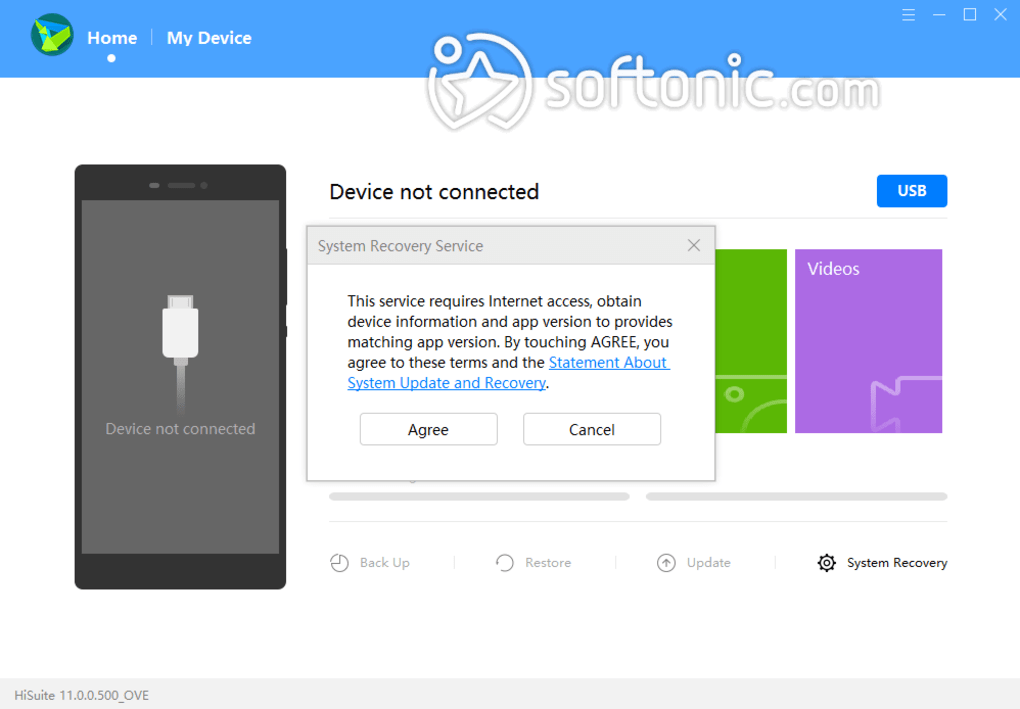
3. System Updates and Rollbacks: The tool facilitates system updates and, if necessary, allows users to revert to previous system versions. This is particularly helpful for troubleshooting software issues or experimenting with different OS versions. However, it’s crucial to remember that rolling back to an earlier version will erase your data, highlighting the importance of regular backups before undertaking this action.
4. User-Friendly Interface: Huawei HiSuite prioritizes ease of use. Its intuitive interface features clear, color-coded sections, guiding users through the various functions and making navigation simple. The design aims to minimize confusion, ensuring a user-friendly experience, even for those unfamiliar with similar device management software.
Strengths and Weaknesses of Huawei HiSuite
While Huawei HiSuite offers a comprehensive suite of features, like any software, it has both advantages and disadvantages:
Pros:
- Comprehensive Data Transfer Capabilities: HiSuite provides a reliable and efficient method for transferring data between a PC and a mobile device, simplifying the process considerably. The ability to manage large files or entire backups is a key advantage.
- Robust Backup and Restore Functionality: The backup and restore features are crucial for data protection. They provide peace of mind, ensuring that users can easily recover data in case of device failure or accidental deletion. This is a critical aspect often overlooked in other similar tools.
- Efficient Application Management: The ability to install and uninstall apps directly through the program streamlines app management, eliminating the need to navigate the device’s settings menus. This saves time and effort for users.
- Intuitive and User-Friendly Interface: The clean and well-organized interface is a significant strength. The clear layout and intuitive design make the software accessible to users of all technical skill levels. This minimizes the learning curve and allows for quick adoption.
- System Update and Rollback Capabilities: The ability to update the system and, if needed, revert to previous versions offers flexibility and control. This is particularly beneficial for troubleshooting and allows for a degree of customization not found in all similar programs.
Cons:
- Varied Feature Availability: The availability of certain features can vary depending on the device model. Older or less common devices might not support all functionalities, limiting the software’s usefulness for some users. This inconsistency can be frustrating for those expecting full feature compatibility across all Huawei devices.
- Dependence on USB or Wi-Fi Connections: The program relies heavily on either a USB connection or a Wi-Fi connection between the PC and the mobile device. This can be a constraint, especially if connectivity is unreliable or unavailable. The lack of alternative connection methods limits flexibility.
- Potential for Data Loss during System Recovery: Rolling back to a previous system version inevitably leads to data deletion. While backups mitigate this risk, it’s a significant drawback and requires diligence from users to avoid data loss. Clear warnings and backup reminders are essential.
- Limited Alternatives for Huawei Devices: Huawei HiSuite is specifically designed for Huawei and Honor devices, meaning alternative solutions for device management may be less comprehensive or user-friendly. This lack of alternatives limits choices for users who may prefer different software approaches.
Huawei HiSuite Alternatives and Competitors
While Huawei HiSuite offers a good solution for Huawei and Honor device users, it’s important to consider alternative solutions for cross-platform device management or if you experience limitations with HiSuite:
While no direct competitors offer the same integrated suite specifically designed for Huawei devices, several options provide overlapping functionality:
- Android SDK (Software Development Kit): For advanced users, the Android SDK offers extensive control over Android devices, but requires significant technical expertise. It’s not a user-friendly alternative for casual users.
- Third-party file management tools: Several applications (e.g., AirDroid, MyPhoneExplorer) enable data transfer and management, but typically lack the integrated system-level control of HiSuite.
- Cloud services: Services like Google Drive, iCloud, and OneDrive offer backup and synchronization features but don’t provide the same level of device management as HiSuite.
Conclusion
Huawei HiSuite provides a comprehensive device management solution tailored specifically for Huawei and Honor devices. Its user-friendly interface, robust backup and restore features, and integrated application management make it a valuable tool for many users. However, users should be aware of the limitations regarding feature availability across different devices and the reliance on USB or Wi-Fi connections. The potential for data loss during system recovery also requires careful consideration and consistent backups. Ultimately, the suitability of Huawei HiSuite depends on individual user needs and technical expertise, weighing the advantages of its integrated functionality against the limitations associated with its specialized nature. Users should carefully consider their specific requirements and assess if the benefits outweigh the potential drawbacks before choosing Huawei HiSuite as their primary device management tool.


