
Icaros is a free, lightweight multimedia application designed to streamline video management on Windows systems. Primarily functioning as a video thumbnail generator, it enhances the user experience within Windows Explorer by providing clearer and more informative visual representations of video files. This detailed guide explores Icaros’s features, advantages, limitations, and its place within the broader landscape of video management tools.
Icaros’s Core Functionality: Generating Video Thumbnails
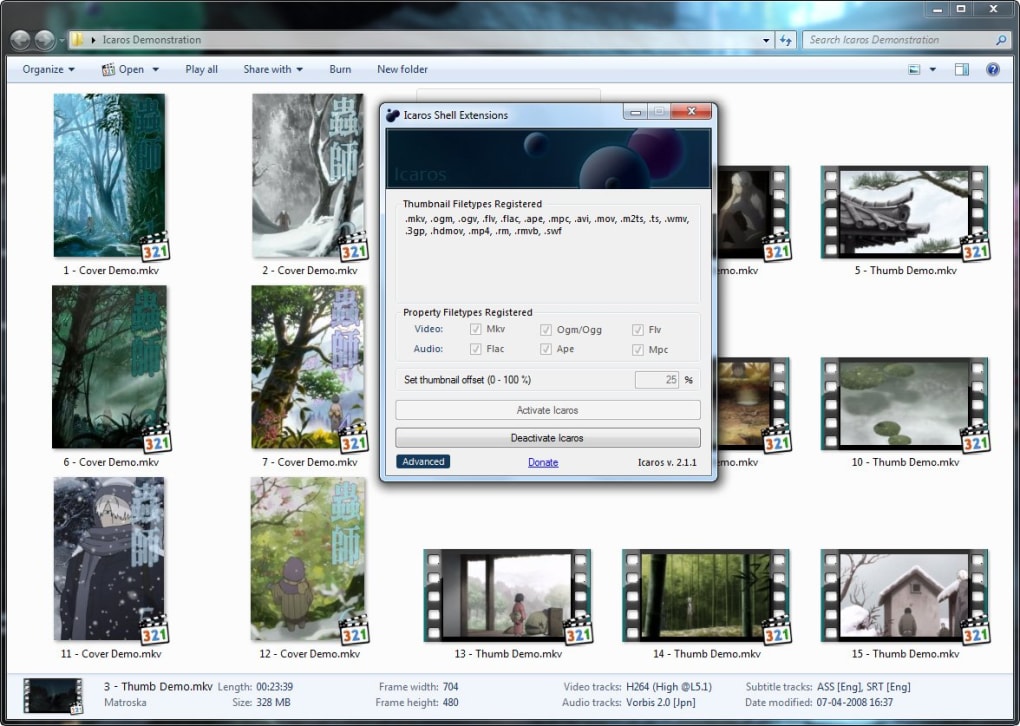
At its heart, Icaros addresses a common frustration experienced by users of Windows Explorer: the generic and often unhelpful default thumbnails for video files. These default thumbnails lack detail, making it difficult to quickly identify specific videos, especially within large collections. Icaros solves this problem by generating custom thumbnails that offer a much clearer visual representation of each video’s content. This functionality dramatically improves video organization and browsing, allowing for quicker and more efficient identification of desired files.
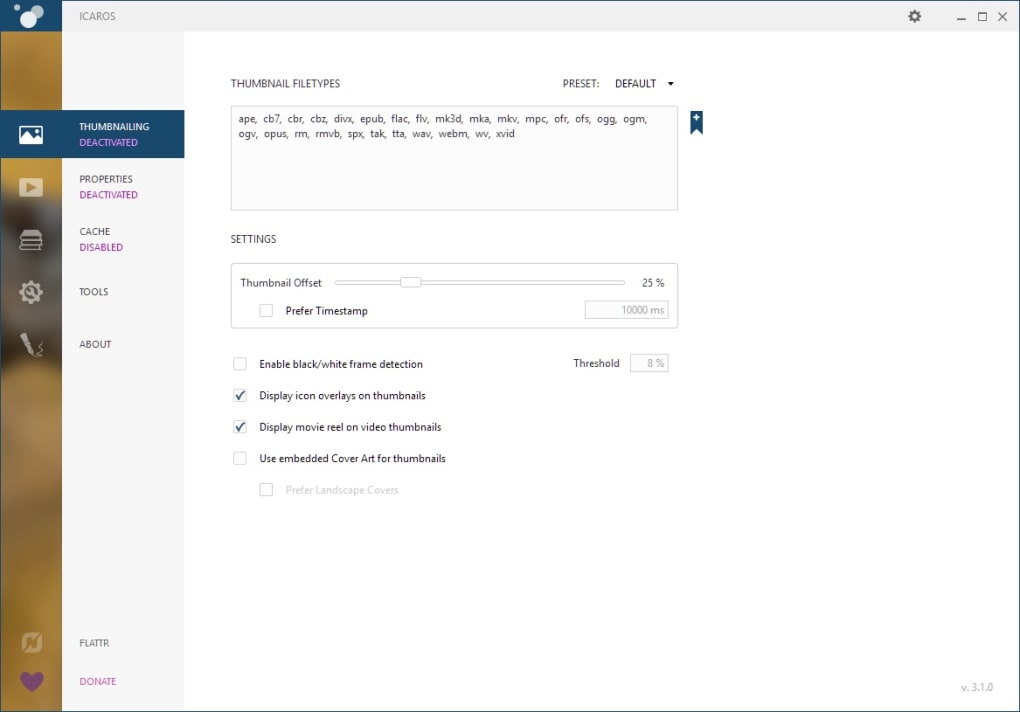
The thumbnail generation process utilizes FFmpeg, a powerful and widely used multimedia framework. This ensures compatibility with a wide range of video formats, supporting most standard codecs in use today. Icaros’s integration with FFmpeg expands its capabilities beyond basic thumbnail creation. By leveraging FFmpeg’s capabilities, Icaros can extract keyframes from videos – visually representative stills – to create higher-quality thumbnails than many alternative solutions can offer. This ensures the thumbnail accurately reflects the video’s content, enhancing the overall user experience.
Icaros isn’t limited to merely generating static images. It dynamically creates these thumbnails based on the video’s content, reflecting the key visual elements and thus providing a more informative visual cue. The software is cleverly designed to avoid simply displaying a generic placeholder image; instead, it seeks to provide a meaningful visual summary of the video itself. This feature significantly elevates the usability compared to simpler applications that merely provide a standard default image.
Further strengthening its capabilities is Icaros’s inclusion of custom parsers. These parsers allow the software to extract metadata from video files, enabling the creation of “Cover Art” thumbnails whenever available. This feature is particularly useful for videos that include embedded album art or other relevant imagery. This sophisticated approach means that Icaros doesn’t just create simple thumbnails; it actively seeks to provide the most informative and visually appealing representation possible.
System Requirements and Installation
Before utilizing Icaros, users need to ensure they meet the minimum system requirements. Primarily, Icaros demands the .NET Framework 4.0. This requirement stems from the application’s reliance on the .NET Framework for various functionalities, including its parsing capabilities and its interaction with the Windows operating system. The presence of .NET 4.0 guarantees that Icaros functions correctly. This is a standard component for many Windows applications and is easily installed through Windows Update or by downloading directly from Microsoft. The installation process itself for Icaros is straightforward and requires minimal user intervention. Once .NET 4.0 is correctly installed, the Icaros installation should proceed without issues.
Advantages of Using Icaros
The advantages of using Icaros are numerous, primarily revolving around improved video management and organization. The most significant benefit is undoubtedly the enhanced thumbnail quality. The ability to generate representative thumbnails allows for significantly easier identification of videos compared to generic default images. This efficiency improvement increases productivity, saving time and effort when navigating through a video library.
Furthermore, Icaros’s compatibility with FFmpeg ensures a wide range of supported video formats. This broad compatibility is a considerable advantage, as it eliminates the limitations encountered with tools that only support a limited selection of file types. This broad support makes Icaros a highly versatile tool, suitable for users with diverse video collections.
The software’s lightweight nature is another key advantage. Icaros consumes minimal system resources, ensuring smooth operation even on less powerful machines. This minimizes any potential performance impact on the system while generating thumbnails. This characteristic contributes to its overall usability and makes it a good option for those who prioritize system performance.
The custom parsers included with Icaros further enhance its utility. The ability to generate Cover Art thumbnails based on embedded metadata significantly improves the visual appeal and informativeness of the thumbnail display within Windows Explorer. This results in a more user-friendly experience, enhancing the overall effectiveness of video management.
Finally, Icaros is offered as freeware, providing an accessible solution for users who need enhanced video thumbnail capabilities without incurring any cost. This free accessibility makes it a highly attractive option compared to paid alternatives, increasing its overall appeal.
Limitations and Considerations
Despite its advantages, Icaros presents some limitations. While it supports a wide range of video formats, it is not guaranteed to work flawlessly with every single video file. Some obscure or heavily compressed formats might cause issues, leading to failure in thumbnail generation. Users should be aware of this potential limitation and understand that while the tool has broad compatibility, it’s not universally perfect.
Additionally, the simplicity of Icaros’s interface, while beneficial for ease of use, also limits its customization options. Users seeking advanced customization beyond basic thumbnail generation might find it lacking. This simplicity, however, is also a strength for users who require a straightforward and user-friendly tool.
Another point to consider is the potential for lower-quality thumbnails. While Icaros aims to generate clear and representative images, the quality ultimately depends on the source video’s resolution and compression. Users should expect some loss of quality in the thumbnails compared to the original video files. This trade-off balances image clarity with the speed and efficiency of thumbnail creation.
Finally, the requirement for .NET 4.0, although common for Windows applications, might pose a challenge for users running very older or less common operating system configurations. Ensuring this prerequisite is installed before using Icaros is crucial for successful operation. This requirement should not be considered a significant barrier to most modern Windows users.
Alternatives to Icaros and Conclusion
Numerous alternatives to Icaros exist, each offering unique features and functionalities. Some alternatives might offer more advanced customization options, while others might specialize in particular video formats or incorporate more sophisticated AI-based thumbnail generation techniques. The choice depends on individual user needs and preferences. Comparing features, system requirements, and price points is crucial before selecting an alternative solution.
In conclusion, Icaros provides a practical and efficient solution for enhancing video management on Windows systems. Its ability to generate custom, high-quality video thumbnails considerably improves the user experience within Windows Explorer. While it possesses some limitations, its ease of use, broad format compatibility, and freeware status make it a highly valuable tool for many users, particularly those seeking a simple and effective way to improve the visual organization of their video libraries. Icaros successfully addresses a common pain point in Windows video management, offering a straightforward yet effective solution.
File Information
- License: “Free”
- Latest update: “July 22, 2025”
- Platform: “Windows”
- OS: “Windows 8.1”
- Language: “English”
- Downloads: “17.7K”
- Size: “13.19 MB”


