
In an increasingly digital world, the way we consume books has profoundly transformed. Gone are the days when physical libraries were the sole repositories of knowledge and stories. Today, millions of literary works, academic texts, and recreational reads exist in digital formats, accessible at our fingertips. Yet, managing these vast digital collections and ensuring a comfortable, personalized reading experience often requires more than just a basic file viewer. This is where specialized software like Icecream Ebook Reader steps in, offering a robust, user-friendly solution for Windows users who are passionate about their digital books.
Icecream Ebook Reader is not merely an application for opening files; it’s a comprehensive ecosystem designed to empower bookworms with unparalleled control over their digital libraries and reading environments. Developed by Icecream Apps, this software aims to replicate and even enhance the traditional reading experience, adapting it for the modern computer screen. It’s a free-to-download trial version that packs a punch with its extensive features, making it an indispensable tool for anyone with a substantial collection of ebooks on their PC. From casual readers to academic researchers, the customizable options and organizational prowess of Icecream Ebook Reader cater to a wide spectrum of users, ensuring that every digital page turn is a pleasure rather than a chore.
Mastering Your Digital Library: Organization and Accessibility
At the heart of any effective ebook reader lies its ability to manage a diverse and potentially enormous collection of digital books. Icecream Ebook Reader excels in this regard, offering intuitive tools that help users organize, categorize, and quickly access their entire literary archive. The program supports a wide array of popular ebook formats, making it highly versatile. Whether your library consists of fiction in EPUB, technical manuals in PDF, vintage works in MOBI, graphic novels in CBZ and CBR, or even Russian literary classics in FB2, Icecream Ebook Reader can handle them all, centralizing your diverse collection within a single, coherent interface.
One of the standout features for library management is the program’s ability to switch between “Bookshelf” mode and “Table” view. The Bookshelf mode offers a visually appealing display, often resembling a physical bookcase, allowing users to browse their collection with cover art prominently displayed. This aesthetic approach makes it easier and more enjoyable to sift through titles, much like perusing shelves in a bookstore. For those who prefer a more data-rich overview, the Table view provides detailed information about each file, including title, author, format, and other relevant metadata. This dual perspective ensures that users can interact with their library in a way that best suits their current need, whether it’s casual browsing or targeted searching.
As digital libraries grow, the challenge of finding a specific book can become daunting. Icecream Ebook Reader addresses this with powerful filtering and sorting capabilities. Users can effortlessly sort their books by categories such as “All,” “Recently read,” “Favorites,” and “Formats.” This means if you’re looking for that novel you just finished, or want to revisit a cherished classic, or perhaps browse all your PDF documents, a few clicks will get you there. Beyond these predefined categories, the software allows for the creation of “custom categories” within the library. This feature is a game-changer for users who want to implement their unique organizational schema, perhaps sorting books by genre, project, academic subject, or even mood. This level of customization transforms a generic digital archive into a highly personal and efficient reading hub.
Furthermore, the program includes a robust search function that extends beyond simple title matching. Users can search directly within their entire library, making it easy to pinpoint books even if only a keyword or author name is remembered. This quick access to desired titles is crucial for productivity and for enhancing the overall enjoyment of a large collection. The ability to export and import your entire library is another invaluable feature, ensuring that your meticulously organized collection and reading progress are never lost, even if you migrate to a new system or reinstall the software. This foresight in design highlights Icecream Apps’ commitment to providing a stable and reliable platform for its users.
Tailoring Your Reading Journey: In-Depth Customization Features
The act of reading is deeply personal, and a digital reader should facilitate, not hinder, that experience. Icecream Ebook Reader understands this implicitly, offering a suite of customization options that allow users to tailor their reading environment to their exact preferences. This goes far beyond basic settings, delving into aspects that directly impact comfort, readability, and immersion.
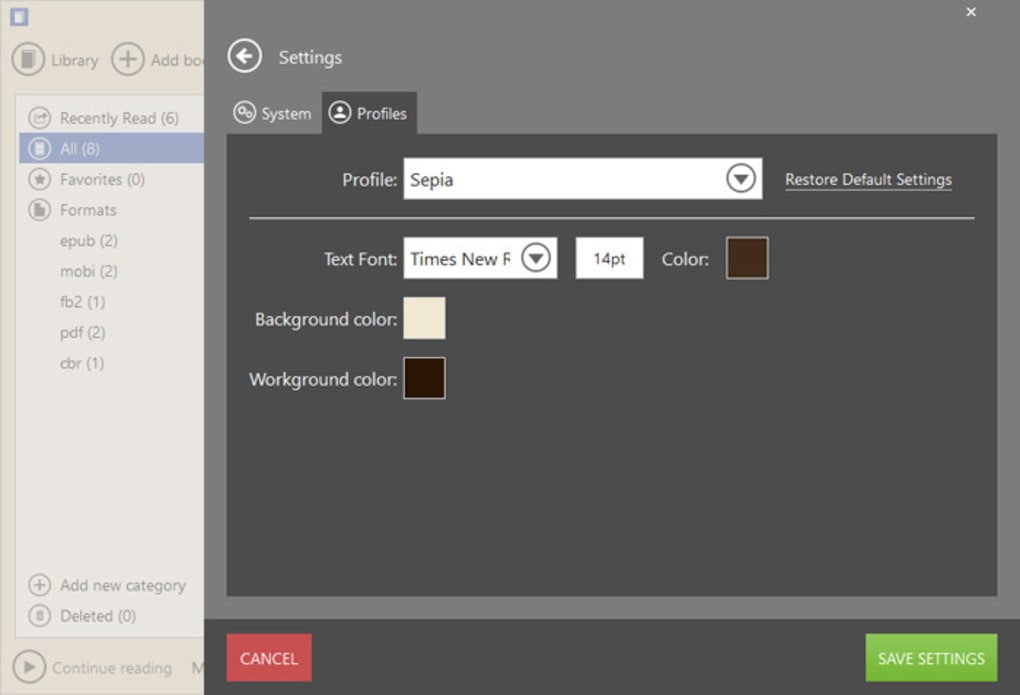
One of the most immediate and impactful customization features is the “font size adjustment.” With a single click, users can make the text larger or smaller, addressing a common pain point for many digital readers. This is particularly beneficial for older readers, individuals with visual impairments, or simply anyone experiencing eye strain, allowing them to adjust the text to a size that is most comfortable for their eyes. But customization doesn’t stop there. Users can also change the “background” of their reading page, moving beyond the stark white that can often cause glare and fatigue. The ability to modify the background color, along with other visual elements, ensures that the screen adapts to the user’s environment and personal aesthetic.
Recognizing that reading conditions vary significantly, Icecream Ebook Reader offers intelligent “Profiles” designed to optimize visibility and comfort across different lighting scenarios.
- “Day” mode is ideal for reading in well-lit environments, typically featuring a bright background with dark text, mimicking the look of a traditional printed page.
- “Night” mode dramatically reduces screen glare, employing a dark background with lighter text. This profile is perfect for reading in low light or complete darkness, significantly reducing eye strain and preventing disruption to sleep patterns that can be caused by bright screens late at night.
- “Sepia” mode provides a warm, off-white background with dark text, creating a softer contrast that is often preferred for reading in average lighting conditions or for users who find pure white backgrounds too harsh even during the day. This profile can reduce digital eye strain over prolonged reading sessions.
Beyond these thematic profiles, the program allows for “changeable page layout.” Users can opt for a single-column layout, which is standard for most ebooks, or switch to a multi-column layout. This is particularly useful for certain types of documents, such as academic papers or PDFs that are designed for a two-column print format, enhancing readability and minimizing horizontal eye movement. The flexibility in layout ensures that the content is presented in the most digestible way, irrespective of its original design.
Another often-overlooked yet critical customization is the ability to “convert the format” of ebooks. While Icecream Ebook Reader supports a broad range of formats, there might be instances where converting a book to a different format could enhance compatibility with other devices or simply optimize it for the reader’s preferred viewing experience within the application. This flexibility ensures that users are not locked into specific formats and can maintain a consistent reading experience across their entire library.
Advanced Tools for Enhanced Productivity and Comprehension
Icecream Ebook Reader transcends the role of a basic reader by integrating a suite of advanced tools designed to boost productivity, facilitate learning, and deepen comprehension. These features are particularly valuable for students, researchers, and anyone who interacts with text beyond simple leisure reading.
For focused reading, the program offers both “Full screen” and “Window” modes. Full-screen mode eliminates distractions from the operating system and other applications, allowing for complete immersion in the text. This is crucial for maintaining focus during long reading sessions or when studying complex material. Window mode, on the other hand, provides flexibility for multitasking, allowing the reader to be open alongside other applications like note-taking software or web browsers.
A highly practical tool for any serious reader is the “bookmarking tool.” Users can easily add bookmarks to specific pages or sections, enabling quick navigation back to important passages. This is far more efficient than scrolling through pages or trying to remember where a particular thought or piece of information was located. Coupled with this, the program provides “quick access to the desired parts of the book through the table of contents and list of bookmarks,” creating an efficient navigation system within even the most extensive volumes.
Interactive text handling is another area where Icecream Ebook Reader shines. Users can “copy text and paste it whenever needed,” a fundamental function for research, essay writing, or simply sharing snippets of information. Building on this, the program allows users to “translate selected text with Google Translate.” This is an incredibly powerful feature for those reading foreign language texts, learning a new language, or encountering unfamiliar vocabulary, providing instant understanding without leaving the reading interface. Similarly, the option to “search text online” for selected words or phrases provides immediate context and further research opportunities, enriching the reading experience significantly.
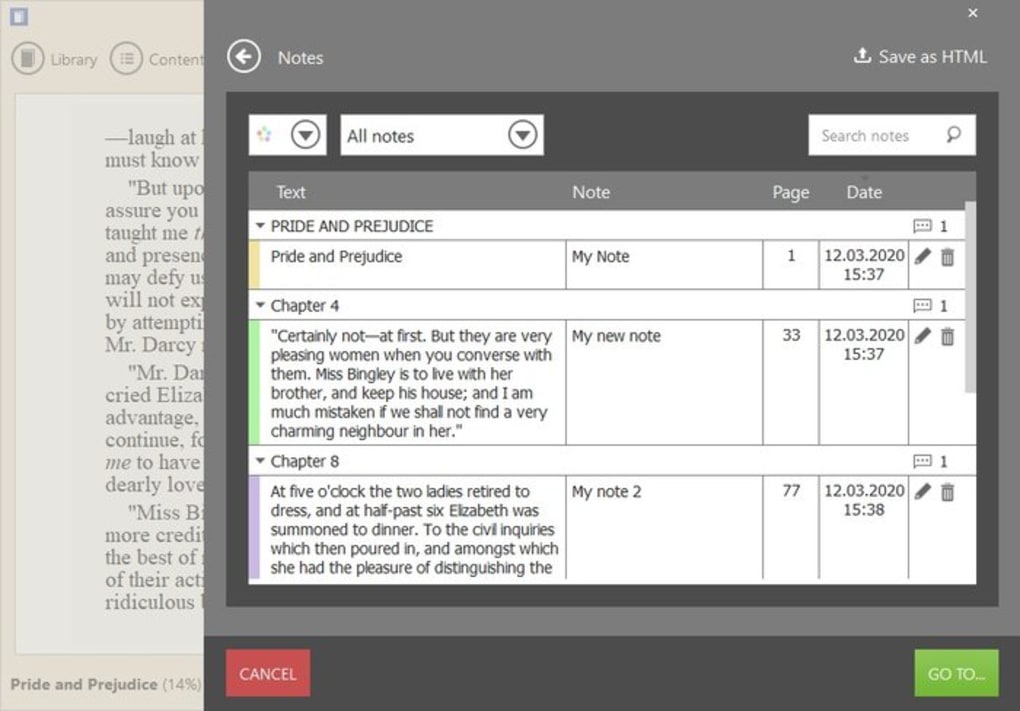
For active learning and critical engagement with text, Icecream Ebook Reader provides robust annotation and highlighting capabilities. Users can “annotate text and save the notes as HTML files,” creating a permanent record of their thoughts, summaries, or questions directly linked to the source material. This is invaluable for study, research, and personal reflection. The ability to “highlight text” in various colors further aids in identifying key information, important arguments, or memorable quotes, visually organizing the content for easier review and recall. The program even allows users to “search within the added notes,” making it effortless to retrieve specific annotations or reflections across their entire annotated library.
Efficient searching extends beyond personal annotations to the entire document. Users can “search within a book by text or by page number,” ensuring that any piece of information can be located swiftly, irrespective of how deeply it is embedded within the text. This is a crucial feature for reference books, academic papers, or lengthy narratives where specific details need to be found quickly. The “navigation scrollbar” further simplifies the process of finding the right parts of books, offering a visual representation of progress and allowing for rapid movement through chapters or sections.
Performance, Compatibility, and User Insights
While Icecream Ebook Reader offers a rich set of features, it’s also important to consider its performance, compatibility, and the feedback from its user base. The program’s design emphasizes ease of use, ensuring that its extensive functionalities remain accessible and intuitive for users of all technical proficiencies. Despite its comprehensive nature, it manages to maintain a relatively small footprint, with its installer size around 29.52 MB (Version 5.31). This ensures a quick download and installation process, without bogging down system resources.
However, a significant point of consideration is its compatibility. As noted in the product description and user reviews, Icecream Ebook Reader is “only currently compatible with certain versions of Windows.” This limitation means users on macOS, Linux, or mobile platforms will need to seek alternative solutions. While this narrows its audience, it allows the developers to optimize the software specifically for the Windows environment, potentially leading to a more stable and integrated experience for its target users. The program supports various Windows operating systems, including Windows Vista and newer versions, ensuring broad accessibility within the Windows ecosystem.
User reviews offer a practical perspective on the software’s real-world application. For instance, one user, Kogije Boss Rabbit, noted some limitations within the trial version. They highlighted that “very limited free services in this app,” specifically mentioning that adding books is restricted to file-by-file selection in the free version, while adding entire folders requires payment. This is a common monetization strategy for trial versions, encouraging users to upgrade to a premium license for full functionality. Another point raised was about the Text-to-Speech (TTS) capabilities: “the TTS voices don’t recognize additional voice installs in Narrator leaving you limited to Zira and David. Don’t expect a good quality voice from this if you want it to read.” This feedback is crucial for users who rely on TTS features for accessibility or hands-free reading, indicating that while TTS is present, its customization and quality might not meet advanced user expectations without external voice packs.
Despite these minor limitations in the free tier and TTS, the overall sentiment regarding Icecream Ebook Reader remains positive, especially concerning its core functionalities: library management and customizable reading. The fact that it’s “free to download and use” for its basic yet powerful features makes it an attractive option for many. Its reputation for being “packed with useful features” and offering an experience that is “easy to use, and highly effective even when it comes to loads of ebooks” underscores its value proposition. Unlike many “basic readers” that offer minimal customization, Icecream Ebook Reader allows users to truly “customize the process and make it as convenient as possible.”
For users seeking alternatives, the market offers a variety of ebook readers, each with its unique strengths. Options like “ePUB Reader for Windows” (specifically for ePUB files), “freda epub ebook reader” (a free reader offering free books), “Adobe Acrobat eBook Reader” (for PDF and other formats), “Kindle” (integrated with Amazon’s ecosystem), “Google Play Books” (browser-based), and “Audible” (for audiobooks) represent different facets of the digital reading landscape. More comprehensive solutions like “Calibre” offer extensive management and conversion capabilities, while “Aquile Reader” provides a modern interface specifically for EPUBs. Icecream Ebook Reader positions itself as a strong contender by balancing robust features with a user-friendly interface, particularly for Windows users who prioritize comprehensive library management and a highly personalized reading experience.
In conclusion, Icecream Ebook Reader stands out as a powerful and highly customizable software solution for managing and reading ebooks on a Windows PC. Its ability to organize diverse formats, offer flexible viewing modes, and provide advanced text interaction tools makes it an invaluable asset for any digital book enthusiast. While users should be aware of its Windows-only compatibility and some limitations in the free version, its core functionalities deliver a polished and personalized reading experience that goes far beyond what typical readers offer. For anyone looking to transform their PC into a dedicated and sophisticated digital reading device, Icecream Ebook Reader from Icecream Apps, available on PhanMemFree, is certainly a software worth exploring.
File Information
- License: “Trial version”
- Latest update: “February 4, 2025”
- Platform: “Windows”
- OS: “Windows Vista”
- Language: “English”
- Downloads: “76.2K”
- Size: “29.52 MB”


