
IconsExtract is a lightweight, portable utility designed for extracting icons from various file types on Windows systems. This powerful tool simplifies the process of retrieving icons from executable files (EXE), dynamic link libraries (DLL), control extension files (OCX), and control panel files (CPL), among others. Its intuitive interface and robust functionality make it a valuable asset for developers, designers, and anyone needing to access and utilize icons embedded within system files. This article delves into the capabilities, features, and applications of IconsExtract, highlighting its strengths and limitations.
Understanding IconsExtract’s Functionality
IconsExtract operates by scanning specified files and folders to identify and extract icons. This process is remarkably efficient, allowing users to extract multiple icons from single files or entire directories within seconds. The program doesn’t require installation, enhancing its portability and ease of use. It’s a standalone executable, meaning you can run it from a USB drive or any other location without needing administrator privileges (though some actions may require them).
The utility’s strength lies in its ability to target various file types commonly known to contain icon libraries. This includes, but is not limited to:
- EXE files: Executable files, often containing icons representing the application.
- DLL files: Dynamic link libraries, which frequently incorporate icons for their associated functionalities.
- OCX files: Object linking and embedding control files, often holding icons for the controls they represent.
- CPL files: Control panel application files, usually containing icons related to their control panel functions.
Beyond these common file types, IconsExtract can potentially extract icons from other file formats that utilize embedded icon resources. This versatility makes it a highly adaptable tool for a range of scenarios.
Key Features and Capabilities
IconsExtract offers several key features that enhance its usability and effectiveness:
-
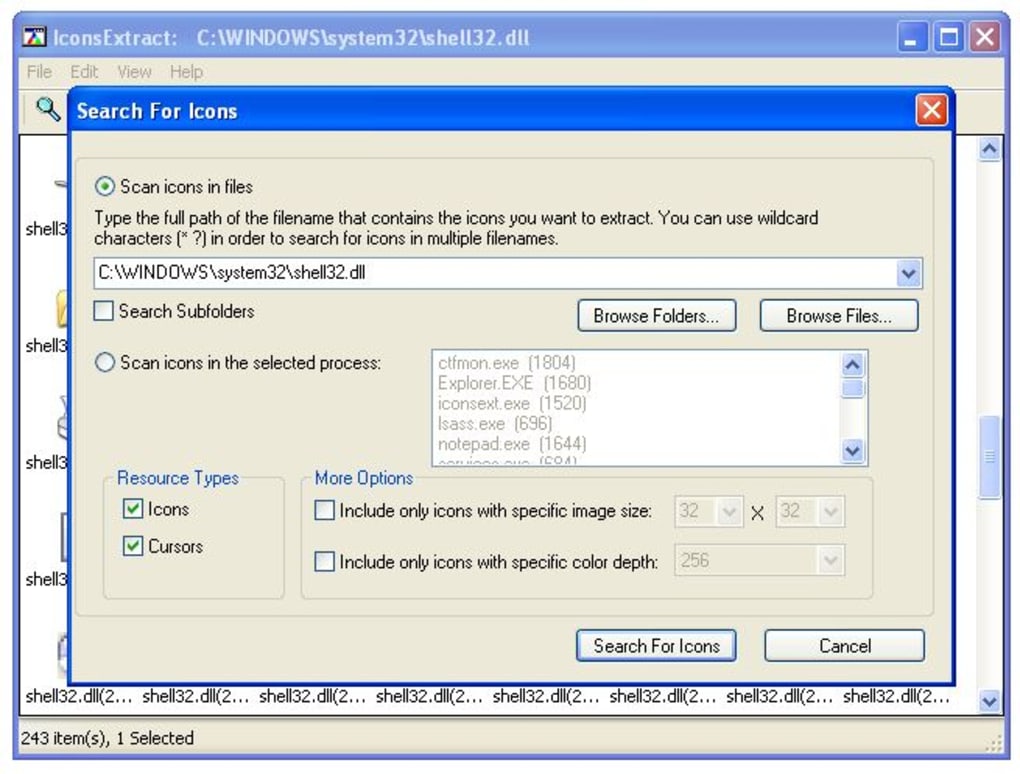
Multiple File Support: The program readily processes single files or entire directories. Users can select a folder, and IconsExtract will recursively scan all subdirectories to extract every embedded icon it can find. This dramatically speeds up the process of collecting icons from large collections of files.
-
Process Icon Extraction: One of IconsExtract’s unique and powerful features is the ability to extract icons directly from running processes. This allows users to quickly obtain icons for applications currently active on the system without needing to locate their respective executable files.
-
Filtering Options: To streamline the extraction process, IconsExtract provides filtering capabilities based on:
- Color Depth: Users can specify the desired color depth (e.g., 16-bit, 24-bit, 32-bit) of the icons to be extracted. This helps filter out icons of unwanted resolutions or color schemes.
- Icon Size: Similar to color depth, users can specify the desired icon size (e.g., 16x16, 32x32, 48x48 pixels). This allows for focused extraction of icons meeting specific dimensional requirements.
-
Advanced Icon Information: IconsExtract doesn’t simply extract icons; it also provides detailed information about each extracted icon, including its size, color depth, and other relevant metadata. This extra information can be invaluable for developers or designers working with icons in their projects.
-
Saving and Copying Icons: Extracted icons can be saved as ICO files individually or in bulk. Alternatively, users can copy icons directly to the clipboard for immediate pasting into image editors or other applications. This flexibility allows for seamless integration into various workflows.
User Interface and Ease of Use
IconsExtract boasts a straightforward and intuitive user interface. Even users unfamiliar with icon extraction tools will find the program easy to navigate and utilize. The program’s simplicity reduces the learning curve and allows for rapid icon extraction, making it accessible to a wide range of users.
Limitations and Considerations
While IconsExtract offers numerous advantages, it’s essential to acknowledge its limitations:
-
Smallest Icon Size Limitation (Historical): Older versions of IconsExtract had a limitation where saving icons directly would only save the smallest available version (often 16x16 pixels). However, copying to the clipboard often allowed access to larger sizes. Whether this limitation persists in the most recent version should be verified before using the software.
-
Potential for False Positives: As with any software dealing with file system operations, there’s a small possibility of misinterpreting data. While rare, IconsExtract might occasionally flag a file as containing icons when it doesn’t. This is usually easily resolved by simply selecting the correct files.
-
No Built-in Icon Editing: IconsExtract is purely an extraction tool. It doesn’t offer any features for editing or modifying the extracted icons. Users will need a separate image editing program to make changes to the icons after they’ve been extracted.
Command-Line Interface Enhancements
For advanced users, IconsExtract provides command-line options. The addition of the -scanpath command-line argument allows users to specify a different base folder or wildcard to initiate the scan. This is particularly useful for integrating IconsExtract into automated scripts or batch processes. For instance, iconsext.exe -scanpath "c:\windows" would instruct IconsExtract to scan the entire Windows directory for icons. This feature significantly enhances its versatility for automated tasks.
Comparison to Alternative Applications
Several alternative applications exist for extracting icons. However, IconsExtract distinguishes itself through its combination of ease of use, portability, and the ability to extract icons from running processes. While other tools may offer additional features such as icon editing or more advanced filtering options, IconsExtract provides a streamlined and effective solution for basic icon extraction needs. It’s important to consider individual needs and preferences when choosing an icon extraction tool. The alternatives might offer more advanced features but often come with a steeper learning curve and larger file sizes.
Conclusion
IconsExtract is a valuable tool for quickly and efficiently extracting icons from a wide variety of Windows files and running processes. Its user-friendly interface, combined with its powerful filtering options and command-line capabilities, makes it suitable for both casual users and experienced developers. While some limitations exist, its overall ease of use and effectiveness make it a worthwhile addition to any Windows user’s toolkit. The ability to extract icons from running processes sets it apart from many competitors and adds a significant layer of functionality. Remember to always download software from trusted sources to ensure the safety and security of your system.
File Information
- License: “Free”
- Latest update: “February 3, 2011”
- Platform: “Windows”
- OS: “Windows 95”
- Language: “English”
- Downloads: “14.2K”
- Size: “34.71 KB”


