
iCUE, developed by Corsair, is a free, unified software application designed to connect and control all compatible Corsair PC peripherals and components from a single, intuitive interface. Born from the merger of Corsair Link and CUE, iCUE represents a significant evolution in PC customization and monitoring tools, offering a comprehensive suite of features for both casual and hardcore PC users. This in-depth review explores iCUE’s capabilities, strengths, weaknesses, and overall user experience.
Comprehensive System Monitoring and Control
At its core, iCUE functions as a robust system utility, providing real-time monitoring of crucial PC components. This includes, but isn’t limited to, the CPU, GPU, RAM, storage devices, fans, liquid coolers, and power supply. The ability to track these components’ performance metrics, such as temperature, voltage, and fan speed, is paramount for maintaining optimal system stability and preventing potential hardware damage from overheating. The clear, visually appealing interface presents this information in an easily digestible manner, providing users with a constant overview of their system’s health.
Beyond simply displaying information, iCUE empowers users to directly control various hardware settings. This allows for fine-tuned adjustments to fan curves and pump speeds, enabling optimized cooling strategies based on real-time conditions and individual needs. This granular control goes beyond pre-set profiles, allowing for customized responses to fluctuating temperatures, maximizing cooling efficiency while minimizing noise. The ability to adjust these parameters dynamically is a significant advantage over more static monitoring software, providing a proactive approach to system maintenance.
RGB Lighting Customization: A Spectrum of Possibilities
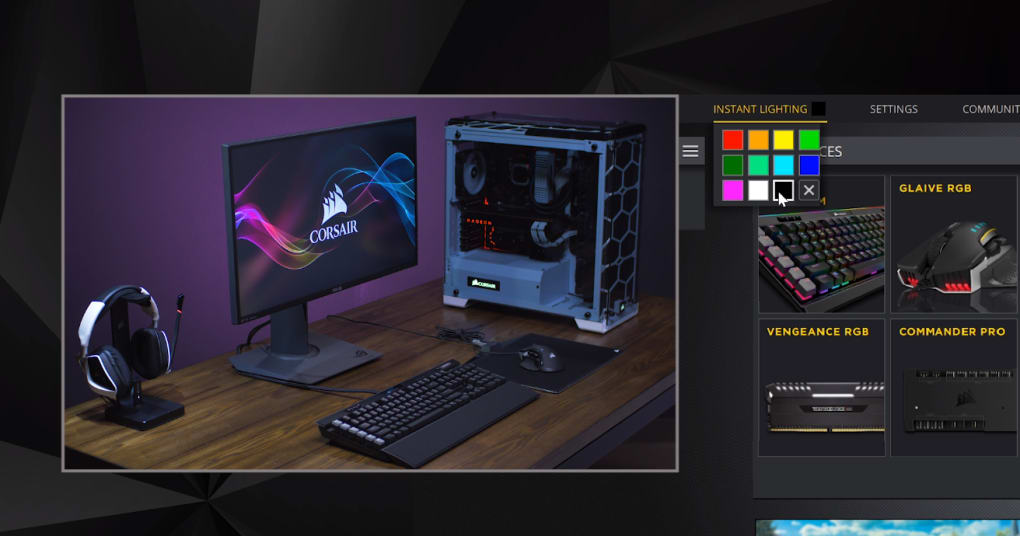
For users with Corsair peripherals featuring RGB LED lighting, iCUE unlocks a world of customization possibilities. The software provides a vast library of pre-set lighting effects, ranging from static colors and breathing patterns to more dynamic and complex animations synchronized with system activity or music. Users can further personalize these effects by adjusting color palettes, brightness, and speed, ensuring a visually unique and personalized PC build. This level of control extends to individual components, allowing for independent customization of each RGB-enabled device, creating complex and coordinated lighting schemes.
iCUE’s lighting customization isn’t limited to static displays. The software integrates with numerous games, allowing the RGB lighting to dynamically react to in-game events. This creates an immersive gaming experience, where the lighting seamlessly reflects the on-screen action, enhancing the atmosphere and providing a more engaging visual feedback loop. This game integration feature elevates iCUE beyond a simple utility and transforms it into an integral part of the gaming experience, adding an extra layer of depth and immersion.
Advanced Macro Functionality and Key Remapping
iCUE extends its functionality beyond system monitoring and RGB lighting control, incorporating advanced macro capabilities and key remapping options. This feature is particularly beneficial for gamers, allowing them to create custom macros for repetitive in-game actions, automating tedious tasks and streamlining gameplay. These macros can be assigned to dedicated keys or buttons on compatible Corsair peripherals, enabling instant execution and enhancing efficiency.
The software’s key remapping feature offers further customization, allowing users to reassign keys or buttons to perform different functions. This allows for personalized keyboard and mouse layouts tailored to specific games or workflows, enhancing comfort and productivity. iCUE supports the creation of multiple profiles, each tailored to different games or applications, ensuring the optimal settings are readily available for each use case. The ability to save these profiles directly within the software eliminates the need for manual configuration changes between different applications or games, improving workflow efficiency and streamlining the user experience.
iCUE’s Integration with the Corsair Ecosystem
iCUE’s primary strength lies in its seamless integration with the broader Corsair ecosystem. It is, undeniably, a brand-specific tool, designed to unify and control various Corsair components. This focused approach allows for a level of integration that is difficult to achieve with third-party, more generalized applications. The software’s comprehensive device support covers a wide range of Corsair peripherals, including keyboards, mice, headsets, and more, consolidating all controls into a single, centralized location.
However, this targeted focus also constitutes a significant limitation. Users with peripherals from other manufacturers will find iCUE largely irrelevant, as it lacks support for non-Corsair hardware. This exclusivity significantly limits the software’s overall appeal, and restricts its use to a niche audience of dedicated Corsair users. This design choice, while ensuring optimal integration with Corsair products, inherently limits iCUE’s potential reach and overall user base.
Limitations and Potential Drawbacks
While iCUE offers a wealth of features and functionalities, it’s not without its shortcomings. While the software strives for comprehensive device support within the Corsair ecosystem, some users have reported compatibility issues with specific hardware or firmware versions. These instances, while not universal, highlight the potential for incompatibility issues within the confines of the Corsair ecosystem itself.
Furthermore, some users have expressed concern about the software’s resource consumption. While not excessively demanding, running iCUE constantly in the background can consume system resources, particularly RAM. This impact is usually minimal, but it’s a factor to consider for users with lower-end systems or those sensitive to background application resource usage.
Another potential drawback is the software’s learning curve. While the interface is generally intuitive and user-friendly, the sheer number of features and customization options can be overwhelming for new users. This can lead to a steep learning curve, requiring some time and effort to fully grasp the software’s capabilities and effectively utilize all its features.
Conclusion: A Powerful Tool for Corsair Enthusiasts
iCUE stands as a powerful and versatile software application, offering a comprehensive suite of features for controlling and monitoring Corsair peripherals and PC components. Its strengths lie in its robust system monitoring capabilities, extensive RGB lighting customization options, and advanced macro functionality. However, its limitations are equally significant, primarily stemming from its exclusive focus on Corsair products, thereby limiting its appeal to a more niche audience.
Ultimately, iCUE’s value proposition is directly correlated with the extent of Corsair hardware integrated into the user’s PC build. For users heavily invested in the Corsair ecosystem, iCUE is an invaluable tool, offering a centralized and streamlined method for managing and customizing their setup. However, users with a diverse range of hardware from different manufacturers may find iCUE’s limited compatibility a considerable barrier to its adoption. Therefore, the decision to use iCUE should be carefully weighed against the user’s existing hardware configuration and their specific needs for PC control and monitoring.
File Information
- License: “Free”
- Version: “5.29.103”
- Latest update: “June 23, 2025”
- Platform: “Windows”
- OS: “Windows 8.1”
- Language: “English”
- Downloads: “12.6K”
- Size: “3.37 MB”


