
Creating professional-grade identification cards often conjures images of complex, expensive, and resource-intensive software solutions. However, for individuals, small businesses, educational institutions, and various organizations seeking a cost-effective yet powerful tool, ID Flow Free ID Card Software stands out. This intuitive application streamlines the process of ID card design and printing, offering a comprehensive suite of features that cater to both beginners and those with some graphic design experience. Available as a free download, ID Flow Free transforms what could be a daunting task into a streamlined, user-friendly experience, enabling anyone to produce high-quality, secure, and visually appealing identification cards without significant costs.
The core philosophy behind ID Flow Free is to democratize professional ID card creation. In an era where security, accountability, and clear identification are paramount, having the means to quickly and efficiently produce reliable ID cards is invaluable. Whether onboarding new employees, registering students, managing event attendees, or issuing membership cards, this software provides essential tools in an accessible package. Its design principles emphasize simplicity without compromising functionality, making it a go-to choice for practical results without the steep learning curve of more intricate design programs. PhanMemFree is proud to highlight ID Flow Free as an exemplary solution, offering genuine value to its users.
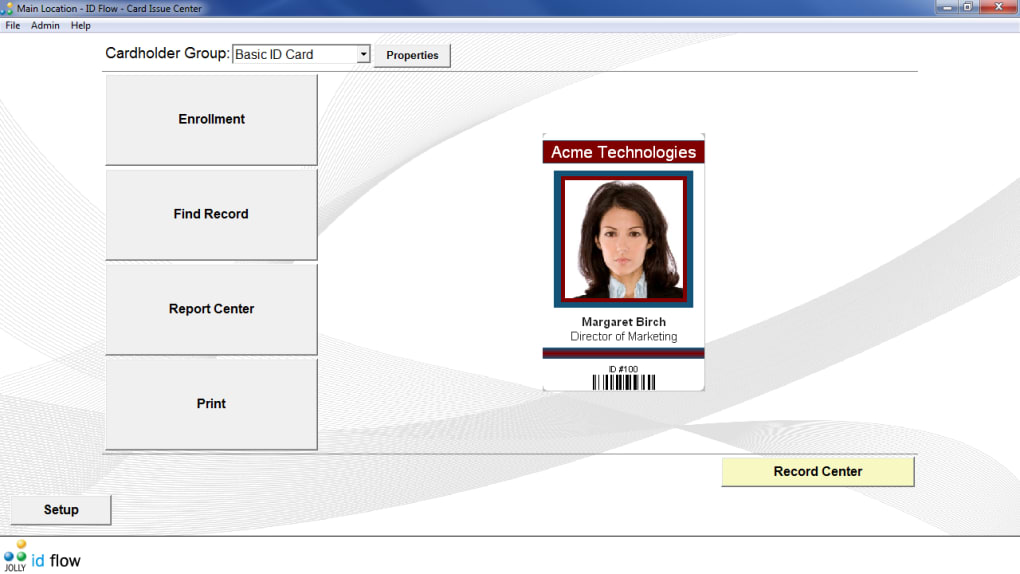
Unveiling ID Flow Free: Core Features and an Intuitive User Experience
At the heart of ID Flow Free ID Card Software is a commitment to ease of use, evident in its thoughtfully designed interface and robust foundational features. The developers have crafted an environment where users can navigate ID card design with remarkable simplicity, proving that powerful tools don’t have to be intimidating.
Streamlined Interface and Centralized Control
ID Flow Free distinguishes itself with an exceptionally clean and centralized editing window. Unlike many software packages that scatter functions across multiple menus, ID Flow Free presents all core capabilities directly on the left-hand side of the page. Essential functions—such as uploading an image, saving a file, adjusting design parameters, and initiating print jobs—are always within easy reach. This “one-window solution,” as praised by users, reduces cognitive load, allowing focus on creative design rather than software navigation. This efficiency is critical for businesses and educational bodies, translating directly into increased productivity. The visual feedback from the central canvas ensures every change is instantly displayed, enabling real-time adjustments and fostering confidence for those new to design software.
Essential Editing Options and Error Correction
ID Flow Free provides all necessary editing options to bring ID card concepts to life. Users can easily upload various image formats, integrate company logos, personal photos, and custom graphics. Parameters like text fonts, sizes, colors, and positioning offer ample creative freedom, ensuring cards align with specific branding.
Intelligent features safeguard against design pitfalls, with automatic saving mechanisms securing progress. The indispensable “undo” button allows effortless rollback of mistakes. This iterative design process, where experimentation is encouraged by a safety net, empowers users to explore layouts without fear of permanent errors. The blend of essential editing tools and thoughtful error correction makes ID Flow Free a reliable and forgiving platform for crafting identification cards.
Bulk Printing and Printer Compatibility
For organizations requiring a large volume of ID cards—such as for new employee intakes, corporate events, or student registrations—ID Flow Free’s bulk printing option is invaluable. This feature streamlines the process, allowing users to queue multiple card designs for simultaneous output, drastically reducing time and effort. Imagine the efficiency gains for an HR department issuing hundreds of employee IDs; bulk printing transforms a potentially arduous task into a swift operation.
Moreover, ID Flow Free demonstrates remarkable compatibility with a vast array of common printers. This broad support ensures users are unlikely to encounter issues with existing hardware, eliminating the need for specialized equipment. The software communicates effectively with standard desktop and dedicated ID card printers, ensuring the final printed product accurately reflects the digital design. This plug-and-play approach is a significant advantage for small organizations utilizing current infrastructure. The software’s ability to handle both single and double-sided PVC cards further expands its utility, catering to diverse identification requirements.
Beyond the Basics: Advanced Functionality and Practical Applications
While ID Flow Free ID Card Software is lauded for user-friendliness and core editing, its utility extends significantly into more advanced functionalities designed to meet contemporary identification and security needs. These features elevate ID Flow Free from a simple design tool to a comprehensive solution for robust ID card management.
Double-Sided Cards for Enhanced Information and Security
Modern identification cards often require more than a single side for information or security features. ID Flow Free provides seamless support for creating double-sided cards, crucial for several reasons:
- Expanded Information Capacity: A second side allows for additional data like contact details, emergency information, terms and conditions, or magnetic stripe data, preventing clutter on the primary side.
- Enhanced Security Features: The reverse side can integrate security elements such as holographic overlays or micro-text as deterrents against counterfeiting.
- Branding and Marketing: The back of an ID card can serve as a subtle branding opportunity, displaying company values or promotional messages.
The software handles the design and printing of double-sided cards with the same intuitive ease as single-sided ones, ensuring perfect alignment and consistency.
Barcodes and QR Codes: Integrating Digital Functionality
Identification cards increasingly serve as gateways to digital systems, enabling quick access, tracking, and data retrieval. ID Flow Free robustly supports the inclusion of both barcodes and QR codes directly into the card design, opening a plethora of practical applications:
- Access Control: Barcodes or QR codes can be scanned at entry points for access control.
- Time and Attendance Tracking: Employees can clock in/out by scanning their ID cards, automating payroll.
- Information Retrieval: QR codes can link to dynamic web pages, contact information, or databases, providing instant access to up-to-date information.
A critical advantage is ID Flow Free’s ability to print these codes without sacrificing quality, ensuring they remain scannable and functional, vital for digital integration.
Detailed Reporting for Auditing and Compliance
Beyond creation and printing, ID Flow Free provides critical administrative functionality through detailed reporting. In many organizational contexts, especially those with strict regulations, maintaining comprehensive records of identification activities is mandatory for auditing and compliance.
The software generates detailed reports itemizing each task related to ID card creation and issuance, including:
- Card issuance dates
- User information (whose card was created)
- Designer information
- Modifications
- Printing logs
These meticulous reports serve as an invaluable audit trail, providing documented evidence for reviews and compliance checks. This feature significantly contributes to an organization’s accountability and helps mitigate future security risks or disputes. For small organizations, having such robust reporting capabilities within a free package is a substantial benefit.
Why Choose ID Flow Free? Benefits, Considerations, and Target Audience
The decision to adopt any software involves weighing its advantages against potential limitations. ID Flow Free ID Card Software presents a compelling case for its use, especially for specific user groups.
The Unbeatable Advantage of Being Free
ID Flow Free’s primary advantage is its cost—it’s free. This removes the financial barrier often associated with professional software, providing substantial savings for startups, SMEs, non-profit organizations, schools, community clubs, and individuals. In tight economic climates, ID Flow Free allows organizations to allocate resources elsewhere while maintaining high standards for identification. This “no-risk software” facilitates broad adoption and empowers entities to implement professional identification systems without upfront investment.
Comprehensive Printing and Editing Options
Despite being free, ID Flow Free offers a rich array of printing and editing options comparable to many paid alternatives for core ID card creation:
- Design Custom Layouts: Craft unique designs, ensuring brand consistency.
- Integrate Diverse Media: Easily include text, high-quality photos (with automatic background removal), logos, and graphics.
- Data Linking: Link design elements to record fields for dynamic bulk card generation.
- Flexible Printing: Print single or double-sided PVC cards, individually or in batches.
- Support for Codes: Implement barcodes and QR codes for digital integration.
These capabilities ensure users can produce professional, highly functional ID cards meeting diverse requirements, from visual identification to access control.
Addressing Limitations and User Concerns
While ID Flow Free offers immense value, it’s important to acknowledge its specific limitations, often stemming from its focus on core functionality. The “absence of advanced editing tools” means users seeking sophisticated graphic design capabilities (e.g., complex vector graphics) might find it basic. However, for its intended purpose—professional ID card creation—its tools are more than adequate. It’s designed as an ID card maker, not a full graphic design suite.
A concern about “newer versions of Windows not supported” is likely outdated. With a latest update in December 2024, it’s highly probable that ID Flow Free supports modern Windows operating systems (Windows 10, 11). Users should consult Phanmemfree.org for up-to-date compatibility. A user report of cards being “chopped off the top” during printing highlights the importance of printer calibration. Such issues are often related to incorrect margins or driver settings, common across ID card printing solutions requiring precise alignment. Test prints and verifying printer settings are crucial.
Who is ID Flow Free For?
ID Flow Free ID Card Software is ideally suited for:
- Small to Medium-Sized Businesses (SMBs): Employee IDs, visitor passes.
- Educational Institutions: Student IDs, staff badges.
- Non-Profit Organizations and Clubs: Membership cards, volunteer badges.
- Event Organizers: Attendee badges, VIP passes.
- Individuals: Personal projects or small group identification.
Essentially, anyone needing a reliable, easy-to-use, and free solution for designing and printing professional identification cards will find ID Flow Free an invaluable asset.
Getting Started with ID Flow Free: Installation, Design Tips, and Best Practices
Embarking on professional ID card creation with ID Flow Free is straightforward. Understanding best practices for installation, design, and management can significantly enhance user experience and output quality.
Simple Installation and Setup
Getting ID Flow Free onto your Windows system is quick and uncomplicated. With a modest file size (around 63.31 MB), download and installation are swift.
- Download: Obtain the software from a trusted source like Phanmemfree.org, ensuring you get the latest stable version (e.g., Version 8.3.497.5.6, updated December 4, 2024).
- Run Installer: Execute the installer file and follow the standard Windows installation wizard, agreeing to terms and confirming installation directory.
- Launch Software: After successful installation, launch ID Flow Free from your desktop shortcut or Start Menu.
The software is designed for standard Windows environments. For any issues, check the developer’s website or Phanmemfree.org for system requirements and troubleshooting guides.
Design Tips for Professional ID Cards
Effective use of ID Flow Free’s features leads to truly professional ID cards:
- Keep it Simple: Prioritize critical information (name, photo, ID number, logo). Use white space for readability.
- High-Quality Photos: Use clear, well-lit, high-resolution photos. ID Flow Free’s auto-background removal helps, but a good source image is key.
- Consistent Branding: Incorporate official logos, colors, and fonts for strong brand identity.
- Legible Fonts: Choose easy-to-read fonts and sizes, avoiding overly decorative or small text for critical information.
- Strategic Code Placement: Place barcodes/QR codes where they’re easily scannable and don’t obscure vital data. Ensure sufficient contrast.
- Proofread Everything: Meticulously check all text for errors before bulk printing.
- Test Print: Always perform a single test print on actual card stock to check color, alignment, and quality before a large run.
Best Practices for ID Card Management
Effective use extends beyond design and printing to smart management:
- Template Creation: Create master templates for each card type to ensure consistency and save time.
- Data Management: If linking to record fields, ensure your data source is accurate, up-to-date, and well-organized.
- Security Protocols: Establish clear authorization for ID card design/printing. Use reporting for audit trails and accountability.
- Physical Security: Secure blank and printed card stock to prevent unauthorized access.
- Regular Maintenance: Keep the software updated for new features, performance, and security. Back up design files and data.
- User Training: For multi-user environments, provide clear instructions for correct operation and adherence to guidelines.
By following these practices, organizations can maximize ID Flow Free’s value, ensuring efficient, secure, and professional ID card operations.
User Insights and the ID Flow Free Community
User experiences and feedback are crucial for evaluating software. ID Flow Free ID Card Software has garnered significant attention, with user reviews highlighting its strengths and areas for consideration.
Positive Reinforcement: Ease of Use and Efficiency
A recurring theme in user feedback is the software’s exceptional ease of use. Many users, even those new to design software, report being able to install and create their first card within minutes. This reflects the success of its intuitive interface and streamlined workflow. Testimonials frequently praise the “one window solution” for quick learning and accelerated card creation, especially beneficial for small companies. Features like customizable badges with company logos, and record-managing systems are lauded for simplifying operations. Users often describe ID Flow Free as “totally reliable,” reporting “no hassles or errors” over extended use, indicating stability and robustness. Developer responsiveness and continuous feature additions are also positively noted.
Constructive Feedback and Continuous Improvement
While feedback is largely positive, constructive points are important. The “absence of advanced editing tools” is understood within ID Flow Free’s specialized role. It’s an ID card maker, not a comprehensive graphic design suite; users can prepare complex assets elsewhere for import. The concern about “newer versions of Windows not supported” is likely outdated, given continuous updates (December 2024) and current compatibility requirements. Users experiencing issues should ensure they have the latest version and updated printer drivers. The report of cards being “chopped off the top” during printing emphasizes the need for careful printer calibration and settings verification. This is common across ID card printing and can usually be resolved by adjusting margins, drivers, or card dimensions.
The ID Flow Free Ecosystem
Consistent updates (e.g., version 8.3.497.5.6, December 4, 2024) signify ID Flow Free is an actively maintained project. This ongoing development ensures relevance, addresses bugs, and potentially introduces new features, indicating a healthy software product, even when offered for free. Platforms like Phanmemfree.org serve as vital conduits for users to discover, download, and provide feedback, fostering a dynamic ecosystem around the software. The collective user experience shared helps both new users make informed decisions and developers prioritize future enhancements.
In conclusion, ID Flow Free ID Card Software exemplifies how powerful, professional tools can be accessible to everyone. Its commitment to ease of use, robust core features, and practical advanced functionalities, all delivered without a price tag, make it an indispensable asset for a diverse range of organizations and individuals. With its active development and positive user reception, ID Flow Free continues to empower users to craft high-quality identification solutions with efficiency and confidence.
File Information
- License: “Free”
- Latest update: “December 4, 2024”
- Platform: “Windows”
- OS: “Windows 8”
- Language: “English”
- Downloads: “99.2K”
- Size: “63.31 MB”


