
IETester is a unique and valuable tool for web developers, testers, and anyone needing to access and utilize older versions of Internet Explorer. While not a full-fledged, modern web browser in the same vein as Chrome or Firefox, its specialized functionality makes it indispensable for specific tasks. This guide explores the capabilities, limitations, and applications of IETester, providing a comprehensive overview for both seasoned developers and curious users.
Understanding the Functionality of IETester
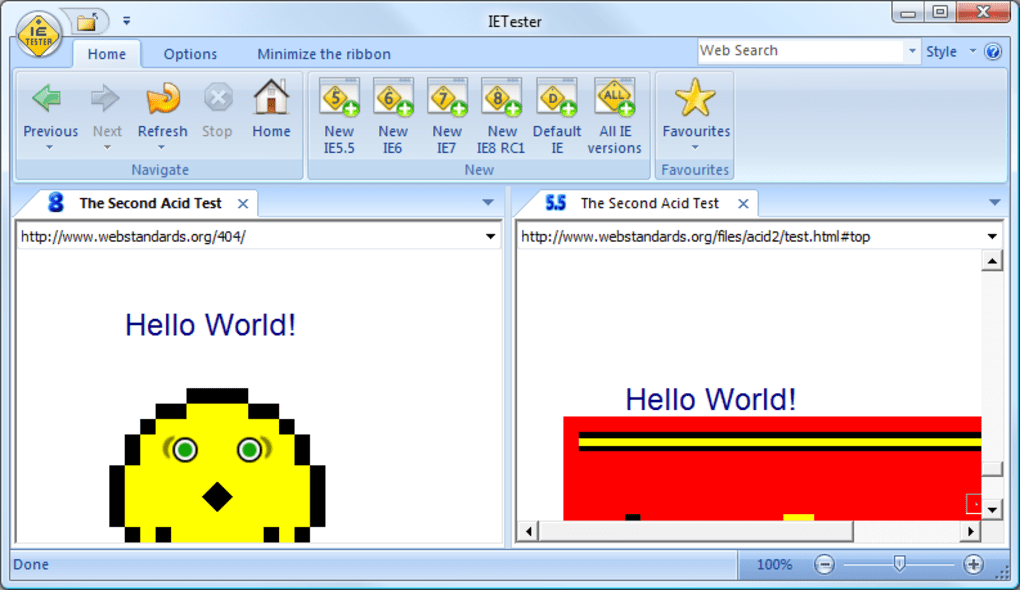
IETester’s primary function is to emulate various versions of Internet Explorer within a single application. This allows users to test website compatibility across a range of browsers without requiring multiple operating systems or individual installations of each IE version. It achieves this by incorporating the rendering engines and JavaScript interpreters from different IE versions, effectively providing a simulated environment for testing purposes. This is particularly crucial for web developers who need to ensure their websites function correctly across a broad spectrum of legacy browsers. The supported versions typically include IE11, IE10, IE9, IE8, IE7, IE6, and even IE5.5. This breadth of compatibility is what sets IETester apart from other browser emulators.
The ability to run multiple IE versions concurrently is a major advantage. Developers can quickly switch between different renderings to identify and address compatibility issues across different IE versions. This streamlined approach saves significant time and resources compared to maintaining separate testing environments for each browser.
One crucial application of IETester lies in supporting older operating systems. While Microsoft has ended support for many older versions of Internet Explorer and Windows, some users still rely on these legacy systems for various reasons, whether due to specific software dependencies or hardware limitations. IETester provides a path to access newer IE rendering capabilities even on older Windows versions like XP, Vista, and 7, bypassing the necessity of upgrading the entire operating system. This makes IETester a powerful tool for extending the lifespan of existing hardware and software configurations.
Advantages and Disadvantages of Using IETester
While IETester offers many benefits, it’s essential to acknowledge its limitations. The software is explicitly identified as experimental, meaning it’s not a polished, bug-free product like a mainstream browser. This experimental nature implies that certain features may not function perfectly, and users should expect occasional inconsistencies.
Advantages:
- Multiple IE Version Support: The most significant advantage is the ability to run multiple IE versions simultaneously, simplifying web compatibility testing.
- Compatibility with Older Windows Versions: IETester functions on older Windows operating systems such as XP, Vista, and 7, providing access to updated rendering engines without requiring a complete OS upgrade.
- Free to Use: The software is free for both personal and professional use, making it an accessible solution for individuals and businesses alike.
- Simplified Testing Workflow: IETester streamlines the website testing process by eliminating the need for multiple browser installations and configurations.
- Enhanced Compatibility Troubleshooting: The ability to quickly switch between different IE versions allows for rapid identification and resolution of browser-specific compatibility problems.
Disadvantages:
- Bugs and Imperfections: As an experimental software, IETester is susceptible to bugs and inconsistencies. Users might encounter functionalities that do not work as expected. Specific examples mentioned often include issues with the “previous” and “next” buttons, JavaScript alert and confirm methods, and Flash support in older IE versions (requiring admin mode).
- Not a Full-Featured Browser: IETester isn’t intended as a complete replacement for a full-fledged web browser. It lacks many features found in modern browsers, such as extensive extension support, advanced security features, and a customizable user interface.
- Limited Development Support: Being an experimental project, IETester might not receive the same level of ongoing development and support compared to established browsers. While updates are released, the frequency and scope of these updates may be less than what users are accustomed to with mainstream browsers.
- Potential Security Risks: Using older versions of Internet Explorer inherently carries some security risks. Users should exercise caution and ensure their system is adequately protected with up-to-date antivirus and firewall software. Regular system updates are also strongly recommended to mitigate potential vulnerabilities.
- Resource Consumption: Running multiple emulated IE instances simultaneously can consume significant system resources, potentially impacting performance, especially on lower-end machines.
Real-World Applications of IETester
IETester finds application in several scenarios:
- Web Development and Testing: Developers utilize IETester to test website compatibility across multiple IE versions, ensuring consistent rendering and functionality across a broad user base. Identifying and resolving compatibility issues early in the development process is critical for preventing problems after deployment.
- Quality Assurance (QA): QA teams utilize IETester for thorough browser compatibility testing, minimizing the risk of encountering browser-specific issues in production environments.
- Legacy System Support: Businesses or individuals maintaining systems based on older versions of Windows and IE can leverage IETester to upgrade the rendering engine without requiring a full system overhaul.
- Enterprise Compatibility: Organizations maintaining internal applications or websites designed for compatibility with older IE versions may use IETester for testing and maintenance.
- Educational Purposes: IETester can be utilized in educational settings to demonstrate the evolution of web browsers and highlight the challenges associated with cross-browser compatibility.
Alternatives to IETester and Concluding Remarks
While IETester offers unique value, other solutions exist for cross-browser compatibility testing. These alternatives include virtual machines, browser developer tools, and cloud-based testing platforms. Each has its own strengths and weaknesses, and the optimal choice depends on specific requirements and resources.
In conclusion, IETester is a specialized tool with unique strengths and weaknesses. Its primary value lies in its ability to test compatibility with multiple legacy versions of Internet Explorer within a single application. While the experimental nature implies some limitations, its unique functionalities make it a powerful asset for web developers, testers, and anyone needing to access and utilize older versions of Internet Explorer. However, it’s crucial to weigh its advantages against its limitations and consider alternative solutions before deployment. The decision to use IETester ultimately depends on the specific context, technical expertise, and resource availability. Understanding these factors is vital for informed decision-making.
File Information
- License: “Free”
- Latest update: “May 23, 2023”
- Platform: “Windows”
- OS: “Windows 7”
- Language: “English”
- Downloads: “181.8K”
- Size: “58.45 MB”


